+14
more
more



This item is no longer available.
A vision of brilliance
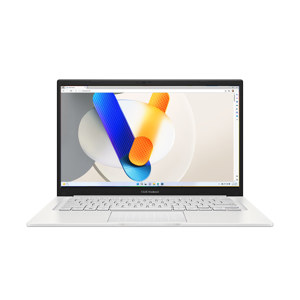
Life is brighter and clearer with Zenbook 14X OLED, the slim, light and compact laptop with a gorgeous 16:10 2.8K OLED HDR NanoEdge touchscreen that gives you the deepest blacks and the most vivid colors. Powered by the latest 11th Gen Intel Core processors and up to NVIDIA GeForce MX450 discrete graphics, Zenbook 14X OLED delivers maximum performance with ASUS Intelligent Performance Technology. The precision-engineered 180 Degree ErgoLift hinge makes sharing content easy, and the innovative ASUS ScreenPad enhances your on-the-go productivity. Let Zenbook 14X OLED light up your work or play, anywhere.
World's first 14" 2.8K OLED HDR display
16:10 aspect ratio, 2.8K (2880 x 1800) resolution, 0.2ms response time, 100% DCI-P3 color gamut.
• Windows 11 Pro
• 11th gen Intel Core i7 processor
• NVIDIA GeForce MX450 discrete graphics
• CPU performance up to 40W with 70% AIPT boost
• High speed SSD 512GB with 3500 MB/s read speed
• 16.9mm/1.4kg thin & light
• Full I/O port with Type-C Easy Charge & high speed Thunderbolt 4
• 16GB LPDDR4X 4266 MHz onboard memory
• ASUS ScreenPad for efficient multitasking
• 180 Degree ErgoLift hinge for easy sharing
• Fast fingerprint login with power button
Display
Bring everything to life in vivid color
Everything comes to life with Zenbook 14X OLED's amazing up to 2.8K OLED HDR NanoEdge touchscreen, which has a 16:10 aspect ratio to give you a bigger visual workspace than a standard 16:10 display. It has a cinema-grade 100% DCI-P3 color gamut and is PANTONE Validated for ultra-vivid, ultra-accurate colors. OLED technology gives you true blacks for enhanced realism, and it cares for your eyes with T±V-certified for low blue-light emissions.
• 2880 x 1800 resolution
• 16:10 aspect ratio
• OLED ultra-vivid colors
• HDR enhanced realism
• 92% screen-to-body ratio
• 100% DCI-P3 color gamut
• Up to 550nits brightness
16:10 NanoEdge display
With its new 16:10 aspect ratio NanoEdge display, Zenbook 14X OLED gives you an 18%-bigger visual workspace than a standard 16:9 display. The taller screen lets you see more of a website or document without having to scroll up or down. It's perfect for reading, writing or coding.
ASUS OLED Display - 5 reasons to choose ASUS OLED laptops
100% DCI-P3 best-in-class color gamut
Vivid displays for precise creativity, color work and vibrant visual entertainment.
70% less harmful blue light
With lower harmful blue-light levels, OLED offers better eye care and sleep quality.
Clearer images at any brightness
Rich colors even at low brightness - always stunning.
DisplayHDR 500 True Black
The deep blacks allow you to see previously unseen details in dark movie scenes.
0.2ms fastest response time on any laptop
Blur-free action scenes in movies and games, with smooth text scrolling.
Color - Ultimate professional-grade colors
ASUS OLED laptops deliver exceptionally detailed and realistic visuals, with a cinema-grade 100% DCI-P3 color gamut. This means that the colors reproduced on the display are richer and more vivid: it's ideal for color-intensive projects, but also enhances any kind of content.
• 100% DCI-P3 color gamut
• 133% sRGB color gamut
• 1.07 billion colors
• Cinema-grade industry standard
ASUS OLED laptops maintain a 100% DCI-P3 color gamut at both high and low brightness levels, while on a standard LCD laptop the color gamut is reduced dramatically at low brightness levels. At a gray-level brightness of 16 G, LCD laptops only have an 11% DCI-P3 color gamut, while ASUS OLED laptops maintain a 100% DCI-P3 color gamut.
Eye Care
70% blue-light reduction for eye care
Blue light is known to cause visual discomfort and disrupt sleep quality. However, due to the nature of the special organic lighting materials in an OLED display, ASUS OLED laptops emit 70% less harmful blue light, and they're also certified by T±V Rheinland and SGS. More importantly, unlike traditional blue-light filters, shifting the spectrum means there's no need to compromise color accuracy.
• 70% reduced blue light
Harmful effects on retinal cells
Cone cells are the cells in the eye's retina that enable color vision. Blue light is often more harmful to these cells compared to other wavelengths of light. In experiments conducted by the Gifu Pharmaceutical University in Japan, mice cone cells were subjected to red, green, and blue light sources. The survivability of the cone cells under blue light exposure dropped dramatically to 20% after 24 hours, while cone cells exposed to other colors retained around 100% survivability.
Blue light disrupts sleep cycles
When it gets dark, your brain produces the hormone melatonin, which helps to maintain the correct scheduling of your daily sleep cycles. According to a Stanford University study the production of melatonin can be blocked by exposure to blue light at night, and potentially cause sleep disruption.
Eye care, even more critical for children
Since children's eyes are not fully developed, with a more transparent lens and cornea, harmful blue light can penetrate the eye more easily, potentially causing premature aging of the retina. Research has shown that in a five-year-old child's eyes, approximately 60% of the received blue-light emissions pass through to the retina, compared to only around 20% for a 60-year-old adult. With ASUS OLED displays, the significantly lower blue light levels mean better eye care for children.
Perceptual Brightness
OLED has much higher perceptual brightness
On conventional LCD displays, detail and color quality usually decrease dramatically as the brightness is reduced. But ASUS OLED laptops are able to show great detail at lower brightness settings due to their high contrast and their ability to maintain a wide color gamut at low brightness. ASUS OLED laptops can maintain good color reproduction at any brightness level, so you can freely adjust the screen's brightness to suit your working environment, while still enjoying exceptionally vivid colors. For example, in the living room environment (usually illuminated at about 100 lux), you only need 177 nits brightness in an OLED display to produce the same clear image as 400 nits brightness in an LCD display. At the lower brightness levels needed on OLED displays, there's less harmful blue light emitted.
Contrast
True black: See the unseen
ASUS OLED laptops reproduce blacks perfectly. An OLED pixel consists of three sub-pixels, each with its own self-generated illumination: a 2.8K (2880 x 1800) display has 9,216,000 pixels, which means it has 27,648,000 self-illuminated sub-pixels, compared to just a few dozen LED backlights in most LCD displays. When displaying black on an OLED display, the pixel is simply turned off to produce the darkest possible black. This enables extremely crisp and clear images even in the darkest scenes. You'll be surprised to see how many new details you'll spot in your favorite movies!
• 1,000,000:1 contrast ratio
• Up to 550nits peak brightness
• 0.0005nits true black
High coverage of HDR standard
The industry HDR standard covers a huge range of brightness from 0.0005 nits - the lowest measurable level - up to 10,000 nits. The true blacks and high brightness possible with OLED displays give them a 75% coverage of the HDR standard, compared to about 46% for LCD displays.
Millions of pixels, individually illuminated
The pixels on an OLED display each contain three sub-pixels. For example, a 2.8K (2880 x 1800) display has 9,216,000 pixels, which means it has 27,648,000 sub-pixels. Each sub-pixel self-illuminates independently, unlike LCD displays with pixels that need to be backlit, usually by just 50 or 60 LEDs. This means that it's easier to achieve true black on an OLED display, by simply turning off a pixel. This can't be done on an ordinary LED display, because the backlight can't be turned off with such granularity. This fact also gives OLED displays exceptionally high contrast.
Response Time
Fastest response time on any laptop for motion clarity
For a display, response time is the time taken to replace one color with another: the faster the time, the better motion is reproduced. The diagram below shows a color transition from purple to blue. On an ASUS OLED, this transition takes only 0.2 milliseconds, while on an LCD, it might take 10 ms or longer. This makes a lot of difference, since OLED colors and images look correct for most of the time a frame is displayed, whereas LCD images may be blurry during the transition process.
ASUS OLED displays have a 0.2 ms response time - the fastest of any laptop, and 50x faster than the average laptop LCD display. This ensures smoother fast-paced action scenes, low-latency gameplay, and subtle details like blur-free text scrolling. In effect, the smooth visuals on an OLED display can rival those on an LCD display with a much higher refresh rate.
• 0.2ms ultrafast response time
• 50X faster response time
Clearer motion than ultrafast LCD displays
The ultrafast 0.2 ms response time of an OLED display means it can switch colors and images much quicker than even LCD displays with higher refresh rate. So a 90 Hz, 0.2 ms OLED display shows much smoother and clearer motion than a 144Hz, 25ms LCD laptop display.