

This item is no longer available.
WinPlus-IPS (WP-IPS) is a simple but powerful application ideally suited for single operator productions.
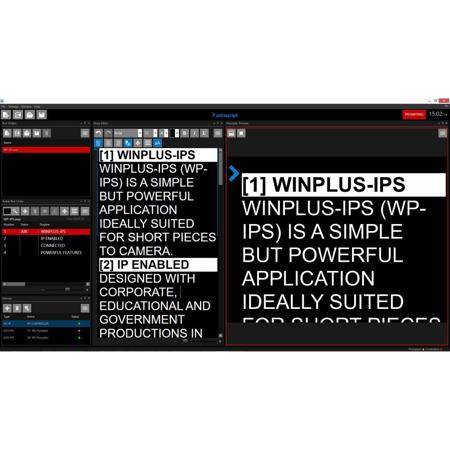
Designed with corporate, educational and government productions in mind, the software employs many of the features of WinPlus-IP, including the modern customisable user interface, super smooth scroll preview and live script editing.
WinPlus-IPS will connect over an IP network to a single controller. An HC-IP desktop hand control is supplied with the software, and optional foot and wireless hand controllers are also compatible. Any number of EVO-IPS monitors and XBox-IP scroll engines can be connected. The device status tool enables monitoring and management of the devices, including firmware updates and configuration of EVO-IPS monitors.
Simplified menus presented above the relevant content area, make the software easy to navigate. Multiple run orders can be loaded for multi-script content, while specialist features such as newsroom connectivity and closed caption generation have been removed for simplicity.
Application
• Connects automatically to Intelligent Prompting devices on the connected IP network (only one controller will connect at any time)
• In-screen real time scroll preview
• Simple customisable user interface: resizable windows, color selection, content tile position, content tile pin to sidebar, tabbed windows
• Script edits during live promptingMulti language support
• Word & RTF Import and Export
• Graphical scroll control
Run Order
• Options: add story, remove story, cloak story, drop story, scroll to prompter, track live story
• Available run order preview
• Drag and drop story
Story Editor
• Options: font type, font size, font format, font color, background color, spell check, cut & paste
• Script matches prompt mode to indicate prompt output
• Follow prompter
• Font resize slider
Prompter Preview
• Super smooth scroll
• Options: on-screen message, invert colors, blank screen
• Presenter preferences
Device Management
• Status: add manual, add discovered, monitoring
• Configuration of EVO-IPS: brightness, contrast, image flip
• Remote program of scroll control function buttons
• Remote software and firmware updates
Compatibility
• HC-IP desktop scroll control (included), FC-IP foot control (not included), Wireless hand control (not included)
• EVO-IPS monitors, EVO-IP monitors, including EPIC-IP systems (no monitor included, no XBox-IP required)
• XBox-IP scroll engine (not included, produces dual HD-SDI output)