
This item is no longer available.
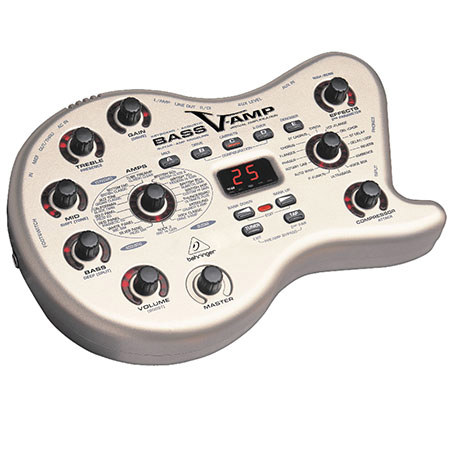
The Behringer Bass V-AMP Ultimate Tone Toolbox comes loaded with 32 amp models, 23 speaker cabinet models and 16 classic effects.
Any Classic You Like
The BASS V-AMP's 32 amp models are organized into three groups: ACOUSTIC, KEYBOARD and GUITAR. Just twist the dedicated dial to plug into unbelievably authentic simulations of the greatest bass sounds from the 1950s to today. When you select an amp model, a speaker cabinet model is automatically selected. But if you'd prefer a different model, just go to EDIT > CABINETS, then use the BANK UP/DOWN buttons to navigate through all 15 options.
Just like on an actual bass amp, you've got a three-band EQ, GAIN, VOLUME and MASTER VOLUME dials. There's even a COMPRESSOR dial for tight, smooth tone with a variable attack. By holding the TAP button, the TREBLE dial becomes a PRESENCE control. This enables the adjustment of a high-frequency filter that can add or remove a "shimmer" from the BASS V-AMP's tone.
Top Tone-In Full Effect
The BASS V-AMP gives you flanger, chorus, reverb, delay and 12 other beautiful digital effects to apply to your sound. Adjust the effect's level in the mix via the EFFECTS dial. To adjust effect parameters, you can rhythmically press the TAP button to alter delay times or LFO speeds or hold down the TAP button and twist the EFFECTS knob to access e.g. feedback or depth. By using a MIDI pedal, such as the Behringer FCB1010, you can access an additional Wah Wah effect. You can adjust the filter characteristic by entering EDIT mode, selecting the DRIVE menu and turning the EFFECTS knob while holding the TAP button.
Presenting the Presets
All of these elements have been combined into 125 different presets divided into 25 banks, accessible through the BANK UP/ BANK DOWN buttons. Within each bank, you can press buttons A through E to explore its different presets. You can also create and save your own presets. Start by selecting a preset, then making any changes you wish: amp, EQ, effect, etc. The preset LED will begin to flash, indicating that the BASS V-AMP is ready to save your settings. To do this, hold the preset button down for about two seconds. Once the LED stops flashing, you have saved the modified preset. On top of all this, the BASS V-AMP also features a built-in tuner and noise gate. In essence, it's a Swiss Army Knife for the home recording enthusiast or gigging bassist who can't seem to settle on one amp.
Stunning in the studio
The BASS V-AMP features several configurations that make it an invaluable asset in the studio. Access the configuration menu by pressing the B and D buttons at the same time. Then use BANK UP and BANK DOWN to select a configuration. When using headphones, the BASS V-AMP will switch into Studio Mode 1 (S1). This stereo mode works well for both monitoring and recording with effects, amp and speaker modeling. It doesn't apply the additional three-band EQ to the signal, but most recording programs like energyXT2.5 have their own EQ. In Studio Mode 2 (S2), the BASS V-AMP sends a signal with amp and speaker simulation, but only the right output has effects. You can either record both left and right outputs to separate tracks or record the "dry" left output while monitoring the right output.
Veni, MIDI, Vici
The BASS V-AMP comes fully equipped to fit right into a MIDI (Musical Instrument Digital Interface) setup. It can be controlled in real time from a computer or via a MIDI foot controller during a live performance. Its MIDI connectors are international-standard 5-pin DIN connectors. You will need dedicated MIDI cables (not included). The MIDI IN jack receives MIDI controller data. It can be adjusted in EDIT mode by pressing the A button and then using the arrow keys. MIDI OUT/THRU sends data to a computer. You can transmit both preset data and parameter changes. Some people even use the BASS V-AMP as a remote control for parameters of their DAW or VST instruments, which is more handy than using the mouse alone. If set to MIDI THRU, the BASS V-AMP does not send its own MIDI information, but passes on the signal received at the MIDI IN connector.
So Much Sound, So Little Hassle
It's hard enough finding another virtual bass amplifier with this much versatility, let alone one as economical as the BASS V-AMP. This go anywhere, do anything wonder will leave you reeling in your own creativity, with cash to spare for other gear you will need along the way to becoming a sonic titan both live and in your home studio.