2022-07-24T20:00:00
Rated 5 out of 5
Love this product and how it streamlined my Home o
I got this a couple of months ago and I absolutely love it. Instead of cords and ports running everywhere this streamlined everything so nicely. In fact while doing some remodeling I wound up working from my kitchen table and I loved how easy it made everything. I didn't lose any speed and the clairity of the monitors is brilliant. I would highly recoommend this Docking Station.
Lisa 5.
Originally posted at

2022-06-07T20:00:00
Rated 5 out of 5
The Small but Mighty 14 Port Docking Station
Ladies and Gents, look no further, all of your device port headaches are soon to be cured! Before even trying this product I was excited because I had always hoped for something that could be a port house for all my family devices. This docking station is great, it has the ability to dock and charge up to 14 different devices. I can have my husband's work computer, laptop, my personal laptop, my business laptop, my cell phone and my daughters' tablet, all charging at once. This is great because now that my husband works from home and I am in the middle of a business start-up, the amount of devices in our household has dramatically increased. No more having to share the wall charging block, or going behind the TV in a tangled mess of wires. Everything is conveniently charging in the same place when needed. The only thing you need is your device cord, no need for wall adapters since all devices are being charged off this single unit. What an amazing invention! Thank you Belkin! We received this product for free in exchange for our unbiased opinion and review.
Kelyn 9.
Originally posted at
2022-05-31T20:00:00
Rated 5 out of 5
Everything you need in a docking station!
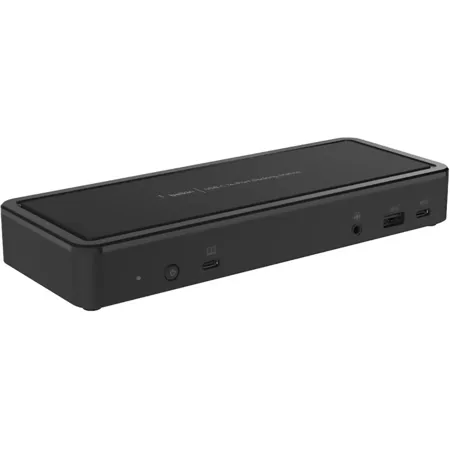
If you have a laptop or device with a USB-C the Belkin 14-Port USB-C Docking Station is for you. It has outputs for three different monitors, two rear USB-A 2.0, 2 rear USB-A 3.1, a rear Gigabit Ethernet Port, a front Audio In/Out port, a front USB-A 3.1 and a front USB-C 3.1. If you need it it has it! The unit is still very compact and will hideaway on you desk not taking up much space. It makes it so quick for me to go from laptop to full computer in no time. Great docking station!
Louis S.
Originally posted at
2022-05-30T20:00:00
Rated 5 out of 5
Good little product
I have been using this with my laptop, and 3 monitors for work. It holds all the ports that are needed for this. I love being able to condense everything into one simple plug in station. The docking station is lightweight and easy to use. I am able to use this with two different brand laptops without issue. I would recommend this to anyone working off of multiple devices for ease of use.
Westmiller81
Originally posted at
2022-05-30T20:00:00
Rated 5 out of 5
Amazing docking station!!
I absolutely love this 14 port USB-C docking station it really helped organize my desk and saved me so much space !! I couldn't be happier I got it and I don't have a mess around my desk anymore, I highly recommend to family and friends !!!
Niam
Originally posted at
2022-05-29T20:00:00
I am in love with this product I have been using it since I received it and it works amazingly I have tried others before but not one like this one I have to get my kids one now they all want one lol soon I'll purchase more
eve1275
Originally posted at
2022-05-28T20:00:00
Rated 5 out of 5
Docking Station is a Gem!
I didn't think I could be obsessed with a docking station, of all things, but I am. This docking station makes my desk set up so neat, organized, and easy. I love being to pop my devices on and off without having to hunt down separate cords on separate outlets or use giant power strips all over my office. Truly one of those adult things you never knew you needed! 10/10 recommend!
SLH1
Originally posted at
2022-05-28T20:00:00
Rated 5 out of 5
So compact and space saver!!!
This USB port station is so compact and so useful. Nowadays is a must have due to all the different electronics we have around. This will not only save lots of space, but it also helps your area look nice and organized.
Sandra1346
Originally posted at
2022-05-23T20:00:00
Rated 5 out of 5
Powerful addition for chromebook
The 14-Port USB-C Docking Station is the perfect solution for personal or home office situations. The dock allows you to connect 2 monitors as well as all of the peripherals that you need. This Docking Station quickly turns your chromebook into a desktop all while charging the chromebook. This small, discreet device is a very nice addition! I highly recommend
Mlrrscruggs
Originally posted at
2022-05-23T20:00:00
Rated 5 out of 5
Perfect desk docking and power
This power station is tiny compared to others I've had! It also had many more options. It worked really well in our home office and with our chrome book. We also have several other gadget chargers plugged in with no issues. Highly recommend!
Lmom129
Originally posted at
2022-05-23T20:00:00
Rated 5 out of 5
Awesome product for my computer setup
I love this hands down for my computer desk setup in my office. I was looking for something like this to make it easier on connecting everything together. I will be buying one more for my work desk or ask my IT department for this to be installed for me.
Lobo84
Originally posted at
2022-05-21T20:00:00
Rated 5 out of 5
Great upgrades from previous models.
Product was a little confusing when unboxing due to the lack of instruction. Quickly found the manual online to get started. Belkin online manuals were as user friendly as the product was. The docking station came with all power cords and a diagram for what each port was. While using an additional monitor with the chromebook, the docking station charged the device exactly like it should have. I did not notice any heat issues as the docking station was properly ventilated. Great product that has all the bells and whistles.
Farmer66
Originally posted at
2022-05-20T20:00:00
Rated 5 out of 5
Works well.
Very handy to have. Use it for the chromebooks family had. 65w. We use it frequently when we travel. Good gift for birthdays and actually all occasions. You can always count on this brand. Highly recommend.
Rose0202
Originally posted at
2022-05-16T20:00:00
Rated 5 out of 5
Turn your laptop into a desktop, love it!
This usb-c docking station is really great to have. If like me you have an ultra book style laptop or newer macs, everything on the computer is connected through the usb-c ports? great, they are fast and can do tons of stuff, but most of my other stuff isn't usb-c. Also, even though I have a big desktop, I don't want to constantly send files or copy them to work more comfortably on it, that's where I really love this. I really love how docking station works as a 1 plug transformation into a desktop. It has its own power supply, so no need to plug your charger in, it works with my Bluetooth keyboard and mouse, and external drives, all plug and play and all through the single usb-c. I have also set it up to share my desktop monitor? so I've just plugged everything in and leave it on my desk at home, so all I need to do is plug the one cable in, and for the monitor, switch it over and laptop becomes desktop. If like me you have to move around a lot with you laptop but much prefer a desktop, this is what you need, I really do love it! It's nicely made and size wise it fits nicely under my monitor and has loads of connections so it should be perfect for most needs. I highly recommend this!
JonG
Originally posted at
2022-05-15T20:00:00
Rated 5 out of 5
Great features!
I have received the 14 Port USB - C Docking Station 65W (Chromebook Certified) as sample and I am super happy, now my mouse, keyboard, printer cables are in one station, no mess in my work area anymore
rosmta
Originally posted at
2022-05-15T20:00:00
Rated 5 out of 5
Great to manage cords!
This 14 port dock is great for managing all my devices and keeping all the cords organized and in one place. The product is super lightweight and looks discreet. I use it to keep my electronics charged and organized on my media cabinet. I highly recommend it if you're looking for something compact yet useful for your electronics.
schimiggy
Originally posted at
2022-05-15T20:00:00
Rated 5 out of 5
Excellent, Versatile Docking Station
At first I wasn't sure how useful this docking station would be, but once I opened it up and checked out all the port options, I realized how many possibilities this opens up. When I connected the dock to a power source abd my device, it came up very quickly, without any connectivity issues. Now I can use my device to plug in a webcam, use headphones, connect to an external monitor, import files, etc. In addition to being very useful, it's also very well-made. It has a nice weight to it and feels very sturdy. This is a great product and I'd happily recommend it to others.
Megan
Originally posted at
2022-05-13T20:00:00
Rated 5 out of 5
Easy set up and very versatile
I love that the power supply is included. Most docks nowadays require you to use your laptops USB C charger. The included power supply powers my lenovo without issues and charges very quickly. The dock was plug and play. I love that it has multiple ports for each monitor. You can connect each monitor as HDMI or DisplayPort unlike inferior docks out there. The usb 3.0 ports chargers very quickly. The dock driver was installed and detected quickly by Windows 10. No issues running 4K monitors with this dock.
Fireant91
Originally posted at
2022-05-12T20:00:00
This works absolutely amazing!worked for my office setup. It was a little bit quirky at first but I got some tech assistance. Was able to use on some existing monitors without having to do anything with the laptop. I definitely would recommend.
Haleemarie
Originally posted at
2022-05-12T20:00:00
It works beautifully!!!! The functionality is more than I originally expected. So far, so good. Everything that I've used it for has worked flawlessly. I'd highly recommend to family and/ or friends!!!!
Boog
Originally posted at