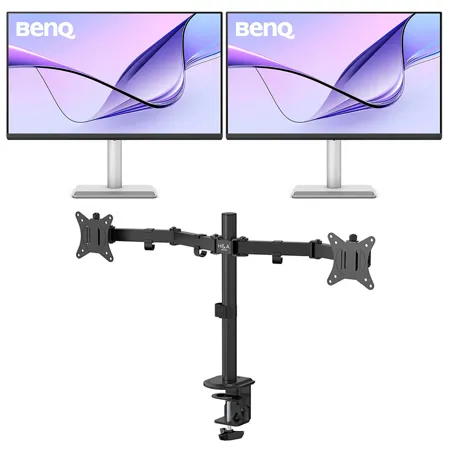

PACKAGE INCLUDES:
Qty: 2

See Options
Need help? Ask our experts.
Review Summary
2025-05-16T14:57:52
Excellent monitor with good color matching etc to MacBook Pro. Purchased primarily for editing photos in Lightroom and Photoshop. Great bang for the buck and arrived earlier than promised. Highly recommend.
MICHAEL H.
2025-03-16T11:36:52
This is the perfect monitor before my use with Apple Logic Pro music workstation on my M4 Mac mini ,This is less than half the price of the Apple 5k display. The pixels per inch makes this a winner and working with Logic Pro, and they're small text boxes. The wide screen is the perfect size, an upgrade from my 27 inch.. I might add that ordering this through adorama was very efficient, and they were very responsive to my needs. Unlike Amazon, were there are no people to talk to, the quality of the service at adorama is very much appreciated and in my book gives them a competitive edge.
EDWARD B.
2025-01-01T07:10:09
I went through 3 monitors before settling on the BenQ MA 32ou. It's a great monitor. I used to have an Imac. I bought the new Mac Mini 4 and this pairs perfectly with it. There is no loss in brightness. It is cleaner than the other monitors, meaning their is less tweaks that I need to do to get a great picture. It is perfect out of the box. Very happy with this purchase. Adorama made it better with their product availability, pricing, and quickness in shipping.
STEVE H.
31.5" (80.01cm)
IPS
LED backlight
3840 x 2160
550 nits
600 nits
HDR10, VESA Display HDR 600
178 Degree /178 Degree
5 ms
1300:1
60 Hz
99% sRGB, 95% P3
Cinema, Coding, Display P3, ePaper, Game, HDR, M-Book, sRGB, User
16:9
1.07 billion colors
140
Nano Matte Panel
5000K, 6500K, 9300K, User Define
1.8 - 2.6, sRGB
2.2
Arabic, Chinese (simplified), Chinese (traditional), Czech, Deutsch, English, French, Hungarian, Italian, Japanese, Korean, Netherlands, Polish, Portuguese, Romanian, Russian, Spanish, Swedish
Yes
2x 3W
Yes
100 - 240V
Built-in
Normal: 45W
Max: 250W
Sleep mode: <0.5W
90W
2
1 (Power Delivery 90W, Display Port Alt Mode, Data)
2 (USB 3.2 Gen 1, 5 Gbps, power charging 7.5W)
1 (USB 3.2 Gen 1, 5 Gbps, power charging 15W)
Yes
Yes
Yes (B.I.+ Gen2)
Yes
Yes
Yes
Eye Comfort 2.0, Flicker-free, Low Blue light (Software Solution), Reflection Free
Yes
Yes
Gray
-5 Degree - 20 Degree
15 Degree / 15 Degree
90 Degree
115mm
100x100mm
24.0-19.4 x 28.1 x 8.7" (608.8-493.8 x 714.5 x 220.2mm)
Landscape: 24.0-19.4 x 28.1 x 8.7" (608.8-493.8 x 714.5 x 220.2mm)
Pivot: 29.1 x 16.7 x 8.7" (739.6 x 424.4 x 220.2mm)
w/o Base: 16.7 x 28.1 x 3.3" (424.4 x 714.5 x 82.7mm)
20.06 lbs (9.1kg)
w/o Base: 13.34 lbs (6.05kg)
192223296176 | 840046050740 | 192223252479
Fanatastic Choice For New Apple Computers!
By STEVE H.
I went through 3 monitors before settling on the BenQ MA 32ou. It's a great monitor. I used to have an Imac. I bought the new Mac Mini 4 and this pairs perfectly with it. There is no loss in brightness. It is cleaner than the other monitors, meaning their is less tweaks that I need to do to get a great picture. It is perfect out of the box. Very happy with this purchase. Adorama made it better with their product availability, pricing, and quickness in shipping.
Great Monitor for the Money
By MICHAEL H.
Excellent monitor with good color matching etc to MacBook Pro. Purchased primarily for editing photos in Lightroom and Photoshop. Great bang for the buck and arrived earlier than promised. Highly recommend.
Mac Colors. No Glare.
Colors Not Matching? Plug in and Get the Right Colors
Most external monitors display colors differently from MacBook computers. As the best color-matching monitors for all MacBook generations, BenQ MA series delivers a wide P3 color gamut and BenQ's Mac color-tuning technology - making the MA Series the best monitors for MacBook users.
Sync with MacBook Control
Now you can synchronize controls between your MacBook computer and monitor with simple keystrokes, just like you would on your MacBook Pro and MacBook Air. Simply press the brightness or volume key, and both displays will adjust simultaneously.
Get it Done with Display Pilot 2
Experience Mac-like simplified settings with BenQ Display Pilot 2 software.
Nano Matte Panel - Your Work, in Full Comfort
Panels that Protect
BenQ makes the best monitors that treat your eyes right. The innovative Nano Matte Panel and BenQ Eye-Care technology eliminate elements like reflection and glare that could harm your vision.
TUV Reflection Free Certified
Being TUV Reflection Free Certified ensures multitasking with minimized distractions. The global safety authority TUV Rheinland also certifies the MA series' Low Blue Light feature as truly friendly to the human eye, ensuring the display reduces harmful blue light.
A Powerful Hub Connects All
More than a stylish external monitor for your MacBook Pro and MacBook Air computer, it's also a powerful hub for your desktop Apple ecosystem. The built-in 90W and 15W USB-C ports charge your iPad and iPhone devices while you work.
MacBook Computers
iPad Devices
iPhone Devices
Mac mini Computers
Game Consoles
2 HDMI
Get connected to various devices for multitasking.
2USB - C
Built-in 90W and 15W USB-C keeps your devices charged and expands connectivity.
We Adjust Easily. You View Comfortably.
No more bad posture. BenQ's best monitors for MacBook Pro and MacBook Air go beyond screen limitations, offering greater freedom with multiple angles and height adjustments for an improved viewing experience.
115mm Height Adjustment
Tilt (-5 Degree to 20 Degree )
Swivel (15 Degree / 15 Degree)
Pivot (90 Degree / 90 Degree)






