
This item is no longer available.
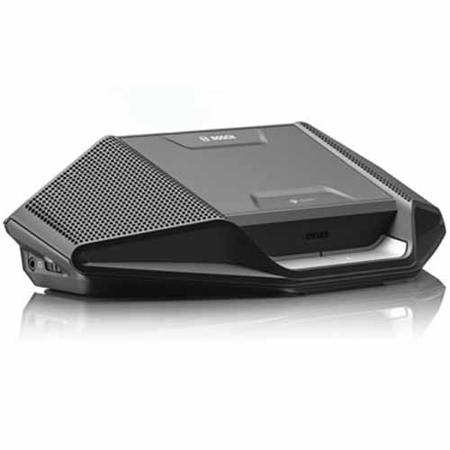
DICENTIS Wireless Device. Pluggable microphone and battery pack to be ordered separately.
The elegantly designed Wireless Device (DCNM-WD) of the DICENTIS Wireless Conference System enables participants to speak, register a request-to-speak, and listen to the speaker during a meeting. The device can be easily configured as a single-use, dual-use or chairperson Wireless Device via the web browser interface of the Wireless Access Point (DCNM-WAP)
General
• The Wireless Devices connect to the DCNM-WAP
• Single-use, dual-use or chairperson can be configured via the web browser interface
• Audio mute button
• Operates in the 2.4 GHz and 5 GHz (UNII1, 2 (extended) and 3) (license free) band
Speech intelligibility
• Maximum speech intelligibility is guaranteed at all times
• The Wireless Devices connects to the DCNM-WAP
• The Wireless Devices produce crystal-clear sound due to a very high signal-to-noise ratio and smart frequency selection
• The loudspeaker and microphone can be active at the same time for a face-to-face meeting experience. To prevent acoustic feedback, a feedback suppressor is built-in
Zero Interference
• Based on standard WiFi
• Seamless automatic frequency channel switching
• WiFi coverage area range test
• Packet Loss Concealment
Security
• The DICENTIS Wireless Conference System and Wireless Devices have secure connectivity using WPA2 to prevent eavesdropping and unauthorized access
• Encryption ensures that information within the system remains confidential
Microphones
• A socket is provided to connect the pluggable microphone (DCNM-HDMIC, DCNM-MICS or DCNM-MICL, all to be ordered separately)
Headphones and loudspeakers
• The Wireless Devices accommodate two headphone connections and controls (on the left and right-hand side), so the speaker can be heard clearly even with excessive background noise
Battery maintenance
• Rechargeable Battery Pack (DCNM-WLIION)
• The lithium-ion Battery Pack can be removed and replaced in a matter of seconds, providing maximum flexibility in recharge scheduling
• Smart battery management via web browser interface control (battery status and usage counting time)
Controls and Indicators
• On top side
Microphone with a red or green indicator
Red indicates microphone is active
Green indicates request-to-speak accepted
LED indicators on device showing
Microphone on state - Red
Possible-to-speak - White
Priority - White (Chairperson only)
Request-to-speak - Green
• On the left and right hand side
Headphone rotary volume controls
• On rear side
Yellow out-of-range of Wireless Access Point LED indicator
Red battery low LED indicator
• Under base side
Recessed, so called 'De-init,' switch to disconnect the connected Wireless Device with the Wireless Access Point (DCNM-WAP)
Interconnections
• Socket for pluggable microphone
Two 3.5 mm (0.14 in) headphone sockets stereo jack type