


This item is no longer available.
Review Summary
2021-03-21T20:00:00
Love this scanner! Does everything any larger scanner can do and then some. As with everything in life, it isn't perfect. The one thing I would like to see in the "next" model of this scanner is a small screen to control it versus the buttons that you have to look up in the manual to remember what they do. Functionality-wise, it is perfect.
BorgX

2020-10-09T20:00:00
This and the Brother’s label maker were game changers for my desktop. I’d be very sad to not have them
Patsy

2020-05-22T20:00:00
Bought it for home use. No problem with this scanner. Five stars.
John68

2019-04-09T20:00:00
Love all that this does, just does not always skip blank pages. It does so vicariously.
Higher E.

2018-12-31T19:00:00
Stopped scanning after abyear despite limited use.
buddha77

2018-11-26T19:00:00
Love this product. Very easy to set up and use, and is the perfect scanner for a home office. Its compact which is great, and it scans fast enough to get most jobs done. Very user friendly, and overall just a good purchase if you have a home office and don't want to take up a lot of space with a bulky printer/scanner. Great for expense reports as well!
JippyTudah

2018-09-09T20:00:00
It is quick, thorough and I love it. Everything you could want and it's so small but does a great job!
cquesada

2018-09-05T20:00:00
I am in love with my little scanner. I needed it to quickly scan double sided documents. Works great. Only drawback is the way to save files. Cumbersome
TBJ S.

2018-09-02T20:00:00
Using this scanner to scan our company's A/P for multiple years and it is so efficient and easy to use!
Robin Y.

2018-07-19T20:00:00
If you're looking for a dainty, (should be convenient, guaranteed to screw up your papers and your day type scanner, look no further this one is IT. It'll be doing fine and then all the sudden feed a piece of paper in crooked and jams. Paper gets frayed on the edges. I promise you that your paper WILL fall to the left and feed improperly. Try to hold it up straight all you want, you're just going to be with with a paper cut, shredded paper, and disappointment.
Kristin

2018-07-15T20:00:00
WiFi connection allows me to use scanner with all computers in the house. Double sided scanning Angi plus. Document feeder lets me scan 10+ documents at a time. Pretty much everything I wanted in a document scanner. Small footprint, doesn’t take up that much space.
Jdramsey

2018-06-27T20:00:00
As soon as I started to use this scanner, it was jamming my important documents. I do not recommend this product at all.
jackie272018

2018-06-25T20:00:00
This scanner is amazing. It feeds properly, and the scans come out beautiful. The software for organizing receipts is great too. BR Receipts is a bit temperamental on my Mac but it’s much better than the “neat” software ever was. You just open it back up if it crashes and I’ve never lost a document in a crash. Basically this scanner has made keeping track of expenses and reducing clutter much easier and fun!
NedGuruGuy

2018-06-19T20:00:00
Over all, I like the product. 2 things I wish were different with this model: I wish it had a guide for the pages at the top, not just the bottom. I think it would cause less jams. The other thing I wish were different is that the Separation Pad lasted longer.
Jennie428

2018-04-01T20:00:00
This scanner is very picky about just how it feeds the sheets in, and will suddenly either feed one in crooked, or suck in five sheets at a time; jamming for either one, and making me pull the mess out (shredded page edges from the scanner now, and start the entire process again. When it does work smoothly, it does a fair job. Scanning a PDF as a Word document usually results in many mis-spellings, or entirely wrong wording, which I have to check against the original, but I can work through that. The paper feed mechanism is POOR, and I would never recommend this scanner to anyone.
robin w.

2018-02-22T19:00:00
Much better than my old printer - recommend this one highly!
jazzy1044

2018-02-14T19:00:00
This is the best scanner I ever owned. It is very fast and so easy to use.
Dr R.

2018-02-14T19:00:00
It caused me to scan through Adobe which was a headache! I spoke to serveral customer reps and they all had me do the same thing "install the driver" but setup never opened. I tried calling my IT dept and they said it was the software
Evey

2018-02-09T19:00:00
Technically quick at a great price, but installs a huge number of unnecessary programs when you turn on your computer.
jro3330

2018-02-04T19:00:00
I really just wanted something small and easy to use - i didnt have much space left on my desk...then i found this Gem! Love it! Super easy and quick to scan. Highly recommend!
chrissy1000000

2018-01-13T19:00:00
It is a great device, fast and fit easily around my desk. It does a great job also the included software. Only do not place more than 10 sheets to scan as they will jam. Also should have additional tab on either side of paper try to prevent pages from tilting and jam the unit. Otherwise I am super happy to have this scanner and is very helpful at work and at home
Rathair

2018-01-12T19:00:00
Love the options of two-sided scanning, saving or printing the document etc. I love the card scanner! It's my favorite feature. From scanning drivers licenses, credit cards, etc. It is perfect for the job needed. I wish it could scan longer receipts, but you can figure out a way to get it all in there. It does misfeed on occasions and that can be a frustration, so you have to watch it. But overall, I am very pleased with the scanner and I would recommend it to everyone. It is a great value for the price!
itsmeteresa

2018-01-10T19:00:00
Have never gotten it to work after multiple replacement parts
Cathy B.

2018-01-09T19:00:00
Pros: The scans are clear, fast, and the set up easy. I was able to find a driver for my Windows 8 machine. Cons: The paper guides need to be higher and improved as scanning more than a few pages can get them misaligned easily. Then the machine will live up to its promotion. Otherwise, you have to hand feed a few pages at a time.
darkened

2018-01-07T19:00:00
Purchased this scanner about two months ago and have been quite happy so far with its performance. I do not use it wireless (haven't figured out how but it works well enough connected directly to my laptop. It can be at times tricky to scan multiple pages, but if you give the scan job a good fan out it works very well.
BDaniels

2018-01-04T19:00:00
We needed a scanner that can handle documents with several pages. This product certainly can. However, recently we have been experiencing several jams because the scanner pulls the paper through at an angle. It may be something minor that needs to be cleaned or adjusted. Otherwise, good performance.
Jenell

2018-01-04T19:00:00
Instant scan of multiple documents or multiple pages of one document
DRob

2017-12-10T19:00:00
Great product for the money. Very happy with the product. Love that it scans multiple pages into one file. Can scan one sided and two sided and delete blank pages.
pawsnjc

2017-11-30T19:00:00
Small compact scanner and that scans well. It fits nicely in tight office spaces.
FAdoc

2017-11-07T19:00:00
My PC crashed but after replacing our hard drive we were able to quickly get our scanner up and running using your brother site information. This was great!
DDennis

Up to 16 pages/minute (monochrome & color)
Yes
Up to 16 pages/minute (monochrome & color)
20-sheet capacity ADF
Wireless 802.11 b/g/n, Hi-Speed USB 2.0
Yes (Wireless LAN)
Yes
File, Image, E-mail, FTP, OCR, USB flash memory drive
Up to 20 sheets (ADF)
24-bit color, 8-bit (256 levels) gray scale, 1 bit monochrome
Up to 600 x 600dpi
Up to 1200 x 1200dpi
Dual CIS
Up to 500 scans per day
No
Yes (Brother iPrint & Scan)
Yes
Yes
Yes
Yes
Yes
Yes (including embossed)
Nuance PaperPort 12SE (Windows), Presto PageManager 9 (Mac), Presto BizCard 6, Control Center 4 (Windows), Control Center 2 (Mac), BR-Receipts
Paper, receipts, photos, business cards, plastic/laminated cards (including embossed)
8.5 x 34"
8.5 x 11.7"
8.5 x 11.7"
14 - 53lbs (6.35- 24.04kg)
14- 29lbs (6.35- 13.15kg)
2.0 x 2.76"
0.4mm - 0.76mm / Embossed up to 1.4mm
2.0 x 2.76" / 2.17 x 3.74"
TWAIN, WIA, ICA, ISIS, SANE
AC Adapter (110-120V, included)
Ready = 4.0W / Deep Sleep = 1.5W / Scanning = 14W
Yes
Windows XP, Windows Vista, Windows 7, Windows 8, Mac OS X v10.6.8 - v10.8.x, Linux
ARP, RARP, BOOTP, DHCP, APIPA(Auto IP), WINS/NetBIOS name resolution, DNS Resolver, mDNS, LLMNR responder, Custom Raw Port/Port9100, FTP Client and Server, SNMPv1/v2c, HTTP/HTTPS server, TFTP client and server, ICMP, Web Services (Scan), SNTP Client
15% - 85%
41 to 95 deg. F (5 to 35 deg. C)
11.2 x 4.1 x 3.3 (284.48 x 104.14 x 83.82mm)
3.3lbs (1.50kg)
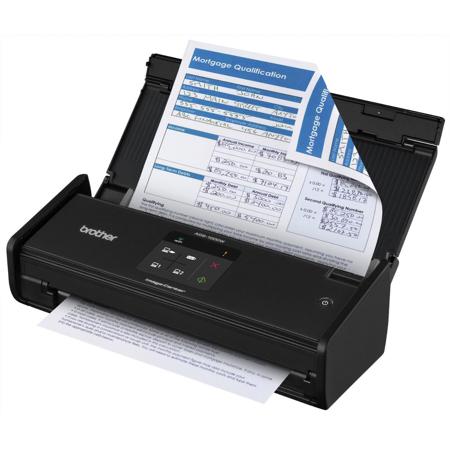
The Brother ImageCenter ADS-1000W Desktop Scanner offers powerful features for your home office or small business in a sleek, compact design. Using the 20-page capacity auto document feeder, this scanner is able to capture single and double-sided documents in a single pass at speeds of up to 16ppm, making it perfect for scanning multi-page, two-sided business documents, as well as single-page documents up to 34" long, receipts, business cards, photographs and embossed plastic cards using the rear card slot.
Wireless network connectivity makes the ADS-1000W simple to connect and share among multiple users and the easy-to-use TouchPanel display enables one-touch scanning to common destinations including PC, e-mail, FTP, USB flash drive and mobile devices using the free iPrint & Scan app. The included suite of scanning software, including receipt, desktop document and business card management programs, makes the ADS-1000W the complete scanning package for your small office.
Wireless Enabled Duplex Document Scanner Packs Business-focused Features, Including an Automatic Document Feeder and an Easy-to-use TouchPanel Display into a Compact, Desk-friendly Size. The Brother ImageCenter ADS-1000W Desktop Scanner offers powerful features for business including two-sided scanning, wireless 802.11 b/g/n network connectivity, a Touch Panel display and an up to 20-page capacity auto document feeder, all in a compact design.
It captures single- and double-sided documents in a single pass at speeds of up to 16ppm. Great for scanning multi-page, two-sided business documents, as well as documents up to 34" long, receipts, business cards, photographs and laminated identification cards via the rear card slot. Automatic document feeder holds up to 20 sheets of paper.
Wireless Network Connectivity
Plus USB interface for local connections.
Fast Scan Speeds
Scans single and double-sided materials in a single pass, in both color and black/white, at up to 16ppm.
Multi-Page Scanning
From the 20-sheet capacity auto document feeder (ADF).
Easy-to-Use TouchPanel Display
For one-touch scanning to common destinations.
High-Precision Scanning
Up to 600 x 600 dpi optical resolution, 1200 x 1200 dpi interpolated.
Versatile Media Handling
Easily scans documents, photos, receipts, business and embossed plastic cards and more - from business card size up to 8.5"(W) x 34"(L).
Advanced Scanning Features
Including background removal, blank page removal, deskew support, auto crop and auto image rotation.
Various Scan-to Destinations
Including file, image, e-mail, OCR, FTP, USB flash drive and mobile devices via the free Brother iPrint & Scan app.
Bundled With a Valuable Software Suite
Including desktop document and business card management, OCR and receipt management programs.
Receipt Management Software
Includes BR-Receipts, offering organization of scanned receipts and data exporting to Quicken and QuickBooks.
Compatibility
Windows, Mac and Linux
Outstanding Support
Includes a one-year limited warranty plus free phone support for the life of the product.
Advanced Scanning Functionality in a Space-Saving Design
The ADS-1000W connects to your wireless network or to a single machine via USB interface, to scan at up to 1200 x 1200 dpi (interpolated) and 600 x 600 dpi resolution (optical). Its compact footprint, along with advanced scanning features such as deskew support, blank page removal, auto image rotation and background removal, make it great for a home office or small business that regularly scans and digitizes printed information, but may not have space for a larger scanner. Compact scanner measures just 11.2" long x 4.1" deep with the document feeder closed.
Scanning to a Variety of Local or Shared Destinations Thanks to the Easy-To-Use TouchPanel Display
The ADS-1000W gives you the option to scan to a number of different destinations to help you manage your documents and workflow. You can also scan to your USB flash drive or to compatible mobile devices using the free Brother iPrint & Scan app or scan to a file, email or image. You can also scan to a shared folder, email server or FTP, to save, distribute and share information. Easily navigate menus, settings and scanning destinations with the TouchPanel Display.
Bundled with a Robust Suite Of Scanning Software To Enhance Document Management
The ADS-1000W includes an enhanced package of scanning software to help you manage and distribute information and reduce the need to store and reference hard copy documents.
Nuance Paper Port 12 SE (Windows) and Presto! PageManager (Mac)
Manage all of your scanned documents, as well as the other documents on your computer
Scan to Microsoft Office formats, as well as Microsoft SharePoint (Windows only)
Scan, convert, organize, repurpose and share PDF documents
Quickly merge multiple files of differing formats from various folders into one multi-page PDF
Scan to E-mail, Folder, OCR and searchable PDF
Presto! BizCard (Windows/Mac)
Scan and export contact information from business cards directly to Microsoft Outlook and other contact management systems
Sort contacts by company group, category and first or last name
Brother Control Center (Windows/Mac)
Configure advanced scan settings for different scan-to destinations and store them for frequent use (i.e.: dpi resolution, file format, duplex scanning).
Includes BR-Receipts - Quicken and Quickbooks Compatible Receipt Management Software
The ADS-1000W includes BR-Receipts, software that captures information from scanned receipts. BR-Receipts also lets you export your receipt data into Quicken and Quickbooks software to help simplify bookkeeping and reporting.
Brother Scanners Are Compatible With The way You Do Business
The ADS-1000W features industry-standard drivers, including TWAIN, WIA, ICA, ISIS and SANE, to help enable easy integration for scanning documents into a wide variety of popular applications. Plus, it's compatible with Windows, Mac and Linux operating systems.
Brother Is At Your Side With Outstanding Customer Support
Brother offer a one-year limited warranty on the ADS-1000W and stand behind your purchase with FREE phone support for the life of your product. Whether you have a product question or a technical issue, Brother is always at your side.