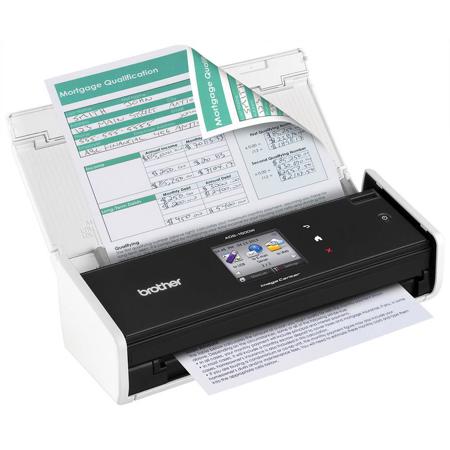

Brother ImageCenter ADS-1500W Compact Color Desktop Scanner with Duplex and Web Connectivity, 600 dpi Optical/1200 dpi Interpolated, 18ppm Mono/Color Scan Speed, 20 Sheets Paper Capacity, Wi-Fi

SKU: BRADS1500W

This item is no longer available.

Overview
Compare
Specs
Protection

Reviews about this item

Review Summary

2023-01-22T19:00:00

Rated 1 out of 5

Drivers can't be updated

I loved the scanner but I can no longer update the drivers which means I have to disable a security setting on my new windows computer to allow the scanner to function. So I had to uninstall and it the scanner is now useless.

Wisconsin

2022-12-26T19:00:00

Rated 1 out of 5

No support for current Mac OS

I used this scanner for years in my office worked great until past couple Mac OS updates were not supported.

Adam

2022-11-13T19:00:00

Rated 5 out of 5

Works Great. Saves Space.

Works Great! Just what I needed. Fast and easy installation. Easy to use and doesn't take up much space on my desk.

Sam L.

2022-09-20T20:00:00

Rated 5 out of 5

Awesome Scanner

So easy to get real estate contracts scanned with this item. I Have had it for a few years now, and the best feature is that it directly connects to Google Drive. It has yet to jam and the two sided feature makes scanning even faster. Highly recommend to anyone that has a medium volume scanning need. The unit is very small and take a very small space on your desk.

Quan515

2020-02-04T19:00:00

Rated 3 out of 5

For MAC Catalina Users

Is Brother going to offer the software in 64 bit form, specialy the BIZ Card Feature since the software no longer works I can use the card reader because not it is real long instead of just the PDF or the card.

Itlnprd

2019-03-27T20:00:00

Rated 2 out of 5

Trouble in paradise

ADS-1500 does NOT like wifi. I cant keep my connection live. I have to reinstall the software every time I want to use it.

Michelf999

2019-03-17T20:00:00

Rated 3 out of 5

Great

I love the product and convenience of fitting on my desk BUT guides do not keep paper in place

gophernow

2019-01-08T19:00:00

Rated 5 out of 5

Great product

Fast and easy. The dumbest is people could use this scanner. Great customer service also.

K B.

2019-01-01T19:00:00

Rated 2 out of 5

Scans never stay strait and can never be very long

Not a total failure, but keeping the paper straight for a clean scan is near impossible. Thus nearly all scans have to be straightened and cropped. Long receipts fail as a paper jam. The device is preset to some length and other programs are unable to change them. The Brother scaring software is clearly dated and in need of a major update; particularly on MAC. Something in the drivers, firmware or other software needs to be changed so that longer paper does not fail. Guide extensions would also help to keep the paper strait as it feeds into the scanner. Not happy about this purchase at all.

mustangman

2018-09-13T20:00:00

Rated 5 out of 5

WOW! In a Box!

Small, compact scanner PERFECT for the home or business office. Invoices and receipts are quickly scanned and inputed into your choice of software (the provided software is AWESOME. Clean up the clutter! GO GREEN!

kessa

2018-07-11T20:00:00

Rated 1 out of 5

constantly disconnects from wifi

not worth it! Buy a fujitsu better scanner, greater quality and more dependable

Carl C.

2018-07-10T20:00:00

Rated 2 out of 5

I am dissatisfied...

I bought the Brother ADS-1500W, and I have to say, I am overall quite dissatisfied with the product. One of the main features I was looking for in a scanner was duplex scanning. That's a big one for me. That means the scanner can scan BOTH sides of a piece of paper with ONE pass through. You don't need to pick the paper up and put it through again, like on other scanners. Just one single pass through and it scans both sides. Now, while the scanner itself does actually have this capability, the software that comes bundled with the scanner doesn't allow for it. The software will literally tell you to take your document and flip it over to scan the other side. Why even make a duplex scanner if you're going to bundle it with software that doesn't even have duplex as a capability? I have another complaint about the bundled software. I have a very powerful computer; I built it myself. And still, this software loves to freeze and crash quite often. Often enough to be very annoying. Because of all the problems I’ve had with the Nuance software that comes with the Brother ADS-1500W, I got some other scanner software called PaperScan, which works a lot better. PaperScan also allows me to do duplex scanning. I don’t have to pick up the document and run it through again to get both sides. Unfortunately, though, the software isn’t the only problem I’ve had with this scanner. When I’m scanning documents, sometimes, on random pages, the digital version will have a line running straight through the page even though the physical paper doesn’t have any line. There is just a dark black line running through random pages on my documents, and I don’t know why. There isn’t any line or fold or anything on the original paper. The line just appears out of nowhere. So I’m guessing that’s a glitch within the scanner. A really annoying glitch. For the high price of this document scanner, you would think that it would work better and would come with software that actually functioned properly. Due to the problems I’ve had with this document scanner, I can’t say I would recommend that anyone purchase it.

Devin

2018-06-26T20:00:00

Rated 4 out of 5

Great Scanner

Great little scanner but it does not have a guide at the top so the papers sometimes gets pulled sideways, even when they are put in straight. If I hold my finger next to the paper it normally goes down straight. It does occasionally jam also.

Linda18

2018-06-12T20:00:00

Rated 4 out of 5

Very Versitile

This scanner is easy to set-up and to learn to operate. Scanning pictures is quick and easy. I have scanned about 1000 old family pictures to a flash drive and the reproduction is very good.

Mack H.

2018-06-12T20:00:00

Rated 4 out of 5

Love to use this.

Easy to use. Simple. Very helpful. Digitizing most of my papers. Fast.

Bob74

2018-06-12T20:00:00

Rated 5 out of 5

Really fast!

Scans very fast and,quality of the scans is awesome and customer service top notch.

Vegas1

2018-06-12T20:00:00

Rated 5 out of 5

Love it! ")

I have always saved certain receipts, statements & other documents. Before the digital age I used a 2-drawer file cabinet. Now I scan & file online. And because I have my Google Drive folders well organized :) I can easily find a document if needed. It is also easy to delete files once they become obsolete. I live my scanner.

grc0520

2018-04-07T20:00:00

Rated 3 out of 5

Good but not enough

Bluetooth not is ont very userfriendly and may be long to relearn intructions and loss of time. But when you got it’s work well

Dannnny

2018-03-20T20:00:00

Rated 1 out of 5

Disappointed in product

We retured the scanner to the store. It was that bad, not business quality in the least.

LuluBelle

2018-03-15T20:00:00

Rated 4 out of 5

Nice, Compact Scanner

This scanner has a small footprint with big machine capabilities. The scanner was easy to setup and connected to my network, and has worked flawlessly. It is easy to store out of the way when not in use. The print quality is excellent and functions as advertised. The machine is of a caliber that I have come to expect from Brother. Great product for my home office.

D K.

2018-03-13T20:00:00

Rated 5 out of 5

Love the size, Works the Best!

I'm comparing to another scanner I had and my Brother is way on top! I love the size, it doesn't clutter my desk. When I'm ready, it turns right on and gives me a great scan copy for my program (paperless, better than Neat, and so easy to work with my Mac.

Angie75

2018-03-07T19:00:00

Rated 5 out of 5

Time Saver with Great Features

Scanner is a great timesaver - like the features you can set this scanner up so many ways to do what you like. The receipt carrier is great, keeps longer or fragile reciepts from getting jammed up.

thevalley

2018-02-20T19:00:00

Rated 5 out of 5

The Best One

I have owned and used several other scanners from name brand companies. This Brother scanner is by far the best. The unit is compact and user friendly. I also like that Brother provides driver updates for Windows when newer versions are added.

Cathyoseven

2018-02-03T19:00:00

Rated 5 out of 5

Compact and Efficient

Makes very good double sided color scans for signed documents, etc. I only need the device once in a while to scan signed legal documents, etc. If the document feeds a bit crooked, the final pdf comes out straight and clean. Recommended.

DeGrape

2018-01-06T19:00:00

Rated 4 out of 5

Great mobile scanner

This is a great unit. I bought the hard case for it also. It makes beautiful scanned PDF files either to a computer or a flashdrive. I have not used it for photos. The only reason I did not give it a solid five is because you have to reset the date and time every time you plug it in. Using it with a computer, it will sync with the computer. Using a flashdrive you have to set date and time which is how I use it most the time. This could be easily corrected and powered by a watch battery.

Jerry634

2018-01-02T19:00:00

Rated 5 out of 5

need help

I can't get this to run on my HP notebook. I think it is something in my setup

Linda M.

2017-12-20T19:00:00

Rated 5 out of 5

Works well

Product works as advertised. Software package is user friendly and works flawelessly. Setup was intuitive and allowed for quick transition from package to production. Scans are accurate and made the transition from paper to electronic records easy.

Bfrustag

2017-11-10T19:00:00

Rated 5 out of 5

Great Duplex Scanning

I had to use this equipment a little while before I could give it a fair review, and with that said I want to say that this scanner is great. I am glad it uses the TWAIN Drivers and that it does 2 sided scanning, along with scanning in color. It is small and compact, which makes it very portable. I seems a little on the overweight side, but not much. It has the weight that I like to anchor it to the desk without having to worry about it falling over. All-in-all this is a very good product.

roxyboy3

2017-11-09T19:00:00

Rated 3 out of 5

Unreliable

This scanner works beautifully at times, and not others. It jams a lot. Now there is a problem connecting with the USB to my computer. I have had to send it back for a replacement once, and the replacement does the same thing the previous one did. Support tries, but no help in the end. Shopping for a scanner made by another company now.

connie12

2017-10-29T20:00:00

Rated 4 out of 5

Works Well;Small Footprint;Good Value

This unit does what it says it does and generally I am pleased with it. It also comes with better than average support by phone. I also regard it as a good value. It has both wireless and USB interfaces which is a nice touch. Paper jams are easily cleared. It supports a large number of paper sizes. The unit will directly scan to popular cloud servers. Unfortunately it can be complex to initially setup in order to take advantage of all its features. More comprehensive documentation would help. This is especially an issue for Mac users as much of the documentation is Windows focused. One thing that would make the unit more attractive would be to have rechargeable battery operation. Currently it must have AC power to operate. Given that the email feature only supports POP servers, using it with Apple Mail is not an option as Apple on supports IMAP. Some of the included 3rd party software for OCR scanning and operation could stand some improvement. OCR operation is slow and some of the software interfaces are complex and confusion. The Mac software is 32 bit based which will not longer function after MacOS 10.13 (High Sierra, according to Apple as they will only support 64 bit software in the next major update. The card scanning software is especially confusing and lacks features found in competing products. Many of the scanning features are duplicated in a similar manner in some of the included software packages which adds to the confusion. Better integration would be nice. However the software drivers, from Brother are up-to-date and do support the latest operating systems. While scanning can be started from the color led display panel on the scanner, its 'shortcuts' do not store custom settings but must be redone for each scan. Storing custom setting in 'Shortcuts' would make this feature much more useful. Consumables such as some of the rollers and paper guide have a long life and are easily replaceable by the user at a fair price.

GymW

Brother ADS-1500W Specifications

  • Operating System Compatibility

    Windows XP, Windows Vista, Windows 7, Windows 8, Mac OS X v10.6.8 - v10.8.x, Linux

  • Scanning Speed

    Up to 18 pages/minute (monochrome & color)

  • Supported Network Protocols (IPv4)

    ARP, RARP, BOOTP, DHCP, APIPA(Auto IP), WINS/NetBIOS name resolution, DNS Resolver, mDNS, LLMNR responder, Custom Raw Port/Port9100, FTP Client and Server, SNMPv1/v2c, HTTP/HTTPS server, TFTP client and server, ICMP, Web Services (Scan), SNTP Client

  • Two-Sided (Duplex) Scanning

    Yes

  • Operating Environment: Humidity

    15% - 85%

  • Duplex Scan Speed

    Up to 18 pages/minute (monochrome & color)

  • Operating Environment: Temperature

    41 to 95 deg. F / 5 to 35 deg. C

  • Automatic Document Feeder

    20-sheet capacity ADF

  • Standard Interface(s)

    Wireless 802.11 b/g/n, Hi-Speed USB 2.0

  • Networking Capability

    Yes (Wireless LAN)

  • Wi-Fi CERTIFIED

    Yes

  • Direct Scanning Destinations

    File, Image, E-mail, FTP, OCR, USB flash memory drive, Network, E-mail server and cloud applications including GOOGLE DRIVE, EVERNOTE, Box, Picasa Web Album, FLICKR, Facebook, DROPBOX and SkyDrive

  • LCD Display

    2.7" color TouchScreen display

  • Maximum Paper Capacity

    Up to 20 sheets (ADF)

  • Scanning Modes

    24-bit color, 8-bit (256 levels) gray scale, 1 bit monochrome

  • Max. Optical Resolution

    Up to 600 x 600 dpi

  • Max. Interpolated Resolution

    Up to 1200 x 1200 dpi

  • Image Sensor

    Dual CIS

  • Daily Duty Cycle

    Up to 500 scans per day

  • Programmable Shortcut Buttons

    Yes (12)

  • Web Connect

    Access GOOGLE DOCS, EVERNOTE, Box, Picasa Web Album, FLICKR, Facebook, DROPBOX, Microsoft OneDrive and OneNote accounts via the Web Connect TouchScreen Interface

  • Mobile Device Compatibility

    Yes (Brother iPrint&Scan)

  • Searchable PDF

    Yes

  • Background Removal

    Yes

  • Blank Page Removal

    Yes

  • Deskew Support

    Yes

  • USB Direct Interface

    Yes

  • Dimensions (W x D x H)

    11.2 x 4.1 x 3.3" / 28.45 x 10.41 x 8.38cm

  • Weight

    3.5lbs / 1.59kg

  • UPC Code

    012502635956

About Brother ADS-1500W

FEATURED REVIEWS

Great Product TERRIBLE CUSTOMER SERVICE

By le501

The scanner is great! The software is easy to customize to your needs and operate. I did have some issue when changing out my router. I went through all of the trouble shooting that was online and in the book, they did not work. Spent 45 min on hold with tech support for them to email me the same information that I had already gone through. I asked the operator on the line if he could give me tech support, after all that's who I called. He said "no, the only thing we can do is send you troubl...

View full Review

Very Good

By jgkhalil

Surpass all our expectations, fast and precise. Useful for get rid of paper documents.

The Brother ImageCenter ADS-1500W Desktop Scanner offers powerful features for your home office or small business in a sleek, compact design. Using the 20-page capacity auto document feeder, this scanner is able to capture single and double-sided documents in a single pass at speeds of up to 18ppm, making it perfect for scanning multi-page, two-sided business documents, as well as single-page documents up to 34" long, receipts, business cards, photographs and embossed plastic cards using the rear card slot.

Wireless networking and Web Connect enable simple scanning to a wide variety of destinations including cloud applications such as GOOGLE DOCS, EVERNOTE, Box, Picasa Web Album, FLICKR, Facebook, Microsoft OneDrive and OneNote, as well as mobile devices using the free iPrint&Scan app, directly from the easy-to-use 2.7" color TouchScreen display. The included suite of scanning software, including receipt, desktop document and business card management programs as well as PDF conversion software, makes the ADS-1500W the complete scanning package for your small office.

• Wireless Networking and Web Connect - Enables direct scanning to a variety of cloud applications including GOOGLE DRIVE, EVERNOTE, Box, Picasa Web Album, FLICKR, Facebook, DROPBOX and SkyDrive
• Fast Scan Speeds - Scans single and double-sided materials in a single pass, in both color and black/white, at up to 18ppm
• 2.7" Color TouchScreen Display - With 12 programmable shortcuts for one-touch scanning to common destinations
• Multi-Page Scanning - From the 20-sheet capacity auto document feeder (ADF)
• High-Precision Scanning - Up to 600 x 600 dpi optical resolution, 1200 x 1200 dpi interpolated
• Versatile Media Handling - Easily scans documents, photos, receipts, business and embossed plastic cards and more - from business card size up to 8.5"(W) x 34"(L)
• Advanced Scanning Features - Including background removal, blank page removal, deskew support, auto crop and auto image rotation
• Enhanced Scan-to Destinations - Including Network folders, cloud application and mobile devices via the free Brother iPrint&Scan app
• Bundled with a Valuable Software Suite - Including PDF conversion, desktop document and business card management, OCR and receipt management programs
• Receipt Management Software - Includes BR-Receipts, offering organization of scanned receipts and data exporting to Quicke and QuickBook
• Windows, Mac and Linux compatible

Wireless Enabled Duplex Document Scanner Packs Business-focused Features, Including Direct Cloud Scanning, Automatic Document Feeder and a 2.7" TouchScreen Display into a Compact, Desk-friendly Size
The Brother ImageCenter ADS-1500W Desktop Scanner offers powerful features for business including two-sided scanning, wireless 802.11 b/g/n network connectivity, direct cloud scanning, a 2.7" color TouchScreen Display and an up to 20-page capacity auto document feeder, all in a compact design. It captures single- and double-sided documents in a single pass at speeds of up to 18ppm. Great for scanning multi-page, two-sided business documents, as well as documents up to 34" long, receipts, business cards, photographs and laminated identification cards via the rear card slot.

Advanced scanning functionality in a space-saving design
The ADS-1500W connects to your wireless network or to a single machine via USB interface, to scan at up to 1200x1200 dpi resolution (interpolated) and 600x600 (optical). Its compact footprint, along with advanced scanning features such as deskew support, blank page removal, auto image rotation and background removal, make it great for a home office or small business that regularly scans and digitizes printed information, but may not have space for a larger scanner.

Scan to a variety of local or shared destinations, as well as popular cloud applications
The ADS-1500W gives you the option to scan to a number of different destinations to help you manage your documents and workflow. You can scan documents to cloud applications such as GOOGLE DRIVE, EVERNOTE, DROPBOX, PICASA WEB ALBUMS, FACEBOOK, FLICKR, BOX and SkyDrive directly from the 2.7" TouchScreen Display. You can also scan to your USB flash drive or to compatible mobile devices using the free Brother iPrint&Scan app or scan to a file, email or image. You can also scan to a shared folder, email server or FTP, to save, distribute and share information.

Bundled with a robust suite of scanning software to enhance document management
The ADS-1500W includes an enhanced package of scanning software to help you manage and distribute information and reduce the need to store and reference hard copy documents:

Nuance PDF Converter Professional 8 (Windows - does not support XP 64bit)
• Convert paper and PDF into Microsoft Office documents
• Search and highlight information in PDFs
• Control, view, edit and print documents with complete security

Nuance PaperPort 12 SE (Windows) and Presto! PageManager 9 (Mac)
• Manage all of your scanned documents, as well as the other documents on your computer
• Scan to Microsoft Office formats, as well as Microsoft SharePoint (Windows only)
• Scan, convert, organize, repurpose and share PDF documents
• Quickly merge multiple files of differing formats from various folders into one multi-page PDF
• Scan to E-mail, Folder, OCR and searchable PDF

Presto! BizCard (Windows/Mac)
• Scan and export contact information from business cards directly to Microsoft Outlook and other contact management systems
• Sort contacts by company group, category and first or last name

Brother Control Center (Windows/Mac)
• Configure advanced scan settings for different scan-to destinations and store them for frequent use (i.e: dpi resolution, file format, duplex scanning)

Includes BR-Receipts - Quicken and Quickbooks compatible receipt management software
The ADS-1500W includes BR-Receipts, software that captures information from scanned receipts. BR-Receipts also lets you export your receipt data into Quicken and Quickbooks software to help simplify bookkeeping and reporting.

Brother Scanners are compatible with the way you do business
The ADS-1500W features industry-standard drivers, including TWAIN, WIA, ICA, ISIS and SANE, to help enable easy integration for scanning documents into a wide variety of popular applications. Plus, it's compatible with Windows, Mac and Linux operating systems!

Brother is at your side with outstanding customer support
Brother offer a one-year limited warranty on the ADS-1500W and stand behind your purchase with FREE phone support for the life of your product. Whether you have a product question or a technical issue, Brother is always at your side.

What's in the box:

  • Brother ADS1500W Color Desktop Scanner
  • Pick-up Roller
  • Separation Pad
  • AC Adapter
  • USB Cable
  • Receipt Carrier Sheet
  • Quick Setup Guide
  • Installation DVD
  • User's Guide (Accessible from DVD)
  • Brother 1 Year Limited Warranty