


This item is no longer available.
Review Summary
2026-02-23T19:00:00
The machine scans lines with a carriage return at the end of each line, so it is necessary to go in manually to remove them in the new file. Plus there are many errors in the form of stray marks and butchered words. A 250-page single spaced document took several weeks to prepare for being uploaded to a website.
Roland M.

2023-02-04T19:00:00
It is amazing scanner, I have been using this to my previous work and I bought this again to my new office. I have no doubt in requesting it again.
Luz M.

2021-05-14T20:00:00
I was used to a higher-end scanner that was getting old, so I replaced it after doing a good bit of research. The Brother ADS-2800W exceeds my expectations on many levels. It adds value on many levels from pricing to functionality, to features. I highly recommend this scanner.
David B.

2021-04-22T20:00:00
Great scanner and its fast! The trays are a little tight to pull out and it feels if you pull them hard enough, they may break. The touch screen menu is great. I have only Brother printers in my office so I can use the Control Center 4 to get to the scan screen. A little limited but it works. The only problem is the ability to download the Paperport program as it does not install on Windows 10 no matter what was recommended online and attempted. More frustrating is the fact that I contacted Brother for assistance in early April and have yet to receive a response or any assistance. Not too happy about that. However, the scanner itself is pretty good. If you want or use Paperport for the scanner software, then this is not the scanner for you. But if you use other scanner software, as stated this is a pretty good scanner.
Febleslaw

2021-04-14T20:00:00
Instructions were not very straight forward for scanning to cloud accounts. It was better than a competitor's model but for the price I would have preferred better. Like the shortcut buttons when configuring for cloud scanning but the overall scanning process to a cloud account is slower than I'd like.
RockyMtnNeo

2019-04-22T20:00:00
The ADS-2800W scanner is a great addition to my office. After setting it up, it scans beautifully. I set up my machine to connect to my wireless router so I am able to scan items to my computer. I have probably scanned 200 pages thus far and only had one item jam, which was a W-2 printed on thick paper that had multiple layers glued together. As advertised, just drop all the pages in the feed tray, even if they are different sizes with some pages double sided and some not and everything magically appears on my computer screen. The machine is able to automatically recognize whether a document is single or double-sided so when it pops up on your screen you don't need to waste time deleting blank pages as the machine does it for you. Great product! I love the software that's included. I would definitely buy it again!
CPA M.

2019-02-10T19:00:00
Why is brother so cheap as not to include a printed user manual with scanner? All files should be included on CDs and installation CDs should work better. I decided to buy the Mac program Receipts by Dirk. Now it is working as I wanted.
Justin1974

2019-01-31T19:00:00
overall is a good product, I appreciate the fast response from brother support, they exchange my machine within 3business days when the machine couldn't scan both sides and we have tried everything.
Ron2019

2018-09-13T20:00:00
The device would be a great tool for what they say in the specifications, but just try to get assistance with it...you cant find anyone who knows anything about it. If you're familiar with the setup; it might be great. Our office is 100% Brother machines--unfortunately, that will change going forward.
HRAnalyst

2018-07-01T20:00:00
Scans fast and my PDF are nice and clear. I can't believe how little space it takes. Love this machine!!
Yolie

2018-06-11T20:00:00
Other than a few minor issues, this has been one of the best scanners I've used. Packed with great features like scanning both sides of a page in one pass, as well as how quick the pages are scanned, and the ability to set network locations to placed the scanned documents. It's been great. The only issue I have had is that there's no way to lower the sensitivity to avoid perforated pages. Not all, but several are caught by the scanner which identifies them as a multiple page feed error. To work around it, we use our printer scanner, but that's probably the only real issue I've had.
JeroG

2018-02-08T19:00:00
Overall needs a lots of improvements. Slow after 7 or 8 pages of scanning.
Ebis

2018-01-21T19:00:00
I was up in the air about buying this machine or the Fujitsu but decided on this one because of the menu feature and that fact that you can scan to an attached USB drive without having a computer hook-up. I also think that this unit is a lot more attractive. I needed a quick call to customer service for some set up questions. They were right on the phone and extremely helpful. If you're looking for a really nice scanner I think you'll be really happy with this one.
TV A.

2017-12-27T19:00:00
I purchased this dedicated scanner for a specific purpose and have not been disappointed. After 3 weeks and over 10,000 scanned pages, this scanner continues to perform beyond my expectations. There is nothing in this price category that can deliver.
Doug1047

2017-12-02T19:00:00
It was easy to install and set up. However, there was a problem with the paper feed. Called Brother and they immediately shipped a replacement, which has worked flawlessly. Image quality and speed is terrific, and it copies on two sides at the same time. Third Brother product I own.
Captain O.

2017-12-01T19:00:00
This is a very quick and easy scanner. The Compression does not seem to be all that good and files are quite large. If the compression ration was better, I would rate as Awesome.
Ask4Andy

2017-09-04T20:00:00
We transitioned from the ADS-2000 to the ADS-2800W. The speed is even better yet and the wireless feature is easy to use and set up. I love that you can scan and email directly from the device. If you are waiting to purchase you are really missing out. If you want a plug and play experience, you can scan directly from the Brother scanner. I would recommend getting to know the control panel software installed on the computer. It will give you an easier way to name your files before scanning and place them in the desired location on your computer. The only improvement I would recommend would be to add a selection for carrier sheet (for receipts and small or crinkled items directly on the machine interface. Right now to use the carrier sheet you need to invoke it from the control software on your computer. Well done, Brother!
Carolontheplains

2017-06-29T20:00:00
Bought for scanning State police paperwork on to memory stick. BI G problem is I have 2 page carbons. They jam the feeder. Can only do single sheet thickness. I have to separate my carbons to feed the machine. Aside from this problem it's fast feeding and grest quality.
Capt_Frank_D

2017-06-16T20:00:00
The scanner, itself, works well and produces excellent scans. I was disappointed that there is no way to initiate a scan-to-pdf into Acrobat from the scanner's control panel. That forces me to use the Mac's control center software to initiate all my scans. The control center software is outdated and has a poor user interface which makes it difficult to customize the scan parameters. The long document capability is worthless--it only scans one side and doesn't automatically detect the width of the document. Another major disappointment is that the Mac TWAIN driver is only functional with Brother's Control Center software—it is not usable from any other applications such as Acrobat or Photoshop which are TWAIN-compatible. Lastly, the software for updating the device firmware flat out doesn't run on any of my Macs. The support supervisor hung up abruptly when I said that I would not have purchased this scanner if I knew the TWAIN driver was not usable in applications.
RDM2

2017-04-20T20:00:00
I purchased the ADS-2800W to place on my desk to help me transition to "paperless" and avoid trudging to our main multi-function printer/scanner several times each day. I had high expectations when I made the purchase, but this device far exceeded my expectations. It is compact, fast and accurate, and the touchscreen controls are simple and intuitive to use. We are now considering purchasing several additional units for our secretaries. Excellent product!
KUDudeinKC

2017-04-16T20:00:00
Being a NON tech savvy solo professional without helpful standby staff assistance, I was so very delighted about how simple and user friendly set up is as well as how fast this scanner is. Money well spent!!
Madelah

2016-11-16T19:00:00
We recently purchased this scanner, and have not had enough time to explore all of it's capabilities, but we are extremely pleased with it so far. The packaged software that came with it is super, and installation was quick and easy. We are using it as a wireless scanner, and that also was easy to configure. We have already tried scans using the OCR and it has worked great. It is user-friendly, fast and accurate.
Tedebear

2016-09-25T20:00:00
I have been using scanner for a few months now and it has worked good.
EmployeeAnthony

Accidents happen where life happens. Protect your favorite Adorama products and purchase a protection plan to stay covered from accidental damage, mechanical or electrical failure, and more.
If we can’t fix it, we’ll replace it at no additional cost.
Protect your product from drops, spills, and more.
Enjoy your gear without fear. We have you covered!
When regular use of your product over time results in mechanical or electrical failure.
We will never charge you a deductible after the purchase of a plan.
Our claims process is simple & easy and our customer service team is happy to help.
Adorama Protect powered by Extend is available for purchase to customers in the United States. Not available for purchase Internationally or in U.S. Territories.
Browse our FAQ
Up to 30ppm (monochrome & color)
Yes
Up to 60 ipm (monochrome & color)
50-sheet capacity ADF
Wireless 802.11b/g/n (with Wi-Fi Direct protocol), Gigabit Ethernet 10/100/1000Base-T and HI-Speed USB 2.0
No
Yes (Wireless & Wired LAN)
File, Image, Email, Email Server, FTP/SFTP, OCR, Print, Network, USB flash memory drive, mobile devices and cloud applications including GOOGLE DRIVE, EVERNOTE / EVERNOTE for Business, DROPBOX, BOX / BOX for Business, Microsoft OneNote, OneDrive / OneDrive for Business and SharePoint
3.7" Color Swipe Touchscreen Display
Up to 50 sheets (ADF)
24-bit color, 8-bit (256 levels) gray scale, 1 bit monochrome
Up to 600 x 600dpi
Up to 1200 x 1200dpi
Dual CIS
Up to 2500 scans per day
Yes (48)
Access GOOGLE DRIVE, EVERNOTE, EVERNOTE Business, Dropbox, Box, Microsoft OneDrive and OneNote accounts via the Web Connect Touchscreen Interface
Yes (Brother iPrint & Scan)
Yes
Yes
No
Yes
Yes
Yes
Yes
Yes
Yes
Yes
ABBYY Fine Reader Sprint v.12, ABBYY PDF Transformer Plus (Windows), Nuance Paper Port 14SE (Windows), Control Center 4 (Windows), Control Center 2 (Mac)
Compatible with Kofax VRS versions 5.1 and up (not included)
No
Yes (Red / Green / Blue / Custom)
Yes
No
No
Yes
Yes
Yes
Paper, receipts, photos, business cards, plastic/laminated cards (including embossed)
Single sheet: 8.5x196"
Multiple Sheets: 8.5x14"
Duplex mode: 8.5x14"
Single sheet: 11- 10lbs (27 - 413g/m2)
Multiple sheets: 11-110lbs (27 - 413g/m2)
2.0 x 2.0"
Embossed: up to 1.4mm (55mil)
Minimum: 2.0 x 2.76" (50.80 x 70.10mm)
Maximum: 2.13 x 3.37" (54.10 x 85.60mm)
TWAIN, WIA, ICA, ISIS, SANE
AC Adapter (110-120V, included)
Ready: 3.0W
Deep Sleep: 1.9W
Scanning = 27W
Yes
Windows XP (32-bit only), Windows Vista, Windows 7, Windows 8, Windows 8.1, Windows 10, Mac OS X v10.8.x and up, Linux
ARP, RARP, BOOTP, DHCP, APIPA(Auto IP), WINS/NetBIOS name resolution, DNS Resolver, mDNS, LLMNR responder, Custom Raw Port/Port9100, SMTP Client, FTP Client and Server, CIFS Client, SNMPv1/v2c/v3, HTTP/HTTPS server, TFTP client and server, ICMP, Web Services (Scan), SNTP Client
20-80%
41 to 95 deg. F (5 to 35 deg. C)
12.1 x 10.2 x 9.8 " (307.34 x 259.08 x 248.92mm)
10.03lbs (4.55kg)
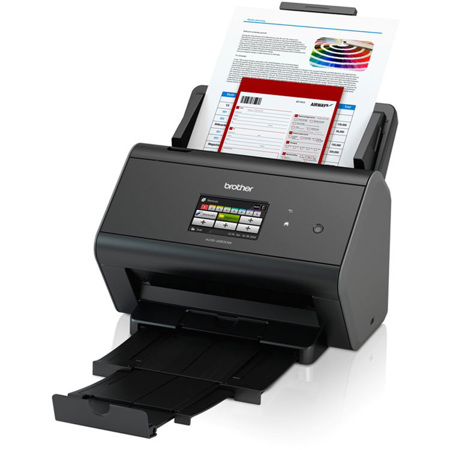
The ImageCenter ADS-2800W Desktop Scanner with Wired and Wireless Networking offers powerful features for mid- to large size workgroups that help simplify the way documents are captured, managed, processed and delivered. Using the 50-page capacity auto document feeder, it captures single and double-sided documents in a single pass at speeds of up to 30ppm, making it perfect for scanning multi-page, two-sided business documents, as well as single-page documents up to 196" long, receipts, business and plastic cards.
With Wireless and Gigabit Ethernet networking plus Web Connect, the ImageCenter ADS-2800W offers simple PC-free scanning to a wide variety of destinations, including cloud applications such as GOOGLE DRIVE, EVERNOTE / EVERNOTE for Business, DROPBOX, BOX / BOX for Business, Microsoft OneNote and OneDrive / OneDrive for Business, as well as mobile devices using the free Brother iPrint&Scan app, directly from the easy-to-use 3.7" swipe color Touchscreen display.
The ImageCenter ADS-2800W includes a robust suite of scanning software, including OCR, PDF editing and desktop document management programs. It is also compatible with Kofax VRS, an industry leader in image processing software that dynamically evaluates each scanned page and automatically applies the correct image quality settings for maximum output enhancement. Plus, integration with Brother Solutions Interface (BSI), which allows developers to access Brother's internal web services to create custom solutions and enhance business workflows, makes the ADS-2800W the complete scanning package for your business.
Fast Scan Speeds
Scans single and double-sided materials in a single pass, in both color and black/white, at up to 30ppm.
Multi-Page Scanning
From the 50-sheet capacity auto document feeder (ADF).
Wireless & Wired Gigabit Ethernet Networking with Web Connect
Enables direct scanning to a variety of cloud applications including GOOGLE DRIVE, EVERNOTE / EVERNOTE for Business, DROPBOX, BOX / BOX for Business, Microsoft OneNote and OneDrive / OneDrive for Business.
3.7" Swipe Color Touchscreen Display
With 48 programmable shortcuts for one-touch scanning to common destinations.
Advanced Security Features
Provides a wide-range of security features including: Secure Function Lock, SSL/TLS, Enterprise Security (802.1x), network user authentication and corporate email address lookup via Active Directory (including LDAP).
High-Precision Scanning
Up to 600 x 600 dpi optical resolution, 1200 x 1200 dpi interpolated.
Integrated Image Optimization Features
Including hole punch removal, background removal, blank page removal, deskew support and more.
Advanced Scanning Features
Such as 2-in-1 Mode for capturing 11" x 17" documents and Continuous Scan Mode for scanning unlimited pages into a single file.
Flexible Media Handling
Easily scans documents, photos, receipts, business and embossed plastic cards and more - from business card size up to 8.5"(W) x 196"(L).
Bundled with a Valuable Software Suite
Including PDF editing, OCR and desktop document management programs.
Kofax VRS Compatible
An industry leader in image processing software that automatically examines scanned materials and applies the appropriate image correction settings for optimal scan results.
Compatible
Windows, Mac and Linux.
Brother Solutions Interface (BSI) Integration
Allows developers to access Brother's internal web services to create custom solutions and enhance business workflows.
Outstanding Support
Includes a one-year limited warranty plus free phone support for the life of the product.
Fast, Secure Wireless Desktop Document Scanner Ready to Help Enhance Your Workflow
The Brother ImageCenter ADS-2800W Desktop Scanner is a robust and reliable addition to your mid- to large-size workgroup which will help simplify the way documents are captured, managed, processed and delivered. Ideally suited for most office environments, the ADS-2800W offers both wireless 802.11 b/g/n and wired Gigabit Ethernet network connectivity standard, plus Wi-Fi Direct and Hi-Speed USB 2.0 for local connections.
Use the 3.7-inch Touchscreen display to help streamline workflows with Web Connect feature, which enables scanning to a variety of destinations, including popular crowd applications. With color scan speeds of up to 30ppm, single-pass duplex (two-sided) scanning, a 50-sheet capacity automatic document feeder and daily duty cycle of up to 2,500 pages, the ADS-2800W is designed to efficiently tackle demanding document capture requirements.
Advanced Document Capture Solutions Designed for Businesses
With flexible media handling capabilities, the ADS-2800W can digitize materials ranging from embossed plastic cards to documents up to 196 inches long at resolutions of up to 1200x1200 dpi (interpolated) and 600x600 (optical). It also includes a variety of integrated image optimization features to help maximize output quality, including hole punch removal, edge cleanup, despeckle, background removal and more. Advanced scanning features further enhance capture versatility, including 2-in-1 Mode for capturing 11" x 17" documents and Continuous Scan Mode for scanning unlimited pages into a single file.
Aiding businesses to manage their document-driven processes more efficiently and productively, the ADS-2800W comes bundled with a robust suite of scanning software. This includes ABBYY FineReader, which provides unmatched text recognition accuracy and document conversion capabilities and ABBYY PDF Transformer(Windows only), enabling users to create, convert, edit and protect PDF documents with ease.
The ADS-2800W is also compatible with Kofax Express and Kofax VRS Elite software. Kofax's patented image enhancement and optimization software helps reduce the time involved in manual document preparation and automatically enhances the quality of scanned images, dramatically improving both manual scanning productivity and the efficiency of document capture processes.
Workflow Versatility With Touchscreen Simplicity
The ADS-2800W gives you the option to scan to a number of different destinations to help you manage your documents and workflows. You can scan documents to cloud applications such as Microsoft OneNote and OneDrive/OneDrive for Business, GOOGLE DRIVE/GOOGLE DRIVE for Work, EVERNOTE/EVERNOTE Business, BOX/BOX for Business, DROPBOX and more, directly from the easy-to-use 3.7" color Touchscreen display. Users can also scan directly to a USB flash drive, shared folder, email server and FTP/SFTP to quickly save, distribute and share information. The ADS-2800W even supports scanning to compatible mobile devices using the free Brother iPrint&Scan app.
Secure Scanning Solutions Adaptable to the Way You Do Business
The Advanced Security Features loaded into the ADS-2800W provides a wide-range of security features including Secure Function Lock, SSL, Enterprise Security (802.1x), network user authentication and corporate email address lookup via Active Directory (using LDAP). And should your document capture and workflow needs require customization, the Brother Solutions Interface (BSI) is an open interface framework supported by the ADS-2800W.
It provides a flexible means for VARs, System Integrators and clients with in-house development capability to customize the scanner for unique applications. Application developers can use BSI to seamlessly integrate internal Brother functions and user interface features into existing commercial or privately developed document management and imaging workflows.
Brother is at Your Side with Outstanding Customer Support
Brother offer a one-year limited warranty on the ADS-2800W and stand behind your purchase with FREE phone support for the life of your product.






