
more
See Options
Need help? Ask our experts.
Review Summary
2024-10-28T20:00:00
This thing is a pain to use. if you put more than one sheet in at a time it feeds two or more at the same time and errors out. So I have to take the paper and lay it out a piece at a time fanned out so it won't grab more than one sheet, but then half the time it tells me there's no paper in the feeder. If I let go of the fanned papers to let them fall into the feeder properly it starts grabbing more than one sheet. I got this to be a time saver, but it takes an eternity to get my scanning done because of all the errors. I absolutely recommend you find something else.
AITA

2023-08-26T20:00:00
This product is so difficult to set up. I have spent nearly 8 hrs trying to connect my google drive to it. With the Epson Receipt Scanners I was set up in a few minutes. I haven't been this frustrated with a product in my life.
James

2023-07-30T20:00:00
I didn't like it. It chewed and skewed by papers. Sent it back and bought refurbished ADS-2800W
Dartmouth

2023-05-03T20:00:00
Overall, it's pretty good. In feed oftentimes folds corners of smaller items, like receipts; should have better infeed paper guides. When turned on, it takes some time to sync up with the network. Software a little cumbersome. Too many utilities to tweak settings. All in all, after making time investment to wade through all the software settings, pretty good so far. Ask me again in five years.
TedG

2023-04-23T20:00:00
I purchased this to bring with me to signing jobs (I'm a mobile notary), as some contractors require scanning signed documents and uploading them to platforms before leaving the signing table. Saves lots of time and effort if they can be reviewed before shipping the hard copies. Works great.
Lisa

2023-01-14T19:00:00
Fast scans but MANY problems with ADF. Very good quality scans but document feeder very problematic with more than one page, even as few as 3 or 4 pages frequently "jam" causing frustration.
BAGAYG

2022-06-06T20:00:00
This is a really great scanner. Definitely a business style scanner. Scans at 40ppm, so scans really fast. The screen is large enough to not have a hard time navigating the menus. Set up is really easy and comes with a lot of drivers support. Would definitely recommend for any business that needs to save documents digitally to not take up space.
gambit202

2022-05-31T20:00:00
So this is easy to setup and use. I've had no issues with the image quality or file types. I've been able to condense down my tax paperwork easily. My parents have even been able to use this to scan their documents.
Scanner s.

2022-05-29T20:00:00
Very much like this scanner. It has helped me get rid of a lot of the clutter. I have boxes of historical papers from my parents and grandparents- didn't want to throw them out, but took up a lot of space. Enter this scanner - it handles lots of papers well, and I really appreciate the wifi connectivity. I can work the scanner with my phone, and have saved to the cloud with ease. For regular documents, I found it better to save them at a low resolution so they won't take up as much space. This thing is on the side desk now, and whenever we get papers in the mail I think I may want to keep, I scan and then shred. Less clutter, and I know where the papers are!
elGuapo77

2022-05-26T20:00:00
The Brother ADS-4700W was very easy to put together and plug into the computer, but setup was challenging. I prefer a direct connection (wired, not wifi, but kept getting the error message stating that there was no software available for Mac 12/Monterey. It took an hour and a half on tech support to discover that the software was already in use for my Brother printer and was not seeing the scanner. Hookup was then easily achieved. The ADS-4700W is very easy to use and alarmingly fast. Despite the initial setup I am thrilled I chose it as I am transferring most of my files to images and hoped not to take a lot of time. Very easy to get the very fine quality images to my computer or wherever else I want them to go. The device is also smaller than expected, which is a big plus. 4 stars because of the setup time and because when inputting passwords into the setup screen the LCD is annoyingly slow to respond. I'm sure Brother is advanced enough to have a better responding touch screen. Overall a very good product.
kristineh

2022-05-24T20:00:00
I am so happy with this scanner. Set up was super easy and was able to start scanning within 30minutes of opening the package. I am very excited to check out all of the features. I noticed an option to scan and send to an email address and will likely try that out next. I also find that it scans both back and front so time-saving. I also appreciate that it can feed through multiple pages without my having to put each page in. I am so happy with this product, it is a true time-saver!
MaraAnn

2022-05-21T20:00:00
Most printer/copier/scanner products have an awful time scanning documents. Most end up with black lines and muddled bits along with having to scan many times to get it to show. This desktop scanner is perfect for scanning in any kind of document. It takes a little bit of setup and my husband helped me figure out how to get it to send as a pdf to my email, but once we got that down it was easy. The copy was incredibly clean and clear without any weird lines or flash. This helps with sending documents off to school for my kids, transferring old documents onto the computer and even works for my artwork so I can use it in digital work. The scanner does both sides and it only takes a few seconds. It can even do different sizes of paper up to standard copy paper. I ran through a lined small notebook piece and it did just fine even with rough edges. The copy is totally clean and uploads easily. I really like that I can send it straight to where it is needed or save it.
Kbug

2022-05-18T20:00:00
Brother Professional Desktop Scanner ADS-4700W is a perfect one for business groups providing a fast and efficient scanning solution. It offers two side scanning at 40ppm in color or black/white. It also has easy menu navigation and the ability to create up to 56 customizable shortcuts for one-touch scanning. It also offers the scan to be saved at cloud locations like google drive and supports a wide range of file formats.
pandit1977

2022-05-15T20:00:00
I work from home and this has helped go paperless. It has a 80 page feeder. I have alot of paperwork and receipts. And this has been quick and easy to use to scan everything. I like that you can connect either via wired internet or wifi. The touchscreen is simple to use and guide thru.
bgleockler

2022-05-15T20:00:00
I absolutely love the speed of this! We scan a lot of documents for business and personal reasons. This makes both extremely easy and quick. The scan is very clear. This was a great investment for all aspects of our busy life.
DevonB

2022-05-15T20:00:00
I work in a healthcare field where there are a ton of documents to scan from doctors visits and notes from therapists. You can put a good 80 pages together for a scan or fax - and you can set up shortcuts with the screen on the front. I heard "document scanner" and didn't think that it would be this advanced and helpful for my job!
JAVA510

2022-05-13T20:00:00
High quality professional desktop scanner. It is a very fast scanner with a very high quality build. It expedites the processes of my business. I will recommend to any business owner looking for a expeditious and high quality scanning quality device.
Dj S.

2022-05-11T20:00:00
I just love Brother brand, they make the best printers and scanners. My work uses all Brother printers. This scanner is just magnificent, super easy to set up, took me less than 2 minutes to do. I connected mine to wifi and was able to print it without any issues, prints comes out in high quality and straight, settings are easy to navigate thanks to touchscreen and it has all of the options you need. Scan to server, scan to SMP, scan to email, and etc., You can control the settings through the scanner itself, through app or a brother software utility on your PC. It does come with all the cables that you need to get it to work without wifi but my suggestion would be if you buying this, use the wifi, you can scan it anywhere. Set up a printer, download the brother full package software, install it and bam you have a wonderful scanner. Highly recommend it for businesses and even just for everyday home use. Definitely worth a price
Bobby P.

2022-05-09T20:00:00
This scanner is wonderful, it was super easy to set up to my computer and it works flawlessly. I haven't had any issues with papers getting stuck and the scanned document shows up very clear on my computer. I would highly recommend.
Koda

2022-05-08T20:00:00
It's very compact, so it doesn't take up a lot of room. It is really sleek looking. I love the capacity of it. It seems very efficient. The look is very modern. Overall I really think this is a very nice scanner.
Chasy

2022-05-07T20:00:00
While this scanner is compact in size, it is big on capability. For it to work its best, the software needed to use it is definitely recommended (at least from what we observed, although not necessarily required. We did so because we do use it with the computer, of which software is required. The scanner setup was a bit more complicated than anticipated, as the only information that came with it is the basic setup for the device itself. (You have to go online to find the user manual, but once we did, the rest of the setup wasn't too bad, even for someone who isn't an expert on technology.) It comes in handy when scanning items to email to clients for contracts on jobs and to the supply company where materials are ordered. Additionally, It's nice that you can scan multiple pages at a time instead of feeding them into the scanner one at time. Also, it comes with the USB cord so it can be attached to your computer, but it also runs off Wi-Fi, which is useful when using another device, such as a cell phone, which we can use later to scan items into folders in the business files on the computer. Because we don't need it for scanning high quality photos, the quality of the scan was pretty much in line with what we needed to send to a PDF format, and the majority of the file go directly to email or the computer itself, which works out great for us. There is an adjustable feeder tray so multiple sized documents can be scanned in and did so surprisingly fast. It also has a tab that extends up to catch the scanned items, so they don't go everywhere once they come through the feeder. This is a great product for business use and works great for our small business needs.
NolaF

Scan to Mobile, Scan to Searchable PDF, Scan To PowerPoint, Scan To Excel, Scan to Word, Easy Scan to E-mail
eduphoria!, Cerner Certified
Yes (Compatibility)
AirPrint, Brother Mobile Connect, Wi-Fi Direct
Wi-Fi Protected Setup
Compatible with Windows, Mac and Linux. Visit support.brother.com for the latest OS compatibility and to download your machine's drivers and software
Wireless 802.11 b/g/n, Ethernet, SuperSpeed USB 3.0 (USB 2.0 compatible)
Scan to E-mail Server (download), Scanning, Corporate Address Book, Secure Function Lock
APIPA (Auto IP), DHCP, DNS Resolver, HTTP/HTTPS Server, ICMP, LDAP, LLMNR Responder, mDNS, SNMPv1/v2c/v3, SNTP Client, WINS/NetBIOS Name Resolution, Web Services (Scan)
RA, DNS Resolver, mDNS, LLMNR Responder, HTTP/HTTPS Server, ICMPv6, SNTP Client, Web Services (Scan)
Back: Scan to USB memory stick; External card reader
Yes
80 (max. pages)
6,000 (max. pages)
Plain, Receipts, Photos (carrier sheet required), Business Cards, Plastic/Laminated Cards (including embossed), Index Card
11 - 53 lbs.
2.0 - 2.0"
8.5 - 197"
2.13 x 3.37"
Embossed: Up to 1.32mm (0.05") Without Embossing: Up to 1.10mm (0.04")
4.3" Color Touchscreen
56
Yes
Silver
20% / 80%
41-95 Degree F (5-35 Degree C)
0.1W / 8.6W / 26W / 1.7W (Power Off/Ready/Scanning/Sleep)
AC Adapter
Continuous Scan, Barcode Metadata, Index, Multi-page Feed Sensor, 1 to 2 Scan, 2 to 1 Scan, Auto Start Scan, Color Drop Out, Hole Punch Removal, Background Color Removal, Auto Image Rotation, Auto Scan Size, Bleed-through Removal, Scan Preview, Document Separation, ADF Auto Deskew, Blank Page Skip
80 (max. pages)
UPC-A, UPC-E, JAN8, JAN13, Code39, Code93, ITF, Code128, Codabar, GS1_128, PDF417, QR Code, Data Matrix
GOOGLE DRIVE/GOOGLE DRIVE for Business, ONENOTE, BOX/BOX for Business, SharePoint Online, Expensify, EVERNOTE/EVERNOTE Business, ONEDRIVE/ONEDRIVE for Business, DROPBOX/DROPBOX for Business
Yes
80 (black & color) (max ipm)
Dual CIS
Kofax Paper PDF for Windows, Brother iPrint&Scan (desktop) for Windows and Mac, Brother Scan Essentials for Windows, Brother Mobile Connect for iOS and Android, Kofax PaperPort SE with OCR for Windows
Up to 1200 x 1200 dpi
600 x 600 dpi
Yes
Windows, Mac OS, Linux
TWAIN, WIA, ISIS, SANE
PDF Single page/Multi-page (Secure PDF, Searchable PDF, Signed PDF, PDF/A, High Compression PDF), Microsoft Office Excel (XLSX), Windows Bitmap (BMP), Microsoft Office Word (DOCX), JPEG (JPG), PDF Single-page/Multi-page (PDF/A, High Compression PDF, Microsoft Office PowerPoint (PPTX), TIFF Single-page/Multi-page (TIF), Text (TXT)
Easy Scan to Email, Mobile Devices, Workflow (Brother iPrint&Scan), Cloud Services (Brother iPrint&Scan), E-mail Server (download), PC (File, Email, Image, OCR), FTP, USB Memory Stick, Network Folder (CIFS - Windows only), E-mail Server, SharePoint, SSH Server (SFTP), Cloud Services (Web Connect)
Sheetfed
Black and White, Color
24-Bit Color, 8-Bit Gray Scale, 1-Bit Monochrome
40 (black & color) (max ppm)
LDAP, IP Filter, Setting Lock, TLS/SSL, Enterprise Security (802.1x), Active Directory, Secure Function Lock
SMTP-AUTH, SNMP v3, SSL/TLS (IPPS, HTTPS, SMTP), 802.1x (EAP-MD5, EAP-FAST, PEAP, EAP-TLS, EAP-TTLS)
SSL/TLS (IPPS, HTTPS, SMTP)
WEP 64/128 bit, WPA/PSK (TKIP/AES), WPA2-PSK (AES)
11.7 x 7.5 x 8.5" (29.7 x 19.1 x 21.6cm)
6.4 lbs (2.9kg)
12502666356
Perfect portable scanner for letter/legal size doc
By Lisa
I purchased this to bring with me to signing jobs (I'm a mobile notary), as some contractors require scanning signed documents and uploading them to platforms before leaving the signing table. Saves lots of time and effort if they can be reviewed before shipping the hard copies. Works great.
Great for business
By gambit202
This is a really great scanner. Definitely a business style scanner. Scans at 40ppm, so scans really fast. The screen is large enough to not have a hard time navigating the menus. Set up is really easy and comes with a lot of drivers support. Would definitely recommend for any business that needs to save documents digitally to not take up space.
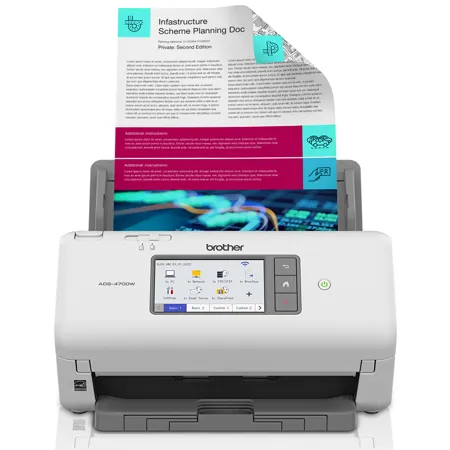
The Brother ADS-4700W Professional Desktop Scanner is designed for the way work now works - providing easy integration with existing workflows, versatile scan-to destinations, and improved productivity. Equipped with fast, two-sided scanning up to 40ppm to help maximize workgroup productivity. Quickly scan via the 80-page capacity auto document feeder. The 4.3" color touchscreen display offers easy menu navigation and the ability to create up to 56 customizable shortcuts for one-touch scanning. Offers Triple Layer Security features to help limit document and device access and protect against network intrusions. Provides wide driver support for compatibility with existing software applications and document management systems. Enables scanning to a variety of cloud applications and is equipped with a powerful bundled software suite to create, edit, and convert scanned documents into a wide variety of file formats. Features built-in wireless and Ethernet network interfaces to easily set up and share on your wired or wireless network or scan to your mobile device . Includes a three-year standard limited warranty for peace of mind.
Fast scan speeds:
Scans single and double-sided materials in a single pass, in both color and black / white, at up to 40ppm.
Multi-page scanning:
Quickly scan a variety of document sizes and types via the large, 80-page capacity auto document feeder to help optimize efficiency. Add additional sheets with continuous scanning mode for even greater productivity.
Flexible connectivity options:
Easy to set up on your wireless or wired network with built-in wireless or Ethernet network interfaces. Equipped with a USB 3.0 interface for local connectivity. Scan-to your mobile device with AirPrint and Brother Mobile Connect.
4.3" color touchscreen display:
Offers easy menu navigation and creation of up to 56 customizable shortcuts for one-touch scanning to common destinations and scan job preview.
Easily adapts to your existing workflows:
Provides wide driver support (TWAIN, WIA, ISIS, and SANE) for easy integration, as well as a number of scan-to destinations including email, cloud services, SharePoint, SSH Server (SFTP), USB memory stick, and more.
Triple Layer Security:
Advanced security helps to safeguard sensitive documents and securely connect to the device and network.
Powerful bundled software suite included:
Offers document management tools to create, edit, and convert scanned documents into a wide variety of file formats including Searchable PDFs, Secure PDFs, Word, Excel, and PowerPoint. Also helps facilitate post scanning processes such as document indexing, merging, separation, and inserting / deleting scanned pages.
Advanced image optimization:
Maximize output quality with integrated image optimization features, such as Auto Deskew, Auto Image Rotation, and Bleed-through Removal, as well as Kofax VRS Elite / Kofax Express compatibility for optimal scan results.
Device management solutions:
Equipped with device management solutions to enable mass distribution of device configurations, security settings, firmware updates, and task automation.
Energy-efficient:
ENERGY STAR compliant and EPEAT Silver rated.
Boost Your Productivity
Busy offices and workgroups can take advantage of double-sided scanning up to 40 pages per minute. The 80-page capacity auto document feeder allows you to maximize productivity. This scanner supports a variety of document sizes and types including letter, legal, business cards, plastic ID cards, receipts, and photos.
Powerful Software Suite Bundle
Comes with document management tools so you can create, edit, and convert scanned documents into an assortment of formats, including searchable PDFs as well as Word, Excel, and PowerPoint files.
At Your Side Support
Brother stands behind its products with at your side support, including a three-year standard limited warranty for peace of mind, plus free online, live chat, or phone technical assistance for the life of your product.
Seamlessly Integrate with Existing Workflows
Adapts easily into different workflows with TWAIN, WIA, ISIS, and SANE driver support and a wide range of scan-to destinations including email, SharePoint, SSH Server (SFTP), USB memory stick, cloud services and more.
4.3-Inch Color Touchscreen Display
Create up to 56 unique custom shortcuts for single-touch scanning to frequently-used destinations. Allows for direct scanning to multiple cloud services including Google Drive, Evernote, Dropbox, and more.
Key Benefits Includes
Easy to Deploy and Manage
Device management solutions allow for mass distribution of device configurations, firmware updates, security settings, and task automation.
Versatile Connectivity
With built-in wireless and Ethernet interfaces, it's easy to set up and share on your network or connect to a single computer via USB 3.0. Mobile device scanning using AirPrint and Brother Mobile Connect.
Professional Quality Image Optimization
Compatible with Kofax VRS Elite/Kofax Express image processing software that can automatically analyze scanned materials and apply appropriate image correction settings for optimal results.
Triple Layer Security Features
With advanced security features, you can restrict document and device access, and protect against network intrusions. Also, the scanner offers support for integrating with critical network security protocols.
Eco-Conscious Features
ENERGY STAR compliant and EPEAT Silver rated.
Advanced Image Capture Features
Help save time by automating setting adjustments with Background Color Removal, Blank Page Skip, Auto Deskew, Auto Image Rotation, Bleed-Through Removal, and more.