Overview
Compare
Specs
Protection

Reviews about this item

Review Summary

2026-04-15T20:00:00

Rated 2 out of 5

Poor set up instructions; absolute hastle!

I had top spend two days trying to get this printer set up as the instructions were not thorough. I pay 17 dollars a month with HP Smart Help; after 4 people, someone finally was able to help to get the printer connected to my desk top computer. Terrible time and much wasted time on my part. Will not continue with HP after this and we have purchased many items this year from you. Bought lst one on line which I had to send back because of connection issues along with ink issue after several attempts. Ended up buying same series from Sam's Club.

Ann S.

2026-04-12T20:00:00

Rated 3 out of 5

Slow joe

Nice looking, compact printer. HP salesperson said it was comparable to my old, reliable 8620 that I have used for used for years. Only wanted a new printer because scans from 8620 scan feeder have a line down pages. 8125e is slow and noisy. Cartridges are bear to load. Cartridges seem small and suspect to often (expensive) replace. Only good thing about 8125e is was cheap (on sale).

Harry C.

2026-03-31T20:00:00

Rated 1 out of 5

COULD BE MORE EADY TO OPERATE

NOT AN EASY PRINTER TO GET USED TO

BILL S.

2026-03-06T19:00:00

Rated 1 out of 5

Trouble with this product

I have had a lot of trouble with this product. I have had trouble setting it up and sometimes it just shuts down as if it has no electrical power. I would call HP Support but can't find a phone number to use.

Insurance a.

2026-02-21T19:00:00

Rated 3 out of 5

Inadequate setup instructions and no scanning for Linux.

The printing software from HP did not have scanning for Linux whereas for the Windows and Apple operating system scanning was part of the package. The instructions did not explain how to connect the printer to WiFi when the password is not known. In contrast, a Canon printer explained the procedure. I tried the WPS button on the HP printer and that worked. It was a shot in the dark. WPS was not explained in the instructions.

Alano

2026-02-18T19:00:00

Rated 5 out of 5

8125e

First printer I've ever bought and I love it. Pretty easy to set up for an old man. I enjoy being able to print or copy anything I want from my easy chair. It is my latest toy!!

Greg H.

2026-02-08T19:00:00

Rated 4 out of 5

Driver needed!

The purchasing was easy, shipping was timely, the set up was dicey. Immediately after setup the printer had printing issues. Turns out the wrong type of driver was installed. Called back a third time because I was getting an error-type message along the lines of ScanToPCApplication that kept popping up then disappearing on the screen. The rep tried a few things then gave up and said it wouldn't cause operational problems. I looked it up online and fixed it myself.

Faircatch C.

2026-01-29T19:00:00

Rated 3 out of 5

Easy to set up and easy to use

I like this printer as it is easy to find any jam and remove such. What I don't like is the very low capacity for paper, half of what I had in my former printer. Also the tray that houses the paper feels very flimsey, and is very touchey. I have to pull put the stack of paper and re-arrange it many times after printing. As much as I like this printer I just don't think the quality is there. It is a much cheaper machine, and I am afraid it won't hold up like my prior printer. It is also slower than my prior printer.

Mary-Lynne

2026-01-20T19:00:00

Rated 5 out of 5

Excellent

This is a real nice printer, I really love iy

My p.

2026-01-17T19:00:00

Rated 3 out of 5

HP OfficeJet Pro 8125e Issues

Seems to be a good printer but the set-up is very difficult. My previous HP printers were pretty much plug-and-play but not this one. Also it seems that HP designs a new print cartridge for each new printer, why can't existing cartridges be used?

GeorgeT451

2026-01-13T19:00:00

Rated 5 out of 5

Great printer

I have an 8025e printer and have loved it. My son needed a printer so when I saw this on sale through HP website, I bought this one for him for christmas. He loves his printer and has been putting it to good use.

kswl

2026-01-08T19:00:00

Rated 5 out of 5

Printer

Excellent product

Jaime O.

2026-01-01T19:00:00

Rated 4 out of 5

New 8120e scanner/printer

Fast multi function printer. Print function was easy to set up, scanning less so. I'm using HP Smart to access scanning. Each time I set up direct scanning communication the printer looses it after reboot of computer.

Eric L.

2025-12-28T19:00:00

Rated 3 out of 5

Printer setup is not flawless and printer is very slow compared to previous HP printers

Price was decent and the printer works. Setup was not flawless, it had some hiccups but we got it up and running. We previously were using an HP 8610 and this printer is MUCH slower in printing that the previous HP we had. Not overly happy with our purchase but it'll work for what we need it for.

KHalstead

2025-11-30T19:00:00

Rated 1 out of 5

Endless paper jams

Endless paper jams. My old HP printer worked well. The new product is disappointing.

Louise388

2025-11-14T19:00:00

Rated 4 out of 5

No complaints

I haven't had any major issues with the printer. The only minor issue is that sometimes when I print it will pull two sheets through printing process instead of one.

HP S.

2025-11-13T19:00:00

Rated 5 out of 5

Best ever

Great printer! Best printer of all I've ever owned

Lrobertson

2025-11-10T19:00:00

Rated 4 out of 5

Office Jet

I really like this printer and all that it does. It was very easy to install and setup. Only problem I can't print envelopes yet as it keeps telling me I have the wrong size in the printer, when I do not. I still cannot figure out what the problem is.

nbybev

2025-10-03T20:00:00

Rated 3 out of 5

Not Efficient

Wifi printing does not work. Printing on both sides requires you to re enter paper into printer

F W.

2025-09-20T20:00:00

Rated 3 out of 5

It Works but slowly

This is a slow printer. The duplex scanning is manually done which is aggravating. The auto feed of documents is really picky. Sometimes it works well, sometimes it doesn't.

Wendy S.

2025-09-07T20:00:00

Rated 4 out of 5

Thanks

love the printer

Mike D.

2025-08-29T20:00:00

Rated 5 out of 5

Great printer

Great printer. Easy to setup and operate. Lightweight as well

DoloresS

2025-08-19T20:00:00

Rated 5 out of 5

bad 4 day installation

WHY should i ? Ive sent 2 bad reviews and didnt get any help completing installation or even apology after employees admission that the printers mistake Cost You and me 4 days

dwaine

2025-08-17T20:00:00

Rated 2 out of 5

Like our last HP printer, but worse

This printer still has all the same deficiencies our last HP printer did. This includes sometimes taking 2 minutes to print a single page while the printer makes all kind of noise. The most useful feature is the scan to computer. But something major has changed with that and it is just terrible now. I'll scan a single page and it will take 2-3 minutes for the save dialog to show on the computer. I don't even want the save dialog ... I just want it to save like it used to. It's just frustrating to use now. So this is definitely a regression from the last printer we had.

Derrick C.

2025-08-13T20:00:00

Rated 5 out of 5

Perfect for home printing

We are really liking our new printer. It was easy to set up and is easy to use.

Deb5

2025-08-11T20:00:00

Rated 3 out of 5

Good printer

Nice compact printer seems to work well have only used twice

Cycling

2025-08-10T20:00:00

Rated 5 out of 5

HP 8125e printer

So far this printer is great, but haven't used much. Wish I would stop being harrassed to review since it takes awhile of use to give a good review.

skt5

2025-08-09T20:00:00

Rated 4 out of 5

Slow

Unit seems too slow while trying to make copies of documents

FGMs

2025-07-27T20:00:00

Rated 3 out of 5

Meh

I love having two-sided printing without having to get up and manually flip the pages. But I don't find this printer to be any faster than our old 3180. In fact, it takes more time to gear up for each use, and the wireless connection doesn't work well. We frequently have to restart it in order to print.

Profjsf

2025-07-20T20:00:00

Rated 4 out of 5

Usability

Screen too small

Bradsey

Select a plan in the Add Protection section above and purchase with this product by clicking “Add to Cart”.

image-protection

TRUSTED PROTECTION PLANS, EXCEPTIONAL SERVICE.

Invest In Your Gear and Peace Of Mind!

Accidents happen where life happens. Protect your favorite Adorama products and purchase a protection plan to stay covered from accidental damage, mechanical or electrical failure, and more.

Repair or Replacement

Repair or Replacement

If we can’t fix it, we’ll replace it at no additional cost.

Accidental Damage

Accidental Damage

Protect your product from drops, spills, and more.

Peace of Mind

Peace of Mind

Enjoy your gear without fear. We have you covered!

Malfunction Protection

Malfunction Protection

When regular use of your product over time results in mechanical or electrical failure.

Zero Deductible

Zero Deductible

We will never charge you a deductible after the purchase of a plan.

Customer-Focused Support

Customer-Focused Support

Our claims process is simple & easy and our customer service team is happy to help.

Adorama Protect powered by Extend is available for purchase to customers in the United States. Not available for purchase Internationally or in U.S. Territories.

HP OfficeJet Pro 8125e Specifications

  • Color

    Black/White

  • Functions

    Print, copy, scan

  • Print Speed - Black

    Up to 20 ppm (ISO, laser comparable)

  • Print Speed - Color

    Up to 10 ppm (ISO, laser comparable)

  • Print Speed - Black (draft)

    Up to 29 ppm

  • Print Speed - Color (draft)

    Up to 25 ppm

  • Print Speed - Black (normal)

    Up to 20 ppm

  • Print speed - Color (normal)

    Up to 10 ppm

  • First page out (ready) black

    As fast as 15 sec

  • First page out (ready) color

    As fast as 18 sec

  • Resolution (black)

    1200 x 1200 rendered dpi

  • Resolution (color)

    Up to 4800 x 1200 optimized dpi on HP Advance Photo Paper 1200 x 1200 dpi input

  • Resolution technology

    HP Thermal Inkjet

  • Monthly duty cycle

    Up to 20,000 pages

  • Recommended monthly page volume

    Up to 800 pages

  • Print Technology

    HP Thermal Inkjet

  • Display

    2.7" (6.86cm) Capacitive Touchscreen CGD

  • Processor speed

    1.2GHz

  • Number of print cartridges

    4x (1 each black, cyan, magenta, yellow)

  • Replacement cartridges

    HP 923 Black Original Ink Cartridge (500 pages) 4K0T3LN
    HP 923 Cyan Original Ink Cartridge (400 pages) 4K0T0LN
    HP 923 Magenta Original Ink Cartridge (400 pages) 4K0T1LN
    HP 923 Yellow Original Ink Cartridge (400 pages) 4K0T2LN
    HP 923e EvoMore Black Original Ink Cartridge (1,000 pages) 4K0T7LN
    HP 923e EvoMore Cyan Original Ink Cartridge (800 pages) 4K0T4LN

  • Replacement cartridges (Contd.)

    HP 923e EvoMore Magenta Original Ink Cartridge (-800 pages) 4K0T5LN
    HP 923e EvoMore Yellow Original Ink Cartridge (-800 pages) 4K0T6LN

  • Compatible Ink types

    Pigment-based (black and color)

  • Print languages

    HP PCL3 GUI

  • Automatic paper sensor

    No

  • Paper trays, standard

    1

  • Paper trays, maximum

    1

  • Mobile Printing Capability

    Chrome OS; HP app; Apple AirPrint; Wi-Fi Direct Printing; Mopria certified

  • Connectivity, standard

    1x Ethernet
    1x Hi-Speed USB 2.0 (device)
    1x Wi-Fi 802.11 a/b/g/n/ac (dual band)

  • Security management

    SSL/TLS (HTTPS)
    IPP over TLS
    802.1x Authentication for Ethernet (PEAP and EAP-TLS)
    WPA2-Enterprise
    WPA3-Enterprise
    WPA2-Personal
    WPA3-Personal
    Certificates configuration
    Password protect EWS
    Unused protocol and service disablement
    Signed firmware
    Administrator settings

  • Memory, standard

    512MB

  • Minimum system requirements

    Apple macOS v11 Big Sur, macOS v12 Monterey, macOS v13 Ventura; 2 GB HD; Internet required
    Microsoft Windows 11, 10: 32-bit or 64-bit; 2 GB available hard disk space; Internet connection; Microsoft Internet Explorer or Edge

  • Compatible operating systems

    Windows 11
    Windows 10
    macOS 11 Big Sur
    macOS 12 Monterey
    macOS 13 Ventura
    macOS 14 Sonoma
    macOS 15 Sequoia
    Linux
    Chrome OS

  • Supported network protocols

    Supported Network Protocols configurations (IPv4, IPv6); DHCPv4, DHCPv6; DHCP options: 81/RFC4702/RFC4704, 12-Hostname; 44; LLMNR; Bonjour/mDNS; LP/ APIPA (Auto IP); NetBIOS/WINS; Port9100; DNS Resolver; SNMPv1/v2; Web Services Discovery; Web Services Print; SSL/TLS (HTTPS); Password-protected network Embedded Web server; Enable/disable network ports & device features, 802.1x wireless authentication (EAP-TLS, LEAP, and PEAP) & 802.1x Wired

  • Paper handling input, standard

    225-sheet input tray, 35-sheet ADF

  • Paper handling output, standard

    60-sheet output tray

  • Duplex printing

    Automatic (standard)

  • Envelope input capacity

    Up to 10 envelopes

  • Borderless printing

    Yes, on Photo & Brochure only (up to 8.5 x 11 in US Letter, 210x297 mm in A4)

  • Finished output handling

    Sheet feed

  • Media sizes supported

    Letter; Legal; Government Legal; Executive; Statement; 4 x 6" ; 5 x 5"; 5 x 7"; 13 x 18cm; 8 x 10"; 10 x 15cm; L; Photo 2L; Envelope( #10, Monarch, 5.5 bar); Card (4 x 6", 5 x 8")

  • Media sizes, custom

    Tray 1: 3 x 5" to 8.5 x 14" (7.62 x 12.7cm to 21.59 x 35.56cm)

  • Media types

    Plain Paper, HP Photo Papers, HP Matte Brochure or Professional Paper, HP Matte Presentation Paper, HP Glossy Brochure or Professional Paper, Other Photo Inkjet Papers, Other Matte Inkjet Papers, Other Glossy Inkjet Papers, Thick Plain Paper, Light/Recycled Plain Paper, HP Tri-fold Brochure Paper, Glossy

  • Recommended media weight

    16 to 28 lbs (7.26 to 12.70kg) (plain paper)
    60 to 75 lbs (27.22 to 34.02kg) (photo)
    20 to 24 lbs (9.07 to 10.89kg) (envelope)
    90 to 110 lbs (40.82 to 49.90kg) (card)

  • Supported media weight

    16 to 28 lbs (7.26 to 12.70kg) (plain paper)
    60 to 75 lbs (27.22 to 34.02kg) (photo)
    20 to 24 lbs (9.07 to 10.89kg) (envelope)
    90 to 110 lbs (40.82 to 49.90kg) (card)

  • Scanner type

    Flatbed, 1-sided ADF

  • Scan file format

    JPG, BMP, TIFF, PDF, PNG

  • Scan resolution, hardware

    Up to 1200 x 1200 dpi

  • Scan resolution, optical

    Up to 1200 dpi

  • Scan size (flatbed), maximum

    8.5 x 11.7" (21.59 x 29.72cm)

  • Scan size (ADF), maximum

    8.5 x 14" (21.59 x 35.56cm)

  • ADF Capacity

    Standard, 35 sheets

  • Digital sending features

    Scan to Email
    Scan to Computer

  • Digital send file Formats

    PDF
    TIFF
    JPEG

  • Copy resolution (black text)

    Up to 600 dpi

  • Copy resolution

    Up to 600 dpi (color text and graphics)

  • Copy reduce / enlarge settings

    25 to 400%

  • Copies, maximum

    Up to 99 copies

  • Power

    Input voltage: 100 to 240 VAC (+/-10%), 50/60Hz

  • Power consumption

    4.07 watts (ready)
    1.02 watts (sleep)
    0.11 watts (manual-off)

  • Energy efficiency

    EPEAT Gold registered

  • Operating temperature range

    41 Degree F to 104 Degree F (5 Degree C to 40 Degree C)

  • Recommended operating temperature

    59 Degree F to 90 Degree F (15 Degree C to 32 Degree C)

  • Software included

    HP Printer Software

  • Sustainability Impact

    Forest First product with HP+
    FSC Certified Packaging
    Contains ocean-bound recycled plastic
    45% post-consumer recycled plastic
    Recyclable through HP Planet Partners
    ENERGY STAR certified
    EPEAT registered

  • Dynamic security

    Dynamic security enabled printer

  • Dimensions (W x D x H)

    18.11 x 13.29 x 9.17" (45.99 x 33.75 x 23.29cm)
    Maximum: 18.11 x 20.28 x 9.17" (45.99 x 51.51 x 23.29cm)

  • Weight

    17.6 Ibs (7.98kg)

About HP OfficeJet Pro 8125e

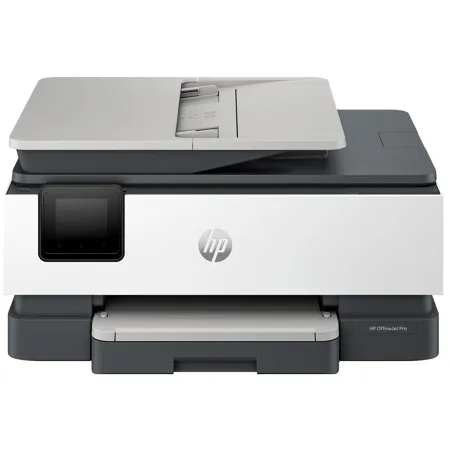
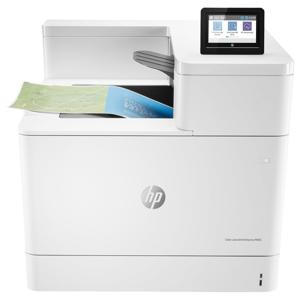
Say hello to the professional color inkjet printer for your home office from America's most trusted printer brand; paired with the easiest-to-use print app. From notes to presentations, enjoy easy printing designed to make you succeed at work. For professionals who work from home and want a professional color inkjet printer that enhances their productivity, just like in the office.

This printer is intended to work only with cartridges that have a new or reused HP chip, and it uses dynamic security measures to block cartridges using a non-HP chip. Periodic firmware updates will maintain the effectiveness of these measures and block cartridges that previously worked. A reused HP chip enables the use of reused, remanufactured, and refilled cartridges.

This is an HP+ enabled printer. Choose HP+ at product setup to activate benefits. HP+ requires an HP account, ongoing connection to the internet, and exclusive use of Original HP Ink cartridges for the life of the printer.

Reliable technology uniquely built to work at home
Say goodbye to noisy printing and stay focused on your work with quiet mode. Stay connected with our most reliable Wi-Fi - dual-band, self-healing - that automatically reconnects. Print confidently and securely over VPN with work-from-home technology from the Most Reliable A4 Brand. Help keep your home office protected from cyberthreats with HP Wolf Essential Security.

Print from your couch with the best print app
Print, scan, copy, or fax right from your smartphone with the best and easiest-to-use print app. Compatible with your favorite cloud storages like Google Drive, OneDrive, Dropbox, and more. Scan multiple documents at once and edit them from your smartphone.

Always be ready to print. Never run out of ink.
With an Instant Ink subscription, you can get ink delivered directly to your door before you run out. Save up to 50% with Instant Ink.

Driving innovation with 45% recycled plastic
Choose printers made with at least 45% recycled plastic. For every page you print, HP protects, restores and manages forests in equal measure. Recycle your Original HP ink cartridges after use for free with the HP Planet Partners program.

• Perfect for home office
• Office-level performance and pro-quality printing at home
• Business documents, reports, presentations, flyers
• Print, scan, copy, or fax right from your smartphone
• Made with more than 45% recycled plastic
• 2.7" color touchscreen
• Connect with Wi-Fi, =USB, Ethernet, VPN
• 35-sheet automatic document feeder
• 225-sheet input tray
• Easy-to-use HP Smart App
• Up to 20/10 ppm (black/color)

Perfectly formatted prints with HP AI
HP AI easily removes unwanted clutter from web pages like ads, logos so you get perfectly formatted prints, every time.

Note: Requires Windows 11

Remove unwanted content
Instead of printing ink-wasting ads or odd layouts, you get just clean, perfectly formatted prints.

Reduce wasted pages
Cut 10 pages down to 2. HP AI formats web content to print only what you need and save paper.

Minimize ink usage
Print only what you need and save ink (or toner) for what matters next.

HP OfficeJet Pro 8125e Features

  • Fast color print, copy, scan, 35-sheet ADF, 2-sided printing, mobile/wireless printing
  • Print, scan, copy, or fax right from your smartphone with the best and easiest-to-use print app
  • Get perfectly formatted prints with HP AI
  • Driving innovation with 45% recycled plastic
  • Dynamic security enabled printer
  • Print up to 20 pages per minute black, 10 pages per minute color
  • Self-healing Wi-Fi & wireless printing
  • 225-sheet input tray
  • Auto document feeder
  • Touchscreen display
  • HP Wolf Enterprise Security

Warranty Information

This product has a limited warranty of 12 months.

Key Features

  • Experience vibrant, high-quality printing with exceptional color resolution for all your documents and photos.
  • Enjoy seamless Wireless connectivity, allowing you to print effortlessly from any device, anywhere in your home or office.
  • Boost productivity with fast print speeds and efficient duplex printing, saving you time and resources on every job.
  • Easily manage all your tasks with versatile scan and copy functions, perfect for home offices and small businesses.
  • Optimize your printing costs with smart ink efficiency features, ensuring more pages per cartridge and less waste.
  • Benefit from an intuitive 2.7" touchscreen and user-friendly design, making every print, scan, or copy simple and quick.

What's in the box:

  • HP OfficeJet Pro 8125e Wireless Duplex All-in-One Color Thermal Inkjet Printer
  • 923 Setup Black Ink Cartridge
  • 923 Setup Cyan Ink Cartridge
  • 923 Setup Magenta Ink Cartridge
  • 923 Setup Yellow Ink Cartridge
  • Power Cord
  • Setup Poster
  • User Manual
  • HP 1 Year Limited Warranty