
This item is no longer available.
Review Summary
2015-04-26T20:00:00
Impressed at the speed of printing. Cost of Toner is high but output seems ok. Easy to use.
BreitenmoserFarm

2015-03-27T20:00:00
very unstable programs. 3 calls to customer support and I still had to look on line for the solution
bert28
2015-03-23T20:00:00
For copying purposes, it is adequate. For printing, the machine is good. For envelope printing, the machine is difficult and frustrating. 7 out of 10 attempts to print envelopes result in a front paper jam in the front load making it necessary to open the front door, clear any jam, and re-insert the envelope. Most times this results in another jam. All attempts have been made to adjust for this, using the back tray, but to no avail. Also, the machine makes the operator "fish" for the printed envelope, in that the machine will not present the finished product for retrieval. Anyone with a larger hand will not be able to retrieve the envelope from the printed material opening. For a person who needs to print multiple envelopes this is not the machine I would advise to purchase.
Slats
2015-03-19T20:00:00
It does what it does well and never has a problem.
bkloken
2014-11-04T19:00:00
Small office class printer. Very fast. Good size tray. Can SCAN, PRINT, COPY and FAX either to or from the computer. Ethernet port so network ready. Does not do duplex printing but other than that a great printer.
DaveI
2014-11-03T19:00:00
We had to return our original purchase due to no paper feed, and received a refurbished copier promptly. We have had several issues with the scanner will not scan to email and keeps changing which computer is send the scans to. Had to re-install driver to correct.
Lowry
2014-10-23T20:00:00
For a number of years I had different HP inkjet printers. My last HP Printer dies and so I looked around for a new printer. I have a number of Mac computers one of which was running OS 10.4. HP did not have a printer that was compatible. I came across the Brothers Laser printer and purchased it. Absolutely love it. So much faster and much easier to set up when compared to the HP Printers I had. Terrific company with great support.
JDevi
2014-10-21T20:00:00
We have had the MFC-7360N for several months now. We do all our accounting reports and faxing from this machine, as well as quite a bit of copying. It really is a hardworking little beast. Paper very, very rarely jams. Our previous all-in-one jammed at least once a week. When the time comes, we would definitely by another brother~ assuming everything continues as well as it has.
TCjd
2014-10-07T20:00:00
HI. AND ALOHA FROM KAILUA HAWAII- THE NEW MODEL IS MORE SILENT* AND IS REALLY 5 STAR ITEM...THANKS FOR SUCH A GREAT PRINTER...J&J
KAILUA91
2014-10-06T20:00:00
In my office, this is the only printer we have now. It is constently running out of tonner. Even though it doe save your incoming faxes when you cant get it to work it won't automatically print them when it is up and functioning again. It's constently getting jammed. It has a mind of its own. I hate this stupid thing.
PCOK
2014-09-25T20:00:00
Keypad works well. Copies crisp. Lightweight. No jams. But.......cover too tight. Contrast doesn't adjust light enough.
marty67
2014-08-22T20:00:00
I love this All in One. My friend has one and I tried it out his MFC and it did everything I needed. It was very simple to use. As soon as i used it I had to buy it. The only reason I am giving it 4 stars instead of 5 stars is because it does not come with a USB cable.
rafaelsb
2014-08-19T20:00:00
user friendly, fast printing machine! as long as you aren't looking to print in color, this is what you want. seems as though i was buying ink cartridges constantly, paying way too much for them and not lasting any time at all. my daughter owns a flower shop, and she does a great deal of printing checks and invoices, the toner cartridge lasted way beyond a year, and costs less than replacing 3-4 ink cartridges!
harvrod
2014-08-05T20:00:00
Our company personnel likes it so far, except it does not do duplex (both side printing. As far as a B&W printer it is good.
M87inc
2014-08-04T20:00:00
I had a Brother MFCU color deskjet printer. But I love this one more than any printer I have previously owned. This is also a MFCU but it is a Laser printer and only prints in Black. All four features work great, especially the printing. It can print, fax, scan, and copy. Never misses a beat and very user-friendly. Great for this old man. GRNPAW.
Grnpaw
2014-08-01T20:00:00
As the brand name indicates Brother Corporation is one of the genuine companies who make fine electronics products at affordable prices and provide good technical services during the life time of the product. I bought this multipurpose (FAX SCAN COPY PRINT) laser printer machine (MFC7360N) on 12-23-12. It still works well. It only prints in black and white. Its toner cartridge TN-420 last long time and prints approximately 1200 pages. This machine works well with HP Pavilion G7 lap top and Asus Transformer T 100 tablet PC. Both are using Windows 8 operating system. This machine is adaptable to evolving technologies. The company provided fully functional driver software for WINDOWS 8 operating system. It is able to connect to a network router and functions by WIFY connection and with USB connection. The most important feature is the becoming obsolete FAX function. In the time of ONLINE privacy violations and EMAIL’s having zero privacy, it is good rely on the Fax feature to send confidential documents to associates. Its scanning feature is convenient with automatic feeder. It scans in color and black and white with high precision of colors. Likewise It can copy multiple sheets through automatic feeder. The machine is certified as ENERGY STAR – it is very conservative in using electricity and keeps the electric bill low. Last but not least, the customer service we receive when call for service from trained professional technicians based in the Philippines is exceptional. Without their dedicated service we will not able to adapt the machine to evolving computer system technologies. The machine is an electronic “brother at your side” as the corporations logo says!
Reviewer100
2014-07-25T20:00:00
I got tired of constantly having to buy ink, and resetting my printer to make it work, so I bought two printers from Brother,. I have to say, it was easy to set up and it worked like a champ, and the toner model will help me save on money. I highly reccomend it.
bravo1
2014-07-24T20:00:00
toner cartridges don't last long enough (about 1/2 of what is advertised ). Will try high yield ones. Fax software - sometimes pc notices you of fax, sometimes not. Otherwise is fast, reliable.
elwilson
2014-07-20T20:00:00
This product could be better due to the fact that you not only need to change the toner, but you also need to change the drum periodically. The drums are expensive and combined with the toner, this machine is very expensive to maintain for a small business or home use.
Sarkman
2014-07-20T20:00:00
I'm a regional sales manager for a chemical company and work from my home. The MFC-7360N works very well and meets/exceeds all of my needs from copying, faxing, and scanning at an affordable price. Thank you.
Falcon10
2014-07-13T20:00:00
This little printer is affordable and gets the job done. Easy to setup and use!
Hatsforyou
2014-07-08T20:00:00
Very pleased with this product copies, scans & faxes well no complaints
Hicks
2014-06-12T20:00:00
I wanted a replacement for my 10 year old, HP all-in-one, laser, mono chrome machine and have been impressed with Brother product the past few years. Installation was a snap with no compatibility problems with a Windows 8 based laptop. The various set up tasks were straight forward. Have been using it for a month so far with no problems. A great machine for low volume use.
JerryNC
2014-06-11T20:00:00
This unit burns through toner cartridges faster than any machine I've owned, I almost never get the number of pages they estimate you should. I print standard documents, not pictures or dark documents. The fax copy is worse than the old roller type fax machines, I've seen copies of stuff I've faxed and it is dark and difficult to read. Inbound copies are ok. The positive is it was very easy to set up for scanning and the software that comes with it is very easy to use. I have had to have this unit replaced once already because of a mechanical failure and lost a new cartridge and drum because of it. I had to buy both again because the failure destroyed them. The ink had only printed around 150 pages.
Lynnette
2014-06-03T20:00:00
Great MFC, reasonably priced, very affordable toner cartridges. Easy to set up and use with Windows 8. Good scanning and copying qualities, simple menu options even a child could navigate. Compact, doesn’t take up much table space. Haven’t used the fax feature yet, but expect it to be as easy as my previous Brother MFC models… Would never buy any other brand!
MFC7360N
2014-05-27T20:00:00
It is so amazing that really save my money; Thanks for the wonderful design of having the separate unit of drum & toner. I love it , It is so smooth and quiet & fast response.
LasVegasMike
2014-05-27T20:00:00
We had been using a colored Printer but using mostly black ink but the colors kept needing to be replaced. Way too expensive for the company paperwork to use. We bought this printer after reading several reviews and are very happy with the quality and how long the ink lasts.
Maria
2014-05-12T20:00:00
I like the machine. But from Day One it had a black streek thru every copy going thru the auto feeder (not the flat bed). The Flat Bed copy works well.. But just imagine the auto feeder feeding 50 copies.......all with a black streek thru it. The white part was broken from day one. hard t o explain
keithy
2014-05-07T20:00:00
I like the printer. It was a trial to get it started. A lot of your instructions were based on the FAX section and I feel the printer it self needs a more in depth instructions.
gilanne
2014-03-16T20:00:00
I had purchased a MFC Brother in 2004 and it is still working today, my son inherited. Best work horse around.
BCruz67
B/W Laser Technology
Toner Cartridge & Drum Unit
24ppm Black
Up to 2400 x 600 dpi
No
250-Sheet Input Capacity
No
Hi-Speed USB 2.0, Ethernet interfaces
No
32MB Memory
Windows / Mac OS
No
No
10000 printed pages
250 to 2000 pages
B/W Faxing
14.4K bps Fax Modem
Approx. 7 seconds per page
Yes
Yes
Yes
No
Yes
Yes
Yes
Yes (258 locations)
Approx. 2.5 sec/page
Yes
Yes
Yes
Yes
Yes
Mono: 8 bit / 256
Mono: MH / MR / MMR
Yes
Up to 400 Page Fax Memory
Yes
B/W Copying
Flatbed
35-Page ADF
24cpm Black
Yes
25% - 400%
Yes
2in1 / 4in1
No
Letter / A4
Yes
B/W & Color Scanning
Up to 19200 x 19200 dpi
600 x 2400 dpi
48 bit
Windows / Mac OS
TIFF / BMP / MAX / JPG / PDF / Secure PDF / PNG / XPS
NDP, RA, DNS Resolver, mDNS, LLMNR responder, LPR/LPD, Custom Raw Port/ Port 9100, IPP, FTP Server, SNMPv1/v2c, HTTP Server, TFTP Client and Server, SMTP Client, ICMPv6, LLTD responder, Web Services (Print)
ARP, RARP, BOOTP, DHCP, APIPA(Auto IP), WINS/NetBIOS name resolution, DNS Resolver, mDNS, LLMNR responder, LPR/LPD, Custom Raw Port/Port 9100, IPP, FTP Server, SNMPv1/v2c, HTTP Server, TFTP Client and Server, SMTP Client, ICMP, LLTD responder, Web Services (Print)
Setting Lock
Network (Ethernet) I/F
Plain Paper: Xerox 4200DP 20 lb., Hammermill Laser Paper 24 lbs
Labels: Avery Laser Label White No.5160
Letter, Legal, Executive, A4, A5, B5
Letter, Legal, Executive, A4, A5, A6, B5, B6, Envelopes, Custom Sizes (3.0-8.5" (w), 4.57-14" (l))
16 - 43 lbs.
16 - 28 lbs.
5.8"/5.8"
8.5"/14"
17-24 lbs.
100 sheets
Yes (monochrome)
AC 120V 50/60Hz
1.5W / 55W / 445W
Yes
50-91deg.F
20-80% (w/out condensation)
30 dB / 53 dB
15.9 x 15.7 x 12.4" / 40.38 x 39.8 x 31.49 cm
25.1 lbs / 11.38 kg
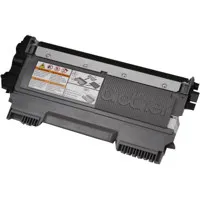
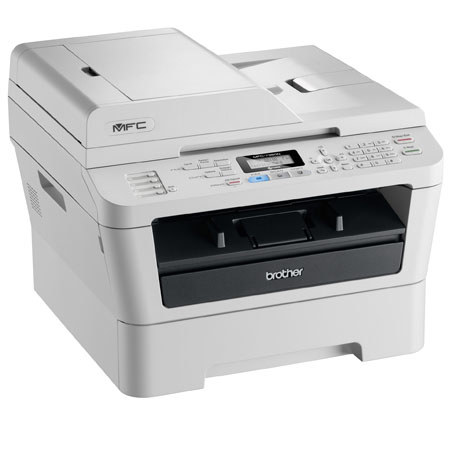
The Brother MFC-7360N is a compact and affordable All-in-One that produces fast, high-quality monochrome laser printing and copying, as well as color scanning, faxing and PC faxing. It provides a built-in Ethernet interface to share with others on your network. Plus, a 35-page capacity automatic document feeder allows you to copy, scan or fax multi-page documents quickly and easily. The MFC-7360N offers flexible paper handling via an adjustable, 250-sheet capacity paper tray for letter or legal size paper. In addition, its advanced capabilities allow you to scan documents to a file, image, OCR, or E-mail.