2022-02-10T19:00:00
Rated 3 out of 5
Good by for the price.
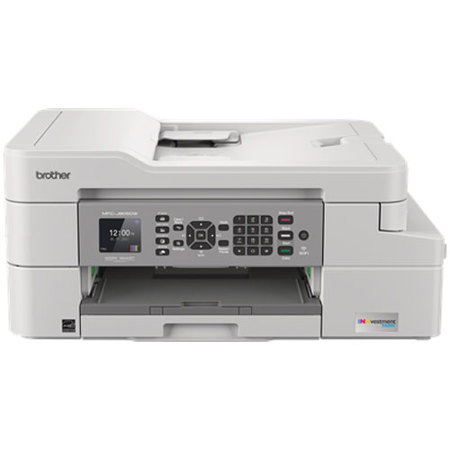
This is a good sturdy printer that works well, but it has a less than intuitive operating system. My bigest gripe is that the print heads dry out between uses. That being said I don't use it more than once a week and I live in the desert where the humidity is around 3%. Some other machines have an automatic cleaning cycle which mitigates this problem.
Peter
Originally posted at

2020-07-16T09:02:42
Rated 5 out of 5
Very Happy with Brother MFC-J805DW Printer
Everything I needed PLUS an unexpected ability to duplex print. If this turns out to be as durable as my friend's Brother printers I won't need another for a decade or more.
Josh W.
2019-07-10T20:00:00
Rated 5 out of 5
Great Small Business Printer
I received this product for free from Brother in exchange for my honest opinion/review of the product. I`ve been using the Brother MFC-J805DWXL printer for a few weeks now and I have been thoroughly impressed so far. The setup instructions were very easy and clear to follow along with, I especially liked the pictures that accompanied each step. I`ve even had to move the printer to a new location and WiFi setup, and I had zero problems getting it set back up and onto a new wireless network. I think my favorite feature is the Inkvestment Tank, not only did I find the ink easier to install that the usual cartridges, I`ve tested the printer out quite a bit and the tanks are all still showing full. I use less than the monthly average they give, for my business, so I`m very hopeful they will last the two years it mentions. The only thing that would have been nice to include in the box is the USB cord to hook to your computer, I understand most people only use the WiFi settings now but my WiFi can be dodgy, so I had to purchase that cord separately. Overall I would definitely recommend this product for your small business or personal needs.
HeatherC991465
Originally posted at
2019-07-10T20:00:00
Rated 5 out of 5
Brother Genuine Printer-White
I received this product for free from Brother in exchange for my honest opinion/review of the product. Before I received this printer I had a very basic printer that only printed in black and white. I would have to say that my favorite feature about the Brother Genuine Ink & Toner printer is that I can print in color from my phone. The product met my quality expectations because it completed all tasks of printing from my computer and phone with ease. I also received an extra bonus with this printer because now I have easy access to scan and fax from my home. I would often have to go to the library to scan, but now I have it at my fingertips in great quality as well. The scanner is very precise and crisp when it appears. Overall, I would recommend this printer because it`s from a brand you can trust that presents quality and needed items.
ShanaeS606008
Originally posted at
2019-07-09T20:00:00
Rated 5 out of 5
Great home use printer
I received this product for free from Brother in exchange for my honest opinion/review of the product. From opening the box, startup and getting to use this printer, it was all a breeze. I especially appreciate being able to print from my iPhone which makes it simpler for me than having to pull out the laptop and fight with my baby to complete a task on there. While I prefer laser printer quality, this is a great option to have at home and isn`t an eyesore on our desk. Would definitely recommend this printer to others.
RadhalinD559255
Originally posted at
2019-07-09T20:00:00
Rated 5 out of 5
Compact sized printer that packs a punch...
I received this product for free from Brother in exchange for my honest opinion/review of the product. Let me first start off by saying I am not very technically savvy and usually I pawn anything off that consists of me having to do more than just plug it in because I don`t want to do all the techie details and considering that this laptop offers WiFi capabilities, I was out of my league as far as setting this thing up. However, I made myself un-package and setup the printer because I wanted to see if following the instructions included with the packaging would be "easy" for someone of my experience level (lol. Pros (install/setup): The printer is a compact which is perfect if you are limited on space like I am.Set up: I set up the printer on my phone and my tablet. The Mobile phone set up was a pretty easy set up. I set up the printer and installed one of the recommended applications on my phone in order to print. It literally only took me 10 minutes to setup the printer and the remaining 20 minutes was the install time for the application on my phone and just me trying to read the instructions to ensure I was doing it correctly). Set up on my laptop was about a 45 minute job (partly due to my laptop just having issues with loading the information from the CD included in the box with the printer. Overall, with reading the included instructions, I was able to set up the two devices without any real complications as the instructions were fairly simple to follow.Cons: As I mentioned above, the included instructions although helped me tremendously in the install/setup for both devices, I was a little confused on the WiFi set up for my phone and had to refer back to the instructions a couple times as the instructions stated I needed to write down my "SSID" network name and password found on the side of my router, however, since I already have a secured network and established name, that is what I should have used and my current password. Not a big deal, I figured it out. Now on to the fun with using the printer through mobile and laptop: Pros:I printed various website data and pictures from my phone to see the quality and I was pretty impressed with the ease of use. Once you download the recommended application for printing, I was able to select the pages I wanted to print and remove pages easily prior to printing. While printing from my laptop I was really interested in seeing the quality of the print and the speed to print. Both delivered as it printed pretty quickly and the print quality is pretty nice (it`s actually nicer than the personal printer I have at work). I also was excited to use the Scan feature once I printed my page to see if it would be easy and what the quality looked like once scanned. Well, remember I`m not that technically savvy so I will cover the "ease" of scanning in the next section...but the quality of the scan was pretty nice, clear and appeared as it was on the original printout. Cons: (mobile/laptop printing/scanning)Well, there wasn`t really a lot of cons for me, except I spent a little bit of time trying to figure out how to scan and which app on my desktop to click (lol). this instruction may be in the actual booklet, but I didn`t really go through that...and the document I initially scanned was slightly turned once scanned, which was strange since I placed it straight on the glass.Overall, this is a great compact printer with a lot of capabilities if you are looking to fax (which I am not), print black and/or white, and scan. The setup is pretty easy especially if I`m able to do it. The printer is great if you utilize WiFi in your home and you want to move about and use your devices, but still have the option to print when needed.
LaKishaJ748192
Originally posted at
2019-07-09T20:00:00
Rated 5 out of 5
Perfect for my home office
I received this product for free from Brother in exchange for my honest opinion/review of the product. I received this product in exchange for my unbiased opinion. I had three existing printers all of which were out of ink. This printer is awesome because it comes with a two year supply of ink based upon a decent amount of pages printed per month which will last me well over 2 years. I work from home full time and this printer is exactly what I needed; something that I don`t have to remember to buy ink for every month or so and that I can rely on due to its professional output. It is perfect size for my home office as it is not too large nor bulky but has all the functionality I need. It was very easy to set up. I did not have any issues whatsoever with the set up or connection to my computer. The instructions were detailed but concise for quick start up. I was also able to successfully connect it to my smart phone and print documents with ease which I find tremendously helpful. My son was also able to connect his school iPad to the printer and print off assignments. I also really like that the paper supply is stored inside the printer as opposed to hanging out over the back and gathering dust. Overall, I am extremely pleased and impressed with this printer and would recommend it to anyone with a home office or who needs the functionality of an all in one printer plus the convenience of printing from portable devices.
ClaudiaF341983
Originally posted at
2019-07-08T20:00:00
Rated 5 out of 5
Great All-in-One Printer-Brother MFCJ805DWXL
I received this product for free from Brother in exchange for my honest opinion/review of the product. I received this product in exchange for my unbiased opinion. I was so happy to receive my new printer, but hoped it would not be bulkly. While the box it was contained in was big, the printer, to my surprise, was not. It easily fit into the space of my old printer. Everything was packaged well and securely and the set-up instructions were easy to read and follow. I`ve been using the printer for a couple of weeks and I am impressed. I love the automatic- 2 sided print option that saves on paper. The ink tank boasts that it has enough ink for up to 2 years of printing, which is definitely a plus in my book. I used the printer to print in both black/white and color. When I first printed something in color, I felt like it wasn`t as vibrant, but when I printed something else the colors were more of what I was expecting. It prints so much faster than my old printer. My favorite function of the printer is that it is AirPrint compatible, unlike my old one. I am highly satisfied with the new Brother MFCJ805DWXL and I would definitely recommend it to anyone looking for an all-in-one printer for home or small office use.
CyntaP419443
Originally posted at
2019-07-07T20:00:00
Rated 5 out of 5
Amazing Printer!
I received this product for free from Brother in exchange for my honest opinion/review of the product. ASSEMBLY: Overall, this printer was very easy to assemble. The quick instructions provided were very easy to read and follow, along with the step by step instructions. It took about 10 minutes to set up. The scanner function was easy to use and the picture quality was pretty awesome. I also like that there aren`t a lot of buttons on the front of the printer that makes things confusing. Everything was simple and straight to the point. STABILITY: The printer is very stable and compact. I live in an apartment and was able to set up the printer, plug it in and use it with ease sitting right on a table in my living room. It is small and in tact and doesn`t take up a lot of space. It`s not a heavy printer either like I assumed, so it can easily be taken to a different location without a hassle. PROBLEMS: Thus far I have not ran into any problems other than color printing time. I decided to print out a picture in color and it happened to be a full printer page sized picture. It took a long time to print. I assume because it was a full color printed page, but I didn`t realize it would take as long to print out. This was also the third page I printed at the time while testing the printer out so maybe I will try again and see if the full color prints will always take as long as it did, or if the color ink was busy mixing for the first time that it had to take a little longer than usual. Either way, this was definitely not a deal breaker for me. Overall I really enjoy this printer and all the capabilities it holds. I like that I can easily print from my laptop and most importantly print right from my cell phone. I easily downloaded the printing app suggested and was sending pictures to the printer! The color quality was amazing and I like how convenient and fast I was able to print.
ShawnaE715708
Originally posted at
2019-07-07T20:00:00
Rated 5 out of 5
Great for Home Offices
I received this product for free from Brother in exchange for my honest opinion/review of the product. I have been using our printer for about a good week now and I print home school worksheets for my son daily. The full set up took no more than about 20 minutes and we had it running within 35! I am most excited that the ink can last up to two years and as a family who regularly uses the printer a few times a week, this is going to truly benefit us. It`s the perfect size and the quality of the ink is great too. I definitely recommend this for anyone who needs a printer for their home office!
MirzaW756127
Originally posted at
2019-07-07T20:00:00
Rated 5 out of 5
A great printer
I received this product for free from Brother in exchange for my honest opinion/review of the product. We have had the Brother printer for about three weeks and it has been amazing.Set up was difficult at first but I believe that was more because of my internet connection. The instructions were confusing to me, but my husband was able to figure them out no problem.We homeschool our kids so love having the ability to print multiple items frequently. The color pictures came out perfectly. The options for collating the pages was very helpful when printing multiple copies of packets for my kids.We used this also to print tickets for a concert we went to which always makes me nervous because they have to scan them, so if printing is off it may not work, but the printing was great!We are very satisfied with this printer as it has suited all of our various needs.
SherylW795244
Originally posted at
2019-07-07T20:00:00
Rated 5 out of 5
Brother Printer Review
I received this product for free from Brother in exchange for my honest opinion/review of the product. I received this product in exchange for my unbiased opinion. When I first opened the box I thought the printer was going to be very bulky, it was not. Taking it out of the box it was very easy to put together. All I had to do was plug it in and follow the prompts on the screen. Printing was a breeze and so was faxing. I can not wait to continue to use it. My walls will be filled with photographs if my children.
DominiqueR621619
Originally posted at
2019-07-05T20:00:00
Rated 5 out of 5
Super Simple
I received this product for free from Brother in exchange for my honest opinion/review of the product. The set up of the printer with my laptop was very simple and easy to follow. The printing quality was great. I love that I can easily change from one feature to the other. I bought photo paper and the printer printed the photos with a very smooth finish! Unlike some other printers where they can look a bit streaky. Definitely a great buy!
MilagrosB145992
Originally posted at