47% Off

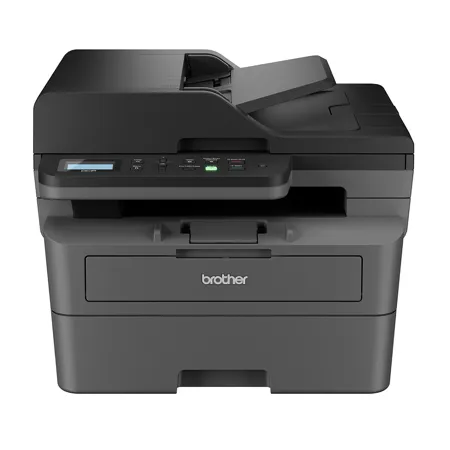
Brother DCP-L2640DW Compact Wireless Duplex Multifunction Monochrome Laser Printer

SKU: BRL2640DW MFR: DCPL2640DW
Earn VIP Reward Points

Key Features

  • Boost productivity with a rapid print speed of up to 36 ppm on this Brother laser printer.
  • Enjoy versatile connectivity with built-in Ethernet, USB, and dual-band wireless options.
  • Rely on the 250-sheet paper capacity for fewer refills and uninterrupted printing tasks.
  • Print professional-quality documents with crisp text, thanks to the 1200 x 1200 dpi resolution.
  • Scan directly to your PC, email, or the cloud using the Brother Mobile Connect application.
  • Automatic duplex printing saves paper and reduces costs for all your monochrome documents.
See More Product Details
Ships from Manufacturer?
Calculate Shipping

See Options

1

Need help? Ask our experts.

Overview
Compare
Specs
Protection
Q&A

Questions & Answers

FAQ

What is the print speed of the DCP-L2640DW Compact Wireless Duplex Multifunction Monochrome Laser Printer?

The DCP-L2640DW Compact Wireless Duplex Multifunction Monochrome Laser Printer can print up to 36 pages per minute.

What connectivity options does the DCP-L2640DW Compact Wireless Duplex Multifunction Monochrome Laser Printer offer?

This printer offers a range of connectivity options, including dual-band wireless (2.4GHz/5GHz), Ethernet, USB 2.0, and AirPrint, allowing you to print from a variety of devices.

Does the DCP-L2640DW Compact Wireless Duplex Multifunction Monochrome Laser Printer support automatic duplex printing?

Yes, the DCP-L2640DW Compact Wireless Duplex Multifunction Monochrome Laser Printer features automatic duplex printing, enabling easy production of double-sided documents.

What is the duty cycle of the DCP-L2640DW Compact Wireless Duplex Multifunction Monochrome Laser Printer?

The DCP-L2640DW Compact Wireless Duplex Multifunction Monochrome Laser Printer has a high monthly duty cycle of up to 35,000 pages, making it suitable for high-volume printing needs.

Can I print from my mobile device using the DCP-L2640DW Compact Wireless Duplex Multifunction Monochrome Laser Printer?

Yes, you can print from your mobile device using the Brother Mobile Connect App, which allows you to print, scan, and manage your printer from virtually anywhere.

Shopper : Why Did You Choose This?Norma M : I"M self employed at was recommended by one of my Supplier,he said it is very efficient

Reviews about this item

Review Summary

2026-03-16T20:00:00

Rated 5 out of 5

Great

Great printer, though it's very sensitive to power surges. It's the only printer in my house that goes off line every time electricity blinks off and on. And we have 4. All brothers brand.

Dmd H.

2026-03-16T20:00:00

Rated 5 out of 5

Economical multi function printer for home use

A nice economical multi function printer for home use, no need to buy a more expensive business model.

Borand

2026-03-14T20:00:00

Rated 5 out of 5

Excellent product

For the price, this is an excellent choice for black-and-white printing. Easy to set up. Works great for printing, copying, and scanning.

Brian

2026-03-14T20:00:00

Rated 3 out of 5

Good multi-function not as reliable As other Broth

Good multi-function but not as reliable as other Brother DCP's

MThreeZeroto167

2026-03-14T20:00:00

Rated 3 out of 5

Well, I can finally print off it

Replaced a bricked HP. Will never get another one. Brother had a difficult startup to get connected with computers. Never did get wireless to work, went out and bought a cord to connect to a computer so I could use it. Will have to figure out why later. Haven't explored scanning at yet. Owner's manual online difficult to use and navigate. Print quality is great. Just wish connecting to the computer was easier.

Tax e.

2026-03-12T20:00:00

Rated 5 out of 5

Good quality printer

Wonderful good, reliable printer. Fast, good quality. Simple to use.

Regan

2026-03-11T20:00:00

Rated 5 out of 5

Nice printer

Love that I can print from multiple devices, only one printer is needed for the home.

Bill

2026-03-10T20:00:00

Rated 3 out of 5

Delayed feedback

I am rating this printer as three stars. If it lasts longer than my previous Brother printer, which became unusable and irreparable, then I will update my review. I was disappointed with the previous printer, but I decided to give Brother one more shot.

Evan

2026-03-09T20:00:00

Rated 1 out of 5

Trying to connect Wi-Fi. Terrifying support asking

terrible Tech Support. I was told I had to spend $400 for malware

cste

2026-03-09T20:00:00

Rated 2 out of 5

Never got it to work wirelessly.

I would give this machine five stars if I could get the wireless part to work. My husband and I sent spent several days on it. It's the first time we've been defeated!

Bette K.

2026-03-09T20:00:00

Rated 5 out of 5

Great printer

Great printer for price. Easy to set up and use. Crisp clear printing. Nice features such as double side printing, set up print from phone or to computer.

LROD

2026-03-07T19:00:00

Rated 5 out of 5

So far so good

So far so good! Ive had it for a month. Easy set up. print and scan is quick and quiet. My last printer (canon)lasted about a year before it started throwing error codes that were hard to address and ultimately more work thannit was worth. I like the fact that i dont need to buy ink and i dont use it constantly so i shouldnt have to worry about dried up ink.

Jasch

2026-03-07T19:00:00

Rated 1 out of 5

High hopes, unhappy reality

The machine is designed to work with it's app. It never allowed me to connect. I returned the printer,

No o.

2026-03-06T19:00:00

Rated 5 out of 5

Great printer

Easy set up, very fast printing. I just love this printer

J K.

2026-03-06T19:00:00

Rated 5 out of 5

Great Printer

Perfect printer for my needs. I print from my phone as I don't have a computer . Set up was easy although I was afraid I might need help but didn't. love the idea that it's a toner not print cartridges like I've had in the past.

J C.

2026-03-05T19:00:00

Rated 5 out of 5

Outstanding Printer Value

Our previous Brother laser printer lasted us more than 15 years, and it was still working fine when we gave it to our son. This DCPL2640DW appears to be the same kind of dependable workhorse, except with wifi and two-sided printing capabilities. It's excellent value.

Galanwarner

2026-03-04T19:00:00

Rated 1 out of 5

Horrible customer service

Customer support is horrible. Very long waits and often can't help.

Steve S.

2026-03-03T19:00:00

Rated 4 out of 5

Great printer/copier

Printer / Copier is great and at a good price point. The toner is a bit pricey but so is everything else!

Joelene

2026-03-02T19:00:00

Rated 3 out of 5

Need some help

It prints wonderfully but I can't figure out how to print an attachment

Regina L.

2026-03-02T19:00:00

Rated 5 out of 5

Great printer

The wireless setup was quick and effortless. The print and scan quality are excellent. It's the best home printer I've ever owned.

Charlie

2026-03-01T19:00:00

Rated 3 out of 5

Network connection is unstable

Nice machine but I have had numerous connectivity issues.

Paul

2026-03-01T19:00:00

Rated 1 out of 5

Constantly oof;ine

Can't stand the printer. Deep sleep. Always off line.

Jack

2026-03-01T19:00:00

Rated 2 out of 5

Need operators manual

There was no operational instruction manual for the printer I purchased. How might receive some sort of information manual?

Dean

2026-02-28T19:00:00

Rated 5 out of 5

The DCP is a great 3-in-1! Works Great!

Exceeded Expectations! Brother Nailed The DCPL2640!

PMK1

2026-02-28T19:00:00

Rated 5 out of 5

Excellent printer & scanner

Excellent printer & scanner. It is so easy to install & use. Printer usually is no brainier but the scanner also is so amazingly easy to use. I love this machine. I can't say enough of good things.

NYC g.

2026-02-28T19:00:00

Rated 5 out of 5

Love it

Love it. Easy to set up. Though I thought it came with an extra toner cartridge? Or maybe if I signed up for that. Not sure, but otherwise I love the printer.

Kjwl

2026-02-27T19:00:00

Rated 5 out of 5

Perfect Printer for home use

This printer was easy to install and setup, practically plug and play. The printer is exactly as described and exceeds expectations. I love the 2 sided printing, which can be de-selected easily if you want only single side. I would recommend this printer to anyone looking for a monochrome laser printer.

Roadman

2026-02-27T19:00:00

Rated 4 out of 5

great printer

it's an excellent printer . I am struggling at 2 sided printing but that is probably more me than the printer

eugene r.

2026-02-27T19:00:00

Rated 4 out of 5

Love it

Easy to use,, enjoy knowing the ink won't dry up before I use half of it

Wilson

2026-02-26T19:00:00

Rated 5 out of 5

Crisp looking

Love this printer. No issues putting in a new toner cartridge. Printing is real sharp.

Nancy

Brother DCP-L2640DW Specifications

Connectivity & Compatibility

Connectivity & Compatibility

Jump to...
  • Mobile Device

    AirPrint, Brother Mobile Connect, Mopria, Wi-Fi Direct

  • Operating Systems

    Windows, Mac, Linux, and Chrome OS

  • One-Push Wireless Setup

    Wi-Fi Protected Setup

  • Standard Interface

    Ethernet, Dual Band Wireless: 802.11 b/g/n (2.4GHz), 802.11 a/n (5GHz), Hi-Speed USB 2.0

  • Standard Network Features

    Printing, Scanning

  • Supported Network Protocols (IPv4)

    APIPA (Auto IP), ARP, BOOTP, Custom Raw Port/Port 9100, DHCP, DNS Resolver, FTP Client and Server, HTTP/HTTPS Server, ICMP, IPP/IPPS, LLMNR Responder, LPR/LPD, mDNS, RARP, SMTP Client, SNMPv1/v2c/v3, SNTP Client, TFTP Client and Server, Web Services (Print/Scan), WINS/NetBIOS Name Resolution

  • Supported Network Protocols (IPv6)

    NDP, RA, DNS Resolver, mDNS, LLMNR Responder, LPR/LPD, Custom Raw Port/Port 9100, IPP/IPPS, SMTP Client, FTP Client and Server, SNMPv1/v2c/v3, HTTP/HTTPS Server, TFTP Client and Server, ICMPv6, SNTP Client, Web Services (Print/Scan)

  • Wi-Fi Certified

    Yes

  • Black Copy Speed (max. ppm)

    36

  • Capability

    Black and White

  • Resolution

    600 x 600 max. dpi

  • Design Style

    Flatbed

  • Duplex Copying

    No

  • N in 1 Functions

    2in1 / 4in1

  • Reduction/Enlargement

    25 - 400 percent

  • Sorting Function

    Yes

  • Stand-Alone Copying

    Yes

General

Jump to...
  • LCD Display

    2-Line

  • Maximum Monthly Duty Cycle

    35000 pages

  • Recommended Monthly Print Volume

    2500 pages

  • Standard Memory (MB)

    256

  • Toner Save Mode

    Yes

Paper Handling

Jump to...
  • Auto Docu Feeder Capacity

    50

  • Duplex Print Capability

    Yes

  • Manual Feed Capacity

    1 sheet

  • Media Type

    Plain, Bond, Envelopes, Labels, Recycled Paper, Colored Paper, Letterhead

  • Min Input for ADF (W x H)

    4.1 x 5.8"

  • Output Paper Capacity

    100 sheets

  • Size

    Duplex Printing: Letter, Legal
    Manual Feed: Custom Sizes (W x L) 3-8.5" x 5-14" (7.7-21.6cm x 12.7-35.6cm)
    Paper Tray: Letter, Legal, Executive, A4, A5, A6, B5, B6, Folio 8 x 13" (20.3 x 33cm)

  • Sheet Weight

    ADF: 16-28 lbs (7.3-12.7kg)
    Manual Feed: 16-61 lbs (7.3-27.7kg) bond
    Paper Tray: 16-43 lbs (7.3-19.5kg) bond

  • Standard Paper Capacity

    250 sheets

  • EPA ENERGY STAR TEC Value (kWh/Week)

    0.42

  • Machine Noise (Ready/Printing)

    30dB / 49dB

  • Operating Environment (Humidity)

    20 - 80 percent

  • Operating Environment (Temp)

    50 - 90 Degree F (10 - 32.2 Degree C)

  • Power Consumption

    (Power Off / Deep Sleep / Sleep / Ready / Printing) 0.06W / 0.5W / 4.4W / 44W / 470W

  • Power Source

    110 - 120 V AC 50 / 60 Hz

  • Automatic Duplex Printing

    Yes (default)

  • Black Print Speed (max. ppm)

    36

  • Consumable Type

    Toner Cartridge and Drum

  • CPU (Processor) Speed (MHz)

    600

  • Emulation

    BR-Script3, PCL6 (PCL XL Class 3.0), PDF Version 1.7

  • First Page Out Time (max. sec.)

    8.5

  • Resolution (max.)

    1200 x 1200 dpi

  • Technology

    B / W Laser

  • Printer Driver Compatibility

    Windows, Linux

  • Advanced Features

    ADF Auto Deskew

  • Duplex Scanning

    No

  • Included Software

    Kofax PaperPort SE with OCR for Windows

  • Interpolated Resolution (max)

    19200 x 19200 dpi

  • Mobile Device Scanning

    Brother Mobile Connect, AirPrint Scan

  • Optical Resolution (max)

    1200 x 1200 dpi (flatbed), 600 x 600 dpi (ADF)

  • Drivers Included

    TWAIN, WIA, SANE

  • Scan To Feature

    PC (File, Email, Image, OCR), FTP, SharePoint

  • Capability

    B / W, B / W and Color

Security

Jump to...
  • Security Functions

    Enterprise Security (802.1x), IP Filter, TLS/SSL

  • Security Protocols (Wired)

    SMTP-AUTH, SNMP v3, 802.1x (EAP-MD5, EAP-FAST, PEAP, EAP-TLS, EAP-TTLS)

  • Security Protocols (Wireless)

    802.1x (EAP-FAST, PEAP, EAP-TLS, EAP-TTLS), SMTP-AUTH, SNMP v3

  • Wireless Network Security

    WPA2-PSK (TKIP/AES), WPA3-SAE (AES), WEP 64/128 bit, WPA/PSK (TKIP/AES)

Physical

Jump to...
  • Dimensions (W x D x H)

    16.1 x 15.7 x 12.5" (40.9 x 40 x 31.8cm)

  • Weight

    25 lbs (11.3kg)

  • UPC Code

    012502672685

Models
Brother DCP-L2640DW Compact Wireless Duplex MF Monochrome Laser Printer
$209.99

$398.99

Save:$189.00 (47%)

Ships from Manufacturer

Usually ships within 2-5 Days. Delivery is subject to availability.

Brother HL-L2460DW Compact Wireless Duplex Monochrome Laser Printer
$179.99

Ships from Manufacturer

Usually ships within 2-5 Days. Delivery is subject to availability.

Brother MFC-L2820DW Compact Wireless Duplex All-In-One Monochrome Laser Printer
$264.99

$279.99

Save:$15.00 (5%)

Ships from Manufacturer

Usually ships within 2-5 Days. Delivery is subject to availability.

InterfaceAirPrint, Ethernet, USB, Wi-FiAirPrint, Ethernet, USB, Wi-FiAirPrint, Ethernet, USB, Wi-Fi
Resolution1200 x 1200 dpi1200 x 1200 dpi1200 x 1200 dpi
Operating SystemLinux, Mac & WindowsLinux, Mac & WindowsLinux, Mac & Windows
Power Requirements110-120V110-120V110-120V
Printer TypeAll-in-OnePrinter OnlyAll-in-One
Cartridge ConfigurationSingleSingleSingle
DuplexAutomaticAutomaticAutomatic
Input Sheets Capacity250250250

About Brother DCP-L2640DW

FEATURED REVIEWS

Multi function feedback

By Warren G.

It has worked flawlessly and instructions were easy to follow. Good purchase.

Fast Printing

By Dave

The printer is used for infrequent printing and is exactly what I wanted. It prints right away so that I do not have to wait for the old inkjet printer to run a maintenance check each time I turn it on.

Are you seeking a multifunctional monochrome laser printer that embodies reliability, efficiency, and high-quality output The DCP-L2640DW Compact Wireless Duplex Multifunction Monochrome Laser Printer is designed to meet the rigorous demands of high-volume printing environments, making it an ideal choice for home offices or small businesses.

Experience the convenience of professional-grade printing with the ability to scan, copy, and produce crisp, clear prints at a rapid rate. This printer boasts an impressive print speed of up to 36 pages per minute, ensuring that your work keeps flowing without interruption. With automatic duplex printing, you can effortlessly produce double-sided documents, contributing to a more sustainable and cost-effective workflow.

The DCP-L2640DW is engineered for peak performance and durability, capable of handling a high monthly duty cycle of up to 35,000 pages. This robust printer is not only built to last but also to deliver consistent, high-quality results with every page. Its high resolution of 1200 x 1200 dpi guarantees that your documents, from detailed reports to sharp images, are printed with precision and clarity.

Maximize your productivity with the printer's versatile paper handling capabilities. A generous 250-sheet paper tray minimizes the need for frequent refills, while the 50-page automatic document feeder streamlines multi-page tasks for copying and scanning. For specialized projects, the manual feed slot accommodates envelopes and specialty papers, adding to the printer's flexibility.

Connectivity is seamless with a range of options to suit your needs. Whether you're printing from a desktop, laptop, or mobile device, the DCP-L2640DW offers dual-band wireless (2.4GHz/5GHz), Ethernet, and USB 2.0 interfaces. Advanced security features ensure that your sensitive information remains protected while maintaining secure connections across all devices.

For those on the move, the Brother Mobile Connect App provides the freedom to print, scan, and manage your printer from virtually anywhere. This convenience is complemented by the ability to order Brother Genuine Supplies and track toner usage directly from the app, keeping you productive even when you're away from the office.

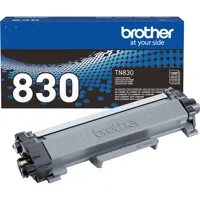
To ensure the highest quality of your prints, the DCP-L2640DW is compatible with Brother Genuine black toner cartridges, available in standard, high yield, and twin-pack options, as well as the replacement drum unit DR830. These supplies guarantee that your documents are sharp and professional-looking every time.

Embrace the efficiency of the DCP-L2640DW Compact Wireless Duplex Multifunction Monochrome Laser Printer and elevate your printing experience. With the Refresh EZ Print Subscription Service, you can enjoy the convenience of never running out of toner, coupled with savings of up to 50 percent on Brother Genuine Toner. Start with a free trial today and discover the difference that this reliable, efficient, and high-quality printer can make in achieving your operational goals.

Brother DCP-L2640DW Features

  • Print and copy up to 36ppm
  • 50-page capacity auto document feeder
  • Ethernet and dual band wireless networking
  • Compact 3-in-1 printer fit for any space

Warranty Information

This product has a limited warranty of 12 months.

Key Features

  • Boost productivity with a rapid print speed of up to 36 ppm on this Brother laser printer.
  • Enjoy versatile connectivity with built-in Ethernet, USB, and dual-band wireless options.
  • Rely on the 250-sheet paper capacity for fewer refills and uninterrupted printing tasks.
  • Print professional-quality documents with crisp text, thanks to the 1200 x 1200 dpi resolution.
  • Scan directly to your PC, email, or the cloud using the Brother Mobile Connect application.
  • Automatic duplex printing saves paper and reduces costs for all your monochrome documents.

What's in the box:

  • Brother DCP-L2640DW Compact Wireless Duplex Multifunction Monochrome Laser Printer
  • Starter Black Toner Cartridge (700-Pages)
  • DR830 Drum Unit (15000-Pages)
  • AC Power Cord
  • Quick Setup Guide
  • Brother 1 Year Limited Warranty