42% Off

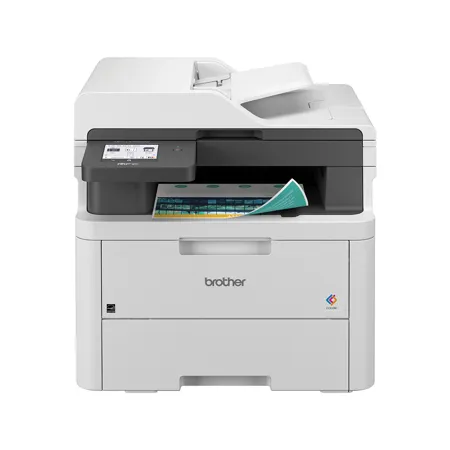
Brother MFC-L3720CDW Wireless All-In-One Duplex Digital Color Laser Printer

SKU: BRMFCL372CDW MFR: MFCL3720CDW
Earn VIP Reward Points

Key Features

  • Experience vibrant color printing with the Brother MFC-L3720CDW color laser printer.
  • Enjoy fast print speeds of up to 19 ppm for both color and black prints, increasing efficiency.
  • Wireless connectivity lets you easily print from your laptop, tablet, or smartphone via Wi-Fi.
  • Automatic duplex printing saves paper and reduces costs, perfect for eco-conscious printing.
  • Scan directly to cloud services like Google Drive and Dropbox for easy document management.
  • The 3.5" color touchscreen provides intuitive navigation for all your printing needs.
See More Product Details
Ships from Manufacturer?
Calculate Shipping

See Options

1

Need help? Ask our experts.

Overview
Compare
Specs
Protection
Q&A

Questions & Answers

FAQ

What functionalities does the Brother MFC-L3720CDW printer offer?

The Brother MFC-L3720CDW is a wireless all-in-one color laser printer that offers printing, copying, scanning, and faxing functionalities.

What is the print and scan speed of the MFC-L3720CDW printer?

The MFC-L3720CDW printer offers fast printing and scanning with speeds of up to 19 pages per minute (ppm) and 29/22 images per minute (ipm) in black and color.

What advanced connectivity options does the MFC-L3720CDW printer provide?

The MFC-L3720CDW printer offers advanced connectivity options with built-in dual-band wireless, Wi-Fi Direct, and a USB 2.0 interface for local connection to a single computer.

What security features does the MFC-L3720CDW printer have?

The MFC-L3720CDW printer is equipped with advanced security features to safeguard sensitive documents and secure connections to devices and networks.

Is the MFC-L3720CDW printer environmentally friendly?

Yes, the MFC-L3720CDW printer is environmentally friendly. It is ENERGY STAR compliant, EPEAT Silver rated, and features Eco Mode and automatic duplex printing.

Reviews about this item

Review Summary

2026-04-16T20:00:00

Rated 5 out of 5

Great product at a great price

I use mine for a small business i operate in a very heavily tourist driven town. It meets every need we have. The auto ink is very afforable and they make sure we never run out.

John

2026-04-16T20:00:00

Rated 3 out of 5

A OK printer for a small business

The print quality is excellent. The only thing I don't like about this printer is that when the printed copy emerges from the printer it is always curled upward. It doesn't come out flat. Also, the small receiving tray that tilts up to catch the paper doesn't do its job very well. With 8 1/2 x 11 paper, it doesn't quite reach the tray and it is sometimes difficult to take the printed piece out. It would probably work OK with legal sized paper, but with the more common standard American paper it is, in my opinion, not well designed. I also have a strange problem, the cause of which I haven't been able to determine. The printer sometimes goes off line. I have a different Brother printer, which will come online when this one goes offline, but both of them are never online at the same time. I don't know if that is a computer problem and network problem or a printer problem.

Arts E.

2026-04-15T20:00:00

Rated 5 out of 5

Well worth the money for the peace of mind

I love my new color laser printer. It was easy to set up, easy to connect to and am happy that I do not need to worry about ink drying up because of infrequent use. If I had know the pros of a laser printer sooner, I would not have 5 dried up inkjet printers in my basement.

Kate

2026-04-13T20:00:00

Rated 5 out of 5

Ink gobbler

Great printer but uses a ton of ink so be prepared

S B.

2026-04-07T20:00:00

Rated 5 out of 5

An excellent product!

This is an excellent printer, easy to use and very versatile. I use it for copying and scanning each and every day.

RANA I.

2026-04-03T20:00:00

Rated 5 out of 5

Would buy again when needed.

This is a great solution for small operations that don't need a full commercial unit. Works great and easy to use.

Don B.

2026-03-31T20:00:00

Rated 5 out of 5

Great printer

Love this printer so much?easy to use! Can print from phone?

Leslie

2026-03-30T20:00:00

Rated 4 out of 5

Good printer but having issues

Good printer but having issues with air drop feature

Ted A.

2026-03-27T20:00:00

Rated 5 out of 5

Works great ??

So far I'm very happy with the printer. Seems like a great purchase.

Eric

2026-03-24T20:00:00

Rated 4 out of 5

Scanning

I think the machine is great, I only wish I could scan Double Sided.

Yvonne

2026-03-23T20:00:00

Rated 5 out of 5

scottsdale

easy to set up and works like a champ. no problems noted but nly a month old. love my brother printers. this is my third one first color but all are great.

a w.

2026-03-19T20:00:00

Rated 5 out of 5

Great little printer

The machine is much lighter than my other printer. And smaller so it doesn't need as much space. It works very well. The print is clear and pictures are sharp. It's easy to feed, scan and do whatever I want. Brother printers are the only way to go.

Liz J.

2026-03-17T20:00:00

Rated 2 out of 5

I just cannot get it to work!

I love it when it is working, but it just will not connect to my computer. I have been without a printer now for more than 3 weeks. It is driving me crazy. I have to email what I want printed to my husband and he prints it out on his very happy Brother printer.

Marg G.

2026-03-16T20:00:00

Rated 2 out of 5

It's ok

Printer is good but connecting it to my computer has been terrible. Sometimes it works and sometimes it doesn't. Despite me following directions from Brother!

Susan C.

2026-03-09T20:00:00

Rated 5 out of 5

Absolutely no issues at this time.

Very easy and straightforward to setup and install on my network. So far, print jobs have been clear and accurately rendered. Jury is still out on disposables usage.

JNLOVE

2026-03-07T19:00:00

Rated 3 out of 5

MFC-L3720CDW printer. Service representatives

All features of the printer works great! Seamless integration with devices. Easy to use. BUT, we needed help replacing toner cartridges. Bought them from Brother. BUT trying to get help from service department is challenging. Told it would be over THREE HOURS to speak with a representative at the beginning of the call. After THREE HOURS, I gave up. This is THREE HOURS to contemplate what should be written in a review. This was not a happy THREE HOURS of my life. I never got to speak to a representative. Are the service representatives real? I just do not know.

Not h.

2026-03-06T19:00:00

Rated 1 out of 5

Prints Great But .....

I do not recommend this product. It came with NO instructions. The default appears to be to print double sided; every time I forget to change to single page the printer jams. It will print page 1, try to flip, then jams. Unblock the jam; it prints the first page; then jams again. The only way to clear the document is to unplug (you cannot turn off) and wait a couple seconds - at least 30 - then turn back on. On the positive side, the documents print fast and look great (once you change to single side). Another negative is the password; this is my home printer; I don't need another password to remember!!!

Patricia

2026-03-06T19:00:00

Rated 5 out of 5

Wirks well

I finally broke down and bought a laser printer. I don't use a printer daily. The ink jets were good for awhile then they'd dry out. I had more trouble than it was worth. I am very pleased with this model Brother printer. It ALWAYS works and there are no problems with it. It is easy to buy and use replacement cartridges. I'm a happy user!

Gloria

2026-03-04T19:00:00

Rated 5 out of 5

Brother is #1

Count on Brother each and every time for performance excellence!

Jani

2026-03-04T19:00:00

Rated 5 out of 5

Great Printer, Great Price

Purchased this reconditioned laser printer to replace a MFC-3710CDW unit and couldn't be any happier! Print and colors are excellent, price was great and, being reconditioned, came with full toner cartridges. Also love the feature that notifies the user when the print job is completed. Though it is meant for small offices, I use it in my home. If I had an office, it would be my printer of choice.

Tom M.

2026-03-04T19:00:00

Rated 5 out of 5

Just Buy Brother!

First color laser all in one printer for the family and second Brother laser we own! Best quality construction, first rate software, superb output.

John K.

2026-03-03T19:00:00

Rated 5 out of 5

Great Printer

Printer does a great job woth excellent prints. Detail and color are excellent.

Dan S.

2026-03-01T19:00:00

Rated 3 out of 5

FINICKY BUT STOUT

THE PRINTER WAS PACKED BEAUTIFULLY, AND IT IS VERY HEAVY. AFTER BATTLING I MADE IT TO ITS TABLE, I HAD TROUBLE GETTING THE PRINTER TO ACCEPT THE CODES BUT FINALLY GOT IT DONE. THEN CAME OUT OF NO WHERE IT WOULD NOT PRINT WORD DOCUMENTS, WELL I FIGURED I COULD GET BROTHER TO HELP ME COULD NOT EVEN FIND A WORKING TELEPHONE NUMBER, AFTER SOME PLAYING I FOUND A LIVE CHAT AND GOT AN AGENT, HE DID NOTHING USEFUL, AND I WOULD RATE HIM ZERO, I TRIED A DIFFERENT NUMBER I HAD A 45 MINUTE HOLD BUT IT WAS WORTH IT, HE GOT EVERY THING STRAIGHTENED OUT. NOW THE REMAINING PROBLEM IS THE PAPERS COME OUT JUST A LITTLE CURLED. NOBODY HAS HAD A CURE FOR THIS.

STEVE

2026-02-25T19:00:00

Rated 5 out of 5

Great!

I last had the brother MFC - 9130 CW. I had four businesses and one at my house. Those units lasted from about 2016 through 2025 until I finally just replaced it this year (2026). I really loved the last one I had so I was looking for features that were the same similar or better. I was comfortable sticking with this brand because all of our years of owning them in our businesses they have provided tons of excellent support and even more repairs or replacements that kept us going. This mall is almost exactly like that one. I would say the biggest differentiator as it's ability to print front and back. Yes it takes a second to do that, but I believe in the end it still takes less time than printing double the amount of pages. I'm hoping this model last as long as the other one does - so far I haven't been disappointed.

Rachel B.

2026-02-23T19:00:00

Rated 5 out of 5

Great Product!

Great Product! Great Product!Great Product!Great Product!Great Product!Great Product!Great Product!

AVVA

2026-02-23T19:00:00

Rated 4 out of 5

Cartridge Replacement is NOT A Simple Process

The install of ink cartridges would be smoother if there was some form of directions included in the box of each toner cartridge. It took me a few minutes to get the hang of removing and installing.

DM H.

2026-02-22T19:00:00

Rated 5 out of 5

Brother Wireless MFC-L3720CDWDigital Color All-in

I LOVE IT WORK GREAT I LOVE THAT I DO NOT NEED TO BUY INK NO MORE GET ONE YOU SEE EASY TO SETUP

JIM 1.

2026-02-17T19:00:00

Rated 5 out of 5

Best Printer Ever!

Love my new Brother wireless printer - works from any device anywhere in the house, and prints beautifully - easy to set up, intuitive to use - and love all the features! Brother is my go-to for printer efficiency and outcomes!

Mary K.

2026-02-16T19:00:00

Rated 1 out of 5

Expensive toners

This is the most expensive printer I ever owned. In one year, I spent over $600.00 to buy unnecessary color toner. What a waste of money. If you have to buy, buy a printer with black toner only. Unfortunately, you can not use the printer when the color toner are low.

Theodros

2026-02-12T19:00:00

Rated 3 out of 5

It is OK -

It was a pretty smooth setup. Prints nice, no problems. Some things I don't like; the price of Brother cartridges are around $364 for 4, Amazon off brand 6 for $64, and work just fine. The paper curls so I went from 20 lb to 22 lb paper, with just a bit of improvement in the curling. Overall, it is OK, but I would not purchase again.

JWAdmin

Brother MFC-L3720CDW Specifications

Print
  • Automatic Duplex Printing

    Yes

  • Print Speed

    Black: 19 ppm (Max.)
    Color: 19 ppm (Max.)

  • Cloud Services (Print)

    Box/Box for Business, OneNote, SharePoint Online, Google Drive/Google Drive for Business, Evernote/Evernote Business, OneDrive/OneDrive for Business, Dropbox/Dropbox for Business

  • Consumable Type

    4 Toner Cartridges and Drum

  • CPU (Processor) Speed (MHz)

    800

  • Emulation(s)

    BR-Script3, PCL5c, PCL5e, PCL6 (PCL XL Class 3.0), PDF Version 1.7, XPS Version 1.0

  • First Page Out Time (max. sec.)

    15

  • Print Resolution (max. dpi)

    2400 x 600 dpi class

  • Print Technology

    Color LED

  • Printer Driver Compatibility

    Windows, macOS, Linux

  • Copy Speed

    Black: 19 ppm (Max.)
    Color: 19 ppm (Max.)

  • Copy Capability

    Black and White, Color

  • Copy Resolution

    600 x 600 max. dpi

  • Design Style

    Flatbed

  • Duplex Copying

    No

  • N in 1 Functions

    2in1 / 4in1

  • Reduction/Enlargement

    25%-400%

  • Sorting Function

    Yes

  • Stand-Alone Copying

    Yes

  • Advanced Scanning Features

    File Split, 1 to 2 Scan, ADF Auto Deskew, Blank Page Skip

  • Cloud Services

    Box/Box for Business, OneNote, SharePoint Online, Google Drive/Google Drive for Business, Evernote/Evernote Business, OneDrive/OneDrive for Business, Dropbox/Dropbox for Business

  • Duplex Scanning

    No

  • Included Software

    Brother iPrint&Scan (desktop) for Windows and Mac, Kofax PaperPort SE with OCR for Windows

  • Interpolated Scan Resolution (max. dpi)

    19200 x 19200 dpi

  • Mobile Device Scanning

    Brother Mobile Connect, AirPrint Scan

  • Optical Scan Resolution (max. dpi)

    1200 x 1200 dpi (flatbed), 600 x 600 dpi (ADF)

  • Scan Drivers Included

    TWAIN, WIA, SANE

  • "Scan To" Feature

    Easy Scan to Email, PC (File, Email, Image, OCR), FTP, Network Folder (CIFS - Windows only), E-mail Server, SharePoint, Cloud Services (Web Connect)

  • Scanning Capability

    Black/White and Color

  • Simplex Scan Speeds

    Black: 29 ipm (Max.)
    Color: 22 ipm (Max.)

  • Broadcasting (Number of Locations)

    350

  • Call

    Waiting: No
    Caller ID: No
    Distinctive Ring Ready: Yes

  • Document Memory Backup

    Yes

  • Duplex Faxing

    No

  • External TAD Interface

    Yes

  • Fax Modem Speed

    33.6K bps

  • Fax Page Memory (max. pages)

    500

  • Faxing Capability

    Black and White

  • Fax/Telephone Switch

    Yes

  • Internet Fax

    Yes

  • Out-of-Paper Reception

    Yes

  • PC Fax Capability (Send/Receive)

    Yes

  • Total Auto Dial Locations

    300

Connectivity & Compatibility

Jump to...
  • Brother Cloud Apps

    Scan to Searchable PDF, Scan to Mobile, Fax Forward to Cloud / Email, Scan to Word, Scan To PowerPoint, Scan To Excel, Cloud Secure Print, Easy Scan to E-mail

  • Mobile Device Compatibility

    AirPrint, Brother Mobile Connect, Mopria, Wi-Fi Direct

  • One-Push Wireless Setup

    Wi-Fi Protected Setup

  • Operating Systems Compatibility

    Compatible with Windows, Mac, and Linux.

  • Standard Interface(s)

    Dual Band Wireless: 802.11 b/g/n (2.4GHz), 802.11 a/n (5GHz), Hi-Speed USB 2.0

  • Standard Network Features

    Printing, Scan to E-mail Server (download), I-Fax (download), Scanning, PC Fax Send/Receive, Secure Function Lock, Secure Print

  • Supported Network Protocols (IPv4)

    APIPA (Auto IP), ARP, BOOTP, CIFS Client, Custom Raw Port/Port 9100, DHCP, DNS Resolver, FTP Client and Server, HTTP/HTTPS Server, ICMP, IMAP4, IPP/IPPS, LDAP, LLMNR Responder, LPR/LPD, mDNS, POP3, RARP, SMTP Client, SNMPv1/v2c/v3, SNTP Client, TELNET Server, TFTP Client and Server, Web Services (Print/Scan), WINS/NetBIOS Name Resolution

  • Supported Network Protocols (IPv6)

    NDP, RA, DNS Resolver, mDNS, LLMNR Responder, LPR/LPD, Custom Raw Port/Port 9100, IPP/IPPS, POP3, SMTP Client, FTP Client and Server, CIFS Client, TELNET Server, SNMPv1/v2c/v3, HTTP/HTTPS Server, TFTP Client and Server, ICMPv6, SNTP Client, LDAP, Web Services (Print/Scan), IMAP4

  • Wi-Fi Certified

    Yes

Security Features

Jump to...
  • Security Functions

    Active Directory (LDAP), Enterprise Security (802.1x), IPSec, TLS/SSL, IP Filter, Syslog Reporting, Secure Function Lock, Secure Print

  • Security Protocols (Wireless)

    APOP, SMTP-AUTH, IPSec, Kerberos, SNMP v3

  • Wireless Network Security

    WEP 64/128 bit, WPA/PSK (TKIP/AES)

Paper Handling

Jump to...
  • Automatic Document Feeder Capacity

    50 (Max. Pages)

  • Duplex Printing Capability

    Yes

  • Manual Feed Capacity (sheets)

    1

  • Input for ADF (W x H)

    Maximum: 8.5 x 14" (215.9 x 355.6mm)
    Minimum: 4.1 x 5.8" (104.14 x 147.32mm)

  • Media Type

    Plain, Glossy Paper, Envelopes (#10), Bond, Labels, Recycled Paper, Colored Paper, Letterhead

  • Output Paper Capacity (sheets)

    150

  • Paper Handling Size

    Duplex Printing: Letter, Legal
    Manual Feed: Envelope, Custom Sizes (3.0-8.5 (w), 4.57-14 (l))
    Paper Tray: Letter, Legal, Executive, A4, A5, A6, B5, B6, Folio (8 x 13" (203.2 x 330.2mm))

  • Sheet Weight

    ADF:
    Min: 16 lbs (7.25kg)
    Max: 28lbs (12.70kg)
    Manual Feed:
    Min: 16 lbs (7.25kg)
    Max: 43 lbs (19.50kg)
    Paper Tray:
    Min: 16 lbs (7.25kg)
    Max: 43 lbs (19.50kg)

  • Sorting Function

    Yes

  • Standard Paper Input Capacity (sheets)

    250

  • ENERGY STAR Certified

    Yes

  • EPA ENERGY STAR TEC Value (kWh/Week)

    0.29

  • EPEAT Registered

    Silver

  • Machine Noise (Ready/Printing)

    40 dB / 46 dB

  • Operating Environment: Humidity

    20-80%

  • Operating Environment: Temperature

    50 Degree F - 90 Degree F (10 Degree C - 32.22 Degree C)

  • Power Consumption

    Power Off: 0.02W
    Deep Sleep: 0.65W
    Sleep: 7W
    Ready:70W
    Printing: 500W

  • Power Source

    110-120 V AC 50 / 60 Hz

General

Jump to...
  • LCD Display

    3.5" (88.9mm) Color Touchscreen

  • Maximum Monthly Duty Cycle

    Up to 40,000 pages

  • Recommended Monthly Print Volume

    Up to 3,000 pages

  • Standard Memory (MB)

    512

  • Toner Save Mode

    Yes

Physical

Jump to...
  • Dimensions (W x D x H)

    17.5 x 16.1 x 15.8" (444.5 x 408.94 x 401.32mm)

  • Weight

    44 lbs (19.95kg)

  • UPC Code

    012502670230

About Brother MFC-L3720CDW

From the office to the home, the advanced Brother MFC-L3720CDW Wireless All-In-One Duplex Digital Color Laser Printer is a high-tech, multifunctional, and reliable solution for all your printing needs. This efficient machine is designed to meet the demands of both small businesses and busy households, offering fast, high-quality printing, copying, scanning, and faxing functionalities.

With a high-speed printing capability of up to 19 pages per minute (ppm) and scan speeds reaching 29/22 images per minute (ipm) in black and color, this printer ensures quick and efficient document production. Its high resolution of 2400 x 600 dpi guarantees crisp, clear, and professional-grade prints, making it an ideal choice for businesses and individuals who value quality.

The MFC-L3720CDW offers versatile paper handling, with a 250-sheet capacity paper tray and a 50-page Auto Document Feeder, reducing the frequency of paper refills and enhancing productivity. It also adjusts for letter or legal size, making it suitable for a variety of tasks.

Connectivity is a breeze with this printer's built-in dual-band wireless (2.4GHz / 5GHz) and Wi-Fi Direct, allowing multiple users and devices to connect easily. It also offers a USB 2.0 interface for local connection to a single computer. The 3.5" color touchscreen is intuitive and customizable, connecting you directly to popular Cloud-based apps like Google Drive, Dropbox, Evernote, and OneNote for dynamic scanning and printing.

The MFC-L3720CDW is equipped with advanced security features to safeguard sensitive documents and create secure connections to devices and networks. With the Brother Mobile Connect app, you can manage your printer remotely, monitor toner levels, and reorder supplies directly from Brother.

This printer is also environmentally friendly, being ENERGY STAR compliant and EPEAT Silver rated. It features Eco Mode, Toner Save Mode, and automatic duplex printing, making it a responsible choice for the environment.

For the best results, use Brother Genuine Toner, made specifically for Brother printers. It promises reliable compatibility and consistently high performance, with cost-effective high-yield and multipack options available.

In conclusion, the Brother MFC-L3720CDW Wireless All-In-One Duplex Digital Color Laser Printer is a versatile, efficient, and high-quality solution for all your printing needs. Whether you're running a small business or managing a busy household, this printer is designed to deliver superior performance and reliability.

Brother MFC-L3720CDW Features

  • Integrated 3.5" Touchscreen: Easily create up to 48 time saving tasks
  • Auto Document Feeder: Copy, scan, and fax up to 50 pages
  • Flexible Connectivity: Dual-band wireless, Wi-Fi Direct, and USB interfaces
  • Advanced Security Features: Safeguard data and create secure connections

Warranty Information

This product has a limited warranty of 12 months.

Key Features

  • Experience vibrant color printing with the Brother MFC-L3720CDW color laser printer.
  • Enjoy fast print speeds of up to 19 ppm for both color and black prints, increasing efficiency.
  • Wireless connectivity lets you easily print from your laptop, tablet, or smartphone via Wi-Fi.
  • Automatic duplex printing saves paper and reduces costs, perfect for eco-conscious printing.
  • Scan directly to cloud services like Google Drive and Dropbox for easy document management.
  • The 3.5" color touchscreen provides intuitive navigation for all your printing needs.

What's in the box:

  • Brother MFC-L3720CDW Wireless All-In-One Duplex Digital Color Laser Printer
  • Starter Black Toner Cartridge (1000 Pages)
  • Starter Cyan Toner Cartridge (1000 Pages)
  • Starter Magenta Toner Cartridge (1000 Pages)
  • Starter Yellow Toner Cartridge (1000 Pages)
  • DR229CL Drum Unit (20000 Pages)
  • BU229CL Belt Unit (50000 Pages)
  • WT229CL Waste Toner Box (50000 Pages)
  • AC Power Cord
  • Telephone Line Cord
  • User Manual
  • Brother 1 Year Limited Warranty