
This item is no longer available.
Review Summary
2023-10-25T20:00:00
Generally a good printer. Aligning the tape sometimes gets tricky especially with the narrower tapes
Mario

2023-08-06T20:00:00
good software and easy to use, label roll should make it more envir friendly, less plastic is better
output123
2014-01-13T19:00:00
It was easy to setup and start using. One annoying "feature", even though I set the default font size to 12, it still starts with 24 point font which I have to change. In the title above I wrote "poor" support, actually I should say "no" support. I posted a question, but never got an answer. After about an hour of testing, I finally answered my question. Otherwise, I would have given a five start rating.
Concho
2013-08-18T20:00:00
The label printer was purchased to avoid producing one or two mailing labels from sheets of label stock. it performed that function quite well. it also has been used to produce address mailing labels for dues notices that i send out each year. the shipping label was used to produce name tags for the annual golf outing - no tag no drink or dinner - it is easy to use and reliable. The printer used at the golf outing is very visible to guests and there are usually questions about where to get one.
frankmac
2013-08-17T20:00:00
I use the QL-570primarily to create labels for mineral specimens and themore I use it the more I LOVE it. It took a few tries to figure out what I was doing but the more I use it the easier it is and the more I like it. it is less hassel to just print an address label for my outgoing mail than to fool around printing an envelope. I am very happy with the printer and would certainly recommend it to any one.
Wings
2013-08-08T20:00:00
I purchased this several years ago. Tried it out. Found the quality of finished labels to be less than what I wanted. Put it in a drawer and forgot about it until now.
Tonkawany
2013-08-06T20:00:00
I've enjoyed the functions of this printer and have used it quite often at work and at home on my personal library of books, dvd's, video's and on the many games I have for the different systems. I own.
s2t2a2n2
2013-08-05T20:00:00
I was part of a focus group on this label printer and afterwords went right out and bought one. I am very pleased with it for many reasons. It prints very fast, and clean, automatically cuts after each label, and loading different sizes is much easier than any other label maker on the market today. The variety of labels available means that it can be used for many different purposes. I have been using this printer for many months and have been completely satisfied with it. I have not hesitated to recommend it to all my business associates and friends alike.
Artour
2013-08-05T20:00:00
Have been using this for several years now for everything from making customer address labels to beer bottle labels for my home brew. Quick and easy for making labels on the fly for slapping on whatever. Very easy to swap out different size labels. Printer itself is an EXCELLENT value, however, the manufacturer labels are a bit spendy in my view but I'm really cheap. For those thrifty souls out there, just use some common sense when it comes to "overpriced" manufacturers consumable supplies on most anything.
ser1851
2013-08-05T20:00:00
Simple to use , updates available. Easy to download. Tech support great
mw1948
2013-08-05T20:00:00
I bought the QL-570 for home use, to make signage, address labels and item labels. It worked great the first couple of times I used it. Once for Christmas card address labels and once for labels and signs for my horses. It was a few months before I used it again. The labels came off the backing while printing and apparently stuck inside the printer. I removed the label but it will not work... I thought of trying to have it repaired, but the repair will probably be more than it cost. So if you don't want a label printer to use only once or twice or if you don't want to buy a new roll of labels each time you use it, don't buy this.
RobinG
2013-08-05T20:00:00
Brother has not kept up with technology. This product is NOT compatable with Windows 7 64-bit so now I have to use a less user friendly product.
gingersparkle
2013-08-05T20:00:00
could not live without this label printer ! It works well, saves a lot of time, makes legible labels where my handwriting is sloppy. I think it is great. I have had it for several years and use it every day. One slight weakness is the software which I find a little clunky and difficult to use but have gotten used to it.
BakerBoy
2013-08-05T20:00:00
Great printer, just wish some of the formatting was easier. Seems I always forget where some of the features are I use. Guess I need to write down where they are at. Other than that, I love it.
OSUBert
2013-07-31T20:00:00
I waited and waited for a printer such as this so when it went on sale and I had rewards to spend from Staples...I purchased this unit...easy as 1,2 ,3 and click print...there is your label..it sits quietly till needed then does the job well...thanx brother~!
Alan007
2013-07-30T20:00:00
Does not do bar codes for mailing. Big negative. Software does not update. Indicates updates are available but will not accept them.
automation
2013-07-29T20:00:00
would be ok if I could make it work. never received instruction book with it.
rogerdodger
2013-07-29T20:00:00
Label maker does exactly what I wanted to do in the first place when I bought it. It has great labels and is very easy to use. My only problem with it so far is that not many office supply stores carry any Brother products and the software I currently use for label making wasn't exactly compatible; had to fiddle with it to get it to work. But great product nonetheless, awesome to work with, labels aren't expensive, and ease of use really helps out. Thanks for making such a great product.
kitzrx
2013-07-29T20:00:00
works great everytime, easy to change label spools quickly, The only thing I would like to see changed is the software, which is dated and kind of clunky to use. On the bright side, you can create labels for frequently used addresses, etc. and save the labels for future use. Overall, I think this is a great tool for the office.
nativesun63
2013-07-29T20:00:00
I am very satisfied with this product, good value. My only con is that I had to re install it twice. Beside losing a few minutes to do so, it is well worth using.
Sussum
2013-07-29T20:00:00
Handles labels very well. Great printer for price.
GeorgiaRED
2013-07-29T20:00:00
Good tool. Professional product. Looks good on letters and packages..
Lefats
2013-07-29T20:00:00
We do use it, it works very well. However, the program that I use to automatically pick up the addresses does not easily transfer the addresses. So we do not use it as much as I thought that we would.
Thriftstore
2013-07-29T20:00:00
This label printer was on sale but was still worth the full retail price compared to others out there. I can do anything with this for my business and personal projects.
RichH
2013-07-29T20:00:00
I bought this printer a year ago and just didn't get around to loading the software. My bad! It is just a great label printer with very intuitive software. I print so many labels for so many purposes that I have to keep buying more label stock! Just a great product. I wish I had loaded and used it a long time ago. My daughter uses the same model printer all the time at her banking job. She really likes it too!
redbeard
2013-07-29T20:00:00
It is so easy to use - when you only need a few labels
sdavidso
2013-07-29T20:00:00
I use this to print address labels for a news letter that I mail each month. Saves so much time and the ability to change address when some one moves. Works great.
709th
2013-07-29T20:00:00
Brother QL 700 is really easy to use and especially reliable.
GBM73333
2013-07-29T20:00:00
Easy to use. Very versatile. Cannot suggest any improvement!
BillJ
2013-07-29T20:00:00
I don't need labels very often, so making a 30-page sheet of one label is a waste of paper for me. Being able to print one label at a time is the answer to my needs. I do wish that the program (P-Touch Address Book would integrate into Outlook so we could have all contacts and addresses in one program. And also be able to print labels from Outlook. Otherwise, grate product and I do recommend it.
shortstoryauthor
PC Connected only
Automatic
300,000 (Die-cut labels); 150,000 (Continuous labels)
68 labels per minute
3 color LEDs
Die Cut and Continuous
2.4"
2.3"
3'
Up to 300 x 600dpi
TrueType
No
No
1379
Yes
Yes
Yes
PC Generated
Up to 9999 copies
Code 39, ITF 2/5, Code 128, CODABAR (NW-7), UPC A/E, EAN 8/13/128, PDF 417, QR Code, Postnet, Laser Barcode, ISBN-2, ISBN-5, Micro QR Code, Datamatrix, Maxicode, RSS
Yes
Yes
Yes
CSV, TXT, MDB, XLS
P-touch Editor 5.0 for Windows
P-touch Editor 5.0 for Mac
USB
PC and Mac OS
Windows 2000 Professional, Windows XP, Windows 7 (download required); Mac OS X 10.3.9-10.4.10
5.2 x 8.2 x 5.6" (13.2 x 20.8 x 14.2cm)
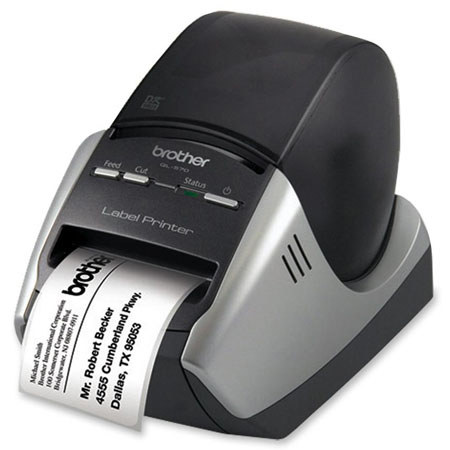
The Brother QL-570 2.4" Professional Label Printer is a compact label printer, designed for office use. It prints up to 2.4" wide and features an integrated automatic cutter. It can be used to create labels for mailing, shipping and administrative applications.