
Review Summary
2022-09-28T20:00:00
Easy to setup and use
Jodi1

2021-05-15T20:00:00
I bought this because my new laptop did not have enough memory and that I could not find something with less memory. Desparation.
my d.

2021-04-07T20:00:00
I still hold hope for this piece of equipment. I needed a replacement for HP's SimpleSave that has worked for years and now is not supported in Windows 10. I was assured by HP that they backed this Buffalo-brand backup system. The instructions that came with the drive were three miniature pictures in tiny boxes and no words. I tried just plugging in the drive, and it was not recognized, although my system "dinged" as if it knew it was there. I found the drive online and downloaded the user handbook, and nothing in the handbook was evident in the drive I purchased. I have been a faithful customer of all products HP (equipment and supplies) since 1993 and this is the first time i have been disappointed. I'm going to continue to try to get some help from HP.
CatLadyofSaintCloud

2021-01-16T19:00:00
The tiny "booklet" that was included had three tiny pictures to explain how to set it up, and no information on how to initiate auto backup.
JimV1

2020-11-20T19:00:00
The Ministation was easy and fast. I am very happy i bought it.
zoe14075

2017-12-28T19:00:00
This Buffalo drive worked well and was easy to install. However, it did not suit my applicaltion which was to archive conference audio files. I contacted the manufacturer and they recommended one of their different models. I returned this drive and procured the Buffalo drive that was recommended and it worked great. HP was great during the return process and they took care of everything. I highly recommend HP Sales and Service!
WillieNM

2017-10-03T09:03:27
Not so easy to find a HD with USB attached any more. External cables are hopeless
JBFC C.
2016-05-13T20:00:00
Alhtough this is a bit pricey, I am quite satisfied with the outcome. I am specially particular about the privacy and this does the work as it takes some time before you can remove the drive safely. and I leave it there doing other things. I just love the attached USB . handy anywhere without fussing around.
Mami

1
SATA 3 Gbps
2TB
HFS+
Thunderbolt
10 Gbps
1
USB 3.0 / USB 2.0
5 Gbps (USB 3.0)
480 Mbps (USB 2.0)
Micro B
1
Thunderbolt: Mac OS X 10.6 or later
USB: Windows 8 (32-bit/64-bit)
Windows 7 (32-bit/64-bit)
Windows Vista (32-bit/64-bit)
Windows XP
Mac OS X 10.5 or later
Desktop
Operating: 41 to 95 deg. F / 5 to 35 deg. C, 20 - 80% (no condensation)
DC 5 V (Bus-powered)
Max 10W (Thunderbolt Mode)
Max 4.5W (USB 3.0 Mode)
TurboPC
Backup Utility
eco Manager
SecureLock
5.12 x 3.17 x 0.91" / 130.05 x 80.52 x 23.11mm
0.58lbs / 0.26kg
747464129990
External hard drive use
By Jodi1
Easy to setup and use
for the price I will buy it agan
By my d.
I bought this because my new laptop did not have enough memory and that I could not find something with less memory. Desparation.
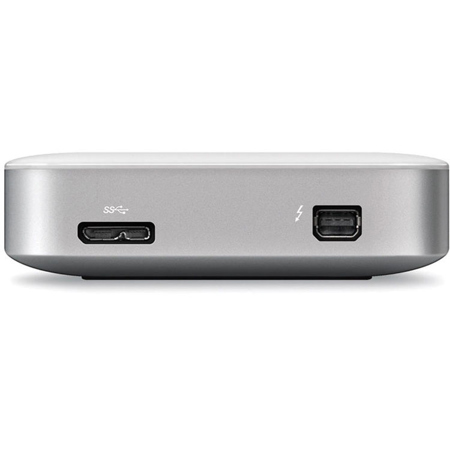
MiniStation Thunderbolt offers easy plug-and-play storage, featuring the revolutionary Thunderbolt interface for unparalleled transfer speeds and a USB port for universal connectivity. With speeds up to 10 Gbps, MiniStation Thunderbolt offers speeds 2X FASTER than USB 3.0. Perfect as a PC (Windows OS systems only supported using USB connection.) or Mac portable hard drive, the MiniStation Thunderbolt offers one of the fastest connection interfaces available.
Thunderbolt interface delivers extremely fast transfer speeds up to 10 Gbps for Mac users
USB 3.0 offers universal connectivity for Windows PCs
Plug-and-play setup provides easy to use storage and quick capacity expansion
Pre-formatted for Mac
Time Machine support offers scheduled backups for protecting Mac computers
Unparalleled Speed
The MiniStation Thunderbolt portable hard drive features the revolutionary Thunderbolt storage technology, raising the bar on how you transfer, store and transport data. Delivering speeds up to an amazing 10 Gbps, this portable Thunderbolt drive uses the fastest interface available, 2X FASTER than USB 3.0, ideal for creative professionals and multimedia enthusiasts. Additionally, daisy-chain up to six Thunderbolt devices to maximize use of a single port (MiniStation Thunderbolt does not have a Thunderbolt pass-through port so it must be the last device on a daisy-chain).
Easy To Use Storage
MiniStation Thunderbolt provides reliable, easy to use portable storage to quickly expand the capacity of your PC or Mac computer with Thunderbolt support and universal USB 3.0 plug-and-play connectivity.
USB Compatibility
Coupled with the lightning-fast Thunderbolt interface is a USB 3.0 port for universal connectivity and backwards compatibility with USB 2.0. The MiniStation Thunderbolt portable hard drive is pre-formatted for Mac computers but can easily be reformatted for use with PCs (Windows OS systems only supported using USB connection.).
Time Machine Backup
The MiniStation Thunderbolt portable hard drive is pre-formatted for use with Mac and compatible with Time Machine for complete data backup. Schedule backups and automatically protect your important files with this powerful Mac portable hard drive.