


+8
more
more

See Options
Need help? Ask our experts.
The Most Compact Thunderbolt 5 Hub
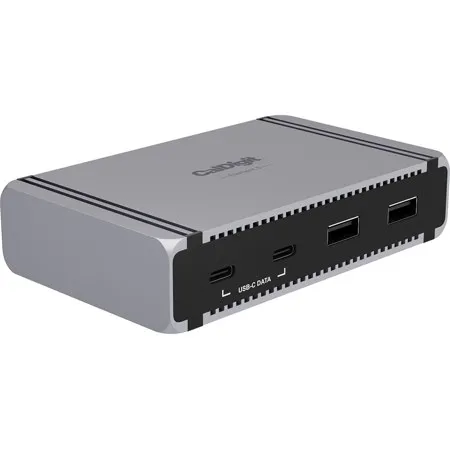
The CalDigit Element 5 Hub (E5) is a truly unique device. It features more ports than any other Thunderbolt hub. It does this while also maintaining the exact same compact size as the previous Thunderbolt 4 Element Hub. With a wide selection of powerful ports, it is an ideal solution for expanding workflows, while taking up minimal desk space. Even though the device is compact, it includes features found in high-end docks, such as 90W of consistent host charging, up to 120Gb/s connectivity, and support for up to 3 displays on supported Windows Thunderbolt 5 PCs. Connect what you need, when you need.
Not Your Average Hub
Traditional USB hubs are mostly equipped with low performing ports, or ports with insufficient power delivery in order to keep your devices charged. The Element 5 Hub allows you to have both great performance, and consistent power, thanks to the up to 120Gb/s throughput of Thunderbolt 5.
Total Compatibility
When you have such a powerful hub you also need the flexibility to use it with any device. The Element 5 Hub is compatible with Thunderbolt 5, Thunderbolt 4, Thunderbolt 3 Macs, USB4, USB4 v2, and USB-C devices. This also includes USB-C or Thunderbolt iPads, iPhones, Windows tablets and more.
Thunderbolt 5
The benefit of a Thunderbolt 5 hub is that you can connect many types of devices to it. The Element 5 Hub features 3 downstream Thunderbolt 5 ports that can connect to monitors, fast external storage, and more. The 15W performance of the downstream Thunderbolt 5 ports means you can charge and power devices much faster than USB hubs.
Define Your Connectivity
The simplicity of the Element 5 Hub's four Thunderbolt 5 ports allows you to create the hub that you want. Don't be confined by pre-built hubs. Use the Thunderbolt 5 ports to connect what you want. Need to connect multiple SSDs, SD card readers, RAID storage, triple 4K monitors? No problem. The Element 5 Hub is a blank canvas ready to be populated with the devices you need.
Faster than Your Average Hub
The Thunderbolt 5 ports on the Element 5 Hub provide up to 6,200MB/s performance for your external storage devices, which is double that of Thunderbolt 4, and much higher than typical USB hubs.
Versatile USB Ports
The versatility of having both USB-C and USB-A ports offers great convenience. All of the USB ports on the Element 5 Hub offer 10Gb/s performance, and 7.5W of power. This is an ideal option for connecting high performance USB-C SSDs to the hub. Don't forget that you can also connect USB-C devices to the Thunderbolt 5 ports.
Connect up to Triple or Quad Displays
Thunderbolt 5 allows for 3 external monitors to be connected to a Thunderbolt 5 host computer that supports triple displays, such as the MacBook Pro with M5 Pro. With an M5 Max, the Element 5 Hub can even support up to 4 external monitors from a single connection by either directly connecting 3 displays, and daisy-chaining the 4th display, or by connecting one display and adding 3 more to the daisy-chain.
Bandwidth Boost
When you connect bandwidth intensive monitors to the Element 5 Hub it will enable Bandwidth Boost in order to prioritize displays, and provide up to 120Gb/s performance. This will then keep 40Gb/s for the rest of the dock. The great thing about this is that it will allow for higher refresh rate displays to be connected to the device, as well as three 4K 60Hz displays on Windows Thunderbolt 5 PCs.
Single, Dual, Triple or Quad Displays
Whether you need a high-resolution display, a high-refresh rate display, or up to 4 external displays, the Element 5 Hub has you covered.
Single Monitor
If you're looking to add a single monitor to the Element 5 Hub you can connect it to one of the spare Thunderbolt 5 ports. If you wish to connect an HDMI monitor you can use a USB-C to HDMI Adapter.
Dual Monitors
• macOS users on base M5, M4, M1/M2/M3/M4 Pro, M1/M2/M3/M4 Max, M1/M2/M3 Ultra, or Intel based Macs can connect up to dual displays
• M1/M2/M3 based Macs are limited to 1 external monitor by design via their Thunderbolt ports
• Windows PC Thunderbolt 5 and Thunderbolt 4 users can connect up to dual displays
Triple Monitors
• macOS users on base M5, M4, M1/M2/M3/M4 Pro, M1/M2/M3/M4 Max, M1/M2/M3 Ultra, or Intel based Macs do not support triple displays
• macOS users on M5 Pro & M5 Max can connect triple displays
• Windows PC Thunderbolt 5 users can connect up to three displays on supported host computers
• Windows PC Thunderbolt 4 users cannot connect three displays natively
Quad Monitors
• macOS users on M5 Max can connect up to quadruple displays
Reversible Design
A great function of the Element 5 Hub's design is that it is reversible allowing you to be able to use it on either side of your laptop. This allows users to have more flexibility and freedom when designing their specific set-up.
iPads, iPhones & Windows Tablets
Not only is the Element 5 Hub compatible with laptops, it can be used with Thunderbolt or USB-C tablets and phones. This includes iPads and iPhones. You are no longer limited to connecting a single device to your table or phone's Type-C port. The Element 5 Hub will add up to 8 devices for next-level connectivity.
90W - Enough Power to Fast Charge your Apple Devices
Traditional USB hubs cannot compete with the Element 5 Hub's power delivery. This is thanks to the included power supply which provides a "sustained" 90W of power delivery at all times to the host device. USB hubs that claim up to 100W power delivery often reduce the actual power delivery based on how many USB devices are connected to it. Rest assured that this does not happen with the Element 5 Hub because of the included 180W power supply.
Docking Station Utility
Adding multiple devices to your hub is great but it can be a nuisance having to manually eject every storage device safely. To solve this problem we have created a macOS Utility Software that allows users to quickly and safely eject all of their storage devices with one click.
A Powerful Offline Charging Station
The Element 5 Hub can even work for you when it's not connected to your computer. Keep your USB-A or USB-C devices connected to the Element 5 Hub and it will continue to charge them. All 9 ports on the Element 5 Hub can be used at the same time for offline charging.
42% Smaller Power Supply
The Element 5 Hub's power supply is 42% smaller than the previous generation, and also 30W more powerful. This makes it even more convenient when travelling with the Element 5 Hub.
Apple SuperDrive
Many docks and hubs are not compatible with the Apple SuperDrive since it requires extra power from the connected USB port. In fact Apple recommends to connect it directly to a computer. CalDigit has solved this problem by creating a driver that will allow the SuperDrive to work through the Element 5 Hub.
https://www.caldigit.com/warranty
714-572-9889







