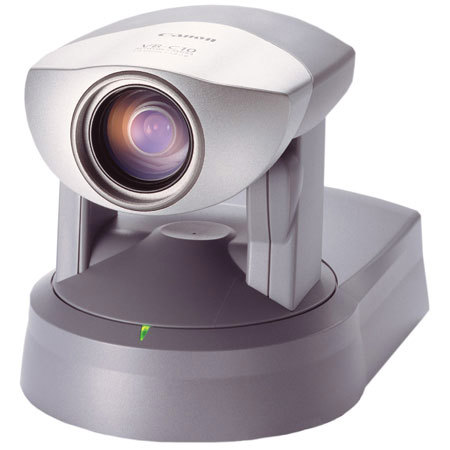
Canon VB-C10 Network Camera with Built-in Network Server, 16x Optical Zoom, 200° Pan 120° Tilt, 30 Frames Per Second Capture Rate, 5MB Storage Capacity
SKU: CAVBC10
This item is no longer available.
Share:
Overview
Compare
Learn
Specs
Protection
About Canon VB-C10
The Canon VB-C10 combines the benefits of an advanced Pan Tilt Zoom Camera and a Network Server in one compact unit. It is the ideal choice for webcasting and security monitoring.
Controllable Pan, Tilt & Zoom functions: 200º Pan (VB-C10R 340º Pan) 120º Tilt (VB-C10R 100º Tilt) 16x Optical Zoom. Horizontal view 47.5º - 3º. High Resolution image: 410K pixel CCD image sensor. Adjust image quality, capture rate and video image size to match the network environment: Capture smooth full motion video. 30 frames per second capture rate, at 320 x 240 pixels. Video capture sizes 160 x 120, 320 x 240, and 640 x 480. Compact size: Integrated server and compact pan/tilt/zoom base means the VB-C10 is never intrusive and easy to install. 4.4 x 4.2 x 5.6 inches (VB-C10). 4.4 x 5.4 x 5.6 inches (VB-C10R). Weighs only 1.4lb (VB-C10R 1.6 lb.)
Fast, quiet operation: Center mounted head delivers precision, high speed movement Pan 1-90º/sec, Tilt 1-70º/ sec. Automatic and Manual image controls: Manual and automatic focus and exposure controls. Automatic White-Balance. Wide angle of coverage: -Focal Length 4-64mm -Optional wide angle adapter to expand the view to 65º.
Sensor input and relay output terminal: Connect external devices such as door sensors or alarms to allow the unit to respond to external changes. Built-in Web Server and FTP Server: Compatible with different protocols to integrate easily into any network. Ethernet Terminal (10M/100M, auto negotiation). Compatible with all the following protocols: TCP/IP, HTTP, BOOTP, FTP, NTP.
Image capture and storage capabilities, either schedule based or sensor activated: 5MB internal storage capacity for captured still images. Automatically retrieve stored images with VBCollector software from a remote location. Customize camera control and image quality remotely with a wide array of software features using VBAdministration Tool software. VBAdministration Tools software: Quickly and easily set up preset camera positions and view-restrictions by eye. Keep accurate records of server operations, and view them with ease. Create Panorama Viewer templates for Panorama Image functions .
Also available as a free download from www.canondv.com> Panorama Image Function: Capture, store and integrate pictures into a single panorama image (similar to photo-stitch). User friendly panorama interface: When viewing the image remotely, you can choose the camera angle and zoom magnification simply by dragging a 'scope' box over any area in the panorama window. VBCollector software: Picture recorded on VB-C10 Pictures periodically collected according to the schedule set by VBCollector Downloaded pictures displayed, and stored on a local computer for easy access. Also available as a free download from www.canondv.com