


+1
more
more
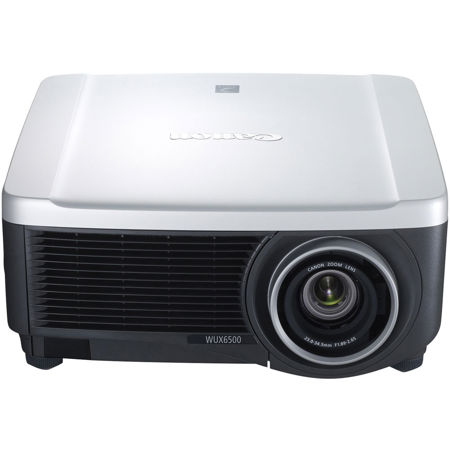

This item is no longer available.
The REALiS WUX6500 Pro AV LCOS Projector unites high resolution and brightness to create attention-grabbing displays with sharp, rich detail, exceptional contrast and outstanding color. Compatible with a variety of Genuine Canon REALiS interchangeable lenses, this projector is well suited for a wide range of applications such as large conference rooms, auditoriums, digital signage, simulation and training applications. The range of applicable industries for this projector is wide and includes higher education, corporate, museums and galleries, houses of worship as well as more.
Exceptional Image Quality
Offering a native, highly detailed WUXGA (1920 x 1200) resolution image, the WUX6500 produces bold widescreen images. Genuine Canon optics combined with Canon's advanced LCOS technology with AISYS-enhancement provide a high brightness of 6500 lumens, a 2000:1 contrast ratio and excellent color reproduction. With LCOS technology the space between pixels is relatively small for a smooth, realistic film-like quality so details are sharp and motion is natural.
Installation Convenience
The WUX6500 provides great versatility for installation. The motorized lens shift makes image adjustment easy, offering a wide range of vertical and horizontal shift, while advanced 4-point Keystone Correction allows independent corner adjustment for optimized performance. The projector can be configured with five optional Genuine Canon interchangeable lenses to help achieve the best high-resolution picture across a range of throw distances. Built-in edge blending also makes it possible to create impressive displays by joining multiple images from different projectors seamlessly.
Versatile Connectivity and Network Management
Connectivity is simple and versatile with comprehensive inputs covering multiple industry standard interfaces. As well as connecting video and sound via HDMI, DVI-I and audio inputs, the WUX6500 is equipped with a built-in HDBaseT receiver so uncompressed HD video, audio and control signals can be transmitted over a single network cable over a distance of up to 100 meters.
There are inputs for RS-232 control as well as RJ-45. A USB type A input makes installing firmware updates simple. The WUX6500 is also compatible with network management systems including PJLink, Extron, Crestron RoomView and AMX Device Discovery, allowing integration with existing systems to provide additional control and monitoring.
Peace of Mind
To provide additional piece of mind, the WUX6500 is backed by Canon's award-winning Professional Service & Support, which includes Canon's Lamp Based Projector and Lamp Limited Warranty (120 days lamp coverage) as well as an Advanced Warranty Exchange Service Program and a Service Loaner Program.
Up to 6500 Lumens and 2000:1 Contrast Ratio Delivers Bright, Engaging Images
This projector projects bright images up to 6500 lumens with up to a 2000:1 contrast ratio that helps ensure deep blacks, bright whites and outstanding color. The results are images with crisp depth and dimension and amazing color accuracy, which is critical to those with discerning needs.
Native WUXGA Resolution (1920 x 1200)
Canon's WUXGA resolution brings bright, true widescreen display of intricately detailed HD video content and still images with outstanding color richness to large-room installations in high resolution WUXGA (1920 x 1200) at a competitive price. Content is projected without compression. Widescreen graphics, text and other visual content from laptops and desktop computers are shown in accurate proportions, just as it appears on most monitor screens.
LCOS Technology with AISYS-enhancement
The exceptional imaging performance of this projector starts with Canon's proprietary AISYS (Aspectual Illumination System) Optical Engine, which utilizes advanced light management technology to maximize the contrast and brightness benefits of the projector's LCOS (Liquid Crystal on Silicon) display panels. The result is highly detailed, seamless, ultra-sharp image projection in virtually any environment.
HDBaseT
This projector is equipped with a built-in HDBaseT receiver facilitating uncompressed HD video, audio and control signals to be transmitted over one single LAN cable with a maximum distance of 100m. This reduces complex wiring schemes used for a typical setup as well as maximizing long cable runs with minimal image quality degradation. HDBaseT operation may vary when connected to other third-party HDBaseT devices. Please consult with a Canon representative for a full compatibility list.
Motorized Lens Shift
Motorized vertical (-55%, +15%) and horizontal (+/-10%) lens shift allows for adjustment of the image with virtually no distortion. This model is also equipped with motorized zoom and focus for further convenience and ease.
360-degree Vertical Installation
360-degree projection allows the projector to be positioned anywhere on the vertical axis. Fan speed can also be adjusted to help optimize results (depending on projector positioning).
4-point Keystone Correction
Allows the corners of the image to be independently adjusted to help ensure optimal image reproduction.
Lens Position Memory
Up to 3 different custom lens presets can be stored and memorized. Each preset includes information for a variety of lens settings.
• Zoom
• Focus
• Lens Shift
• Keystone
• Aspect
• Screen Color Adjustment
• Digital Image Shift
This is especially convenient for digital signage as this projector makes it easy to switch from one signage set-up to another. The lens presets can also be of use in education where the presets can be used to quickly change the settings from projecting on a screen to the settings needed for projecting on a blackboard.
Screen Color Correction
Enables users to fine-tune the colors of images based on the color of the projection surface. Adjustments can be made from Normal and Greenboard, as well as additional tuning for projecting onto virtually any other colored surface.
Test Patterns
27 test patterns are provided to enable smooth installation and adjustment.
Picture by Picture
A Picture by Picture feature enables two high-quality images from two digital inputs (via DVI and HDMI) to be projected simultaneously side-by-side within the projected image.
Multiple Image Modes for Optimal Image Quality Reproduction
This projector includes pre-set Image Modes and additional customizable Image Modes to suit a wide range of user preferences and projection environments.
Multiple Image Modes
Image Modes provide different variations of color reproduction characteristics suitable for the image type and projection environment. They include:
Standard
Ideal for bright rooms and when using content from computer screens or motion picture content.
Presentation
Ideal for somewhat bright rooms when text needs to be clear, such as when part of a video presentation.
Dynamic
Ideal for rooms that are somewhat bright and when showing motion picture content.
Vivid Photo
Ideal for rendering rich color brilliantly and reproducing skin tones naturally.
Photo/sRGB
Ideal for projecting images from sRGB-supported digital cameras.
Video
Ideal for rooms that are somewhat dark and for video content.
Cinema
Ideal for viewing theatrical image content in a room without lighting.
5 Customizable Modes
Ideal for custom set-ups. Provides up to 5 user-selected combinations of image quality settings that can be stored in the memory and selected as an image mode.
Motion Blur Reduction
This projector includes Canon's latest Motion Blur Reduction feature for improved visibility when movement is fast. By inserting extra frames to video content, motion blur is reduced and the clarity of graphics and text on fast-moving objects is preserved. Three different modes (Strong, Low and Off) are included for flexibility, with each depending on the level of movement and type of video content.
Advanced Professional Installation Settings including Built-in Edge Blending and Advanced Registration
A variety of advanced installation settings provide added customization options for challenging installation areas.
Edge Blending
The Edge Blending function enables the user to combine multiple images to create a seamless, extra-wide projection. Advanced functions allow for color blending and black level adjustments to maximize image quality.
Advanced Registration
Advanced Registration allows independent position adjustment of the three primary colors (RGB) with high accuracy (0.1 pixel) ultimately reducing blurred colors or lines often projected at the edge of an image.
Micro-Digital Image Shift
The Micro-Digital Image Shift function shifts the image electrically, using the surplus pixels on the LCOS panel.
Registration
The Registration function modifies the registration by electronically correcting color shift due to changes in alignment of each RGB panel position.
Fan Mode
Fan Mode gives the user the ability to adjust the fan speed to support different environmental workspaces.
Vertical Projection
The Vertical Projection function automatically adjusts fan speeds and other configurations to support vertical installations.