


This item is no longer available.
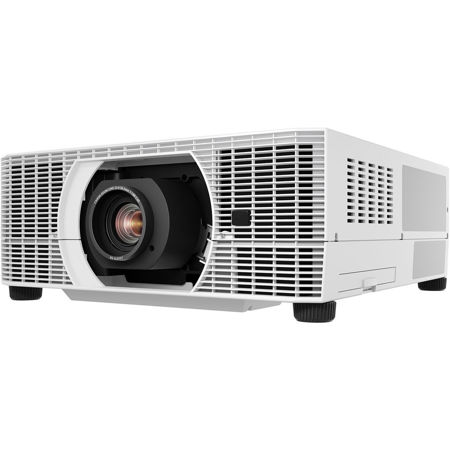
The REALiS WUX6700 LCOS Projector combines exceptional image quality, high brightness and superb quietness at only 27db, along with a wide range of interchangeable lens options and advanced features in an innovative design. The REALiS WUX6700 is ideal for higher education, corporate applications, advertising, marketing, houses of worship, simulation, training, museums, galleries and more. Its low-noise operation makes it especially suitable for quiet environments such as higher education and medical fields.
Exceptional High Image Quality
Native WUXGA (1920 x 1200) resolution enables a highly detailed image in a large, widescreen display with both high brightness of 6700 lumens and a high contrast ratio of 2000:1. The REALiS WUX6700 features Canon's own, unique LCOS (Liquid Crystal on Silicon) technology with AISYS-enhancement, producing virtually seamless images with outstanding color reproduction and saturation. Advanced color management tools also allow independent color adjustment for highly detailed color control.
Flexible Installation
The REALiS WUX6700 offers a center lens design and is compatible with six interchangeable Genuine Canon lens options. These lenses provide consistent brightness and superior stability for a variety of applications and can be fitted easily, in seconds, thanks to their convenient spigot design.
The six lenses include the Ultra Short Fixed lens RS-SL06UW, which is compatible with Marginal Focus for accurate projection onto a curved surface and features a throw ratio of 0.54:1 with a generous lens shift (-15% - 75% vertical, +/-30% horizontal). The REALiS WUX6700 is designed to help reduce fan noise for quiet operation (up to 27 decibels).
Versatile Connectivity and Network Management
A comprehensive range of industry standard interfaces provide all you need for convenient, user-friendly connection. Inputs include HDBaseT, HDMI, DVI-I, DisplayPort, USB Type A, RJ-45, RS-232, audio inputs and Network Multi Projection (NMPJ) over Wi-Fi.
Up to 6700 Lumens and 2000:1 Contrast Ratio Delivers Bright, Engaging Images
The projector projects bright 6700 lumen images with up to a 2000:1 contrast ratio that helps ensure deep blacks, bright whites and outstanding color. The results are images with crisp depth and dimension and amazing color accuracy, which is critical to those with discerning needs.
Native WUXGA Resolution (1920 x 1200)
Canon's WUXGA resolution brings bright, true widescreen display of highly detailed HD video content and still images with outstanding color richness to large-room installations in high resolution WUXGA (1920 x 1200) at a competitive price. Widescreen graphics, text and other visual content from laptops and desktop computers are shown in accurate proportions from edge to edge with sharp detail.
LCOS Technology with AISYS-enhancement
The exceptional imaging performance of the projector starts with Canon's proprietary AISYS (Aspectual Illumination System) Optical Engine. This engine utilizes advanced light management technology to maximize the contrast and brightness benefits of the projector's LCOS (Liquid Crystal on Silicon) display panels, which deliver superior reflectivity and durability while accomplishing high luminance. The result is highly detailed, seamless, ultra-sharp image projection in virtually any environment.
Multiple Image Modes including DICOM Simulation Mode for Optimal Image Quality Reproduction
The projector includes pre-set Image Modes and additional customizable Image Modes to suit a wide range of user preferences and projection environments.
Multiple Image Modes
Image Modes provide different variations of color reproduction characteristics suitable for the image type and projection environment. They include:
Standard
Ideal for bright rooms and when using content from computer screens or motion picture content.
Presentation:
Ideal for somewhat bright rooms when text needs to be clear, such as when part of a video presentation.
Dynamic:
Ideal for rooms that are somewhat bright and when showing motion picture content.
Photo/sRGB:
Ideal for projecting images from sRGB-supported digital cameras.
Video
Ideal for rooms that are somewhat dark and for video content.
Cinema:
Ideal for viewing theatrical image content in a room without lighting.
5 Customizable Modes
Ideal for custom set-ups. Provides up to 5 user-selected combinations of image quality settings that can be stored in the memory and selected as an image mode.
DICOM Simulation Mode
Ideal for displaying medical images in non-diagnostic settings. Both Blue Base and Clear Base settings are supported.
Image Adjustment and Advanced Adjustment Options for Customizable Image Characteristics
The projector offers extensive image quality adjustments to help users customize the image to meet their specific projection needs.
Image Adjustments
The Image Adjustment settings allow users to customize the image and color characteristics to fulfill their specific imaging needs. These include:
• Brightness
• Contrast
• Sharpness
• Gamma
• Color Adjustments (Color Level, Color Balance, Color Temperature, Gain (RGB), Offset (RGB))
Advanced Image Adjustments
These adjustments provide greater flexibility to professional users with more options to adjust the image as desired. These settings include:
Ambient Light:
This technology allows the user to select the color temperature, lamp type and other characteristics that are in the active environment.
Random Noise Reduction
This feature eliminates minute noise that may appear in the image.
MPEG Noise Reduction
This feature eliminates block noise that may appear when playing back compressed digital images and "mosquito noise" that may appear in a dot pattern near the edges.
Mosquito Noise Reduction
This feature eliminates "mosquito noise" exclusively from still images.
Dynamic Gamma:
When applied, this feature analyzes individual areas of the image for specific, independent contrast adjustment so light and dark areas do not appear over- or under-exposed.
Memory Color Correction
This Canon technology can be used to enhance skin tones and other color features for rich, vivid results that look striking to the human eye.
6-Axis Color Adjust:
This technology lets users fine-tune the hue and saturation of each of the primary and secondary colors, providing a high degree of control that can make each projected image a "masterpiece."
Fine-tune Gamma:
This setting enables the adjustment of gamma curve, allowing the user to adjust white, red, green and blue.
Motion Blur Reduction
The projector includes Canon's latest Motion Blur Reduction feature for improved visibility when movement is fast. By inserting extra frames to video content, motion blur is reduced and the clarity of graphics and text on fast-moving objects is preserved. Three different modes (Strong, Low and Off) are included for flexibility, with each depending on the level of movement and type of video content.
Quiet Operation as Low as 27dB
The projector design allows air-cooling fans to be muted, which helps achieve quiet operation as low as 27dB with brightness adjustments. This provides a distinct advantage in environments such as schools, hospitals and galleries or anywhere noise and distractions need to be kept to a minimum.
Advanced Professional Installation Settings including Built-in Edge Blending and Advanced Registration
High Altitude:
If the projector sits in high land over 2300 meters above sea level, High Altitude mode enables faster fan speeds to prevent overheating.
Edge Blending:
The Edge Blending function enables the user to combine multiple images to create a seamless, extra-wide projection. Advanced functions allow for color blending and black level adjustments to maximize image quality.
Micro-Digital Image Shift
The Micro-Digital Image Shift function shifts the image electrically, using the surplus pixels on the LCOS panel.
Registration
The Registration function modifies the registration by electronically correcting color shift due to changes in alignment of each RGB panel position.
Fan Mode
Fan Mode gives the user the ability to adjust the fan speed to support different environmental workspaces.
Vertical Projection
The Vertical Projection function automatically adjusts fan speeds and other configurations to support vertical installations.
Built-in Real-time Clock
The built-in Real-time Clock allows scheduling of specific operations such as set startup and shutdown at chosen times. This helps to manage power consumption by creating operating schedules which can result in extended projection life. For convenience, Real-time Clock settings can be accessed via the projector's own user-friendly graphical interface.
- RS-SL01ST Lens -
Designed for select REALiS projectors, this interchangeable lens incorporate Genuine Canon optics for outstanding color, clarity and performance. It feature a one-touch spigot type design so they can be installed quickly and securely. The lenses are also engineered to virtually eliminate brightness variation.






