
This item is no longer available.
Review Summary
2018-04-16T20:00:00
I bought few years ago, and it lose connection with my old computer frequently. I thought there was a defect in this mouse... Few years later, I changed my laptop to Surface Pro, and surprised to find a seamingless bluetooth connection with the mouse. It turnned out that problem was the laptop, not this mouse. As most of the laptop does not have individaul key pad, this mouse can be very special...I benefited while calculating my tax report. Having a keypad in mouse is truly an innovation.
John11122

2015-07-27T20:00:00
This mouse was a good idea, and should have been useful for me. I bought one completely sealed from a guy who had a spare one. Unfortunately, I now discover it needs a specific Canon BT dongle to work! Even though I have built in BT it will not work with any generic dongle, of which I have three. Strangle, it will also not work with the Canon Pixma printer dongle either. A real disappointment to me, as a long time Canon devotee :( Makes a good paperweight though!
Canon f.
2015-04-06T20:00:00
This mouse is great on any Windows platform below Windows 8 I loved it so much that I bought another when I purchased my new laptop which is an ASUS. Now my favorite mouse is better off as a paper weight. It disconnects in the middle of work and will not reconnect unless you go to bluetooth settings and click on the Canon X Mark Mouse Icon...Obviously you must do this with your touchpad...lol Then just when you think its working again it freezes.... No drivers for this device exist so I guess its going in desk drawer until i need a paperweight
FlipFlop
2015-01-07T19:00:00
I've had a love hate relationship with my Mark 1 mouse for a few years now. I'll need it for the data entry or calculator key functions, but then I shelve it for the next 4-6 months due to frustration over intermittent operation. The mouse freezes. It locks up and requires the PC ON switch to be recycled and a number of jabs at the ESC key on my keyboard in order to get it going again. When I am using it I have kept a USB mouse handy so I can plug it in and turn off the Mark 1 when my disgust reaches saturation. The mouse is functionally perfect, has a fine laser resolution, is fantastic for keying in numbers, offers a backspace key, great CAL function, a great fit in the hand, moves and tracks well, firm clicks on the scroll wheel and L/R buttons. One of the most perfect interface devices made - IF ONLY IT WORKED CONSISTENTLY :(
xanadu
2014-03-12T20:00:00
I bought two of these, one for home and one for the office. they worked great for a while, but after 6 months or so one of them will no longer connect via bluetooth and the other one has lost the springiness to the right button so it gets actuated at random times. The calculators work great though if you need a small 4-function calculator with a non-standard keypad size.
John
2014-01-22T19:00:00
I’ve had this mouse for about a year. When this mouse was connected to my netbook running windows 7, it was laggy and sometimes unresponsive. I tried connecting it to my regular laptop (also Windows 7, and as other users have experienced, it would have difficulty reconnecting after it was used and went into hibernation. I just received a new CAD workstation laptop (Precision M3800) running Windows 8.1. Unfortunately this workstation doesn’t have a keypad – which makes solid modeling numeric input difficult. As an interim fix, I decided to try the Canon Mark I mouse. The mouse worked flawlessly – completely opposite of my past experience. The mouse is responsive and accurate. Now, there are also no connectivity issues after the mouse hibernates after a few minutes without use (as there were previously). Now, here this mouse really shines – the number pad and calculator! There is a “CAL/KP” key to switch it from a calculator to a keypad. When in calculator mode, you can crunch numbers, then press “Enter” and it will send the computed value to your solid modeling application (so far I’ve tried it with Solidworks and Inventor). Or you don’t press enter, and it doesn’t send anything to your computer – it just works as a calculator. When in keypad mode, you can use it as a keypad and have it provide input real-time. And an added bonus is having the option to just hit the “Enter” key after you’ve performed an action in the CAD software – completely unrelated to any numeric input. As for ergonomics, the buttons must be pressed directly down, not forward. This allows you to rest your palm on the key pad (with reasonable pressure) without activating any of the keys due to the slope of the profile. Great foresight on Canon's part with this design. Overall I’m pleased with this mouse’s features, and I’m happy I didn’t throw it away after seeing its behavior with Windows 7.
Sam H.
2013-06-26T20:00:00
who sells a bluetooth mouse without a bluetooth dongle option? it seems canon. i even have a bluetooth computer and it is sporadic at best to link. how would you like working on files and your mouse freezes with no way to link back up since it's frozen. if you dont offer a dongkle option tghen stop selling these.
cb6352
2013-01-29T19:00:00
I tried it on Windows 7 pro SP1, 64 Bit As others have said, when it goes dormant, it no longer responds. Double left click does not reactivate. Switching on and off does not reconnect. Troubleshooting does not find any issues and selecting properties states no mouse was found. Without deleting the device from Bluetooth devices and adding it again, it will not function. It is essentially a paperweight that looks like a mouse.
ABooth
2013-01-19T19:00:00
- in case you have no Num Pad it enables a quicker numerical data entry - connectivity and instalation under Windows 7 OK, quick - i would welcome more functional keys (on the sides e.g.
jan v.
2013-01-06T19:00:00
I've been trying to connect the mouse for most of the morning to my Win7 laptop. The computer shows that the mouse is connected but cannon populate any of the device info including the MAC address. The pointer does not work and the mouse keep flashing the BT icon like its still looking for the computer. Also the button to switch from calculator to KeyPad does nothing. Its just a way over priced calculator or a Tecky paper weight.
Dave
2013-01-01T19:00:00
Disconnected from the bluetooth device at first which was annoying but livable. Then quit connecting at all.
kalmkeyth
2012-11-05T19:00:00
This is a really cool mouse, but as others have stated, if you leave your computer for an extended period of time, the bluetooth connection drops and the only way to re-connect the mouse is to delete the device from your Bluetooth manager and re-pair the device. Let's hope Canon submits a fix for this soon.
NML
2012-08-31T20:00:00
The bluetooth connection is unreliable. If you decide to take a break from working and come back, you'll fnd that the connection is lost. The only way to get the mouse to function again is to remove the batteries and possibly reinstall it. I've had this for a day, and I've already had to do this 3 times. I would not recommend this product to anyone.
Michelle
2012-06-10T20:00:00
This device would otherwise make a great productivity tool if not the for problem stated in the title line, so much so I consider it useless! When it connects to the host (i.e. a PC or a notebook computer) it works great in all aspects until it disconnects itself from the host in auto shut-off mode (to conserve battery power I assume). After which point it could not reconnect with the pairing PC/Notebook unless the hosting PC/notebook goes through the device removal, pairing and connecting cycle each time the connection is lost. There is no way to force the device to stay connected let alone to hope for a simple reconnect capability. Not a practical device to use on a regular basis.
specware
2012-05-08T20:00:00
The Canon Mark I combination Mouse/Keypad functions well as a mouse; tracking seems crisp and responsive. Bluetooth pairing was simple, with no drivers were required. Due to the small size of the the device, the Calculator/Numberpad can be a bit cramped; while convenient for travel and occasional use, a dedicated full-size pad may be better for heavy users. In addition, the numberpad cannot be used to enter special character Alt-number codes.
Guppy
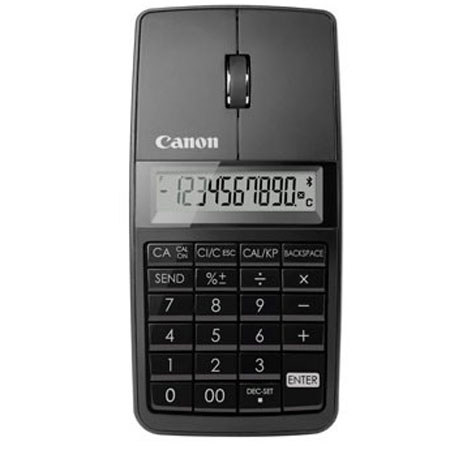
The Canon X Mark I Mouse Slim Computer Link Calculator (Black) is a remarkable, lightweight 3-in-1 device that serves as a wireless mouse, 10-digit calculator and keypad. Equipped with a 1200 dpi laser, the X Mark I Mouse Slim delivers precise and smooth cursor control along with a beautiful, sleek design. Whether you're using the X Mark I Mouse Slim as a mouse to move your cursor on a PC or Mac, a calculator to crunch numbers for a report, or a keypad to enter data into a spreadsheet, the X Mark I Mouse Slim comfortably compliments the contours of your hand to provide easy access to its functions. Nylon pouch case is included.