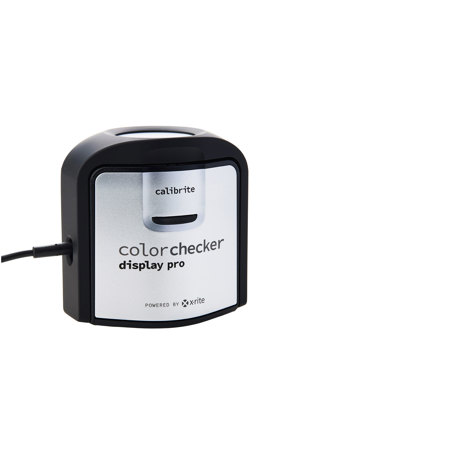
Calibrite ColorChecker Display Pro with ColorChecker Classic Mini
SKU: CBCDIS3MN
This item is no longer available.
Share:
Overview
Compare
Specs
Protection







About Calibrite ColorChecker Display Pro
The Calibrite ColorChecker Display Pro powered by X-Rite is the ultimate solution for Creative Perfectionists who demand speed, options and flexibility to attain color accuracy.
Color Perfectionists know that a calibrated and profiled display is a critical element in an efficient digital workflow. Nobody wants to spend hours at their monitor perfecting images or video only to find that their display wasn't accurately representing their digital files. What you see on your monitor (or projector) has to match your digital file or you will never be happy with the result, no matter how much time you devote to perfecting it.
In our world, perfection is not too much to ask for. ColorChecker Display Pro delivers.
Enhanced features include:
Technologically advanced and ergonomic multi-functional measurement device.
ccProfiler software powered by X-Rite, for calibrating and profiling all modern laptop, desktop monitor and projector technologies, such as LED, Plasma, RG Phosphor, OLED and Wide Gamut
- ColorChecker Classic Mini: -
Photo Color Control from Capture to Edit
• Replaces the X-Rite ColorChecker Mini (MSCCMN-RET)
• A standard 24-patch ColorChecker target in a handy credit card size
• 6 grayscale patches; RGB and CMYK colors, and a mix of everyday colors for great results
• Can be used with the ColorChecker Camera Calibration software to create ACR or ICC profiles
The ColorChecker target is an array of 24 scientifically formulated colors that have been the leading industry color reference target for more than 40 years. It is designed to deliver true-to-life color reproduction so that photographers and filmmakers can predict and control how color will look under any illumination.
Taking advantage of a ColorChecker target is easy. Simply include the ColorChecker in your photo or video capture, and then, later, while editing use it to compare, measure and analyze differences in color reproduction in any color rendition system.
Perfect Color And More Control Than You Ever Thought Possible
Color Perfectionists shouldn't guess when it comes to on-screen color accuracy. The color you see on your monitor or projector is the color you should expect from your printer. Once you take the guesswork and frustration out of calibrating and profiling your displays, you'll save time and money while gaining full creative control over your images.
And now, with the ability to change the color grading of video footage growing by leaps and bounds the necessity for accurate color representation on screen is even more paramount. The only way to edit video accurately is to view your footage accurately. With the included video color standards you can also make sure that what you see is what you'll get throughout your digital video workflow.
State of the Art Instrument for Unrivalled Color Measurement Accuracy
Calibrite ColorChecker Display Pro powered by X-Rite incorporates technologically advanced filter and optical systems, amazingly fast measurement speed, and unrivalled color accuracy on all modern display technologies including LED & Wide Gamut LCDs. It's also spectrally calibrated, which makes it field upgradeable to support future display technologies.
The ultra-modern ergonomic design incorporates three functions - ambient light measurement, monitor profiling, and projector profiling - into a very sleek, compact and fully integrated device with no parts to misplace.
• Intuitive all-in-one design is very easy to use
• Compact and self-contained for maximum portability
• Custom-designed RGB filter set provides accurate color measurements
• Optical design allows for high repeatability on the same display and across different display types for more consistent color matching
• Rotatable diffuser arm can be used as a stand for tabletop projector profiling, ambient light measurement and as a cover for instrument optics
• Conveniently integrated tripod mount for projector profiling in larger venues
Calibrite ccProfiler software powered by X-Rite with "Basic" and "Advanced" Mode Flexibility
The color management software offers the ultimate flexibility and control. "Basic" mode offers a wizard-driven interface with predefined options for the quickest path to professional on-screen color. "Advanced" mode offers user-defined options for more sophisticated profiling workflows to deliver the highest quality color results on monitors and projectors, as well as display testing and quality assurance tools. No matter which mode you use, you'll be able to attain professional color results for a more perfect match between your display and printer.
Features
Monitor Profiling:
• Calibrate and profile all modern laptop and desktop monitor technologies, such as LED, Plasma, RG Phosphor, OLED and Wide Gamut
• Infinite control: white point, luminance, contrast ratio, gamma and more
• Broadcast video standards support: NTSC, PAL SECAM, and ITU-R Rec.BT.709
• Ambient Light Measurement: automatically determine the optimum display luminance for comparing prints to your display, based on a measurement of the lighting conditions where prints will be viewed
• Ambient Light Smart Control: the intensity or amount of ambient light surrounding your workspace affects the way you perceive colors on your display. ColorChecker Display Pro can compensate for this effect and provide the option to automatically adjust your profile or simply notify you as ambient light conditions change
• Flare Correct: measures and adjusts your display profile for reduced contrast ratios caused by flare light (or glare) falling on the surface of the display. By accurately measuring your effective display contrast ratio, you'll have an even more accurate display profile
• Intelligent Iterative Profiling: an adaptive technology that produces optimized results for maximum color accuracy on each unique display every time you profile
• 3 patch set sizes: small, medium, or large - allow you to increase your profile accuracy by measuring a higher number of patches
• Profile optimization: create custom patch sets to optimize your profiles by choosing a combination of patch set size, extracted colors from specific images and/or PANTONE spot colors selected from the included PANTONE Color Manager software
• Workflow Flexibility: advanced user-defined controls support more sophisticated workflows. For example, White Point can be set from predefined values, custom xy values, based on measurement of ambient light, based on measurement of another display, or from previously measured values, etc.
• Multiple Display and Workgroup Matching: re-use profile settings on multiple displays connected to the same computer or to multiple computers within a workgroup
• Before and after images show instant results: using one of our images or your own
• Profile reminder: notifies you when it is time to re-profile your display
• Easy to follow on-screen help guides and videos - no extra manuals needed
Projector Profiling:
• Quickly and accurately create projector profiles to show your images on the big screen with color confidence
• Intelligent adaptive profiling technology for maximum color accuracy from each unique projector
• Compact device for maximum portability on location
• Diffuser arm adjusts to a stand for table top applications
• Conveniently integrated tripod mount for larger venues
Display QA Workflow:
• Visual validation using pre-defined and user defined images
• Measurement based validation using industry standard targets and reference data sets (SWOP, Gracol, Fogra, etc.)
• Measurement based validation using PANTONE color and libraries
• Measurement based validation using colors extracted from user defined images
• User defined PASS/FAIL Delta-E tolerance for average and maximum values
• Color accuracy trending over time (per connected display)
Display Uniformity Test:
• Measure white point and luminance uniformity over 9 locations on display
• User defined PASS/FAIL tolerance
Calibrite ColorChecker Display Pro Features
- ColorChecker Pro Features
- Professional quality monitor profiler with easy-to-use software
- Ideal for photographers, designers and content creators that demand high levels of detail
- Basic and advanced user-level interface
- Replaces the X-Rite i1 Display Pro (EODIS3)
- ColorChecker Classic Mini Features
- Create camera profiles, check images, correct white balance and perform color correction
- ColorChecker Camera Calibration Software allows camera calibration using Adobe Lightroom and Photoshop in addition to Capture One
- ColorChecker targets are ideal for creating custom camera profiles (DNG and ICC), correcting neutral balance and exposure, and provides a standard for color corrections
- Use for color grading; check cameras and lights - Graphic Arts: Check any printing or proofing process
- Easy to carry compact target size 2.5 x 4.3"