This item is no longer available.
Review Summary
IEEE 802.11ac, 802.11n, 802.11g, 802.11b, 802.3, 802.3u, 802.1D, 802.1p, 802.1w (Rapid Spanning Tree), 802.1X (security authentication), 802.1Q (VLAN), 802.11i (Wi-Fi Protected Access [WPA2] security), 802.11e (wireless QoS), IPv4 (RFC 791), IPv6 (RFC 2460), Routing Information Protocol (RIP) v1 (RFC 1058), RIP v2 (RFC 1723)
LAN, WAN, USB, console
Power button (on, off)
Reset, Wi-Fi on, off
Category 5e or better
Power, DSL and WAN, Internet, LAN (ports 1-4), wireless, VPN, USB
Linux
Dynamic Host Configuration Protocol (DHCP) server
4x 10/100/1000-Mbps LAN ports with a managed switch
1x 10/100/1000-Mbps GE WAN port
1x VDSL2
Static routing
Dynamic routing
RIP v1 and v2
Inter-VLAN routing
Port Address Translation (PAT), Network Address Port Translation (NAPT) protocol
Port Address Translation (PAT), Network Address Port Translation (NAPT) protocolNAT
Port-based and 802.1Q tag-based VLANs
6 active VLANs (2-4094 range)
Dual-stack IPv4 and IPv6
6rd
Stateless address auto-configuration
DHCPv6 server for IPv6 clients on a LAN
DHCPv6 client for WAN connectivity
Internet Control Message Protocol (ICMP) v6
Static IPv6 routing
Dynamic IPv6 routing with RIPng
Software-configurable to any LAN IP address
Software-configurable to any LAN IP addressDMZ
802.1Q-based VLANs, 6 active VLANs
Stateful packet inspection (SPI) firewall, port forwarding and triggering, denial-of-service (DoS) prevention, software-based DMZ
DoS attacks prevented:
SYN Flood
Echo Storm
ICMP Flood
UDP Flood
TCP Flood
Block Java, cookies, active-X, HTTP proxy
IP access control lists; MAC-based wireless access control
Static URL blocking or keyword blocking
HTTPS, username and password complexity
WPS
WPSWPS
2 levels of access: admin and guest
802.1p port-based priority on LAN ports, application-based priority on WAN ports
4 queues
Differentiated Services Code Point support (DSCP)
Class of Service (CoS)
Bandwidth management for service prioritization
750 Mbps (Ethernet WAN)
7500
20 Mbps
20 Mbps(3DES, AES)
Simple, browser-based configuration (HTTP, HTTPS)
Command line using SSH
Command line using SSHCLI
Command line using SSH
Web browser, Bonjour, Universal Plug and Play (UPnP)
Local, syslog, email alerts
Ping, Traceroute, DNS lookup, and Port Mirror
Firmware-upgradable through web browser, imported or exported configuration file
Supports NTP, daylight savings, manual entry
GUI supports English
802.11b: direct sequence spread spectrum (DSSS), 802.11g: orthogonal frequency division multiplexing (OFDM), 802.11n: OFDM
, 802.11ac: OFDM
5-GHz 802.11ac, 2.4-GHz IEEE 802.11n standard-based access point with 802.11b/g compatibility
11 North America, 13 most of Europe, auto-channels selection
Wireless isolation between clients
4
2 dBi
2.4 GHz
802.11b: 19d Bm +/- 2.5 dBm
802.11g: 17 dBm +/- 2.5 dBm
802.11n: 15 dBm +/- 2.5 dBm
5 GHz
802.11a: 15 dBm +/- 2.5 dBm
802.11n: 14 dBm +/- 2.5 dBm
802.11ac: 12 dBm +/- 2.5 dBm
2.4 GHz
-86 dBm at 11 Mbps, -74 dBm at 54 Mbps
-68 dBm at mcs15, HT20
-65 dBm at mcs15, HT40
5 GHz
-74 dBm at 54 Mbps
-68 dBm at mcs15, HT20
-64 dBm at mcs15, HT40
-64 dBm at mcs8nss=2, VHT20
-59 dBm at mcs9nss=2, VHT40
-57 dBm at mcs9nss=2, VHT80
Dual-band 2.4 GHz and 5 GHz
Supports up to 100 concurrent clients
Supports multiple Service Set Identifiers (SSIDs),
4 SSIDs per radio (band), 8 SSIDs in total.
Supports SSID to VLAN mapping with wireless client isolation
Wired Equivalent Privacy (WEP), WPA, WPA2-PSK, WPA2-ENT, 802.11i
WMM, WMM power save (WMM-PS)
WMM, WMM power save (WMM-PS)WMM
12 V/2.5 A
FCC, CE, IC, Wi-Fi
0 to 40 deg. C (32 to 104 deg. F)
-20 to 70 deg. C (-4 to 158 deg. F)
10% to 85% non-condensing
VDSL2 Connectivity for Small Businesses
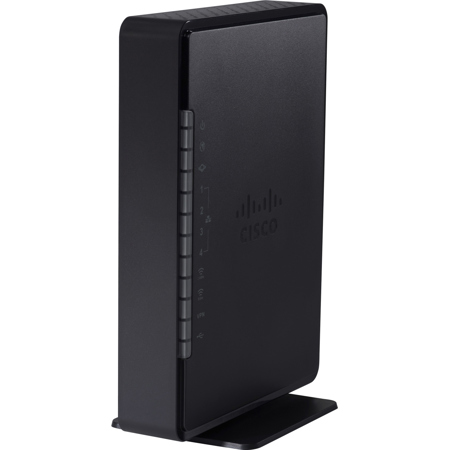
When you need Very High Bit Rate Digital Subscriber Line 2 (VDSL2) business networking connectivity, the Cisco RV134W VDSL2 Wireless-AC VPN Router is an ideal product. This model offers a robust firewall and VPN for highly secure communications. Its Ethernet WAN port makes it a flexible solution. Like Cisco RV132W Wireless-N ADSL2+ VPN Router, the RV134W offers networking in a single box. The RV134W can connect to a VDSL2 interface or to a regular Ethernet WAN interface. The router supports the free Cisco Small Business FindIT Network Discovery Utility, which allows for automatic discovery and one-click software downloads.
IPsec VPN security
Wireless-AC access point
Built-in four-port Gigabit Ethernet (GE) switch
VDSL2 connectivity
GE WAN
USB 3G/4G/LTE
Limited lifetime warranty
Industry-leading support
Internal antennas
Sleek new design