This item is no longer available.
Review Summary
Accidents happen where life happens. Protect your favorite Adorama products and purchase a protection plan to stay covered from accidental damage, mechanical or electrical failure, and more.
If we can’t fix it, we’ll replace it at no additional cost.
Protect your product from drops, spills, and more.
Enjoy your gear without fear. We have you covered!
When regular use of your product over time results in mechanical or electrical failure.
We will never charge you a deductible after the purchase of a plan.
Our claims process is simple & easy and our customer service team is happy to help.
Adorama Protect powered by Extend is available for purchase to customers in the United States. Not available for purchase Internationally or in U.S. Territories.
Browse our FAQ
IEEE 802.11ac, 802.11n, 802.11g, 802.11b, 802.3af/at, 802.3u, 802.1X (security authentication), 802.1Q (VLAN), 802.1D (Spanning Tree), 802.11i (WPA2 security), 802.11e (wireless QoS), IPv4 (RFC 791), IPv6 (RFC 2460)
Category 5e or better
Internal antennas optimized for installation on a wall or ceiling
Linux
5 - 10/100/1000 Ethernet, with support for 802.3af/at PoE, power port for AC adapter (not included)
802.3af/at PoE and external 48V/1.25A DC power adapter (not included)
Reset button
Slot for Kensington lock
One multi-function LED
Yes
1 management VLAN plus 16 VLANs for SSIDs
Yes
Yes
Yes
Yes
Yes
Yes (IPv6 host support, IPv6 RADIUS, syslog, Network Time Protocol (NTP))
802.1Q-based VLANS, 16 active VLANS plus 1 management VLAN
Yes, including Enterprise authentication
Yes, management access control list (ACL) plus MAC ACL
HTTPS
Yes
Yes
Mounting bracket included for easy mounting to junction box
Kensington lock slot
Wi-Fi Multimedia and Traffic Specification (WMM TSPEC), client QoS
Up to 1.2-Gbps data rate (real-world throughput will vary)
Up to 128 connective users, 32 active users per radio
Yes
8
240
Built-in web user interface for easy, browser-based configuration (HTTP, HTTPS)
Web browser, Simple Network Management Protocol (SNMP) v3, Bonjour
Yes
Local, remote syslog, email alerts
Logging and packet capture
Firmware upgradable through web browser, imported or exported configuration file
DHCP client
Yes
Yes
Dual concurrent radios (2.4 and 5 GHz)
Dual radio, orthogonal frequency division multiplexing (OFDM)
IEEE 802.11a/n: OFDM (BPSK, QPSK, 16 QAM, 64 QAM)
IEEE 802.11ac: OFDM (BPSK, QPSK, 16 QAM, 64 QAM, 256 QAM)
802.11n/ac
2x2 MIMO with 2 spatial streams at 5 GHz
2x2 MIMO with 2 spatial streams at 2.4 GHz
20-, 40-, and 80-Mhz channels for 802.11ac
20- and 40-Mhz for 802.11n
PHY data rate up to 1.2 Gbps
802.11 Dynamic Frequency Selection (DFS)
802.11a/b/g:
54, 48, 36, 24, 18, 12, 9, 6, 11, 5.5, 2, and 1 Mbps
802.11n: 6.5 to 300 Mbps
20-MHz bandwidth: MCS 0-15 for supported data rates
40-MHz bandwidth: MCS 0-15 for supported data rates
802.11ac: 6.5 to 867 Mbps
20-MHz bandwidth: MCS 0-9 for supported data rates
40-MHz bandwidth: MCS 0-9 for supported data rates
80-MHz bandwidth: MCS 0-9 for supported data rates
A Regulatory Domain:
2.412 to 2.462 GHz; 11 channels
5.180 to 5.240 GHz; 4 channels
5.260 to 5.320 GHz; 4 channels
5.500 to 5.700 GHz; 8 channels
5.745 to 5.825 GHz; 5 channels
E Regulatory Domain:
2.412 to 2.472 GHz; 13 channels
5.180 to 5.240 GHz; 4 channels
5.260 to 5.320 GHz; 4 channels
5.500 to 5.700 GHz; 8 channels
C Regulatory Domain:
2.412 to 2.462 GHz; 11 channels
5.180 to 5.240 GHz; 4 channels
5.260 to 5.320 GHz; 4 channels
5.745 to 5.825 GHz; 5 channels
K Regulatory Domain:
2.412 to 2.472 GHz; 13 channels
5.180 to 5.240 GHz; 4 channels
5.260 to 5.320 GHz; 4 channels
5.500 to 5.620 GHz; 7 channels
5.745 to 5.805 GHz; 4 channels
2.4 GHz:
802.11b/g: 20 MHz: 3
802.11n: 20 MHz: 3
5 GHz:
802.11a: 20 MHz: 21
802.11n: 20 MHz: 21, 40 MHz: 9
802.11ac: 20 MHz: 21, 40 MHz: 9, 80 MHz: 4
Wireless isolation between clients
No
Internal fixed PiFA antenna
Maximum antenna gain of 4.35 dBi on 2.4 GHz
Maximum antenna gain of 3.96 dBi on 5 GHz
Yes
Yes
16
Yes
Yes
Yes, with unscheduled automatic power saving
Access point mode, WDS Bridging, Workgroup Bridge mode
IEEE 802.3af/at Ethernet switch
Cisco power injector: SB-PWR-INJ2-xx
Cisco AC Adapter - SB-PWR-48V-xx (not included)
PoE peak power: 19.2 W (with PSE load)
Safety:
UL 60950-1
CAN/CSA-C22.2 No. 60950-1
IEC 60950-1
EN 60950-1
Radio approvals:
FCC Part 15.247, 15.407
RSS-210 (Canada)
EN 300.328, EN 301.893 (Europe)
AS/NZS 4268.2003 (Australia and New Zealand)
EMI and susceptibility (Class B):
FCC Part 15.107 and 15.109
ICES-003 (Canada)
EN 301.489-1 and -17 (Europe)
0 to 40 deg. C (32 to 104 deg. F)
-20 to 70 deg. C (-4 to 158 deg. F)
10% to 85% noncondensing
5% to 90% noncondensing
256MB RAM
128MB flash
2.4 GHz - 802.11b: 1 Mbps at 16.0 +/- 1.0, 11 Mbps at 16.0 +/- 1.0
2.4 GHz - 802.11g: 6 Mbps at 14.0 +/- 1.0, 54 Mbps at 14.0 +/- 1.0
2.4 GHz - 802.11n HT20: MCS0/8 at 14.0 +/- 1.0, MCS7/15 at 14.0 +/- 1.0
2.4 GHz - 802.11n HT40: MCS0/8 at 13.0 +/- 1.0, MCS7/15 at 13.0 +/- 1.0
5 GHz - 802.11a: 6 Mbps at 16.0 +/- 1.0, 54 Mbps at 16.0 +/- 1.0
5 GHz - 802.11n HT20: MCS0/8 at 15.0 +/- 1.0, MCS7/15 at 15.0 +/- 1.0
5 GHz - 802.11n HT40: MCS0/8 at 15.0 +/- 1.0, MCS7/15 at 15.0 +/- 1.0
5 GHz - 802.11ac HT20: MCS0 at 14.0 +/- 1.0, MCS8 at 14.0 +/- 1.0
5 GHz - 802.11ac HT40: MCS0 at 14.0 +/- 1.0, MCS9 at 14.0 +/- 1.0
5 GHz - 802.11ac HT80: MCS0 at 14.0 +/- 1.0, MCS9 at 14.0 +/- 1.0
2.4 GHz - 802.11b: 1 Mbps at -96, 11 Mbps at -89
2.4 GHz - 802.11g: 6 Mbps at -92, 54 Mbps at -74
2.4 GHz - 802.11n HT20: MCS0/8 at -90, MCS7/15 at -74
2.4 GHz - 802.11n HT40: MCS0/8 at -87, MCS7/15 at -70
5 GHz - 802.11a: 6 Mbps at -90, 54 Mbps at -76
5 GHz - 802.11n HT20: MCS0/8 at -91, MCS7/15 at -74
5 GHz - 802.11n HT40: MCS0/8 at -87, MCS7/15 at -70
5 GHz - 802.11ac HT20: MCS0 at -91, MCS8 at -69
5 GHz - 802.11ac HT40: MCS0 at -87, MCS9 at -64
5 GHz - 802.11ac HT80: MCS0 at -86, MCS9 at -61
6.5 x 4.33 x 1.8" (165.10 x 109.98 x 45.72mm)
1.06 lbs (0.48kg)
High-Performance, Easy-to-Deploy and Highly Secure Business-Class Wireless-AC Connectivity
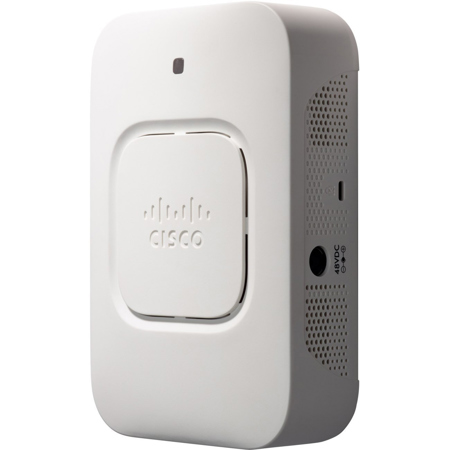
In today's dynamic business environment, employees are becoming more mobile and collaborative than ever. To stay productive, they need dependable, business-class access to network applications throughout the office. The Cisco WAP361 Wireless-AC/N Dual Radio Wall Plate Access Points with Power over Ethernet (PoE) provide a simple, cost-effective way to extend highly secure, high-performance mobile networking to your employees and guests, so they can stay connected anywhere in the office regardless of what mobile devices they use. This flexible solution lets you connect dozens of employees and can scale to accommodate additional users and changing business needs.
Provides cost-effective 802.11ac connectivity with speed up to 1.2 Gbps
Supports 2x2 multiple-input multiple-output (MIMO) technology with two spatial streams for maximum performance on both 2.4- and 5.0-GHz radios
5 Gigabit Ethernet LAN with Energy Efficient Ethernet
Mounts directly to an electrical or data junction box
A captive portal helps enable highly secure guest access with customized roles and rights
Single Point Setup requires no controller for easy, cost-effective deployment of multiple access points
Works right out of the box with easy installation and a simple web-based configuration and wizard
The WAP361 access point uses a concurrent dual-band radio for improved coverage and user capacity. The 2x2 multiple-input multiple-output (MIMO) technology with two spatial streams allows the access point to run at maximum performance in both 5.0-GHz and 2.4-GHz frequencies. Gigabit Ethernet LAN interfaces with PoE facilitates flexible installation and can reduce cabling and wiring costs. Intelligent quality-of-service (QoS) features let you prioritize bandwidth-sensitive traffic for voice over IP (VoIP) and video applications.
To provide highly secure guest access to visitors and other users, the WAP361 Wireless-AC/N access point supports a captive portal with multiple authentication options and the ability to configure rights, roles and bandwidth. A customized guest login page lets you present a welcome message and access details and reinforces your brand with company logos.
WAP361 access points are easy to set up and use, with an intuitive wizard-based configuration to get you up and running in minutes. An attractive design with flexible mounting options allows the access points to blend well into any small-business environment. To enhance reliability and safeguard sensitive business information, WAP361 access points support both Wi-Fi Protected Access (WPA) Personal and Enterprise, encoding all your wireless transmissions with powerful encryption. In addition, 802.1X RADIUS authentication helps keep unauthorized users out.
Designed to scale smoothly as your organization grows, the access points feature controller-less Single Point Setup, which simplifies the deployment of multiple access points without additional hardware. With a WAP361 access point, you can extend business-class wireless networking to employees and guests anywhere in the office, with the flexibility to meet new business needs for years to come.
Concurrent dual-band radio support up to 867 Mbps on a 5.0-Ghz radio and 300 Mbps on a 2.4-Ghz radio to increase capacity and coverage
2x2 MIMO with two spatial streams on both 5.0 GHz and 2.4 GHz allows for maximum performance
Single Point Setup, a controller-less technology, simplifies the deployment and management of multiple access points, without requiring additional hardware
A 5-port Gigabit Ethernet LAN switch supports both PoE powered device (PD) and powered sourcing equipment (PSE) so that IP devices can be powered and the access point can be powered by the backbone switch
Robust security, including WPA2, 802.1X with RADIUS secure authentication and rogue access point detection, help protect sensitive business information
Captive portal support facilitates highly secure, customized guest access with multiple rights and roles
Simple installation and an intuitive web-based configuration and wizard facilitate fast, simple deployment and setup in minutes
Support for PoE allows for easy installation without expensive additional wiring
A sleek design with multiple internal antennas and a versatile mounting kit allows for mounts directly to an electrical or data junction box
Intelligent quality of service (QoS) prioritizes network traffic to help keep critical network applications running at top performance
Power-saving sleep mode and port control features help to increase energy efficiency
Workgroup Bridge mode lets you expand your network by wirelessly connecting to a second Ethernet network
Support for IPv6 lets you deploy future networking applications and operating systems without costly upgrades
A limited lifetime hardware warranty provides peace of mind






