2026-08-01T20:00:00
Rated 1 out of 5
Capablity???
Did not do all that I want and the sales rep forgot to tell me that!!
Dimar
Originally posted at

2026-07-30T20:00:00
Rated 3 out of 5
A satisfied customer
I feel like there should be a person that we can talk to walk you through the setup process for the person who is not tech savvy and that is scared of doing something wrong and to be able to see that the product works and if they have a problem they can talk them through it and they can get it written up for them to get fixed or whatever they can help them with so that way you don't lose a customer who needs the product that they have bought from you and they will come back for years to come and recommend it to others
Threasa Y.
Originally posted at
2026-07-28T20:00:00
Rated 1 out of 5
Returned Printer
Was not happy with printer. Too slow. Wouldn't print properly on canvas which I explained to the sales rep was VERY important. Returned printer.
L K.
Originally posted at
2026-07-26T20:00:00
Rated 3 out of 5
Disappointed
Somewhat disappointing since this printer is a replacement for a laser jet - This printer cannot print double side, it won't support an HP Printer software that will let my older iMac print in color and it doesn't have a document feeder. Sorry I didn't ask more questions.
Plain m.
Originally posted at
2026-07-26T20:00:00
Rated 5 out of 5
HP 5101 Printer Review
The 5101 HP Printer was easy to operate. I ordered from HP and it came in a box that was packaged very well to prevent any damage. Easy to install ink and get on line and easy to operate. The app is full of information about the product and what it can do. Great for my home use.
Danny B.
Originally posted at
2026-07-22T20:00:00
Rated 4 out of 5
Printer needs better software.
The printer works great. It was easy to set up even with the tank option. However, the software was confusing and did not set up easily.
I was hoping for a better experience with the AI printing.
Office D.
Originally posted at
2026-07-07T20:00:00
A dissapointment to find out that the paper loader is on the outside and other functions as double side printing is a annoyance. Apparently I picked a printer for kids. No USB cable came with the printer, and it took almost two days to get it operational.
Daddd
Originally posted at
2026-06-29T20:00:00
Installation was long and convoluted. Print time was unacceptably, long especially for a miniscule Excel document - hours in this case. Returned the 5101 and purchased an Office Jet Pro 9135e.
Kolosky
Originally posted at
2026-06-28T20:00:00
Rated 5 out of 5
HP SMART TANK - GET HAPPY WITH EVERY HP!
NICE AND EASY, ONCE YOU GET GOING YOU CAN'T STOP!
Know I.
Originally posted at
2026-06-25T20:00:00
Rated 3 out of 5
Power Cord Doesn't Fit Well b
The power cord for this printer does not fit well into the slot. It falls out too easily.
J J.
Originally posted at
2026-06-22T20:00:00
Rated 3 out of 5
Hp Smart Tank
The HP Smart Tank is nice, the print quality isn't as good as my last printer. Some of the parts seem cheaply designed and the display system isn't as user friendly.
Mama B.
Originally posted at
2026-06-22T20:00:00
Rated 2 out of 5
issues/time
first printer did not work, even after 3 hours on the phone. second printer would not "connect" even after 2 hours on the phone with AI. finally , technician took over my computer and got it working. had to go thru this a second time. working well now. jury still out.
rayamb
Originally posted at
2026-06-19T20:00:00
It wouldn't work because my wifi is 5G and this all-in-one works on 2.4G. Had to return it.
MatSubZero
Originally posted at
2026-06-02T20:00:00
Rated 5 out of 5
Nice printer
The printer is working great. No problems. It was easier to fill the tanks than I anticipated.
R W.
Originally posted at
2026-06-01T20:00:00
Rated 5 out of 5
so far its a good printer
This was the best HP setting up I have ever used. Hooked wifi within seconds. No other has been able to do that. Time will tell. For the price and amount of ink coming with it, its a good buy
jrgsr
Originally posted at
2026-05-30T20:00:00
Rated 1 out of 5
Not happy
Does not work, way too complicated, they make the program fail to complete until you give data.
Goingto c.
Originally posted at
2026-05-10T20:00:00
Rated 5 out of 5
HP 5101 All in one had easy setup, I like the ink tank design and it prints and scans well.
Works great so far
Edward H.
Originally posted at
2026-05-06T20:00:00
I still can't get the printer to work right. Can't get it to work on my phone either. I need help!
PixieDust
Originally posted at
2026-05-06T20:00:00
Rated 2 out of 5
Slow Processing, Disparaging Confusing 2 sided
A long pause before printer responds to print command...Too difficult and unwieldy when printing double sided pages....Ink longevity is good.
V B.
Originally posted at
2026-04-30T20:00:00
Rated 4 out of 5
Great Printer for good price
Its a nice printer...Works as it is suppose to and think it will do better with these ink tanks then regular cartridges...
Mike L.
Originally posted at
2026-04-21T20:00:00
Rated 5 out of 5
Quicker ssetup
reasonable setup
Seattle2026
Originally posted at
2026-04-15T20:00:00
Rated 5 out of 5
It's so easy!
I was reluctant to purchase a printer that relied on liquid ink, thinking the ink would evaporate or be a mess when I tried to fill the ink canisters. In fact, it was so easy that I had to call HP and make sure that I'd done correctly. The ink vials have a notched opening that perectly fits the canisters - there's no way to spill the ink. The test sheet was perfect for color alignment, and we're very pleased with this printer.
JJ0502
Originally posted at
2026-04-03T20:00:00
Rated 4 out of 5
Control Panel lighting.
Unless something is printing, most of the lighting is off making it difficult to use! Even when something is printing, some of the lighting is off!
Ed K.
Originally posted at
2026-03-25T20:00:00
Rated 4 out of 5
New HP 5000
Easy setup
Don E.
Originally posted at
2026-03-12T20:00:00
Rated 5 out of 5
HP printers get the job done!
I called HP when I needed a new printer because I had one in my home for years and I had worked with HP printers on many job sites. They are easy to set up and use immediately.
Laura M.
Originally posted at
2026-03-09T20:00:00
Rated 1 out of 5
do not get
HORIBLE EXPERIENCE CONNECTING TO MAC MINI printer also does not print clearly would not recommend for mac users as it doesn't seem to compatable,not great for clear printing.
anon1738
Originally posted at
2026-02-16T19:00:00
Rated 5 out of 5
Pelased with this printer.
I needed help to set it up but it's been working great so far and happy with how it functions.
Isabelle B.
Originally posted at
2026-01-08T19:00:00
Rated 5 out of 5
HP All-In-zone ONE OF THE BEST!!!!!
Works great
Tammy C.
Originally posted at
2025-12-29T19:00:00
Rated 2 out of 5
Very hard to figure out problems with it.
I am not sure I am glad that I bought this one. It worked at first but after about a couple of weeks it now will not print the files on my computer that I want to make a copy of.
Sandy J.
Originally posted at
2025-12-25T19:00:00
Rated 3 out of 5
Prints beautifully, but design deficiencies outweigh everything else
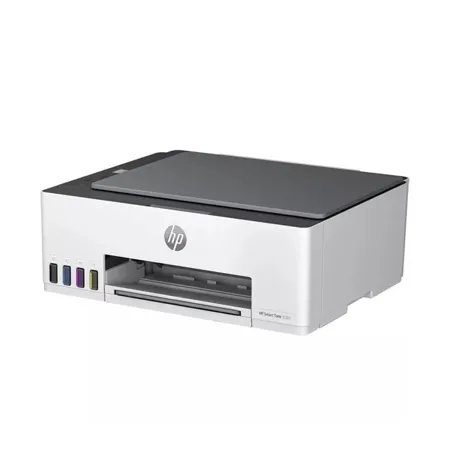
I admit I didn't do good research when I chose this product; I did not know the paper would be held outside the machine, subjecting it to changes in humidity, static, etc. I also didn't realize it doesn't do automatic two-sided printing, which is a feature I need, so if you need it, too, don't buy this machine.
I wanted ink tanks to keep from constantly having to change cartridges; it was very easy to introduce the inks, and the quality of printing is excellent.
Other than that, all the indicators and buttons are on top of the machine, which makes it very awkward to read any error messages unless you place the printer well below eye level. That definitely didn't work for me. Paper loading is incredibly awkward and inconvenient, and the slot for paper very badly designed. This makes double-sided printing a real pain, since you have to manually re-insert the paper to do that.
The upshot is that I'm giving it to a non-profit who won't be troubled by these deficiencies and buying an Epson that's better designed. Expensive lesson. Learn from mine.
Diana P.
Originally posted at