2019-06-27T20:00:00
Rated 5 out of 5
Perfect for working from home.
I am in love with this docking station. I did not need anything special to use it I simply plugged it up and it was ready to use. I was pleasantly surprised at how many ports it had and how well it actually works. It does seem to be very well made as well as durable. I have had no problems with it not working on the computer or any of the ports not working while in use. I have had no problems with it getting hot. I am very pleased with how nice this is and how well it works.
Amberj
Originally posted at

2019-06-26T20:00:00
Rated 5 out of 5
Amazing Product!
I honestly had no idea what an amazing product I was getting when I ordered this! It docks to your Dell Laptop and has so many different ports for adding external monitors or other peripherals. (You can read what ports it has in the item specs.) It really expands the capabilities of your laptop. It plugs in to your laptop with a USB-C cable, so be sure yours is compatible. It's genuine Dell, so it's well-made, and you can feel it's heavy duty and good quality. The instructions are easy to understand. I'm very happy with it and would definitely recommend it to others.
daUPhere
Originally posted at
2019-06-26T20:00:00
Rated 5 out of 5
Free space
I love the sleek and stylish look of this station,the quality is great and the color matches with any decor.This product allows all of us to be able to work on different projects at the same time because we are able to plug multiple devices without any bulk cords.
RudyJ
Originally posted at
2019-06-26T20:00:00
Rated 4 out of 5
Good for what I needed it to do.
It's perfect for what i need my laptop on a screen + mouse / keyboard + game controller.
Great plus with the 180W adapter which allows to recharge my laptop (135W)
It's small, but it comes with a large adapter
I attached it on the side of my desk, so no wire (all the mess is hidden at the back). Just one wire to plug my laptop.
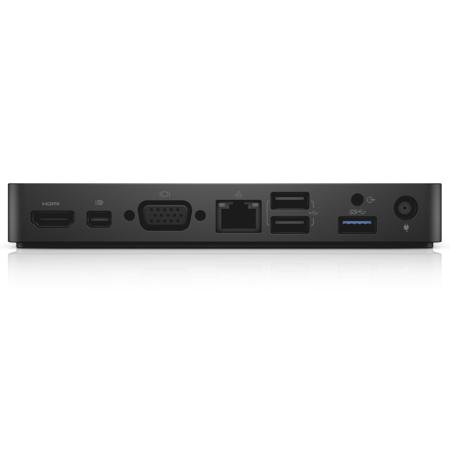
2 usb in the front + 3 at the back
Great product with a good design and quality.
leila7137
Originally posted at
2019-06-09T20:00:00
Rated 1 out of 5
This thing is garbage. Read the specs carefully before purchase.
Only supports up to one single 4k video connection...that's it...in 2019 this is being sold with new laptops. For clarification, if you're running 4k, you can only output to one monitor. If you want to output to dual monitors, you are limited to 1080. If you want to run 3 monitors, you have bought the wrong docking station because this one can't do that at all.
CtotheJ
Originally posted at
2019-05-28T20:00:00
Rated 1 out of 5
did not meet expectations
I bought this item as recommended by the dell website, to go along with my inspiron17 5000 series. Unfortunately, there is no connection port on the computer to where the docking station can connect, so this was a waste.
darrett
Originally posted at
2019-04-18T20:00:00
Rated 2 out of 5
Fragile and unreliable
I work in an enterprise environment serving a client at a site with 500 users, with 15,000 nationally. Easily 10% of the users I deploy this dock to have problems within weeks.
The most common problem is that the Ethernet port drops connection briefly every few minutes. If you're browsing, streaming, or gaming, you may not even notice, but my client has several applications that crash immediately and lose unsaved data every time it happens. The only work-around is to not use an Ethernet cable connected to the dock.
Audio over the 3.5mm port is poor quality.
The difference between "connected" and "disconnected" is about 1mm and a very gentle click, a problem inherent to the USB-C connector and not exclusive to this model of dock.
USB-C is fragile, and the cable is thick and stiff, which limits placement on the desk. The fact that the cable is on the left side of the dock, and Dell places most USB-C charging ports on the left side of the laptop limits placement further.
Leave at least 6" of clearance from the USB-C port, or there is a good chance it will break early. Make certain never to place the USB-C connector on top of anything, or rest anything on top of it for the same reason.
Scott
Originally posted at
2019-04-17T20:00:00
Rated 1 out of 5
Poor support
The USB-C connection became damaged recently and while the dock has a replaceable USB-C cable, Dell does not sell the cable.
Witchdoc59
Originally posted at
2019-04-16T20:00:00
In a batch of 50 docking stations. We RMA 20 already. The most common problem is it will stop charging the laptop and you'll see a low voltage warning then it stops working for good. No a true docking station. This is a port replicator and not as reliable, if the lightning port gets worn out on the laptop your are screwed.
Gary L.
Originally posted at
2019-04-16T20:00:00
Rated 5 out of 5
Space saver
Recently purchased this for home office. Such a great design from the original docking stations. I no longer have to search for the correct hole placement when docking laptop. It has plenty of connections for dual monitors, and wireless keyboard and mouse.
MSM
Originally posted at
2019-02-21T19:00:00
Rated 5 out of 5
Works great
I bought this docking station for my home office. I wanted to be able to use my laptop with a monitor and full size keyboard without having to plug in a bunch of cables. The WD15 does exactly that. I use a new Dell XPS13 laptop with 24" monitor, wireless keyboard and mouse. I can take the computer out of my travel bag while in sleep mode. Plug in one cable and I am up and running without having to even open up my laptop. Great product, does exactly what I wanted it to do.
JD57
Originally posted at
2019-02-03T19:00:00
Rated 1 out of 5
Garbage. I've had for 2 years and have had 2 years of problems
This product does not consistently do what it is designed to do. USB ports turn off and on at random, even after the 6+ BIOS updates, TB updates, etc. When I initially purchased my new LP and dock, I spent over 4 hours with tech support to fix or make the product work as advertised but to no avail. If you need to have a dock as part of your set up, I would strongly recommend looking at different manufacturers because it is that bad and frustrating. Every day, will my mouse work? or my monitor? or ethernet...
jsom
Originally posted at
2019-01-15T19:00:00
Rated 5 out of 5
Great decision
Finally gave up my desktop and went with a new laptop for travel reasons. With the docking station, I have the best of both worlds!
Harri
Originally posted at
2018-12-25T19:00:00
Rated 2 out of 5
Main Power button on Docking station does not turn off PC or USB attached devices
Was told the power button could shut off or put to sleep the connected PC, monitor, and USB devices, etc. It seems to work for the monitor, but not the PC or any connected USB devices. Can someone pls advise how fix this. Thanks.
Kobe
Originally posted at
2018-12-12T19:00:00
Rated 2 out of 5
Much Adoo About Less Than Great
Lots of work getting software up to date. Run after run of updates. Looses connection to internet too frequently. Main interface cable more like conduit than cable - not flexible enough for solid connection without being hard on port. Charger has twice messaged that it isn't enough to charge laptop and run device so I now have laptop charger and dock charger running. Great to have the extra ports but what a PIA just to get more ports.
Lee
Originally posted at
2018-12-10T19:00:00
ALL of these new Dell USB-C docks are jokes. They are more expensive and more complex (more prone to fail do to using a cable and that cable shorting out) than the old school E-port docks. This particular model is definitely average. It does not have enough USB ports for most of our users. It's only capable of displaying 2 monitors at 1920x1080@60hz. Beware that if you previously had a 3 monitor setup like a lot of our users and used the old E-port dock, you will need a more expensive one like the TB16.
FM84
Originally posted at
2018-08-30T20:00:00
Rated 1 out of 5
Not Reliable
Ended up going with the D6000 dock since it seemed way more reliable.
john
Originally posted at
2018-08-09T20:00:00
Bought yesterday. VGA does not support extended monitor display. Mini disaplyport monitor not recognised. Too much hassle.
Dell
Originally posted at
2018-07-10T20:00:00
Rated 3 out of 5
Dell Docking Station WD15
I bought this a month ago and it is working fine, my only compliant is that it could use more USB ports.
Steve q.
Originally posted at