This item is no longer available.
Review Summary
2023-11-05T19:00:00
The monitor was easy to setup and connect to my system. I did have a minor problem knowing which cables were needed to be used. The audio quality is very good but the focual point on the camera leaves my image too far away (to wide angled)
Neil S.

2023-11-01T20:00:00
its not working properly with a Dell Dockin station and another monitor.
JM

2023-10-29T20:00:00
The monitor looks nice and performs well. The web camera is good quality and the speakers are great for Teams calls.
Grant

2023-10-22T20:00:00
Pros Love the camera design, you can turn it off and on when needed Able to swivel left & right, tilt forward & backward Love the USB-C upsteam port, less cabling Con One button design on the back makes it a nuisance to adjust the color and brightness
Samuel

2023-10-22T20:00:00
Pros Love the camera design, you can turn it off and on when needed Able to swivel left & right, tilt forward & backward Love the USB-C upsteam port, less cabling Con One button design on the back makes it a nuisance to adjust the color and brightness
Samuel M.

2023-10-18T20:00:00
Easy all in one solution, simple setup, great picture. I didn't even have to load drivers, it worked out of the box.
Chris

2023-10-03T20:00:00
Tested a few monitors for our company and it saves us money not having to purchase a separate docking station. It also has a built in speaker and camera. Good picture quality and camera quality overall
MS

2023-08-28T20:00:00
We Love These Monitors! everything you need built right in, one wire to a laptop makes all of your connections. It really is a monitor plus a dock all in one. It is such a cost savings as well, I couldn't buy a monitor of this quality, with the camera, mic, good speakers etc, and a dock for as low a price as this monitor.
Cj G.

2023-08-27T20:00:00
Not great! Honestly, between all the driver and firmware updates and the fact that I still need to turn it off and back on again at least a couple of times a week because the camara or microphone have stopped working, I would not recommend this product. I even had it RMAed and the replacement suffered from the same issues. The display itself is fine but the hub functionality lags the display especially when daisy chaining a DisplayPort display.
Joshua

2023-08-11T20:00:00
Great monitor with plenty of connections built in, but run the firmware update right away. The webcam was a bit grainy, but the firmware update resolved it.
Chad H.

2023-08-07T20:00:00
Seems like a good monitor. I had to send the first one back as the power cord was missing and instead of sending a power cord they sent a new monitor. It arrived quickly and I was able to use it 3 days before I had to send the tower back (this issue in another review). But when I did use the monitor it had great color and worked well!
Melody

2023-08-02T20:00:00
Very sleek design. It works really well with Teams application. We love the fact that it has a built in docking feature removing all the unnecessary cords.
Kathy

2023-07-23T20:00:00
Purchased this monitor for personal use. Excellent monitor with amazing quality. Love the sound bar and pop up webcam! Considering purchasing a second one.
Lindsay R.

2023-07-09T20:00:00
It charges, and easily works as a dock for my monitor. Its seamless and functional, takes up a lot less real-estate on my desk
Hannah T.

2023-07-09T20:00:00
The dell monitor C2422HE Monitor has been easy to work with as a peripheral device. Webcam and Microphone for the soundbar and audio has been fantastic when working properly but after using the headphone jack on the soundbar the monitor loses a lot of functionality and needs a bit of configuring before it is usable. Our team members use headsets primarily which leads me to wonder if the headphone jack is just a headphone jack or has support for a headset as well? The Teams button and Call answering button have been working as needed. Soundbar and Microphone Issues: Volume up and down button: The audio adjustment buttons on the soundbar are not very responsive, most of the time when trying to turn down or up volume it will take multiple touches and even holding to get it to work. Sometimes completely unresponsive where I need to unplug my laptop from the type c cord to get any response. Headphone Jack and audio echo: First off, the headphone jack does work even with a headset plugged in. While plugged in and set to the speaker bar for audio the audio comes through but looks to be there is no support for a Microphone to default to the soundbar. Once in a meeting in teams the microphone from the headset is not defaulted and still uses the webcam microphone even when the webcam/microphone are pushed into the off position created an echo. Is the headphone jack for the soundbar only supporting Headphones? I had to disable the mic from the webcam/microphone on the Monitor to stop the echo to allow the headset plugged into the headphone jack to stop Echoing.
Taylor

2023-07-09T20:00:00
Overall we have been somewhat satisfied with this conference monitor. The idea of having everything built into one device was very appealing. The issue we have run into is with some users using Teams and the camera/mic switching back to the laptop mic and camera even with all the drivers and updates installed. This may be a Teams issue or a conference monitor issue but since we have switched the User back to a docking station with a separate webcam there has no an issue.
Bob-SSC

2023-06-27T20:00:00
excellent monitor for desktop with demand for video conferencing and meetings. very good sound quality and handy controls.
cmehawaii

2023-06-11T20:00:00
Clear and sharp. Camera works really well!
FB

2023-05-25T20:00:00
great screen resolution and easy auto setup with my older laptop!
Steve K.

2023-05-16T20:00:00
Sound Bar is a terrific, new add-on.
Chuck G.

2023-05-15T20:00:00
Great products and we are very happy with our purchase!
Rose

2023-01-31T19:00:00
Great monitor for conferencing and working. Quality of screen picture is amazing.
Meika

2022-08-18T20:00:00
great monitor, exceptional display. great sound from the sound bar
It s.

2022-03-14T20:00:00
Excellent features built in to this monitor plus high quality resolution is easy on the eyes too.
CASA C.

2021-03-30T20:00:00
This setup is really convenience on space for any front desk or home office.
Jose

Accidents happen where life happens. Protect your favorite Adorama products and purchase a protection plan to stay covered from accidental damage, mechanical or electrical failure, and more.
If we can’t fix it, we’ll replace it at no additional cost.
Protect your product from drops, spills, and more.
Enjoy your gear without fear. We have you covered!
When regular use of your product over time results in mechanical or electrical failure.
We will never charge you a deductible after the purchase of a plan.
Our claims process is simple & easy and our customer service team is happy to help.
Adorama Protect powered by Extend is available for purchase to customers in the United States. Not available for purchase Internationally or in U.S. Territories.
Browse our FAQ
Team up. Seamlessly.
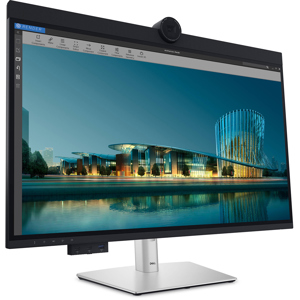
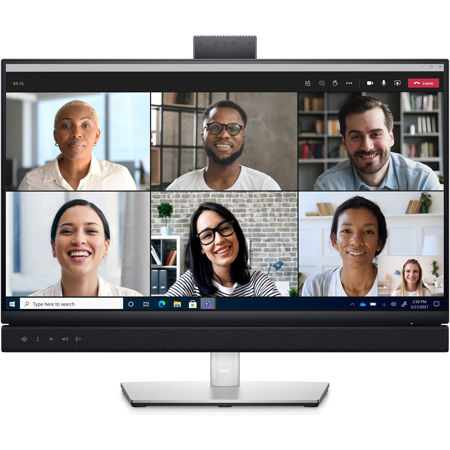
Collaborate like you're there on a 24-inch FHD monitor with an integrated 5MP camera, dual 5W speakers and a dedicated Microsoft Teams button.
One button. Tons of benefits
Introducing the world's first 24-inch FHD video conferencing monitor certified for Microsoft Teams, purpose-built so you can launch the Teams application, join meetings and respond to notifications with a press of a button. Plus, there is an LED indicator to notify you about a Teams alert.
Collaborate like you're there
With the high definition 5MP IR camera, dual 5W integrated speakers and noise-canceling mic, you can feel in-person even while you're remote.
Quick, safe protection
Save time signing in with secure, Windows Hello facial recognition that's faster than remembering and typing your password.
Personalized convenience
Say what you need and let Cortanai do the rest with hands-free commands.
Jumpstart productivity
Simply press the monitor power button and the power sync feature seamlessly starts your monitor and connected Dell PC, even when the laptop lid is closed. Compatible with select Dell PCs.
World-class video conferencing
Immersive collaboration
Collaborate like you're there. Razor-sharp video clarity of the pop-up 5MP IR camera gives you more than twice the details and zoom of a 2MP on a wide, beautiful screen. Dual 5W integrated speakers deliver clear, vibrant communication from any workspace quashing background chatter with noise-cancelling microphone.
Enhanced security
The pop-up web camera hides safely out of sight when not in use, and there's an intelligent layer of security with facial recognition through Windows Hello.
Seamless video from all angles
FHD video with 30 frames per second rate delivers seamless, media-quality video and stunning screen clarity. The 178 Degree /178 Degree wide viewing angle presents superior views and consistent colors ideal for video conferencing.
Your productivity hub
Connect to productivity
With wired connectivity options like RJ45 and USB-C, your monitor delivers reliable Ethernet, power, audio and video-all in a clutter-free setup.
The power of USB-C
Get up to 90W of power delivery via USB-C, and charge your laptop (even when the monitor is off) with the Always On Power Delivery feature. This single-cable solution also saves up to 72% of workspace setup time, reduces cable clutter and transmits power, data and audio-all at once.
Quick convenience
Plug in whatever you need and keep it in reach with the two, super speed USB 5Gbps (USB 3.2 Gen1) quick-access ports. There's even space to charge your mobile phone (up to 15W power charging) with the USB-C quick-access port.
Enhanced manageability
Managing your monitor is easy with MAC Address pass-throughi, PXE Boot, and Wake-on-LAN conveniently built in.
Multitask efficiently
Connect two PC sources to the monitor-our intelligent Auto KVM feature detects the second connected PC and seamlessly switches controls over. KVM (keyboard, video and mouse) allows you to control both PCs with a single keyboard and mouse. Plus, you can enhance efficiency by 21% by adding a second monitor via the daisy chain feature.
Collaborate in comfort
Crafted for eye wellness
ComfortView Plus is an always-on, built-in low blue light screen that optimizes eye comfort by reducing potentially harmful blue light emissions while delivering excellent color accuracy.
Designed with you in mind
Navigate the menu and adjust screen settings with the easy-to-use joystick control.
Beauty meets function
This sleek monitor features a small base and an improved cable management design that hides cables in the monitor riser, for a clutter-free desk space at your office or home office.
Comfort is key
Tilt, swivel, pivot and adjust the height of your monitor to a maximum of 140mm because you should be comfortable however and wherever you work.
Dell Display Manager
Productive at every level
Easy Arrange allows you to easily tile multiple applications across one or more screens with 38 pre-set window partitions and the ability to personalize up to five windows, giving you improved multitasking abilities.
Seamless transitions
The auto-restore feature remembers where you left off, so applications will go back to where you left them, even after you've unplugged.
More ways to manage
Asset management reports allow IT managers to quickly capture and track monitor information as well as configure multiple monitors at once through a single setup.
The key to convenience
Shortcut keys can save you even more time, letting you easily configure your display management settings so you can get to work faster.
Green thinking: for today and tomorrow
Environmental standards
This monitor meets the latest regulatory and environmental standards such as EnergyStar, EPEAT Gold, TCO edge certified, RoHS Compliant and TCO-Certified Display.
Eco-conscious packaging
To reduce our manufacturing impact on the environment, this monitor is shipped Styrofoam-free and the packaging is made of at least 75% recycled cardboard.
Energy conservation
Save energy when your monitor is not in use with PowerNap, a feature that dims or puts your monitor to sleep when it's not in use.
Advancing sustainability
Dell Technologies is committed to reducing environmental impact throughout the product lifecycle