2020-02-27T19:00:00
I have had mine for only a month now and I hate it, it works sometimes then then arrow jumps all over the place,and yes I put a new batterie in it when I received it.
Tony G.
Originally posted at

2020-02-22T19:00:00
Rated 3 out of 5
needs to improve
I have diferent tipe of dell mouse and I like but i have problems whit the side buttons is the diference whit the other one but in general I like
I m.
Originally posted at
2020-02-20T19:00:00
Rated 5 out of 5
Great buy : )
So far works great! Easy to use, wheel is smooth. Glad I bought it : )
Lorrona
Originally posted at
2020-02-14T19:00:00
Rated 2 out of 5
Poorly Engineered Mouse
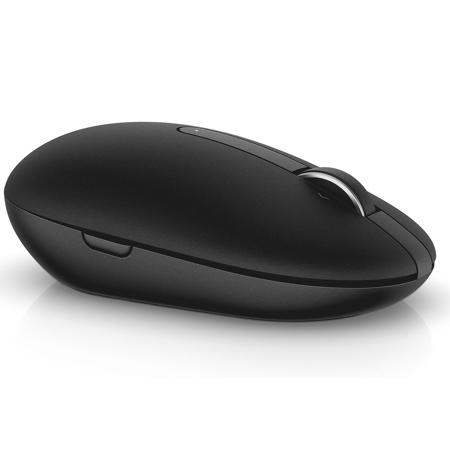
The back button on the right side of the mouse is poorly located. I keep accidentally clicking the right button. It is highly annoying. I have gone back to my old Dell wireless mouse which was well engineered.
skiphess
Originally posted at
2020-02-14T19:00:00
Rated 2 out of 5
Over-engineered and overpriced
WAY over-engineered and overpriced. The buttons on the side of the mouse are incredibly annoying. Half of the time I think there's something stuck to my fingers. The other half of the time I accidentally click the buttons and perform some operation that I don't want to.
TooLazyToSendItBack
Originally posted at
2020-02-12T19:00:00
Rated 5 out of 5
Nice Mouse
The mouse works great. It took me a few minutes to find the usb chip INSIDE the mouse. But once I found it everything was perfect.
Carl
Originally posted at
2020-02-10T19:00:00
Rated 5 out of 5
Wireless Mouse Review
Works great and is very responsive. Be careful of clicking the buttons on the sides - they're a little hidden. My only complaint is the shipping fee which was 50% of the cost of the mouse.
Julie
Originally posted at
2020-02-09T19:00:00
Rated 3 out of 5
Dell Mouse too Mousey
I did not like the feel. Hands too big so it wasn't easy to position, etc
Little L.
Originally posted at
2020-02-06T19:00:00
Rated 5 out of 5
Works great
Although i prefer to use the mouse pad and touch screen this wireless mouse is great
Robster
Originally posted at
2020-01-31T19:00:00
Rated 3 out of 5
Ok But not the best
Ok, but loses connection often, prefer wired mouse more reliable.
RTM
Originally posted at
2020-01-29T19:00:00
Rated 3 out of 5
Wireless mouse. Light does not work.
The wireless mouse works. However, the light on the bottom of the mouse does not light up when I turn on the mouse.
I would like a replacement
Teresa
Originally posted at
2020-01-17T19:00:00
Decent mouse. Wish for the price it was optical.
John
Originally posted at
2020-01-16T19:00:00
Rated 5 out of 5
great Mouse
Ive used this mouse for a while now. Very easy to use and very resposnive. Recommend to everyone.
LARRY
Originally posted at
2020-01-15T19:00:00
Rated 5 out of 5
Dell Wireless Mouse-WM326
Got it for my wife to go with the new Inspiron 5000 I gave her for Christmas. The best thing about it was that as soon as you switch the mouse on, it starts working. It's been very reliable and I highly recommend it to anyone looking for a no hassle wireless mouse.
Rudy
Originally posted at
2020-01-15T19:00:00
Rated 5 out of 5
Good MOUSE
Good Wieless mouse mouse. Does what it is supposed to do.
Albert D.
Originally posted at
2020-01-14T19:00:00
Rated 1 out of 5
There are better available
can't get it to work and top doesn't close tightly
jvan
Originally posted at
2020-01-13T19:00:00
Rated 1 out of 5
Didn't work straight out of the box
I have one of these, liked it so i bought another one - the new one does not work, returned it, have yet to hear anything from Dell.
M h.
Originally posted at
2020-01-12T19:00:00
Rated 1 out of 5
Mouse not worthy
The mouse jumps all over. It's difficult to control. You don't know what is going to do or where it will jump to. It is difficult to place cursor on a specific target.
Frank
Originally posted at
2020-01-10T19:00:00
Rated 5 out of 5
Raring the Dell Wireless Mouse-WM326
Works well. No problems with it being detected to start and has worked flawlessly since.
Mike
Originally posted at
2020-01-09T19:00:00
Rated 1 out of 5
Wireless mouse
horrible !!! worst I've ever used, Jumps. Waste of money
ROBERT
Originally posted at
2020-01-09T19:00:00
Rated 4 out of 5
Wireless Mouse
Having a wireless mouse is very good as you do not have to
connect any wires like the desk top computer.
BT n.
Originally posted at
2020-01-08T19:00:00
Rated 2 out of 5
Dell Mouse
The Dell Mouse is too light; it does not roll easily over most surfaces. Also, it falls apart at the lightest drop.
Margaret
Originally posted at
2020-01-07T19:00:00
Rated 1 out of 5
Dumb design.
Have to snap it open to get the USB connector out. Dumb design.
Eric B.
Originally posted at
2020-01-07T19:00:00
Comfortable and intuitive to use. Works reliably and as expected. No issues thus far with the battery.
Project M.
Originally posted at
2020-01-01T19:00:00
Rated 5 out of 5
Dell Wireless Mouse
Love the wireless mouse..I am able to use it better then the pad
Leola
Originally posted at
2020-01-01T19:00:00
Rated 1 out of 5
No instructions for mouse
I've been using a track ball for years and can't figure out how the mouse works. Instructions would have been nice. For now it isn't even a good paperweight.
PamB
Originally posted at
2019-12-31T19:00:00
Rated 4 out of 5
compact wireless mouse - not bluetooth
works perfectly, but use of the supplied dongle required. Not bluetooth.
Kenny
Originally posted at
2019-12-31T19:00:00
Rated 5 out of 5
Easy to get going
Open box. Install battery. Plug thingy into usb port. DONE !!!
What's not to like??
kmastx
Originally posted at
2019-12-29T19:00:00
Rated 1 out of 5
Abandoned it
The finger rests are a slanted dome rather than concave for comfortable control. The thing that drove me crazy are the little buttons on the sides that you can't avoid bumping. They cause you to jump tabs constantly plus other erratic things. I went back to my old mouse.
Vince S.
Originally posted at
2019-12-27T19:00:00
Rated 2 out of 5
dink dongle
mouse works great but had to install another dongle to get to work. why it didn't work with my key board and old dell mouse dongle???
longtimeuser
Originally posted at