

We'll be closed for Shavuot on Fri 5/22. Orders placed after 4PM on Thu 5/21 will be processed on Sun 5/24.
This item is no longer available.
Review Summary
2023-05-05T20:00:00
Had this product wired into my new home in 2017. Encountered various connectivity issues over the past 5 years, which were resolved. Today, however, after chatting with a specialist and going through the reset process the unit was deemed worthless. Would not install/purchase this product again.
cm8084

2023-02-09T19:00:00
Very cool that there is a HEOS Alexa Skill so I can control my zones using Alexa. If only the Fire TV Stick home theater option could connect via WiFi that would be gold.
DMBENE

2021-12-23T19:00:00
Service has been down for over a month and have called numerous times to resolve the issues to no avail. Error is the same "Failed to Connect to the HEOS Server." Support not able to resolve the issue which makes the device all but a paperweight!
RDC_656

2021-12-07T19:00:00
After spending $1300 to get an Arcam streamer only to find that the app (Music Life) is very difficult to use and does not support Apple Music or Amazon. I got free trials of Qobuz and Tidal but found that trying to access a particular album was difficult. So, having HEOS on my Denon AVR I knew it was easy to use. The stand alone HEOS link works great.
Banker7

2021-08-22T20:00:00
There must have been some recent update related to using Alexa voice commands to play Amazon music streaming on HEOS devices. I have a HEOS link and a 2600 AVR that use the Alexa link and they both stopped working at the same time. They are in separate locations so its not a network issue. It stopped working about 2 weeks ago.
t4116

2021-06-12T20:00:00
I bought the link to take advantage of Amazon HD (or Spotify HD when it becomes available.. Streaming has reached new heights with this technology with better than CD sound and imaging. Can?t wait to upgrade my 4100 to the new 4700 and relocate the old system to my sitting room?. Note: do not buy if you want Apple lossless because it only connects via Airplay which will not stream HD music.
Johnny A.

2020-09-16T20:00:00
Every service has crossfade builtin(Spotify, Tidal, Deezer, iTunes, Mood Music, etc..) but if you try to do this through the native HEOS app it is not possible at all!!! Will not be using this in any of our properties again as no one wants to hear 3 seconds of silence between tracks.
FourFront

2019-09-08T20:00:00
I Love the integration of this product with the Denon/Marantz echo system. I use the USB input to select HiRez files to play. Integrates well with my Marantz system. I also use one with another non Marantz/Denon system and it works without question. I have whole house auto in HiRez that I can play from anywhere in my house regardless of where the file is stored. The 3.5mm input is great for plugging into other systems. I would love to see better integration with the Bluetooth, controlling the unit when there is no WiFi available.
Thomasps

2019-09-08T20:00:00
I Love the integration of this product with the Denon/Marantz echo system. I use the USB input to select HiRez files to play. Integrates well with my Marantz system. I also use one with another non Marantz/Denon system and it works without question. I have whole house auto in HiRez that I can play from anywhere in my house regardless of where the file is stored. The 3.5mm input is great for plugging into other systems. I would love to see better integration with the Bluetooth, controlling the unit when there is no WiFi available.
ThomasPS

2018-10-26T20:00:00
This product need more software development. Software is bad, always losing the pair of speakers
Philippe

2018-07-17T20:00:00
I am a professional home theater installer and I have installed many of these along with many other HEOS products. The HEOS link and the entire HEOS line is fantastic!!! If you have had any issues at all or written a bad review, I'm sorry to say that you probably just didn't understand the product or how it works. As I stated before, I have installed many of these and every single customer has absolutely loved it!!! The free app is very simple and works great! The only problem I have ever seen had to do with the network itself, the entire HEOS system runs on the network, so you need to make sure you have a good router. If your router is old, slow, or just not good... well then the HEOS system will not work properly. This is the poor networks fault, not HEOS. I highly, highly reccomed anything HEOS and I love installing it! It's easy to install, easy to use and sounds great! What's not to love!
THT3

2018-05-30T20:00:00
A good addition to our home sound system. A little pricie, however.
Loophole

2018-04-26T20:00:00
Works great just need to connect to Apple Play hi res service
Flapjack

2018-04-25T20:00:00
It is fun listening to the many music streaming radio stations. Good quality. I love my HEOS by Denon. I am rocking on!!!
RockingOn81

2018-03-15T20:00:00
The good - this thing can connect to almost anything. It's got connections for miles. it also has most of the music services. It would be great to have access to Google Music, but other than that it covers the bases well. The bad - the app is still buggy. It struggles with playing something that has been paused, or controlling after my phone has been dormant for a while. I almost always have to shut the app down and restart it to make it work again. It also does not like restarting most streams from a dormant state. If you were listening to something a few hours ago and simply want to restart play it usually doesn't work. The worst offense, however, is the lack of a sleep timer!
bosser56

2018-03-02T19:00:00
The sound is good, but the app is unreliable. I can’t really comment on the features, because it rarely works the way it should.
Jkay7

2018-02-13T19:00:00
For an installer, and the end users I deal with, the most important thing is reliability and ease of use. The app is intuitive and solid. It has the capability of sounding as good as your content will allow, and it works.
Scottscott

2018-02-13T19:00:00
I couldn't get it to sync with my phone. I tried for several hours getting frustrated. I tried my tablet and it worked within seconds. I use it practically every day now.
RobertP14

2018-02-08T19:00:00
I had been using and beta testing Sonos for years before recently switching everything over to Heos. The better sound quality was a big reason but add to that hi-res audio support, Bluetooth support and the battery option for the Heos 1 and it was an easy decision. It also integrates better with 3rd party automation systems like Control4 now that Sonos blocked UPNP support.
Jtiffany

2018-01-28T19:00:00
The app makes this product worthless. This is not very serious from Denon. Connection is lost before the song is finished, crashing all the time, must do setups all the time...this is just poor app development ... Even the navigation is poor, the "back" button is closing the app?? Read the app reviews before you buy this!!
anders

2018-01-19T19:00:00
As a integrator, by far superior than Sonos, way more connectivity, better UI, quality you can expect from a company thats been many years in the custom industry. I see several negative reviews on how they have so many problems... but what all these do it yourselfers don’t understand that this system works off your network, so step one would be to make sure your network coverage is good across your whole house, so in most cases you need network access points, real ones that plug in through internet ports not the bandaids you buy at best buy and plug in to your wall outlet. So if you have a solid internet network expect the heos system to work flawlessly and far supperior than sonos in sound and connectivety
Mannyg713

2018-01-09T19:00:00
We have had signal issues on all the channels and the experience has been incredibly frustrating. We have had a tech out twice and it still does not work.
Bill1035

2017-12-28T19:00:00
Love the concept of the system. It is integrated into my whole house Elan system. However, every time there is an update the Elan system does not communicate to the HEOS. Please ensure you are communicating to your 3rd parties about software updates so everything works smoothly. I have had the tech’s our to my house 4 times to fix.
Hamilton6

2017-12-22T19:00:00
Ok, lest skip over the HEOS software itself which could be improved. Let’s talk about the link. Functionality wise, hardware wise, no issues so far. However, when adding it to an existing entertainment system, ESPECIALLY when it is a DENON receiver, why can’t I have my link control the zone 2 of a DENON receiver the way an HEOS native multi zone receiver can! This is a big oversight or an intentional crippling of the device which is extremely unfortunate. IT ABSOLUTELY NEEDS TO CONTROL ALL ZONES and show up in the app the way it does for an HEOS Receiver. Also, go ahead and add codes to other receivers as well so someone does not have to replace a recent av receiver but still be able to create an HEOS syste, with a Lin and other HEOS products.
Joshuaad

2017-12-05T19:00:00
I love the Link! but i have issues with the phone app. The app takes like 10 minutes to see the Link or the HEOS receiver..all other controlers work great.
Amazing H.

2017-10-07T20:00:00
Solid and easy to use wireless multi room speaker controller
Dublinmcx10

2017-10-07T20:00:00
The Best sound quality and product keep up the good work
Do o.

2017-09-28T20:00:00
I am satisfied with the on-line music sources, but I would really like to be able to integrate my ITunes other than a hard wired input.
grelap

2017-09-13T20:00:00
The Link is a great way to integrate all of the streaming sources as well as any Hi-Rez music files via the USB or play direct from your iPhone or iPad. The app is getting better and seems pretty stable now! The sound blows Sonus away IMHO
stromanator

2017-09-07T20:00:00
Excellent connectivity with easy interface and surpurb sound has made this a go to piece for may projects.
Bull49

HEOS wireless pre-amplifier: turn any stereo system into a wireless zone.
The HEOS Link is part of the HEOS wireless multi-room sound system that enables you to enjoy your favorite music anywhere and everywhere around your home. By utilizing your existing wireless home network and the HEOS app on your iOS or Android device, you can explore, browse, and play music from your own music library, from online streaming music services, and from thousands of internet radio stations.
With the HEOS Link, you can add HEOS multi-room audio to an existing music or home theater audio system, and you can play different songs in different rooms or the same song in every room.
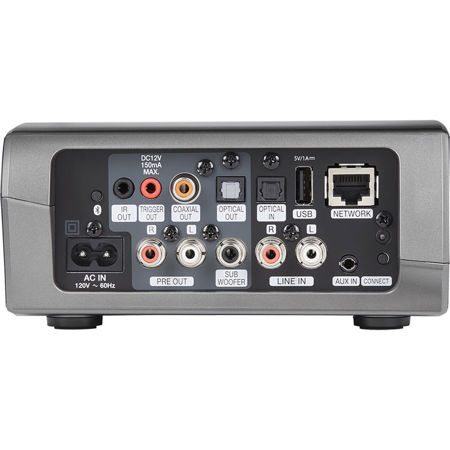
The versatile HEOS Link features built-in dual band "N" wireless technology for quick and easy connection to your home network. In addition to the built-in wireless function, the HEOS Link is also equipped with an RJ-45 Ethernet port for hard wire connection to your LAN. The USB port lets you connect a portable USB drive, and you can also use the USB connection to charge your portable device.
In addition to the stereo pre-amp outputs, there's also a sub output for connection to a powered subwoofer. Both coaxial and optical digital audio outputs are included for compatibility with the widest range of equipment, and the unit features an optical digital audio input. The HEOS Link is also equipped with a stereo line input (via RCA jacks) as well as an additional auxiliary input with a 3.5mm jack for direct connection to a portable player.
As with our HEOS wireless speaker models, you'll be able to stream your favorite music tracks and control the HEOS Link with our HEOS App, which is available in both iOS and Android versions. With the HEOS App, you can choose to listen to music tracks on your smartphone, tablet or portable audio player, and you also can listen to your choice of internet radio stations, and you can also listen to your favorite music streaming service.
Our exclusive digital technology provides precise audio synchronization (within microseconds) to ensure top audio fidelity and stereo imaging quality.
And, the HEOS Link provides additional convenience for owners of Denon audio components or systems. Connect the included infrared emitter to the HEOS Link IR output and place it so that it's near the front panel of your Denon component. Or, if your Denon has a direct IR input jack, you can connect the HEOS Link via the supplied IR direct cable. Then, via the HEOS App, you can turn your Denon system on and select the appropriate input and enjoy your favorite music tracks. You can choose to listen to different songs in different rooms or play the same song in all rooms. There's also a 12V trigger output that lets you connect the HEOS Link to other devices or products that feature a 12V trigger input, such as motorized drapes or a drop-down motorized front projection screen.
The HEOS Link stereo pre-amplifier enclosure, elegantly features stylish silver accents, and for convenience, there are volume and mute controls discreetly placed on the side panel.
All HEOS Speakers Feature
Multi-Room Sound
Every room can have its own HEOS sound. Or, group multiple speakers to fill the house with the same song. Multi-room means multiple options.
Apps & Streaming Services
Cloud music, streaming music and your music library-all your favorite sources are supported by this amazing FREE app.
Amazing Sound Quality
It's no accident that HEOS speakers produce pristine sound. They are engineered by the experts at Denon, innovators in audio for more than 100 years.
Easy Setup
It's amazing how quickly you can start listening to your HEOS speakers. Place your speakers, and you will be listening to music in minutes. It's really that simple.
HEOS + Alexa - Speak Your Commands
Use your voice to stream your favorite music services to this HEOS-enabled device. Ask Alexa to play music from Pandora, Spotify, Amazon Music and much more. Switch between inputs (Blu-ray, DVD, Media Player, etc.), turn volume up or down, pause, mute and play the next song - all with your voice.
To start streaming with Alexa voice commands, open the Alexa app and select "Skills." Add HEOS Home Entertainment to enable. Then, go to Smart Home in the Alexa app menu and choose Devices and Discover or say "Alexa, discover my devices."
With HEOS Home Entertainment and Alexa, you can stream to this product and any other HEOS-enabled device. Play music from Pandora, iHeart Radio, Amazon Music Unlimited, Tidal, Napster, Spotify, Deezer and SiriusXM. All you have to do is ask.