



See Options
Need help? Ask our experts.
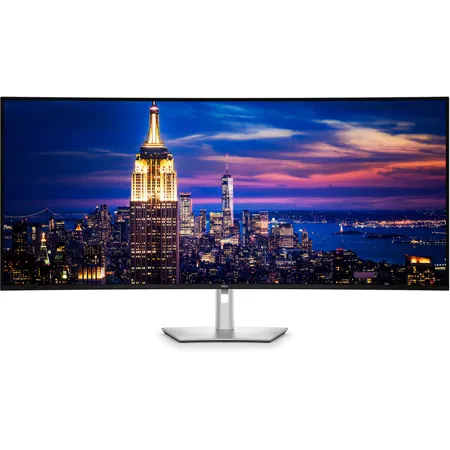
Unlock unparalleled productivity with this 6K ultrawide monitor designed for seamless multitasking, superior visual clarity, and all-day eye comfort.
World's first 52-inch 6K monitor
Revolutionize your workspace by replacing a multiple monitor setup with an ultrawide monitor, available exclusively at Dell. Enjoy seamless multitasking, superior visual clarity, and all day eye comfort while reducing desk clutter.
Expand your view
Experience breathtaking clarity on a curved screen with a cinematic 21:9 aspect ratio, 129 pixels per inch, and IPS Black technology for exceptional detail and deeper contrast.
World's best eye comfort
This monitor is TUV 5-star certified for eye comfort, featuring category one hardware low blue light certification.
Reduces blue light
The world's first monitor to achieve TUV category one hardware low blue light certification, reducing harmful blue light emissions to <=20% for all day eye comfort without sacrificing color accuracy. This is up to 60% less exposure than competitors.
Adapts to your environment
A built-in Ambient Light Sensor intelligently adjusts brightness and color temperature to suit your surroundings, delivering consistent comfort day or night.
Smoother visual experience
Enjoy less flicker and seamless scrolling with a 120Hz refresh rate, creating smoother motion.
Low reflectance panel
The low reflectance panel reduces glare from outside light sources and improves screen contrast.
Exceptional contrast and accurate color
IPS Black panel technology delivers a 2000:1 contrast ratio for deeper blacks, while 99% DCI-P3 and Display P3 color coverage with Delta E <1.5 ensure vivid, precise color.
Streamline your productivity
Seamless multitasking
Multitask effortlessly on the world's first monitor to implement Picture-by-Picture (PbP) with Screen Partition. Connect to two PCs simultaneously and display content across four unique partitions. No external hardware needed.
Connect up to four PCs
Picture-by-Picture (PbP) lets you view content from multiple PCs on one screen. The KVM (Keyboard, Video, Mouse) and Auto KVM features empower you to control them with a single keyboard and mouse.
Lightning-fast efficiency
With a variety of connectivity options, easily connect your peripherals to optimize your workspace and boost productivity.
Thunderbolt 4
Power your devices with a single cable connection with up to 140W EPR (Extended Power Range) enabled by Thunderbolt 4.
Extensive connectivity
Connect all your devices with a multitude of ports, including a pop-out quick access module featuring two USB-C ports (up to 27W power delivery) and one USB-A port.
Stable connection
Connect to the Ethernet with a built-in RJ45 port with up to 2.5GbE. The Ethernet Switch mode feature gives you the flexibility to lock the wired Ethernet to a chosen PC while continuing to share one set of peripherals to control multiple PCs.
Works seamlessly with devices on macOS
Tested with devices on macOS, this Thunderbolt monitor with Display P3 color is your ideal Mac devices companion for superb color coverage and accuracy. Daisy chaining multiple displays via a single cable requires Thunderbolt connectivity. Please check your device for compatibility, as select M-series chips may not support some features. Install Dell Display and Peripheral Manager application to customize advance settings.
Effortless deployment and setup
This monitor is purpose-built with lightweight aluminum and a VESA-mounting solution for easy installation and flexible management.
Quick and simple setup
Replace a multiple monitor setup with a single, lightweight monitor for easier installation and reduced setup time. The 2m Thunderbolt cable powers your laptop and keeps your desk clutter-free with a single connection.
IT-friendly flexibility
Use the stand in the box for immediate setup or opt for a without stand option for VESA mounting flexibility. The Dell Pro Heavy Duty Single Arm - HDA26 is available for purchase separately.
Dell Display and Peripheral Manager
Experience Dell's singular, innovative application to optimize the performance of your entire Dell PC workspace.
Maximize productivity
Easy Arrange tiles apps across screens with pre-set partitions and customizes up to five windows, enhancing multitasking. Easy Arrange Memory saves and restores app profiles manually, on schedule, or at start-up.
Easy navigation
Control and work across multiple network or USB connected PCs and monitors with a single keyboard and mouse, seamlessly transferring files between them.
More manageable
Save time and boost IT efficiency with the Dell Device Management Console to manage your Dell peripheral fleet at scale, from a single cloud-based console. Discover expanded Command Line Interface features from Dell Display and Peripheral Manager.
Optimize your picture
Customizable colors
Easily calibrate your monitor's colors on the new Dell Color Management software, with Calman Verified certification.
Manage ICC profiles
Create, store, and manage ICC profiles on your computer dynamically through the software dashboard.
Compatible with multiple operating systems
Dell Color Management software is compatible with multiple operating systems including Windows and macOS.
Environmentally forward thinking
Intentional design in every part
At the heart of our design is a commitment to sustainability. That's why our monitor helps reduce waste with a design made from recycled materials, with up to 90% post-consumer recycled plastic, 100% recycled aluminum, 50% recycled steel, and 20% recycled glass.
Environmental standards
This monitor is certified ENERGY STAR, is registered EPEAT Gold with Climate+, and carries the latest TCO Certification, as well as being TCO Certified Edge, ensuring the use of safer materials, renewable energy use, and extended product life.
Seamlessly modernize your tech
We can help you responsibly and securely retire your legacy IT equipment, regardless of brand, while addressing your sustainability goals.
866-795-5597







