
This item is no longer available.
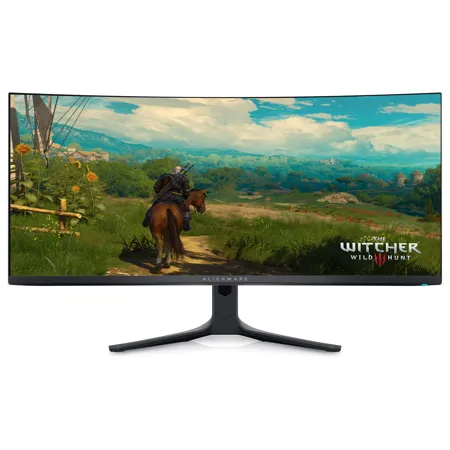
34" curved monitor with QD-OLED technology and AMD FreeSync Premium Pro. Featuring infinite contrast ratio and VESA DisplayHDR TrueBlack 400 for an incredible front-of-screen performance.
Unstoppably immersive
Quantum Dot Display Technology enables a slim panel design and delivers a superior color performance with a higher peak luminance and greater color gamut range vs WOLED (White OLED). The monitor features an extensive cinema-grade color coverage of DCI-P3 99.3% across a wide viewing angle, and colors are accurate out of the box with a factory calibration of Delta E less than 2.
Expect incredibly realistic visuals for gameplay that draws you in deeper thanks to 1000 nits peak brightness, infinite contrast ratio and VESA DisplayHDR TrueBlack 400 certification.
Lag-free gameplay
AMD FreeSync Premium Pro Technology and VESA AdaptiveSync Display certification lets you experience ultra-low latency gameplay for tear-free gaming every time, and offers support for HDR-capable games.
Expect smooth gameplay and view fast-moving graphics with incredible clarity for quicker in-game reactions thanks to an industry-fastest 0.03ms GtG (Gray to Gray) response time and up to 165 Hz (native) high refresh rate.
Innovative, iconic design
The unique Legend 2.0 Premium design is the perfect blend of stunning form and enhanced functionality. In addition to its sleek QD-OLED curved 1800R panel, the AW3423DWF monitor features improved cable management, 360 Degree ventilation for better heat dissipation and a new centralized On-Screen Display (OSD) joystick to make adjusting your settings easier. Customizable AlienFX lighting on the logo and screen size number on the back of the monitor enhances gaming ambiance.
For critical creating
For content creators and game developers who require precise color-critical work, the new Creator Mode feature was designed for you. This OSD menu option allows you the flexibility to choose between the native (DCI-P3) and the sRGB color space, depending on your work needs, and the ability to adjust the gamma settings.
The Picture-In-Picture (PIP) and Picture-By-Picture (PBP) feature lets you view two PC sources simultaneously for next-level multi-tasking.
Quality + comfort
The Alienware 34 Curved QD-OLED Gaming Monitor is engineered to avoid burn-in caused by items appearing onscreen for long periods of time. Additionally, you'll receive a 3-year service coverage for further quality assurance. And with ComfortView Plus, you can game longer, thanks to an always on, built-in low-blue light screen technology that reduces blue light emissions without impacting color accuracy.
Optimize your gameplay
A revamped OSD layout with centralized joystick allows for easy navigation of the monitor's settings and features. Among these features is the all-new AlienVision-four custom hardware-based overlays designed to enhance your visual experience in real-time based on actual gameplay.
• Night Vision: Helps increase visibility by improving both clarity and contrast during dark scenes in games
• Clear Vision: Enhances sharpness and clarity by removing obstructive elements like smoke, haze or mist
• Chroma Vision: Applies a heatmap to your game based on a thermal palette
• Crosshair: Displays a crosshair that assists the in-game aiming by being "always visible", making it easier to hit your target every time
866-795-5597