2021-04-06T20:00:00
Rated 4 out of 5
Slow to wake
Sometimes it takes a sec to connect after sleeping
Ahi
Originally posted at

2021-03-29T20:00:00
Rated 5 out of 5
Great mouse for the price
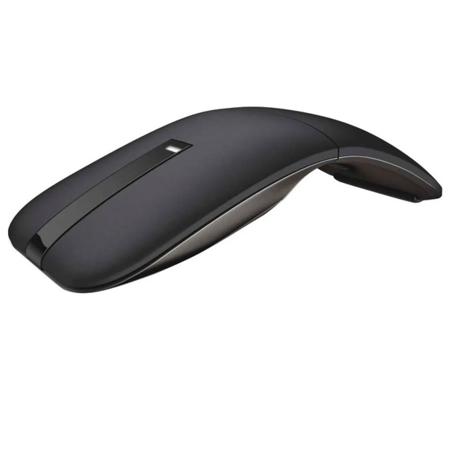
The WM615 is actually a very good product. While I knew it would work I didn't know exactly how well it would. Turning it on is as simple as a twist. I paired this with a new 2020 Dell Inspirion 7300 2 in 1 and the two work together like it was designed with each other in mind. I get instantaneous connection, fast response, precise pointing, and it just looks cool. It is very compact when in the off flat mode and doesn't take up any USB ports which on todays laptops are far and few. Price wise? Not bad. I got it for under $50. I bought it after my laptop and if I new then what I knew now I would bought it at the same time and used my percentage discount at checkout. Either way I love it and you will too.
Dexter C.
Originally posted at
2021-03-13T19:00:00
Rated 3 out of 5
Dell Mouse WM615 review
The mouse goes into auto-scroll way too much. Causes issues. Otherwise works fine.
Ben
Originally posted at
2021-02-24T19:00:00
Rated 3 out of 5
Mouse control has slow response
I like the style of the mouse but the mouse tail control is slow respond.
Steve
Originally posted at
2021-02-23T19:00:00
Rated 5 out of 5
handy Device
Nice travel mouse to go with my laptop
Vic M.
Originally posted at
2021-02-16T19:00:00
Rated 5 out of 5
Excelente Mouse
Very comfortable, nice feeling
GRN
Originally posted at
2021-02-14T19:00:00
Rated 3 out of 5
Bluetooth Mouse
Overall a good product but can lose the signal sometimes. My experience is the reliability not same as a wired mouse. Overall ok.
Mike K.
Originally posted at
2021-02-12T19:00:00
Rated 3 out of 5
Dell Bluetooth Mouse - WM615
Very disappointing at the price
Difficult to pair
No scroll capability
HQ F.
Originally posted at
2021-02-12T19:00:00
Rated 4 out of 5
slim travel mouse
slim design makes it easy to take along for traveling
Terri
Originally posted at
2021-02-12T19:00:00
Rated 5 out of 5
Very good
Good mouse with great look
Sherif R.
Originally posted at
2020-12-23T19:00:00
Rated 5 out of 5
excellent
excellent quality mouse!!! similar to my broken other dell..
minh t.
Originally posted at
2020-12-03T19:00:00
Rated 3 out of 5
Not Great
The scroll sometimes would stop working but the clickers would still work. It's not the most reliable mouse.
Kathy
Originally posted at
2020-10-27T20:00:00
Rated 3 out of 5
Keep batteries on hand!
This mouse works fine. But it does lag a bit and it goes through batteries insanely fast. (And that's with me turning it off at the end of every day.) I was excited to have a Bluetooth mouse when my XPS didn't have standard USB ports...but after the lag and constant need for batteries, I've switched back to a USB-C mouse.
I do keep this one as a back up. It's decent but not great.
Hope
Originally posted at
2020-10-21T20:00:00
Rated 4 out of 5
Decent Bluetooth Mouse
I like the mouse... it is light, compact and easy to use. I do prefer a rotating mouse wheel instead of the strip on top of the mouse.
RW
Originally posted at
2020-10-18T20:00:00
Rated 5 out of 5
Dell wireless mouse
Its ergonomic design is comfortable for your hand. I like not having to have too many wires.
David
Originally posted at
2020-09-21T20:00:00
Rated 5 out of 5
Great product
Smooth and precise and easy to use
Dorothy
Originally posted at
2020-09-12T20:00:00
Rated 5 out of 5
Great design and efficacy
Excellent and ergonomic product. Very easy to use
Kanter
Originally posted at
2020-09-06T20:00:00
Rated 3 out of 5
Jittery and Poor Feel
I don't like the feel and setup is non intuitive.
The E.
Originally posted at
2020-08-26T20:00:00
Works great. Looks nice too
Slipshod
Originally posted at
2020-08-22T20:00:00
Rated 5 out of 5
Good product
Excellent, I use it everyday
VG
Originally posted at
2020-08-14T20:00:00
Rated 4 out of 5
Good but Ergonomicly not great.
The mouse work well. Ergonomics have are not ghe greatest. The spin wheel "third button" is a touh sensor. The work ok but the feel being smooth provides very little tactile. Also fitting into the palm overall is not comfortable for extended time and fingers do not "fall" easily into place.
chuck
Originally posted at
2020-08-13T20:00:00
nice but needs an off on switch to save the battery
Jina
Originally posted at
2020-08-03T20:00:00
Rated 5 out of 5
Mouse Issues Solved
Initially I was not happy with the performance of the Bluetooth Mouse. It would go to sleep and be slow to wake up and respond. The motion and actions were not smooth, and very inconsistent when in use. However, after two updates of drivers, and making adjustments in the mouse settings, it is functioning very well with no problems or issues. All of the previous performance problems were corrected and it functions as well as a hardwired mouse.
Jarm
Originally posted at
2020-08-03T20:00:00
Rated 1 out of 5
no.........................
no bueno at all..................
no
Originally posted at
2020-08-02T20:00:00
Rated 5 out of 5
Easy to use
Like shape and size; fits hand well
JMR
Originally posted at
2020-07-30T20:00:00
Rated 2 out of 5
Scroller is terrible
After receiving a replacement for a damaged shipment I find this mouse disappointing. Cursor movement is fair but the scrolling is a real pain. Often I can't tell when I'm on the scroller which means I have to look at the mouse plus the movement scrolls the wrong direction. I'll probably revert to my USB mouse.
Herb
Originally posted at
2020-07-29T20:00:00
Rated 4 out of 5
Good, almost great.
I like this mouse, but sometimes the touch scrolling doesn't work well. I'd rather have a wheel.
Charlie
Originally posted at
2020-07-26T20:00:00
Rated 5 out of 5
Convenient
I love this tool. I’m from an age where a mouse helps me maneuver a PC better. Plus no wires or connecting devices, sets up very easy to your Dell computer!
Rebecca
Originally posted at
2020-07-25T20:00:00
Rated 5 out of 5
Blue tooth mouse
Compact, sleek, great fit and very comfortable, easy connect and very easy-to-use. Slight adjustment from standard mouse. Well worth the few dollars more in price. .,
Pop
Originally posted at
2020-07-24T20:00:00
Rated 5 out of 5
Dell bluetooth mouse - WM615
The mouse has a nice feel and works well
Kathy
Originally posted at