Orders placed during Passover Holiday (Wed 4/1 after 4PM ET – Thurs 4/9) will ship Fri 4/10. View our holiday shipping schedule.
This item is no longer available.
Review Summary
2023-03-14T20:00:00
We use it as a third monitor in portrait mode for mail and Teams
Tauchen

2022-08-29T20:00:00
Love the quality and resolution
JR

2021-02-28T19:00:00
its great. very happy i went with 24". Beautiful clarity. I like how it goes up and down and swivels.
Cindy

2021-02-24T19:00:00
The wife says the new modder is great
Dawn G.

2021-02-23T19:00:00
Great monitor, love the function of it rotating up, down, and 180*
Cheri

2021-02-23T19:00:00
Little taller than normal, but that's a good thing... No bezel has the modern look. Recommended.
allsystemsgo

2021-02-23T19:00:00
Love the extra real estate a 1200 monitor provides
Matt

2021-02-18T19:00:00
Picture is crystal clear and fits nicely on my desk.
Matt R.

2021-02-14T19:00:00
The Product was just as described and ordered and delivered ahead of schedule.
St C.

2021-02-14T19:00:00
this display has a 16:10 ratio (rather than 16:9) which gives you more display height to your desktop.
msmatherne

2021-02-14T19:00:00
Excellent Picture Colors and Clarity
Dell U.

2021-02-12T19:00:00
Very good monitor. Especially like that it can be controlled by the monitor app. Only downside is that it recovers from standby slower than my more expensive Dell monitors
Charlie F.

2021-02-12T19:00:00
Looks great. Crisp colors meet the expectation!
Steph

2021-02-12T19:00:00
I needed a second monitor as I was working off a laptop. Getting headaches almost daily. This monitor is great. Comes with ComfortView/blue light mode and the large screen helped immensely. Images are clear, beautiful color. Love the fact I can toggle back and forth between work laptop view and personal PC view.
PCH

2021-02-04T19:00:00
The thin bezel is a nice feature for multiple monitor workstations. I like the extra height pixels (1200 versus 1080. For decades, I have found Dell monitors to be reliable. Hopefully my recently purchased monitors continue that tradition.
Dana S.

2021-01-12T19:00:00
Good monitor to match up with the U2415 for a dual monitor desktop.
wsm

2021-01-12T19:00:00
The quality is great & manual screen adjustability is fantastic.
Alex

2021-01-09T19:00:00
So far this monitor has worked very well.
David W.

2021-01-09T19:00:00
Expected better resolution ... 1920 is the upper limit
Mark

2021-01-09T19:00:00
Great size Good price. But came with one incorrect cable Had to buy an HDMI cable to connect to my Dell computer( not really old but not brand new).
R48

2021-01-08T19:00:00
Wonderful monitors for my gamer.
Chontrelle

2021-01-08T19:00:00
Nice size and great quality of picture
JnP O.

2021-01-04T19:00:00
Doing a good job. Working great.
The M.

2021-01-03T19:00:00
Clear image, and easy to install.
GB

2020-12-31T19:00:00
Monitors work great. My old monitors had a problem with falling asleep and not waking up. Installed these and the problem is gone. Two 24" side by side. Nice lookin' screens! Shipping to Hawaii was fast and free.
Lee M.

2020-12-30T19:00:00
Perfect size with incredibly clear picture. Not too big, not too small, it’s just right. Love it so much we may be buying another for our business
Colleen

2020-12-29T19:00:00
Works great! Easy set up.
Hymn

2020-12-28T19:00:00
Excellent monitor. Crisp, large, beautiful volor!
joblo

2020-12-28T19:00:00
This is an add-on to my 32" 4K curved. This monitor works perfectly as a vertical display. Very happy with another Dell purchase!
Nat

2020-12-28T19:00:00
I use the monitor for work and it fits my needs really well. The extra USB ports are a huge help and I can't understate the usefulness of having the height and direction being adjustable without having to move the base.
Matt F.

Great Picture
By JR
Love the quality and resolution
Taller dimensions are great for writing and larger documents
By StuMeyer
I like the taller profile. Still wide enough for side-by-side documents.
View it right
See more, scroll less
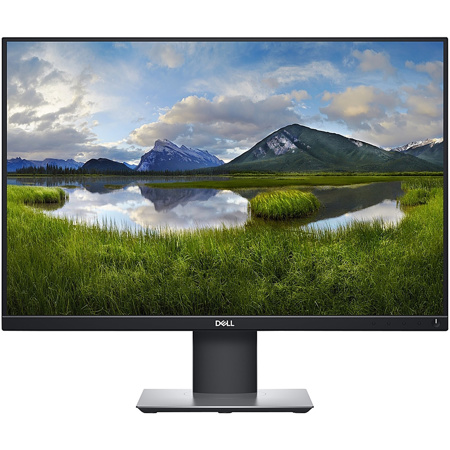
View applications with an extended vertical view on a tall 24" 16:10 1920x1200 (WUXGA) monitor which provides 11% more onscreen real estate.
Go vertical
Pivot 90 degrees and enjoy outstanding clarity from every angle with IPS technology.
Practically borderless
Work with an uninterrupted view across multiple screens with Dell's three-sided ultrathin bezel design. And, when you use two monitors together, you can increase your productivity by up to 21%.
Easy on the eyes
Optimize eye comfort with flicker-free technology and ComfortView reducing up to 60% of harmful blue light emissions.
Convenient and comfortable
Versatile connectivity
Connect to any device you need to with HDMI, DisplayPort and DVI.
Your view, your way
Stay comfortable with the ability to tilt, swivel, pivot and adjust the height of your monitor.
Stylish and practical
73% of employees believe that reduced clutter and better connectivity helps with productivity. Free up valuable desk space with a thin monitor profile and compact monitor base.
Adapting made easy
Customize your workspace with VESA-compatible mounts and stands. Snap your monitor into place using the Quick Release slots behind the monitor panel for easy installation.
Environmentally smart
Environmental standards
These monitors meet the latest regulatory and environmental standards such as ENERGY STAR, EPEAT, TCO and CEL/CECP/CEC.
Eco-conscious packaging
Zero styrofoami and at least 25% of recycled cardboard for ease of composting/recycling.
Energy conservation
Save energy when your monitor is not in use with PowerNapi, a feature that dims or puts your monitor to sleep when it's not in use.
Optimize and organize with Dell Display Manager
Productive at every level
Easy Arrange allows you to easily tile multiple applications across one or more screens with 38 pre-set window partitions and the ability to personalize up to five windows, giving you improved multitasking abilities.
Seamless transitions
The auto-restore feature remembers where you left off, so applications will go back to where you left them, even after you've unplugged.
More ways to manage
Asset management reports allow IT managers to quickly capture and track monitor information as well as configure multiple monitors at once through a single setup.
The key to convenience
Shortcut keys can save you even more time, letting you easily configure your display management settings so you can get to work faster.
Connectivity Options
Ports & Slots
1. Security lock slot | 2. Power connector | 3. DisplayPort | 4. HDMI port | 5. Stand lock feature | 6. DVI port | 7. VGA connector | 8. USB 3.0 upstream port | 9. USB 2.0 downstream port (2) | 10. USB 3.0 downstream ports (2)
Cables Included
Power cable | DP cable | USB upstream cable