This item is no longer available.
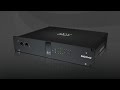
DiGiGrid IOS-XL is a comprehensive audio interface with a built-in extreme SoundGrid DSP server that adds more plugin processing power to your system. Ideal for professional and personal production environments alike, the IOS-XL is the all-in-one solution for Studio and Live. Together with the SoundGrid Studio System, DiGiGrid IOS-XL enables you to mix and monitor in real time using hundreds of SoundGrid-compatible Waves and third-party plugins, with incredibly low latency of only 0.8 milliseconds.
Hardware
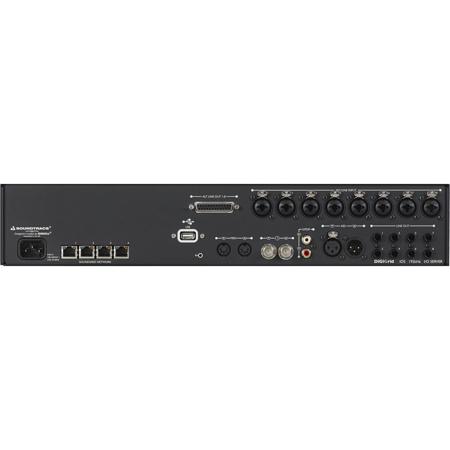
DiGiGrid IOS-XL features 8 mic/line inputs with broadcast/studio-quality preamps; 8 line outputs; 2 headphone outputs; and MIDI I/O, S/PDIF and AES ins and outs. IOS-XL also features a built-in network switch. To connect more SoundGrid-compatible components to your system, all you need is a single Cat 5e/Cat 6 Ethernet cable.
• Internal SoundGrid DSP Server (SoundGrid Extreme V3 Server equivalent)
• 8 channel mic/line ins (XLR/TRS combo)
• 8 channel line outs (TRS or 25-pin D-con)
• 4 SoundGrid RJ45 Ethernet ports AES/EBU or S/PDIF I/O (switchable)
• Optional sample rate conversion on AES / SPDIF inputs
• 2 headphone outputs with front panel analog level controls
• 1 AC input
• 1 USB port (for software upgrades/support only)
• 2U rack-mounted
• Supported sample rates: 44.1, 48, 88.2, 96 kHz (176.4 and 192 kHz will be supported in the future)
• Word clock I/O
• Clock synchronization via Word Clock input, AES/EBU, SPDIF, SoundGrid (Sync over Ethernet)), Internal
• MIDI I/O
• Reset switch
Software
The IOS-XL installer includes the relevant drivers and software for your unit: the SoundGrid ASIO/Core Audio driver, the SoundGrid Studio Application, the eMotion ST mixer, StudioRack and the IOS-XL Control Panel.
DiGiGrid IOS-XL Comes with the Complete SoundGrid Studio System Software by Waves
The SoundGrid Studio System is the next generation of sound technology. It is a real-time processing and networking platform designed to bring your studio up to light speed. It allows your DAW to offload its plugin processing to a SoundGrid DSP server and enables your devices to communicate with one another and with the devices of the people you work with.
The SoundGrid Studio System integrates seamlessly with all DAWs and DiGiGrid (or other SoundGrid-compatible) I/Os, providing endless possibilities for setups of every size-from a single DAW with one DiGiGrid I/O, to an entire network of host computers, I/Os and SoundGrid DSP servers.
The SoundGrid Studio System Gives You the Power to Do More
• Real-Time Processing - Run hundreds of plugins simultaneously
• Low-Latency Monitoring - Track and rehearse with full-on plugins in near-zero latency
• Networking - Connect everything and everyone through a centralized hub
• Seamless Integration - Connect multiple DAWs using the SoundGrid ASIO/Core Audio driver
• Open Architecture - Compliant with SoundGrid-compatible Waves and third-party plugins
SoundGrid Studio System Software Components
SoundGrid Studio Application - For managing the SoundGrid network on your host computer
• eMotion ST Mixer - Low-latency monitoring for tracking and rehearsing
• StudioRack - For running plugin chains, saving and loading their presets and offloading their processing to a SoundGrid DSP server
• SoundGrid ASIO/Core Audio - Connects any DAW to the SoundGrid network as a software I/O
SoundGrid Studio Application
The SoundGrid Studio Application is your tool for managing all software and hardware connected to the SoundGrid network. With its dynamic I/O mapping ability, the SoundGrid Studio Application lets you configure your SoundGrid network, manage its various components and set up any combination of drivers and SoundGrid-compatible devices. It also enables I/O sharing between several computers, allowing you to manage their resources from your host computer.
The SoundGrid Studio Application enables you to
• Configure your SoundGrid ASIO/Core Audio driver and DiGiGrid I/Os (Auto-configuration Wizard available)
• Process, mix and monitor in real time (together with StudioRack and the eMotion ST mixer)
• Connect and patch multiple hardware devices and software I/Os
• Stream audio from and to multiple host computers running different DAWs
• Create and save your own configuration templates
• Control the parameters of your DiGiGrid I/Os (channel input gain, phantom power, etc.)
eMotion ST Mixer
eMotion ST is the mixer part of the SoundGrid Studio System. Combined with StudioRack, it lets you run SoundGrid plugins for low-latency monitoring, giving you complex monitor mixing options while recording with your DAW. eMotion ST is a high-quality mixer with 8 multi-purpose inputs, 64 additional StudioRack input channels, 2 FX busses, 6 mix busses and a main stereo mix. Since the mixer operates within the SoundGrid network, any DiGiGrid I/O or any available SoundGrid-compatible I/O device, whether hardware or driver-based, can provide it with inputs and outputs.
The eMotion ST mixer can run hundreds of Waves and third-party SoundGrid-compatible plugins in low latency, replacing in this respect the external mixer traditionally used to create monitor mixes for studios and headphones.
• 8 multi-purpose mono/stereo input channels
• 2 stereo FX aux buss/returns and 6 stereo aux buss/returns
• Up to 64 mono channel feeds from StudioRack plugins
• 8 insert slots per channel for SoundGrid plugins
• Connects to multiple DiGiGrid I/Os and other SoundGrid-compatible devices and hosts
• Compliant with SoundGrid-compatible Waves and third-party plugins
• Fully integrates with StudioRack
• Enables use of SoundGrid plugins as standalone processors for any purpose
• Requires at least one DiGiGrid I/O and a SoundGrid DSP server
StudioRack
StudioRack is a software rack dedicated to running plugin chains. The processing of each chain can then be directed to your host computer's CPU or to the SoundGrid DSP server in your IOS-XL, as you choose. When you process your plugin chains on the SoundGrid server, StudioRack lets you monitor your tracks in extremely low latency via the eMotion ST mixer.
• Compatible with most popular DAWs
• Plugin chains are processed on local CPU or SoundGrid DSP server
• Compatible with Waves and third-party plugins
• Enables monitoring in super-low latency
• Up to 8 plugins per rack
• Fully automatable
• Plugin chain presets can be loaded on any DAW as well as on MultiRack and eMotion ST
• Instant access to plugin parameters within each chain
• Intuitive MIDI control over all plugins
• Avid Control Surface support
DiGiGrid IOS-XL Control Panel
• Clock settings: source, sample rate, type, status
• Mic preamp controls: input gains, phantom on/off
• Optional sample rate conversion on digital inputs
• Input and output meters
• Save and load presets of unit settings
• Save your settings along with your Waves and SoundGrid host application sessions
Native DAW with a DiGiGrid IOS-XL (Offloading Audio Processing to the IOS-XL's Built-In SoundGrid Server)
This diagram shows a typical studio setup, including a host computer with a Native DAW and a single I/O interface connecting mics, instruments, headphones and monitors. By adding a DiGiGrid IOS-XL with its built-in SoundGrid DSP server, you can offload your audio processing from the DAW and enjoy much greater processing power (up to 8 plugins per StudioRack insert). You can also use StudioRack together with the eMotion ST mixer, letting you record and monitor with extremely low latency and dramatically increasing the number of plugins you can use simultaneously.
• DiGiGrid IOS-XL
• Host computer with a Native DAW
One Computer, One I/O with a DSP Server, One Expansion I/O Unit, One DAW
Want to mix, record and monitor with a large number of plugins in near-zero latency? By adding the IOS-XL's built-in DSP server to your SoundGrid network you can offload your audio processing from your DAW to the server. This dramatically increases the number of plugins you can run simultaneously. In addition, it allows you to use the eMotion mixer, which lets you create personalized monitor mixes from your DAW mix and outside sources and also allows you to open 64 StudioRacks.
• DAW (Pro Tools, Nuendo, Cubase, Logic, etc.) with SoundGrid Studio installed
• Multi-input SoundGrid I/O device with server - DiGiGrid IOS-XL
Need more I/Os? Just connect a DiGiGrid IOX expansion unit to your DiGiGrid IOS-XL via a single Cat 5e or Cat 6 Ethernet cable and now you have 12 more top-quality input preamps, 6 line outs and 4 more individual headphone outputs.
Running Various DAWs Simultaneously Using a Single DiGiGrid IOS-XL
Use this configuration for running audio signals from multiple DAWs simultaneously and mixing them in real time.
• DiGiGrid IOS-XL
• Host computer with Native DAW
• Computer 2 - Native DAW
• Computer 3 - Native DAW
• Computer 4 - Native DAW
• 1 GB network switch
In this setup, a single Cat 5e or Cat 6 Ethernet cable connects each of the four computers to the DiGiGrid IOS-XL's Ethernet switch. Each computer that is part of a SoundGrid network uses the SoundGrid driver to stream audio into the network. In the above configuration, the main host computer running the SoundGrid Studio Application patche