

This item is no longer available.
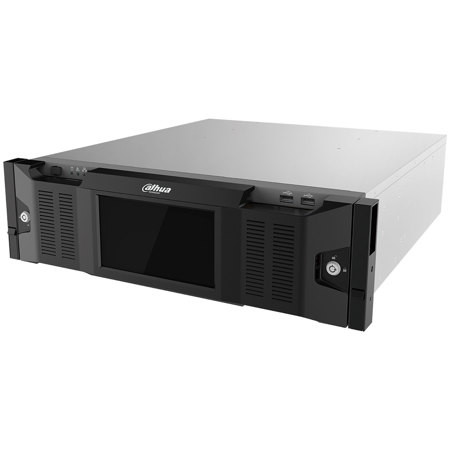
DSS7016-S2 is a powerful surveillance system preloaded with Linux-optimized DSS Pro software, which has high performance and scalability. It supports up to 2000 network cameras and extend the devices by distribution. And it supports 3.5"chassis with up to 15 hot plug hard drives for center storage which provides a very powerful all-in-one solution for projects.
Features
High Performance
• Supports 3.5"chassis with up to 15 hot plug hard drives and extend the storage via ISCSI
• Supports up to 2000 video channels per server and it can extend the devices by distribution system
High Reliability
• Redundant power option will make the system more stable
• Hot standby application of two servers will keep the system 7x 24h stable operation
Main Functions
1. Web Manager
Business Configuration
Organization Management
• Through organization to achieve device group management.
Device Management
• Device initialization: Initialize Dahua's device
• Add devices via auto search, IP, IP Segment, auto register(for 3G, 4G, DHCP device).
• Manage Dahua's devices such as network camera, network speed dome, NVR, DVR, MDVR, etc.
• Modify Dahua device's IP address.
• Modify the added Dahua device's password.
• Bind the associated camera: it's very convenient for alarm config to link the bound cameras, and you can bind POS channel and camera for POS transaction
Role and User Management
• Manage the user's permission via role(device permission, control permissions).
• User can be assigned with the roles to obtain the corresponding permissions.
• User can be restricted by the MAC and expiry data.
• Setting PTZ permission for user.
• User can be locked.
• Supports import domain user and assign roles to the user.
Event Management
• Alarm type: device, video channel, alarm input, IVS alarm, thermal, vehicle blacklist, face arming.
• Alarm Scheme: All day template, Weekday template, Weekend template and custom template
• Alarm Priority: Low, Medium, High.
• Linkage: record, snapshot, live video, alarm output, PTZ, video wall, E-mail, User.
Storage
• Supports edge storage and central storage.
• Central storage: Extend storage via iSCSI
• Creates record plan by time template: All day template, Weekday template, Weekend template and custom template
• Backup the video from the edge storage, like EVS, NVR, DVR and etc. by schedule
• Backup the video from MDVR by WiFi
• Disk Quota: Group the disk, and cameras can be allocated to different disk groups.
Map
• Google online map, Google offline map, raster map
• Up to 8-level submap
• Configure the hot spots(camera, alarm input, intelligent channel) and sub maps on the map.
Video Wall
• Display/hide the screen ID
• Supports screens combination
• Bind the decode channel with the corresponding screen.
Face Database
• Face library management
• Adding face one by one
• Import faces in batches
• Set person type for face, you can add person type by yourself
• Send face library to face recognition devices, and configure the similarity
Vehicle Blacklist
• Vehicle Blacklist management
• Vehicle blacklist arming and disarming
• Import and export vehicle blacklist Average Speed
• Location configuration
• Region configuration(Start location, end location, length, minimum speed, max speed)
Store Management
• Config store layout
• Config the resources to the store
• Config the store location to get weather information
• System Maintenance
Backup and Restore
• Automatically backup system database (daily, week, month)
• Manually backup system database
• Restore system database from server or local file.
System Dashboard
• Overview and detail system information.
• Running Status: CPU, storage, bandwidth.
• Service, device and user online information, device health report.
• Event Information Statistics: total events and processed
• Source Information: Video channel, alarm channel
Log
• System, admin, client log.
• Search and export log.
Other Functions
• Supports https
• Device time calibration
• Setting log, alarm info, POS data, heatmap storage time
Service Management
• Delete the slave server
• Enable and disable slave server
2. Control Client
Live View
Displays device tree. Show/hide offline device
• Displays the device IP address or device name on the device tree
• View real-time video.
• Common layout (1,4,6,8,9,13,16,20,25,36,64 ) and customized layout
• PTZ control
• Electric focus
• Manual recording(store on PC or central storage)
• Snapshot
• Instant playback
• Digital zoom
• Fisheye dewarping
• Fisheye and speed dome smart tracking
• Smart tracking for panoramic camera
• Audio talk
• Set alarm window
• Quickly decode the video to video wall
• Turn on/off the audio in live view
• Region of interest: Divide one window into 4 or 6 parts, one shows whole image, others show the detail
• Display map in Live View
• Save the current live view as a view
• Up to 4 Live View tabs
• Supports adding channel to favorite
• Video tour by device, Org, Favorite, View
• Quickly switch to playback
• Supports NKB1000 to control camera on Live View
• POS transaction overlay
• Set POS overlay style
• Adjust the video image
• Adjust the display mode(full screen and original)
Playback
• Replay from the front-end devices or central storage
• Video filter: normal, motion, alarm
• Sync play
• Reverse playback
• Slow and fast forward (up to 64X and 1/64X)
• Playback frame-by-frame
• Lock or mark the important record for central storage
• Download the video, supports avi, dav, flv, mp4, asf
• Decode the video to video wall
• Fisheye dewarping
• Adjust the video image
• Snapshot
• Quickly switch to live view
• Adjust the display mode(full screen and original)
• Common layout (1,4,6,8,9,13,16,20,25,36 ) and custom layout
Download Center
• Download record from central storage or device, supports avi, dav, flv, mp4, asf
• Download record by timeline, files or tags
• Supports multi-task download
Event
• Real-time and history alarm info
• Alarm detail info, like live video, record and pictures from related camera, alarm source location on the map
• Acknowledge the alarm
• Arming control for alarm source
• Forwards the alarm to relevant user
• Manually send alarm email to relevant person
• Search alarm by alarm source, alarm time, status, handle user, priority
• Search alarm events and export the alarm list.
Video Wall
• Decode the real-time video to wall
• Manually/automatically decode to wall
• Manage the video wall split
• Change the stream type of video channel
• Adding box, turning on/off screen and getting the video stream to control client
• Tour the video channel in one screen
• Schedule plan: Setting the running task on timeline
• Tour plan: looping different tasks, and each task has duration time
• Supports NKB1000 to control video wall
Map
• View the live video and playback on the map
• Supports the area or length calculating for GIS map
• Supports visible range and initial angle(only available for part PTZ model )
• Alarm source turns red and flickers on the map when alarm occurs
People Counting
• People counting: Provides daily, weekly, monthly, yearly reports
• Heatmap
• Exports the people counting and heatmap data.
Face Recognition
• Automatically captures faces in the camera field of view
• Extracts face attribute information from captured face
• Real-time face comparison
• Quickly register face to face library
• Searching face via face attribute
• Searching face via uploading a face image
• Searching comparison records
• Generate the track for the specific face
• Generate daily, weekly, monthly attribute report based on the gender and age
ANPR
• Real-time license plate recognition
• Vehicle passed record
• Generates vehicle trajectory based on license plate and time info
• Search arming record Other functions
• GPU decoding
• Connect NKB via USB
3. Mobile Client History Record
• Show recently viewed channels, you can open live video or playback via history records
• Up to 20 history records, then replace the oldest operation record
Live View
• Open more than one channel at same time, up to 16 channels
• Three stream type: HD(high definition), SD(standard definition), FL(Fluency)
• Supports PTZ control
• Supports horizontal screen play
• One-key switch to playback
• Snapshot, local record, audio talk
Playback
• Replay device record and center record(Up to 8X and 1/8X)