

This item is no longer available.
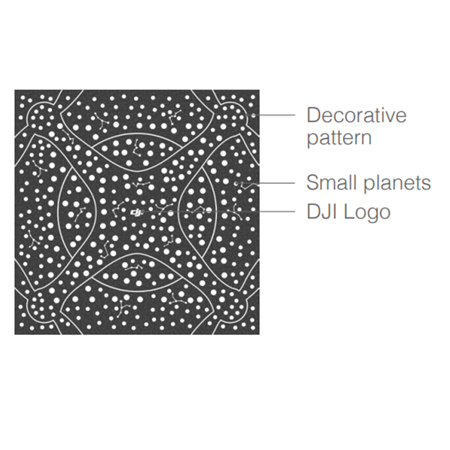
TT 3 x 3m flight maps can be regarded as large mission pads used in the same way with the flight maps, TT can perform single-drone fixed-point flight and multi-drone formation flight. The pattern of the flight map is composed of DJI Logo, decorative pattern, and planets. Small rocket Mission pad ID Planets Decorative pattern Small planets DJI Logo DJI Logo Small planets Decorative pattern
• DJI logo: This represents the positive direction of the x-axis in the mission pad coordinate system.
• Decorative pattern: For decoration.
• Planets: TT recognizes the ID of the fight map by detecting the arrangement of the planets and obtains the coordinate values in the coordinate system of the flight map.
Flight Map Coordinate System
The flight map pattern contains a three-dimensional coordinate system, where the origin is at the center and the flight map is a plane described by an x-axis and y-axis.
Operations
The flight maps only work with TT or Tello EDU drones that support SDK 3.0 or later versions.
Flight map placement
Lay the flight map on a level surface and adjust the orientation of the DJI logo as needed.
Enable TT mission pad detection
• Place TT in the center of the flight map and enter the SDK mode
• After entering SDK mode, enable the mission pad detection function of TT with the "mon" command
• Enable forward or downward-looking mission pad detection with the "mdirection x" command as needed
Have TT recognize the flight map
Command the TT to take off and hover. Instruct Tello to recognize the flight map using the mid parameter in the SDK and perform corresponding flight actions based on the coordinates and ID information.
Command Descriptions
The flight map commands are the same as those of the mission pad.
Note that the ID of the flight map is 12. Effective flight map recognition range Recognizable height range: 0.9 - 2.0m, Recognizable horizontal range: The effective programming range is 2.8 x 2.8m.






