


This item is no longer available.
Review Summary
2017-04-14T15:19:23
I hate ink jets. They clog, they are temperamental. This printer is everything an Ink jet is not. It's reliable. Its fast. Good thing, because I don't think there are any other dye sub printers out there that print 8x12 edge to edge. Simply beautiful pictures with no fuss.
Gene T.
2014-04-28T21:00:00
I use the DS80 (also the DS40) for event printing. They work very well and produce fast and beautiful prints. The ability to stack them saves a lot of space while being able to reload the ink/paper in seconds. Your first print kit pays for the printer easily. If you have the 80&40, the 80 will pay for both at $10 per print. The printers are a compact size but a bit heavy. The tray on the 80 is a little bulky and oddly shaped but I stack it on the bottom. It's no problem to me, I'm just trying to fill this text box. I have had zero problems with these printers. I'm actually going to purchase another 40&80 so I can print 4 sizes at any given time and not have to switch the print kits.
Gerald I.
2014-01-08T19:00:00
I bought this printer for event printing but I just got it yesterday. I have set it up and have printed a few test prints which seemed to work well. The printer is very heavy and wished I would have bought the travel case for it. Set up was easier when I watched a youtube clip. This review is targeted more towards Adorama and their methods of packing the product for shipping. The printer itself was packed really well but the rest of the components/wires/disks/paper tray were in an area basically floating around without any bubble wrap or Styrofoam. The install disk was out of it's package full of dust and scratches. Everything has been working so far but it is only the first day. Having this experience makes me a bit nervous about future purchases. As for the printer, I am very excited about using it at my first event this weekend.
Mr B.
2012-07-19T21:00:00
the best printer i had in years dye sub produce excelent picture
sidg
2012-04-17T21:00:00
I finally had the chance to give my three DNP DS80s a workout and I have to be honest, the reliability was amazing. Over the course of one day in six hours we printed over 700 8x10 prints. In that 700, I only saw three that came out with flaws (two if I wasn't so picky). The fans that the prints were distributed to were very, very pleased and we did not get one complaint on print quality (many complements however). Which I have to say is very good because these are some picky fans purchasing very expensive prints. The printers never ceased, never jammed, never did anything adverse, even after all three got knocked off the cart they were on. They were however in Pelican cases so I am sure that helped. I will say I still absolutely hate the paper trays, they are bulky and very often get in the way. They also are a pain to pack because they are so large and do no compact but heck, if all I can complain about is the paper tray, i am very happy. I do also wish the 8x10 paper for these printers was a touch thicker. I would definitely recommend these printers.
DarkriderCJ
2012-03-04T19:00:00
These printers seem to be very nice. I have not had it out in the field but have spent a lot of time with it testing and getting ready for the field. I bought two of these for convention photo ops and it seems like they are going to be great. I have my first field test with them next month. I should be looking at around 1000+ prints over two days, so that will be the real test. Included in the (HUGE) box was the printer, a USB cable, power cord, windows driver discs (NO MAC DRIVERS! Had to get them online), paper tray, instructions, a (very cool) quick reference card, and a cleaning kit (incl alcohol pads, small fine sandpaper, thermal head cleaning pen, etc). It was super simple to set up. Loading the media is easy, straightforward and not tricky in the least. In fact, I was amazed at how very simple it was. The color and gloss amount is great out of the box when printing from photoshop CS5 on my Mac with very little tweaking. I was able to get the settings correct to get an edge to edge print, sized correctly with only a couple tries. A word of note. They are about 40lbs and I would strongly suggest a case of some type. They fit nicely in a Pelican 1550. The waterproof feature of the Pelican is really not needed in most applications but being that they are dustproof as well should pay off nicely as Dye Sub printers certainly don't like dust. For printing I easily recorded an action in photoshop CS5 to batch print to the DNP DS80 and it seems to work amazingly. It averages about 26 seconds for a full color borderless 8x10 and I don't think it has ever taken over 30 seconds to put one out. Full size, uncompressed 300 dpi 8x10 .tifs start printing almost immediately after clicking print, something I was very excited about (my inkjets took forever it seemed). Not a huge fan of the paper tray. The printer needs to be at the very edge of a table or desk to put the paper tray on and let it hang. I would like to have seen one that is more angled. When the printers are stacked, the paper tray has to be removed from the top printer to open and replace media in the lower printer. That could prove to be a bit of a pain when the top printer is printing a batch. All and all, as of now, I am very excited about the DNP DS80 printers and provided they work out in the field, I will be adding more soon!
DarkriderCJ
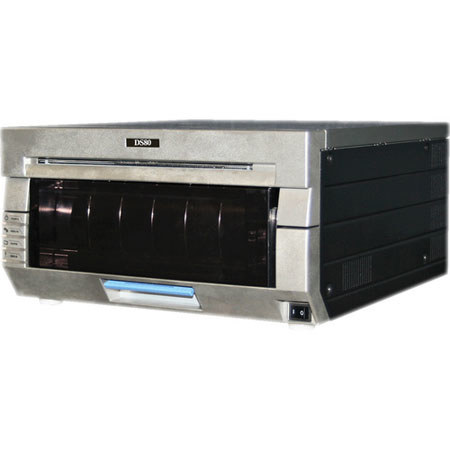
DNP DS80 Printers is high-speed, high-quality photo printers for use in event photography, photo labs, photo kiosks, by professional photographers, or in other commercial applications. With the same chassis as the DS40, it very easy to transport. Wherever you need it, you can bring your DS80 printer. The newly developed heat-control IC makes possible high-speed printing of high-definition photos. It takes about 35 seconds to output one borderless 8 x 12 inch (203 x 305 mm) print.
Mac OS-X driver
The new Mac driver package version is v5.0.169 and supports Mac OS-X 10.9 and 10.