2018-03-12T20:07:07
Rated 5 out of 5
great label & stamp printer at great price
rapid delivery, well packaged, easy setup at a very good price. hard to ask for more!
Jeffrey L.
2016-08-28T20:00:00
Rated 3 out of 5
Nice solution. Expensive buying direct.
Printer works flawlessly. The on/off button on the scale is a bit finicky but works well once on. Overall a very nice solution. My big negative is the price. After buying directly from Dymo I saw on Amazon for nearly $100 less.
Rich4221
Originally posted at

2014-11-11T19:00:00
Rated 5 out of 5
Nice Addition to office
Haven't had the desktop mailing solutions too long, but both of them have been making life easier for our filing and our postal needs,
tlmiller
Originally posted at
2014-10-17T20:00:00
Rated 5 out of 5
So easy to use
We bought this a month ago and love it so easy to set up and use. Would recommend this product highly
Sandy62
Originally posted at
2013-02-11T19:00:00
Rated 5 out of 5
Makes my life so much easier!
Makes my life so much easier!
Erica
2013-02-04T19:00:00
Rated 5 out of 5
No more waiting in Lines at the Post Off
I love that I can now do all my postage printing from home. No more waiting in Lines. The address import is also a nice option.
Love31
2013-01-21T19:00:00
Rated 4 out of 5
Great help!
I have two little children and toting them to the post office all of the time was getting tiresome! I love having the ability to quickly print off postage and mailing from my own home! Once I had this set up, it was easy to use! So happy with my purchase!
Ktna182
2013-01-19T19:00:00
Rated 5 out of 5
Making Mailing Easy
This has made life so much easier for me as a direct sales business owner with 2 toddlers. Mailing is a breeze now. And my shipping labels look very professional. DYMO customer service was also top notch when I needed assistance with a user error!
Regina L.
2013-01-16T19:00:00
Rated 5 out of 5
Definitely good purchase
This is replacing a larger postage machine in our office that we have to pay a monthly rental rate for. We have been very pleased with the performance so far.
Becky o.
2013-01-16T19:00:00
Rated 5 out of 5
Excellent description
This is great for mailing. I have two for different types of lables and it works excellent with the software.
CHARLES S.
2013-01-16T19:00:00
Rated 5 out of 5
AWESOME! Best price around!
I hate going into the post office, especially in the winter with 2 little kids in tow. I do a lot of business mailings and this has saved me many times!
Lynloves31
2013-01-16T19:00:00
Rated 5 out of 5
love this product
I use this product for mass mailing and everyday mail and shipping needs.
31Leader
2013-01-16T19:00:00
The product is exactly as described, but it was a little unclear when I purchased it that you can't print regular Priority postage without a monthly membership. You can print First Class up to 13 oz or Flat Rate Priority, but not regular Priority Postage. I wish this has been more clearly stated especially since it comes with a 10 lb scale which would lead you to believe that you can.
Thirty-one l.
2013-01-16T19:00:00
Rated 4 out of 5
Efficiency!
This makes life so much easier and I spend 90% less time at the post office!
Kim
2013-01-08T19:00:00
Rated 4 out of 5
Dymo Twin Turbo 450 "Glad I got it" !!!
Like I said, this is a quality easy to use machine that makes it easy to print postage for letters and packages directly for home delivery. I saved time & money not needing to go to th post office this Christmas.
And dat's da troot !!!
Buzzclik
2011-11-13T19:00:00
Rated 3 out of 5
Surprised
I use it for my business and found the initial setup to be difficult since the first label jammed and suck to internal parts, after a little investigation I noticed they built into the printer leavers to release the roller for cleaning.
RICHARD J.
2011-10-23T21:00:00
Rated 5 out of 5
Pays for itself very quickly
There is nothing else like it out there.
Picture this scenario. You need to address an envelope, you highlight the address in your document, then paste it into the Dymo software and hit print. Out comes a perfect label. Without this, you would have to run a sheet of 30 labels, when all you want is one.
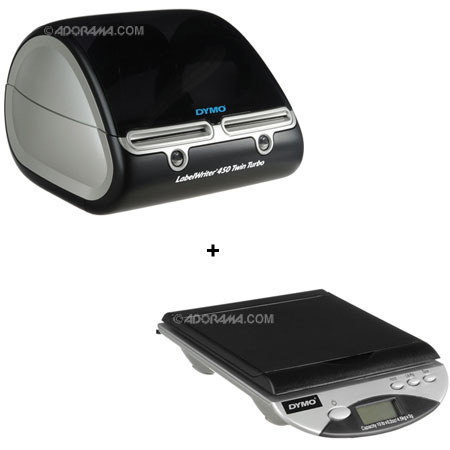
Here's another scenario. You need to send something a bit bigger or heavier than an envelope. You plug in the scale, load the stamp program, click "Weight" and it spits out the exact postage stamp. It does this by having two independent printers in one, so you can keep regular labels on one side, stamp labels in the other.
So, you not only get the label... and the exact postage stamp, but you've also saved a trip to the post office to have them weigh it. Just drop it in your mailbox. Done.
Nothing else can do this. Most other label solutions rely on sheets of stamps.
CouponPages.Com
2011-03-06T19:00:00
Rated 5 out of 5
Excellent!
Quickly prints labels and postage - two important functions for a small law firm. Small footprint fits easily on desk.
GLG
2009-04-25T20:00:00
Rated 1 out of 5
Would love this if it worked correctly
The printing skips and I have wasted so many labels......done eveything support recommended and still have the problem. I had the single label and had no problems,but wanted the Twin Turbo and love the scale in order to use stamps, but have had too many problems with the Turbo.
Faye2902
Originally posted at
2008-05-14T20:00:00
Rated 5 out of 5
Twin Turbo...
Absolutely awesome unit. I print labels and stamps from this machine and I could not be happier.
Bob2901
Originally posted at
2007-12-05T19:00:00
Rated 5 out of 5
Wow, This is amaizing product
We use the dymo system to promote our web site [...] we print more than 2k labels every month for our promotion.
Joe2900
Originally posted at