
This item is no longer available.
Review Summary
2020-06-23T20:00:00
Was working fine, then low battery indicator came on, changed batteries, low battery light still on, now it does not print. Is there an ink cartridge?
HBWJ

2020-04-28T20:00:00
Excellent features, I am so happy as brought this product.
JR22
2020-02-27T19:00:00
I purchased through Amazon. Set up was simple enough and labels came out fine. The only issue I have so far is that after you type text, the only way to clear the display for your next label is to backspace. A “clear” function would be useful. Nitpicking I know, but seems like that would be a straightforward function to implement. Otherwise, I’m satisfied.
JSBlix
2019-10-28T20:00:00
1st device purchased through Office Depot. Didn't power on even with brand new batteries. Contacted Dymo who sent me a new device. Label Jam error. Tried watching youtube troubleshooting..no dice. Contacted Dymo troubleshooting...no dice. They sent me another device. SAME PROBLEM. Will be asking for a refund.
MEWATL
2019-08-21T20:00:00
Super easy to use. Quite addictive - I'm labeling everything!
jcz1004
2019-03-20T20:00:00
Same problem as everyone else. Brand new out of the box . Label Jam. Tried all the fixed the rep stated to no avail. Sorry i ever bought this headache
donnie
2019-03-09T19:00:00
I bought this through Target and it has been an incredible disappointment. It does not feed the labels through, and on the rare occasion that it did print, the text was illegible and scrunched up together. I've contacted customer service through this company and they sent me a replacement set of labels to determine if the original labels were the issue. The new labels won't print either. When I tried to return this at Target today, it's out of stock in every store. I wasn't expecting much for the price, but I at least expected it to work. I want to give the benefit of the doubt on a product that maybe it's a fluke, but this is not enticing me to be a return customer.
dru_silver
2019-02-23T19:00:00
Have had other Dymos, which worked fine. This one was more money and unfortunately more problems. The machine has not worked since I bought it. I will call support, but who wants to spend money to then have to fix the item>
Forlorn P.
2019-02-15T19:00:00
I have this less than 2 years and it’s dead. I have not even used one label cassette. Changed batteries twice, still no power. So disappointing as I think it is a great looking machine and functional, it just doesn’t work. I expected better from a Dymo product.
little l.
2019-02-13T19:00:00
The first time I tried to use the Dymo 160, straight out of the package with brand new batteries, I got the low battery symbol. Can't charge it because the charger is not included and is not a common usb. This is my first time using a Dymo product and wow is it bad.
Jamie1234567
2019-02-09T19:00:00
Received product as a gift at Christmas and decided to work on files by creating labels for all of them. Label maker did not work correctly right out of the box. Provided a "label jam" error code so I went to the website to to clear. "Remove cassette and clear jam" took the cassette out multiple times and would not clear error. Poor documentation on fixing this issue.
First u.
2018-12-19T19:00:00
I was trying to find a replace for an earlier model DYMO, came across the 160 at a really good price and was very happy with the product upon receipt.
Marke
2018-12-04T19:00:00
To whom it may concern, I’m going to share my experience with the DYMO 160, which I purchased from the local hardware store on a sale price of $15 on black Friday. First off, I did my research and this label maker received highly praised reviews as an entry level label maker. On amazon it obtained a 4+ average rating, which led me to choosing this label maker, plus the sale price my local hardware store advertised helped sway me to pull the trigger. At a glance it seemed to suit my needs. I’m restoring a vehicle and was in need of a label maker. I’m currently rewiring the factory engine harness and using the label maker to label circuits, gauges, plugs, sensors, etc. When I opened the box, I was severely dissatisfied that it did not include batteries or the optional AC adapter. Upon further inspection of the device I noticed the 9V port on the top and it made me think, “was there supposed to be a connecting device that I didn’t receive?” Shortly after I surveyed the box and noticed on the back of the packaging the last bullet it reads, “Powered by 6 AAA alkaline batteries (not included) or optional AC-adapter. This was a major annoyance, since I was read to begin using the label maker, after which I spent hours laying the diagram and wires ready to be labeled. So, on my way to the local drug store to buy batteries. During the drive the packing got me thinking, “it doesn’t make much sense to integrate an external adapter if the adapter isn’t included.” This is just poor advertising on the company’s part, in an attempt to make more of a profit at the customer’s expense and frustration. Anyways, now that the batteries and labels that were included were installed it was time to print, or so I thought. The label jammed 3 times, in which I had to adjust the rotating dial the spins the labels since it was jammed and not able to freely rotate. After the quick troubleshooting my first label was made. I will say the quality of the print on the label is very nice, and the two-part adhesive back allowed me to easily peel the label from the protective backing. I then put my first label on my set of wires. The label did not stick very well, it instantly began to lose its shape and adhesive properties. Upon further inspection I noticed the label obtained a yellowish color, similar to an effect of old paper. Since the labels were not sticking and I was beginning to get irritated I decided to just use scotch tape over the label and be done with it. The tape adhered with no issues, which leads me to the conclusion that the labels included with the label maker are old and worn, losing adhesion properties. Upon further inspection I noticed the label maker was manufactured in 2016. I really hope Dymo can do what is right and provide me with a new set of labels. In any event, I may just go with a different brand altogether. I hope this review helped to further future decision-making processes. Attached are some pictures describing my experiences with the adhesion failing to adhere.
aa_ron
2018-05-30T20:00:00
excellent features, i am thankful to brought this product.
Nancy22
2018-05-23T20:00:00
Very good product with excellent features available in the market at very god price
Jackjones
2018-05-07T20:00:00
So good item to be shopped online to make office purposes hasslefree
QA 0.
2018-04-09T20:00:00
One issue I have with this tool is that the On/Off buton is not protected from accidental pressing. It would be better to be recessed or have a raised protective guard around it, to try to prevent accidental poering on while being carried in a briefcase or similar.
CBHTech
2018-03-18T20:00:00
The very first time I tried to print, I got the message Label Jam. I've tried two tape cartridges. I've turned the machine on and off. I've re-seated the batteries. I even read the suggestion (on another 1 star review) to use the cleaning tool. Alas, there is no cleaning tool in my label maker. What a lousy product.
Disgusted C.
2018-03-15T20:00:00
Can't use. When I try to print it says I have a label Jam.
Crazymom
2018-01-14T19:00:00
Stopped printing clearly after less than a year! Design is highly unintuitive. Worthless!
Deb2401
2018-01-01T19:00:00
It works great! No Problems with all it's features its hard not to be able to label about anything
jazzmanofjax
2017-12-31T19:00:00
I was printing labels via computer and "regular" printer; thought this might be easier. It really isn't, plus it lacks the versatility (and ease of typesetting you get using a word processing program on a computer. This thing "feels" like its technology is 25 years old. It is portable, and can be used when a computer/printer hookup is not available.
WestEndAl
2017-12-21T19:00:00
This product is incredibly handy for home or small business organization. The different sized fonts and and characters make for further organization.
4snarfs
2017-12-18T19:00:00
The device freezes when connected to power The code appears (err: CRC!)
saeygh
2017-12-07T19:00:00
Bought this product earlier this week. Opened it up, tried to print, "label jam" messaged occurred immediately. Looked up troubleshooting information. Dynamo website says "clean the print head with the cleaning tool attached to the compartment lid." Tool does not exist. Returned it and got another brand new one. EXACT SAME ISSUE. "Label Jam" and no cleaning tool.
Zach
2017-11-24T19:00:00
I purchased THREE of these in one day and all were defective. Either the Label was jammed or it wouldn't recognize the cartridge. All were new, in the box. Looks like it would have been a nice product but when all three have to be exchanged/returned, I wouldn't recommend purchasing one.
nonickname1
2017-07-04T20:00:00
Good operational label maker but very large in the hand and required two hands to hold it.
RICHMB
2017-06-08T20:00:00
This is a very inexpensive and very useful tool to have. It is easy to use, and helps me keep my office files organized, without anyone needing to read my handwriting.
Robert P.
2017-04-18T20:00:00
The labels don't stick to much, not even paper very well. Went through three new label cartridges, the labels ONLY stick to paper, and that's questionable. Fall right off folders after a week. After the first few I thought, "Am I an idiot? Am I doing this wrong?" $120.00 mistake to buy this and the three extra cartridges when you can pick up a cheap one that will do the same. The device itself is great, simple to use, quality printing.... but, the best label maker in the world is worthless if the labels don't stick ! Dymo, please don't apologize, it's an empty gesture. Would have returned the unit but I've had it too long thinking somehow the labels were going to magically start sticking to things.
J L.
2016-08-29T20:00:00
I just called and was informed that the AC-adapter is sold separately; and they were out of stock. Taking it back!
Chico
2.000
Roll (0.23 in), Roll (0.51 in), Roll (0.375 in)
1 x manual load, 1 rolls, Roll (0.51 in)
6
AAA
No
Qwerty
Preview screen, character keyboard
Vertical
1 line x 13 characters
2 x 4.6 x 8"/5.08 x 11.68 x 20.32cm
071701059352
Simple, basic label maker, good bang for the buck
By Steve11
As other reviews say, there is no very complex instructions. There is a 5 step process in a picture. But, that is how you use it. Turn on, type, choose some options, and print. Click the lever on the side and it cuts off. The adhesive does not seem sticky, but I have been sticking to pipes and electrical boxes with no problem. If it jams, then the cartridge you pop in does not have the tape fed below the two fingers. Prints are clear, and many options for font, symbols and clip art.
Replaces Dymo 1000........simple & easy
By Outcasthb
This is a simple, easy and precise labeler. This is replacing a Dymo 1000 that was getting hard to find tape other the black on white. This is one of the easiest to use and since the QWERTY keyboard was added, it makes things simple. Hint: pull a little tape out of the cartridge prior to loading and you should not have any tape jamming issues.
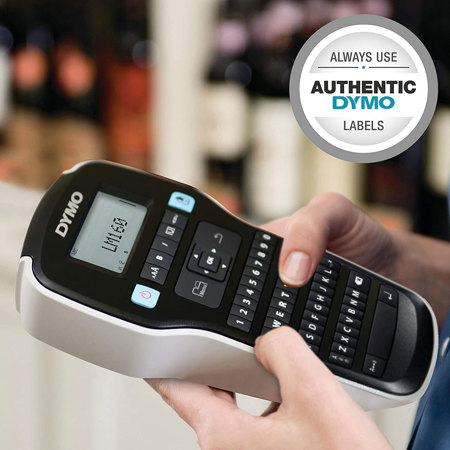
Pick up a portable Dymo LabelManager 160 Label Maker and start making your mark on the world. Just type your text, format it with one-touch Smart Keys and print. It's that easy to create professional looking labels in and around the office. It is so compact and lightweight that you can take it anywhere and label anything. This label marker uses 1/4", 3/8" and 1/2" Dymo D1 labels.