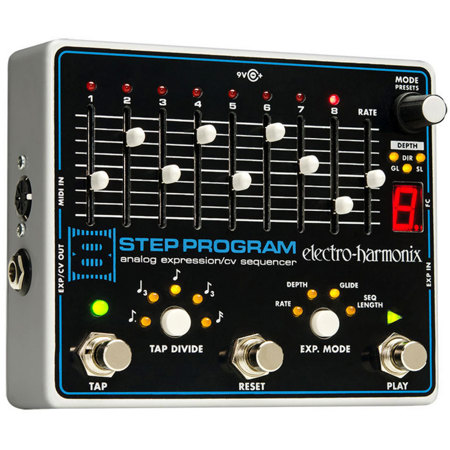
Electro-Harmonix 8 Step Program Analog Expression/CV Sequencer Pedal
SKU: EH8STEP
This item is no longer available.
Share:
Overview
Compare
Specs
Protection







About Electro-Harmonix 8 Step
Expression/CV Sequencer with 8 steps to control devices with parameters like oscillators, filters, and delay parameters!
The EHX 8-Step Program Analog Expression/CV Sequencer connects to another device and delivers sequencer control over parameters that respond to expression pedals or CV generators like oscillators, filters, delay parameters, you name it. Set your tempo with the Rate slider or Tap Tempo footswitch, or sync to a drum machine or DAW via MIDI clock. Six Tap Tempo Divide modes provide rhythmic diversity. This thing is a tweaker's delight!
You can add the optional 8 Step Program Foot Controller expands that to 100 presets!
Step 1-8 Sliders & LEDs
8-STEP's sequences are composed of up to 8 Steps. Each step has its own independent slider for setting the expression or CV level. As you push a step slider upward, its output level increases.
Mode Knob, Mode LEDs & Digit Display
The MODE KNOB is a rotary encoder with push switch. The three MODE LEDs below the knob and the DIGIT DISPLAY below the MODE LEDs all work together to allow you to edit and display multiple parameters.
FC Jack
Connect the FC jack to the 8-STEP's optional 8-STEP FOOT CONTROLLER to expand the number of available presets from 10 to 100.
Rate Slider
The RATE slider is one of two ways of setting the internal tempo of the 8-STEP, the other method being the TAP FSW. As you push the RATE slider upward, the tempo, or speed, of the sequence increases.
EXP In Jack
Connect an expression pedal with a TRS plug to this jack to control the following parameters with your foot: RATE, DEPTH, GLIDE and SEQUENCE LENGTH.
Play Footswitch
The main function of the PLAY FSW is to start and stop the sequencer. Press and release PLAY to toggle between sequence playback and stop.
EXP. Mode Button & LEDs
The EXP. MODE button chooses the destination parameter for an external expression pedal or control-voltage to modulate. The lit LED indicates the selected mode.
Reset Footswitch
The main function of the RESET FSW is to force the sequencer to jump back to its first step. Press and release the RESET FSW to perform a sequence reset.
Tap Divide Button & LEDs
The TAP DIVIDE button allows you to divide down your Tap Tempo to create faster tempos in relation to what you tapped. There are 7 available TAP DIVIDE modes represented by five LEDs.
Tap Footswitch & Beat LED
Use the TAP FSW to tap in the sequencer's tempo. To tap in a tempo, press and release the TAP FSW at least twice.
EXP/CV Out Jack
The 8-STEP's sequence is output through this jack.
MIDI In Jack
Connect the MIDI output to the MIDI IN jack on the 8-STEP.
Electro-Harmonix 8 Step Features
- Four sequence direction modes: Forward, Reverse, Bounce and Random
- Rotary encoder gives you control over glide rate, direction, sequencer length and depth
- Save, store and recall 10 presets
- The optional 8 Step Program Foot Controller expands that to 100 presets