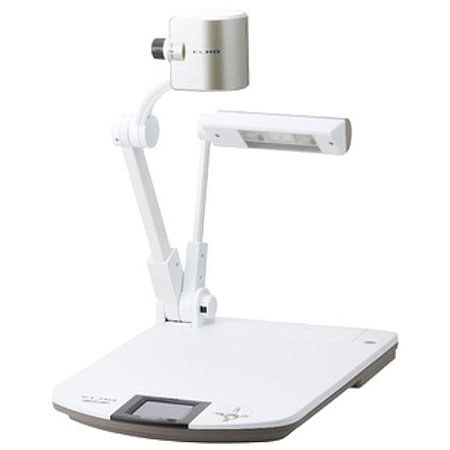
About Elmo P30HD
The Elmo P30HD Visual Presenter lets you capture high-quality video and audio and connect to a projector or a plasma TV to deliver powerful interactive presentations.
Whether in a classroom or a boardroom, you can display video, images and documents and emphasize their details with sophisticated features like split-screen, highlight, mask, picture-in-picture, color filters and annotations. The features are part of an included software called Image Mate and can be applied to images already captured or to those placed under the camera eye for live projection, or to both. Monitor what you're presenting on a built-in 3.5" LCD and optionally connect to a CRA-1 tablet to deliver your presentations wirelessly from as far as 50 feet away, making annotations and applying other features as you walk around the room. If you're a teacher, record class sessions and post them on YouTube or elsewhere online for students who were late or absent, or for parents, or for yourself.
The P30HD has a CMOS sensor that captures 3.4 million pixels worth of information. The lens of the camera is large and lets in lots of light for clear images. The lens features a 16x optical zoom, which combines with an 8x digital zoom to magnify even tiny details of documents or objects by up to 128 times, clearly, without any distortion.
The camera arm is flexible and lets you get shots from almost any angle, even from upside-down. Audio is captured by a built-in mic and an external mic can optionally be connected. Video is delivered in 1080p HD, in full-motion at 30 frames-per-second. Video, photos and audio can be saved internally via available USB and SD slots, or can be saved onto a connected computer. The P30HD is compatible with Macs and PCs. Also, on/off and other basic functions can be carried out by an included remote control or optionally by RS232C.
Elmo P30HD Features
3.4M CMOS & Full HD (1080p): The P30HD's megapixel image sensor captures everything from fine text to three-dimensional objects in 1080p full HD. Projecting to a large high-quality digital TV or a plasma over 100" can demonstrate the true value of the P30HD
Powerful 128x Zoom: When the P30HD's high-magnification 16X optical zoom is combined with its 8X digital zoom, images can be enlarged up to 128 times for the clear, distortion-free display of even the tiniest details
Built-In 3.5-Inch LCD Monitor: Thanks to the built-in 3.5-inch LCD monitor, you can see before you on the control panel exactly what viewers see behind you on the screen. This way, you can adjust your materials as needed and continue your presentation without ever turning around or missing a beat
Adjustable Free-Angle Camera Arm: Broaden the view and heighten your impact. The flexible camera arm lets you capture your subjects from any angle and focus attention precisely where you want it
Easy Access to Primary Functions and Quick Setup: With zoom and auto focus conveniently concentrated on the camera head, you can zoom in, zoom out and adjust the focus as needed without disrupting the flow of your presentation
3D Noise Reduction: New developed 3D noise reduction helps to remove picture distortion completely. Crystal clear images can now be shown on a big screen without any flickering in the image
30 fps for Smooth Motion Display: At 30 frames per second, the P30HD smoothly captures and reproduces moving images
Full-HD & HDMI Output: The P30HD's versatile output connections bring greater freedom and flexibility to presentations. With its full-HD output and HDMI port
Wireless remote control: The uniquely designed infra-red receiver can pick up a signal from up to a distance of 7m, enabling you to control the P30HD from almost anywhere
RS-232C: By connecting the RS-232C to a computer, you are able to use the computer to control power (on/off) and other functions
Presentation Support Tools: The P30HD has various presentation support features, such as Picture in picture, Spilt screen, Masking, Highlighting, Color filtering and Mosaic, which help presentations and lectures to be more effective and interactive
Recording: Save presentation on External Memory. Both still images(jpg) and audio video files(mp4) can be saved on a USB flash drive or SD Memory Card for future use. Files may also be saved to a PC or Mac using Image Mate Software(included)
Audio Input & Output: With the P30HD, audio enhancement can be added to presentations or lectures via the built-in microphone or an external microphone input (Mic In/Line In). Audio output can be routed to the external HDMI or Audio Line Out port
Annotate on Live Images: The images captured from the P30HD can be annotated in real time, creating a solution for conveying complicated concepts and important points
Annotate Live Images without a Computer: The CRA-1's wireless adapter can be plugged into the P30HD directly, allowing direct annotation on live images from anywhere in the room without using a computer
Obtain added features with a computer: With the CRA-1's supplied software - Image Mate Accent, there are more features that can be used in presentations, including various recording features, time lapse photography, interactive whiteboard features and more