2026-06-30T20:00:00
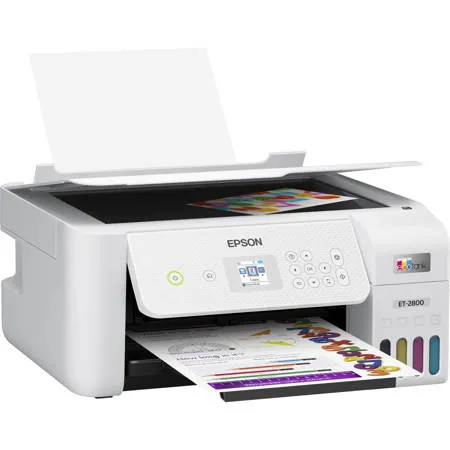
i researched for a bit...have always bought HP printers...took a minute to understand set-up instructions but finally got it done....the PC did not respond to the set-up literature, that was difficult...it was the price of HP ink cartridges and the size of the HP tank models that sold me on the Epson...prints clear, crisp copies...ink refilling was a snap
printer 2.
Originally posted at

2026-06-20T20:00:00
Rated 2 out of 5
Disappointed customer
What a shame I bought this five years ago and it's been nothing but inconsistent. Sometimes it prints great, other times, prints like absolute dog doo. Printer head alignment and cleanings do nothing. Such a fall in quality from when I used to sell Espon back in 2006
bnbuckeyesaz
Originally posted at
2026-06-04T20:00:00
Rated 1 out of 5
Worthless!
Horrible experience. Setting up for the first time and I get an error message stating there may be foreign material inside the printer. I followed all the instruction, but the message continues (I've followed the instructions multiple times now) and nothing changes. Printer will not work. It's worthless. I'd give it zero stars if that was a choice.
LiLeEmm
Originally posted at
2026-05-28T20:00:00
Rated 3 out of 5
EPSON Scan 2
I purchased the ET-2800 at the end of 2025 and found it challenging to make the wireless connection to my computer. After several attempts I finally got the connections for wireless printing but no scanning. Fst forward to May 2026 and with technical assistance from EPSON India, I stumbled through the proicess of downloading EPSON Scan 2 to enable scanning but with several steps added to enable scanning. All very trying.
J W.
Originally posted at
2026-05-28T20:00:00
Rated 5 out of 5
Painless set-up
I was concerned before setting this up, the replacement for my 7 year old EcoTank - I'm 76 and not as tech-savvy as I used to be. But it was seamless and painless. Installation instructions were clear, and it took under an hour.
Wyle
Originally posted at
2026-05-20T20:00:00
Rated 3 out of 5
The Printer is ok, but Difficult to Use
It is impossible to see the ink level on the machine. I am unable to just get a window with printing preference unless I go into my systems folder. The application has been downloaded and reset many times. The Epson information does not show up in that search. This can be a very difficult printer to use
gak83
Originally posted at
2026-05-20T20:00:00
Rated 1 out of 5
DO NOT PURCHASE THIS PRINTER. Epson DOES NOT stand behind.
DO NOT PURCHASE THIS PRINTER. I purchased this printer 10/14/2023 from office Depot. It was suppose to come with ink. There was no ink there. From day one this printer had connection issue. I called them so many times after so many attempts they will make it work. I'll spend hours to fix it myself and if I could not fix problem I'll call them and sometime they will get it going for a day. I only called them after several attempt myself. They did not want to replace the printer. It had 2 years warranty. Now it is completely dead. I've $200 worth of ink and that will go to waste. DO NO PURCHASE
PKSS
Originally posted at
2026-05-19T20:00:00
Rated 3 out of 5
I need help with this device
I have been having trouble with this printers connection. And cannot install the application to be able to scan without the application. Please fix this issue
Gabby8
Originally posted at
2026-05-14T20:00:00
Rated 2 out of 5
Needs work, ink jams very frequently
The ink jams very frequently, manual cleaning often required.
Difficult and uncomfortable.
How is it possible that it need so many firmware updates???? Once a week????
FP F.
Originally posted at
2026-05-10T20:00:00
Rated 1 out of 5
Manual 2 side printing for a 350+CAD is not acceptable
Manual 2 side printing for a 350+CAD is not acceptable
Jayleo
Originally posted at
2026-05-07T20:00:00
Rated 5 out of 5
A Good Printer
Although I found the online setup cumbersome, I just downloaded the print driver from the Epson website and all went well. It's a good and quick printer.
SVES
Originally posted at
2026-05-01T20:00:00
Nice little printer for the price. Does what I want it to do. I use the usb cable because I don't want to be bothered by Wi-Fi connections. The only thing that I wish was different was the display screen was larger for someone's eyesight that is not good.
RW64
Originally posted at
2026-04-30T20:00:00
Rated 3 out of 5
Great Prining, bad setup systems
I bought this product on April 28th. The print quality is excellent. This is my 3rd Epsom product that I have bought. I have found Epsom online servicing to be excellent. One product failed in the past and Epsom sent me a new unit making 4 units I have had. Their quality is excellent which is why I purchased this unit. I miss the automatic feeder what my WF 2430 had for photocopying and scanning. Also my previous WF units had a very easy to use Scan app. The printing speed is very good. However I have found it difficult to use the printer as it keeps what to communicate with Epsom Connection. Also is was difficult to set up not as simple as the WF's I had previously. This unit is slow in copying and scanning and the Scanning app was difficult to set up and completely separate to the set up of the print and copy setup. The initial filling although done exactly as requested did overflow the unit a bit. Once needs to have paper towels handy so as not to mess up everywhere. Once filled the unit is excellent.
Maz01
Originally posted at
2026-04-29T20:00:00
Rated 5 out of 5
started:
Ecotank Et-2800 Wireless Color
When I say this printer is so great. I use it to print out my product label and those labels are think, the printer is able to withstand the thickness of the paper. Highly recommend.
Traore
Originally posted at
2026-04-25T20:00:00
Rated 1 out of 5
Misleading marketing photos - Read Tray only
I bought this printer, and all the marketing pictures are misleading. This is a read Tray charging only !
When I look at the specs, is it not immediately obvious. Only I saw a little logo 'rear tray charging' on the box, and it was too late.
aflame217
Originally posted at
2026-04-23T20:00:00
Rated 1 out of 5
Stay away from EPSON printers
I would strongly recommend staying away from this Epson printer.
I purchased the Epson EcoTank ET-2850 about a year ago, and unfortunately, my experience has been very disappointing. Compared to brands like Brother and HP, the quality and usability are not even close.
The printer developed a manufacturing issue earlier this year (a waste container issue). After multiple follow-ups, I was sent a refurbished replacement, which was described as "as good as new." However, the replacement unit was noticeably louder, and I tried to accept it despite the difference.
Unfortunately, the printer has now developed another issue with Wi-Fi connectivity. When I contacted support, they were unwilling to assist further and simply stated that the warranty is only one year, even though the replacement (Refurbished) unit they provided is now the one experiencing issues. The customer service, including the manager I spoke with, was unprofessional and not helpful.
Based on my experience, I would not recommend purchasing this model, as it is so bad compared to the Brother brand and HP.
Maia
Originally posted at
2026-04-09T20:00:00
Rated 1 out of 5
horrible printer
This lasted less than a year, 6 months for the print quality to become subpar, within a year it just stopped working. Avoid Epson products!
Epx9
Originally posted at
2026-04-07T20:00:00
Rated 3 out of 5
Can't Print Borderless on 5X7 Photo Paper
While it's not a showstopper and reason to return it, the ET-2800's inability to print borderless on 5X7 photo paper is a major deficiency. If I had known that before buying it, I most likely would have bought something else. However, there was a very good sale at Staples (Canada) so for the total price of C$190.72 (including GST), I'm willing to live with this shortcoming.
ScubadooX
Originally posted at
2026-04-05T20:00:00
Rated 5 out of 5
Epson 2800 model
So far easy setup instructions. I have a Epson 2720 model also, it has been fabulous. The only problem I am encountering, is connecting wifi for auto printing selection, new model and addition 2800 for crafting and 2720 for regular printing.
BDLC
Originally posted at
2026-04-04T20:00:00
Rated 1 out of 5
Seriously ya can't make this up
Placed my order on March 11th and STILL have not received it. They say they sent another one and I'd get it in 2-3 business days. That ended on Friday and still nothing. I didn't even get tracking on the second one.
I am beyond frustrated and disappointed
Denise D.
Originally posted at
2026-03-30T20:00:00
It pretty much sucks and could be the worst printer we have purchased. Never by an Epson again, works for a while then just completely quits printing Guess we will stick to HP printers.
Chrisandcheryl
Originally posted at
2026-03-23T20:00:00
Rated 1 out of 5
ink tank still displays empty
Printer has bottles of ink included in the box and still display no ink after filling out the tank, after added the colors from the box, ridiculous!
vreitz
Originally posted at
2026-03-21T20:00:00
Rated 1 out of 5
Terrible! Paper feeding problems & awful print quality
I bought this printer less than a year ago and it is absolutely terrible. I've had numerous connection problems, constant updates, the paper won't feed properly and will say it is empty or jammed when it is not and the print quality is awful. I wasted my money. I'm done messing with it. What a waste of my money. Do not buy this product.
Shana69
Originally posted at
2026-03-19T20:00:00
Rated 1 out of 5
Absolute Waste of Time, Money, and Energy
I have never been more frustrated with a piece of equipment in my life.
I purchased this printer expecting something simple and reliable. Instead, I've spent over 10 hours trying to get it set up-following every instruction exactly as provided. I used the app, manual setup, WiFi setup, resets-you name it. Every troubleshooting step failed.
The biggest issue is connectivity. This printer constantly fails to connect to WiFi, drops connection, or refuses to complete setup altogether. For something that is marketed as "easy" and "smart," it is anything but. The setup process is overly complicated, unreliable, and clearly not designed with real users in mind.
What makes this even more frustrating is that I now have ink loaded in the printer, which makes returning or replacing it even more difficult. So now I'm stuck with a product that doesn't work, after investing both money and a ridiculous amount of time.
At this point, I'm not just disappointed-I'm genuinely seeing red. This product has been a complete waste of time, energy, and money.
To anyone considering buying this: don't. Save yourself the frustration and go with a different brand.
Epson needs to seriously reevaluate both their product reliability and their setup process, because this experience is unacceptable.
Exam
Originally posted at
2026-03-16T20:00:00
Rated 3 out of 5
Support prossess
The unit seems to be fine! However I am having trouble printing various paper sizes. The support venue lacks any way to contact any real person to talk to for help! NOT impressed
Witt
Originally posted at
2026-03-12T20:00:00
Rated 1 out of 5
Bad dont buy
This printer cant sat its wifi direct.
So frustrated. It doesnt come with usb cable just me aware. I trying to see if I can return because I am sick of fighting it to find connection.
Also, I have printed maybe 5 page since I bought it, when I finally get it to work, it keep pausing asking me to check ink level and it doesnt finish printing!!
Limee
Originally posted at
2026-03-08T20:00:00
Rated 1 out of 5
Poorly Made
Think twice about buying this Epson 2803 ECOTANK. The cartridges are made of a thick plastic on one side and a paper film like a ziploc bag that is glued over the side of the tank, which makes it easy for other ink color to spill inside the other colors on the film side, which is what happened with mines. The lines the ink go through are made of soft plastic. The app kept showing me that I needed to put ink in and I didn't need to fill it at all. The printer kept printing green, and yellow, no red or black in a color picture. Get a 5 yr warranty if they have it. This printer and the extra bottles of ink is getting threw away, $298.00 wasted on junk. Photos are blocked from showing.
Epson E.
Originally posted at
2026-03-07T19:00:00
It started out easy to install until I got to the part about connectivity. This part was not user friendly.
Setup
Originally posted at
2026-02-18T19:00:00
Rated 1 out of 5
Worst printer ever!!!!!
I wish there was an option for 1/4 star.
Chuck101
Originally posted at
2026-02-15T19:00:00
Rated 2 out of 5
OK until nozzles clogged 6 months in...
Purchased for a senior citizen. Basic all-in-one with ecotank seemed to be a good buy until 6-months in, the nozzles clogged and could not be fixed using the usual maintenance protocol. Manual cleaning was needed (a complicated process for most). Expensive for only getting 6 months out of this printer as, ultimately, needed to buy a new printer as a replacement (went with a different model).
epgr
Originally posted at