2026-06-25T20:00:00
Rated 5 out of 5
Easy setup.
The online setup was clear and easy to follow. Everything connected quickly and it works just fine.
Baffledbytech
Originally posted at

2026-06-23T20:00:00
Rated 5 out of 5
Excellent purchase
Great printer so far - easy to use and prints well. A little slow printing but not bad.
RHev
Originally posted at
2026-06-22T20:00:00
Rated 3 out of 5
Decent and gets the job done
This printer was on sale and the idea of refillable ink led us to buy it Jan. 2026. Easy to set up. Print quality as expected. The tanks took some getting used to but it sure beats frequent cartridge orders.
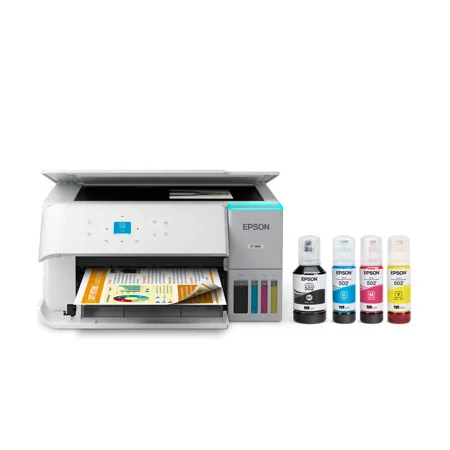
Our rating of 3 stars is due to the ridiculously tiny display and the upright paper feed leading to curled or uneven edges.
808Review
Originally posted at
2026-06-20T20:00:00
Rated 5 out of 5
Epson ET-2980 Printer
Needed to replace an Epson printer that was several years old. Printer is used at home for moderate printing tasks involving letters, documents and photos. Set up was extremely easy!! Just need to follow directions that are provided. Go one step at a time!! This easily connected to wi-fi and not only my computer but also our phones and tablets so we can print from any device. Print is clean and sharp. Filled the tanks with the ink included in the box. Setup & priming for printing took some of the ink but I used what was left in the bottles to fill the tanks back up. Full tanks after setup was completed and have now printed numerous pages. Very happy!!
R123
Originally posted at
2026-06-18T20:00:00
Rated 1 out of 5
what the heck?
so you bringing it in fix it up make it look all shiny in. You give a 30 day warranty on it. Is that all you get? .. Oh You can get extended warranty for more money. We don't stand behind what we do long is the message. I'm seeing. how was thinking about switching from my HP printers because I like the Eco Tank idea but I think HP has a similar tank
jonnyb
Originally posted at
2026-06-17T20:00:00
Rated 4 out of 5
Loved my last Epson - but this will suffice
I loved my last Epson printer where the paper came from the tray under the printer. This option was not available in the price range I was looking for?which was no more than 350.00. This printer is a bit more difficult to navigate through the small screen also. I don't need large jobs printed, so it will do for my size of business.
Traci N.
Originally posted at
2026-06-16T20:00:00
Rated 1 out of 5
Horrible installation and operating instructions.
Very difficult installation and operation. On the front of the printer, there are 7 buttons with different symbols on each button with no explanation describing the function of each button. I addition, there are 4 arrows surrounding a small screen which displays messages with no explanation on which button to use. I called the support telephone number 4 times for help. The support person stayed on the line for a few minutes and then gave me a "reference number" before hanging up with no solution. It took 2 days to finally get the printer to work with my computer. Horrible experience. The final printouts were a good quality.
RaymondP
Originally posted at
2026-06-07T20:00:00
Rated 1 out of 5
Renewed by Epson printer, ET 2988 did not work, sadly.
I bought a renewed printer and unfortunately it's being sent back because it didn't work.
Glimmer37
Originally posted at
2026-06-06T20:00:00
Bought about a month ago ? so far, so good, effort setup, connected to wifi easily print speed okay
Pkstopper
Originally posted at
2026-06-03T20:00:00
Rated 1 out of 5
Bad product, worse Epson Co.
Although the printer is extremely difficult to set up-a process performed solely via a ridiculously small screen and controlled not by a computer, but by a mobile phone (which is absurd, given that a printer serves as an accessory to a computer, NOT the primary component of the equation)-it does function once configured. Furthermore, when scanning a document with this Epson printer, you cannot send it as a Gmail attachment because the printer does not support that platform. But that is not the worst part: Epson offers a one-year warranty extension upon product registration, yet-after the product has actually been registered-the company refuses to honor it. In short, both the product and the company are not merely "bad"; they are worse than bad.
A c.
Originally posted at
2026-05-30T20:00:00
Rated 1 out of 5
Not compatible with my MacBook
Stop asking please
MerriamWebster
Originally posted at
2026-05-28T20:00:00
Rated 5 out of 5
second purchase
This is the second Epson refurbished that I bought the first one was good for over five years
LGMc
Originally posted at
2026-05-28T20:00:00
Rated 2 out of 5
Nothing at all worth buying again
This has to be the worst company ever. Support is Monday-Friday 7am-4pm PST. ONLY. They don't reply and they don't care that you are having issues. The printer is a basic printer, so nothing exciting there. I will never buy from Epson again because of their lack of service, lack of customer care, lack of online resources that normal people can use, and lack of....oh I could go on.
biffffff
Originally posted at
2026-05-26T20:00:00
Rated 2 out of 5
incomplete print
After I filled al the ink containers, I tried to print a document in black ink. A couple of lines were only half height, so kept trying until I finally got a legible copy.
Muriel
Originally posted at
2026-05-26T20:00:00
Rated 1 out of 5
DO NOT BUY
BUYER BEWARE!! We just got this printer and we have tried several times to print documents double sided only for it to jam each and every time! So far it has not printed without a problem yet. I am so disappointed! Customer service is slow and unhelpful. Will be returning asap! DO NOT BUY. I do not recommend!
KLW3000
Originally posted at
2026-05-15T20:00:00
Rated 5 out of 5
It prints the size influence that I use!!!!
I have purchased three other printers and could not get any of them to do the influence that I wanted it to do, then I got the Epson, it is great it prints all sizes of envelope envelope.. It is easy to operate. I couldn't be happier.!!!
Fernetta
Originally posted at
2026-05-11T20:00:00
I would probably not buy another epson. I had to have a friend come to link it to my computer and she even had a hard time doing it. I had an HP before and will probably go back to that when this one breaks.
Irma
Originally posted at
2026-05-09T20:00:00
Rated 5 out of 5
I use my product to print important documents from work.
I would recommend this product to friends and neighbors and family
Reginald R.
Originally posted at
2026-05-08T20:00:00
Rated 1 out of 5
STOP!!!!...Do NOT!! buy this piece of junk!!!!
The worst!!!!! absolute WORST PRINTER ever!!!... do not and I repeat DO NOT!!! buy this printer. I am telling you 100% honest this is the worst printer ever created. It looks like it was designed to to be difficult in every way from the tiny screen to the constant disconnecting from the internet and then it tells you in a message that your wireless router is the problem..... it's asking you to uninstall and reinstall it has no explanation other than you are the problem and your Wi-Fi is the problem....... what gets me as they are so disgusting Epson by allowing us to continue to be on the market and they know that it's a piece of crap yet they're still selling it..... I am sure anybody that has responded in a positive way is not human and is some sort of AI generated situation................. It is beyond frustrating.,,, and again I am 100% telling the truth. This is a piece of garbage, a waste of money and more importantly, a waste of your time save yourself the aggravation. I.... I would give it -100 stars if I had the option............... Epson should be ashamed of itself for taking peoples money!!! yeah yeah he's a take a picture
Spiro
Originally posted at
2026-05-07T20:00:00
Rated 4 out of 5
Great Printer but Bad Set Up
The printer is great, set up was difficult and the screen is hard to read.
LisaA
Originally posted at
2026-05-07T20:00:00
Rated 5 out of 5
Big ink containers
I'm happy with this new one. Questions, does this recognize the paper? I use 8 1/2x 11. I don't see this as a choice. I can't seem to get it to print on both sides with my iPad or android phone. Thanks
Pup99dog
Originally posted at
2026-05-04T20:00:00
Rated 4 out of 5
Good printer, suspect app for IPhone
A good value printer with the eco tank option to save on ink cartridges. It was easy to set up and use initially. But the next day it didn't show up on my Epson Smart Panel app on my phone! Do I had to remove the app and reinstall it for it to connect. It has done this 3 more times since then. It does this on my wife's iPhone as well. Not too impressed by that. We learned now that we have to power the phone down completely if it doesn't connect. Some days it does, some days it doesn't????
Stefan H.
Originally posted at
2026-04-18T20:00:00
Rated 5 out of 5
Great printer
This is my third eco tank printer.
Brad J.
Originally posted at
2026-04-17T20:00:00
Rated 4 out of 5
So far so good....
Have only been using for about 2 weeks now. Easy to set up with app. Using with a IMac. Scanning feature works well. I have only use the scanning feature through the app. Not sure how to using this feature on the printer screen menu.
IMac u.
Originally posted at
2026-04-17T20:00:00
Rated 2 out of 5
Computer illiterate
Not terribly computer illiterate really having trouble setting it up no mention of what each button does watching YouTube videos they say push this push that. How am I supposed to know this just need simple instructions for an idiot
Rumpelstiltskin
Originally posted at
2026-04-14T20:00:00
Rated 5 out of 5
It's a winner
I am extremely pleased with the quality of my new printer. It prints beautiful color documents very quickly. The Wifi is very dependable. I would definitely recommend this product.
Scotch H.
Originally posted at
2026-04-14T20:00:00
Rated 5 out of 5
Prints good
So far so good
Mjma
Originally posted at
2026-04-14T20:00:00
Rated 4 out of 5
Frustrated by some features
While it is considered a quality printer, there are issues. Setting up the printer to the internet is counter-intuitive. Frequently, the process froze and the printer had to be shut off and turned back on. In addition, it really doesn't have a touch screen but a very small, badly placed window of 1.44". I will give this a couple of more days but not sure it won't be returned.
Jack2
Originally posted at
2026-04-13T20:00:00
Rated 2 out of 5
Not a good purchase
I've had this printer this printer for 6 months. I don't like it. I would not buy it again. My previous Epson printer, a WF-3540, was great. I had it many years and had very few problems with it. Eventually parts wore out.
My main issue with the ET-2980 is the microscopic display. It is 1 inch by 1 inch with tiny font. It is very hard to see, and I seem to constantly have to answer questions and enter ok or proceed. The usability is terrible. There was space for a larger display - I assume it was a cost-cutting decision. I was unable to print mailing labels on this printer. I wasted lots of time trying different settings and nothing worked. It kept spitting out the label sheets. Also the paper holder is small. I am disappointed with this printer
Noralyn
Originally posted at
2026-04-11T20:00:00
Rated 3 out of 5
Epson printer
Everything is good except the pictures are blurry
Elisheba W.
Originally posted at