2026-01-14T19:00:00
Rated 5 out of 5
Doc Scanner WorkForce ES-580W Wireless
We now have two of these scanners. This one is mine. It is working perfectly.
Kathy26
Originally posted at

2026-01-11T19:00:00
Rated 4 out of 5
Sturdy enough.
I have owned this scanner for over three years. It has always worked well and is sturdy enough to take on Notary Signing Agent appointments. The only problem I have found is when scanning documents over legal size, the machine will stop as if a jam, which needs to be cleared. All other pages up to legal size work great and feeding issues are minimal and easily correctable.
I highly recommend this scanner for work products and home use.
Coachmack22
Originally posted at
2025-12-30T19:00:00
Rated 5 out of 5
Workforce Es-580w is a DREAM!
I am so impressed with the Workforce Es-580w! It has improved the turn-around time in returning documents from literally hours to minutes. Being it is portable and wireless has been a game changer, especially since it has the capability to scan large packets (verses one page at a time).
wvan
Originally posted at
2025-09-28T20:00:00
Rated 5 out of 5
Works like a champ!
Used the unit to document 40,000 pages of a national organization's magazine (70 years worth). Worked flawlessly. PDFs are OCRed and allow research across all issues of the magazine including advertisements. Brilliant unit! Only wish it could do larger than 8.5x11" format too.
GeorgeF1
Originally posted at
2025-04-16T20:00:00
Rated 1 out of 5
doesn't work with mac
Bought it a week ago and it doesn't work. Returning it.
Time w.
Originally posted at
2025-03-18T20:00:00
Rated 5 out of 5
Awesome machine!!!
I haven't been this excited about an office product since my first laser printer! I LOVE this scanner! It's so fast, it does double sided sheets, I don't get arm cramps from lifting lids and putting papers on the glass. It is AWESOME.
KayDee
Originally posted at
2024-11-26T19:00:00
Rated 1 out of 5
No Mac OS support
Used to have Mac OS driver and now it doesn't. Spent nearly $500 for an expensive piece of deesk art.
Not c.
Originally posted at
2024-11-21T19:00:00
CANT GET IT TO CONNECT TO MY LAPTOP
bbBBBBB
Originally posted at
2023-08-27T20:00:00
Rated 5 out of 5
Great Scanner!
Works great and I love the duplex feature. I have mine connected to my Wi-Fi but no computer. That way I can put it where I have room. Most of the time, I'm scanning to the cloud so I don't need the computer anyway. I've had the scanner about 2 1/2 years with no issues.
ConnieL429
Originally posted at
2023-08-06T20:00:00
Rated 4 out of 5
nice, but...
Fast and high quality images. Only disappointment is wireless feature doesn't work for me reliably. Good results with usb cable.
billashw
Originally posted at
2023-08-03T20:00:00
Rated 5 out of 5
Replace Neat Scanner
Worked perfectly to replace aged Neat Scanner
Joe K.
Originally posted at
2023-04-03T20:00:00
Rated 1 out of 5
Not Reliable
I have this scanner for a few months. It works sporadically. Most of the time it can't connect to my computer. This is even with using the USB cable. I've done the updates but doesn't help at all. I am very frustrated. A machine that works one out of every 20 tries is not worth using.
Jo R.
Originally posted at
2023-03-28T20:00:00
Rated 2 out of 5
Horrible setup and software
Scans well once you go take your advanced technical degree. I'm a Mac user. The software, setup and help screens for this thing are right out of 2002 or something. Took forever to get it setup, and the help docs were not very instructive. If you like being Mr. IT-Solve-It guy for 90 minutes, be my guest. Otherwise, maybe look for a brand that has a UX at least in 2009.
Kidd R.
Originally posted at
2022-10-29T20:00:00
Rated 5 out of 5
Great Scanner for Home & Business
I was amazed with the easy of operation and the overall scan quality. Super Fast, Small Footprint, easy setup and saving Docs to my Computer was a breeze. Love the product Epson has made here.
Dan_S
Originally posted at
2022-07-18T20:00:00
Rated 1 out of 5
Know that not all will work unless you have an Epson printer
It scans. Does not let me email or print since I don't have an Epson printer. Will not be using. Purchasing a ScanSnap that will work universally.
TTinNC
Originally posted at
2022-06-06T20:00:00
Rated 5 out of 5
great and speedy and amazing
Bought today.
Angelove
Originally posted at
2022-06-03T20:00:00
Rated 5 out of 5
Very happy!
I upgraded from the ES300. Love the capacity and that it auto detects when it pulls more than one page. Highly recommended!
Seattle
Originally posted at
2022-05-24T20:00:00
Rated 1 out of 5
VERY DISAPPOINTED!
I bought this scanner because I was told I could scan to a Shared network folder and I get a DNS Error and no one at EPSON knows how to fix it. Wasted MONEY!!
Eric_C
Originally posted at
2022-03-04T19:00:00
Rated 5 out of 5
Great results, easy use
I bought this only 1 week ago but have had great success so far. Any issues I have had were due to my own lack of experience with a scanner. All issues were quickly resolved by referring to the downloadable manual.
Working great for my Genealogy research.
Chainr
Originally posted at
2021-06-07T20:00:00
Rated 5 out of 5
Fastest scanner
This is the perfect scanner for any home of small business that has lots of form to store on the computer.
this was relatively to setup and now can quickly scan a whole stack of forms to store on computer as well as small receipts etc.
Scans both sides at once so no need to re-feed the paper again to get the other side.
So many more feature that this scanner can do and everyday I am discovering new features.
srulyny
Originally posted at
2021-05-16T20:00:00
Rated 5 out of 5
Love this product! Makes scanning documents easy
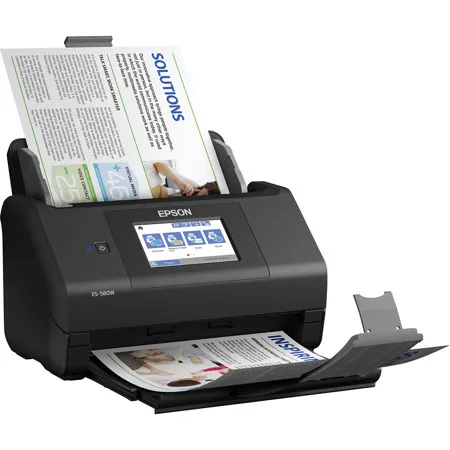
My Review for WorkForce ES-580W Wireless Duplex Touchscreen Desktop Document Scanner is a very easy to use and scans fast and is very convenient to use from phone/ email. This product is lightweight not big and bulky. The touchscreen feature makes it so easy to navigate and locate what you need. So I am now working from home and I can definitely say I need this product to keep me organized and decluttered. This product has great speed, love it has double-sided, and wireless capabilities. I would recommend this product to others fast setup, fast and quick, strong wireless capibilities even comes with a usb.
Tamlu
Originally posted at
2021-05-11T20:00:00
Rated 5 out of 5
Good Product
This is a very impressive machine. It has allowed me to really reduce the quantify of paper on my desk. Load it up and scan it in. Pretty simple to use, fast and wireless. 10/10 will definitely recommend
Tjholmesphd
Originally posted at
2021-05-02T20:00:00
Rated 5 out of 5
Great scanner
I had a cheaper scanner with a smaller footprint but it was prone to jams if the paper wasn't perfectly flat and didn't handle large volumes well. This scanner though a little bigger does give me more success on scanning a larger amount of documents on the first try.
Austin D.
Originally posted at
2021-05-02T20:00:00
Rated 5 out of 5
Compact Design
This document scanner is awesome! It has a compact design that fits nicely in a small space. Even with the compact design, it does an amazing job of scanning high quality documents and pictures. Plus, it can connect to the app so you can access stuff with ease!
Ben90
Originally posted at
2021-05-01T20:00:00
Rated 5 out of 5
Good product
I like how fast and easy this document scans. It?s scans both sides of paper at the same time I use it from my mobile device. It is very easy to use and the touchscreen makes it even better because it takes less time and I can just scan the document just like that without the hassle I really enjoy using this document scanner it?s very useful and I love how fast it scans and upload
Johnowatler
Originally posted at
2021-04-28T20:00:00
Rated 5 out of 5
Great Scanner
This Epson WorkForce ES-580W Wireless Duplex Touchscreen Desktop Document Scanner has helped me tremendously with getting organized. It was easy to set up. I am impressed with the efficiency and it has been such a time saver for me. I scan to my smartphone, tablet and USB memory drive. I use the built in port to scan to my USB memory drive. Can also be scanned to my online storage account. It scans documents on both sides at one time which is very convenient. With the 100 page document feeder, I get all my scanning done quickly.
The touchscreen is very user friendly and helpful for easy and fast activation.
Another great feature is that it is wireless.
I can preview, email, and upload scans with the ScanSmart Software.
This scanner has exceeded my expectations and I would definitely recommend it.
rororo
Originally posted at
2021-04-27T20:00:00
Rated 5 out of 5
Powerhouse
Wow - this is one fast scanner. A must-have for any busy office and useful for any not-so-busy home office as well.
It scans multiple pages super quickly. We gave it a 35 page double sided document and it scanned it in no-time (less than a minute for sure) and surprisingly the scan quality is great as well. This is a real feat.
We are looking forward to scanning in our old documents so that we can keep just a digital file and empty our filing cabinets!
Sffap
Originally posted at
2021-04-22T20:00:00
Rated 5 out of 5
Fast Scanner
wow, this scanner is fast when putting in a lot of pages to get things done quickly. I was usually my old ink jet one page scanner and this is going to save me a lot of time weekly. I look forward to saving hours weekly.
cr53
Originally posted at
2021-04-21T20:00:00
Rated 5 out of 5
Very great scanner!
Good scan quality and searchable PDFs. Although it was a bit difficult to set up it took me a few hours to do so but it was so worth the time after I got it up and running it's an amazing scanner. It has both the speed and the quality. It scans multiple pages at a very fast speed and a plus for me it that's it's touch screen. It also allows you to adjust the file to the size you want. The touchscreen contains all the controls you need and is easy to navigate. It works so great with the Wi-Fi really fast. Over all I really like this scanner and it works so great I would definitely recommend 100%
Beya
Originally posted at
2021-04-21T20:00:00
Rated 5 out of 5
Works for pictures
I got this scanner because it works for documents as well as photographs. I have a seven year old who is always creating pictures and writing stories. However I am running out of room to store all her projects. I got this scanner so I can scan all her artwork and stories to the cloud to later use to make a book when she graduates. The scanner is easy to link to my desktop and the touchscreen is easy to navigate. The art projects I?ve scanned so far look great and it scanned a pile of projects much faster than it would have taken on a flat scanner.
Wolvinesgirl
Originally posted at