2026-07-24T20:00:00
Rated 2 out of 5
So Disappointing
I bought this (WF-4830) last year, had it for almost a year and it stopped working.
Epson replaced it. The replacement arrived less than 10 days ago. I installed it and the one worked for less than a week. I loved the printer but now I'm concerned that I might have to change brands. So disappointing.
Weezy
Originally posted at

2026-07-14T20:00:00
Rated 1 out of 5
Junk at any prince
I gave up trying to use this as a printer and I have an hp printer also so I use this as a scanner. I put some generic ink in since I don't use it much and their ink lasts about a week or two for the high priced ones. It printed for a while then did an update and now it will not print because it says the ink is not epson ink. I uninstalled it and then reinstalled it and then the scanner stopped working. It took me all day to get that going again. Junk is what this is.
GoodCompany
Originally posted at
2026-07-12T20:00:00
Rated 2 out of 5
Slow printer
The printer is extremely slow and sometimes it just forgets the WiFi and you have to reenter it
Deve
Originally posted at
2026-07-09T20:00:00
Rated 3 out of 5
Nine Month ordeal
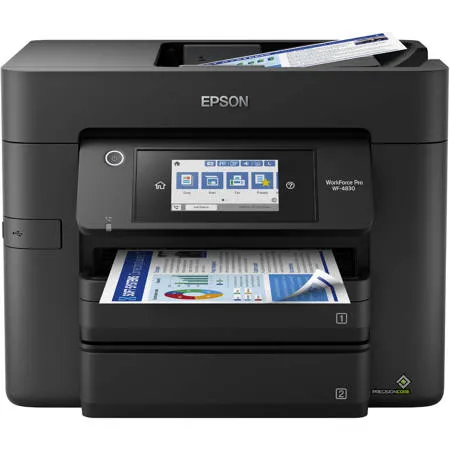
Had this Workforce Pro WF-4830 for nine months. It worked beautifully for close to eight months without any issues AND then, the printer started acting with the printing ink. The printing ink started running as I was using it. Brand new ink and I noticed the color wetness as I was doing maintenance on it. The framing around the printer ink was cheap. The frame started coming loose and then it the color ink started leaking. I noticed I started having problems with my printer working right. It started to run like a 20 year old machine. Really, really slow. Not happy. It should not have been falling apart just nine months from purchase and I took care of my copier everyday wiping it down and trying to keep dust down. It didn't pay me back in the long run since it just seem to give up. Paper jams, when wi-fi from modem stopped working one day when it came back on I had to download the software again and then my wi-fi gave out and I did a uninstall because it was just causing me one problem after another. Not right for it to be onlly nine months old. When I had to uninstall the software when I was reloading it all on my place the wi-fi cnnnection wouldn't come on because it stated my password was wrong. I hadn't changed that password in ages. I just couldn't figure out why this happened. Finally, I just kept the printer off with electric cord unplugged and when I finally plugged up the electric cord it finally accepted my password and it acted like there was nothing wrong in the first place with the password issue. I just finally gave up on it and have turned it off. Wste of money.
Ronny B.
Originally posted at
2026-07-08T20:00:00
Rated 1 out of 5
Worst printer I have used in my life.
I cannot fully explain how bad this printer is. I have had it for maybe 30 days and each day I get more frustrated with it. Do you want to print 3 pages? Haha no, you get thirteen with each page of content halfway split between 6 pages. Find something you need to print? Not today, because somehow between your last print and now a paper jam occurred. Easy fix for the paper jam? No again, it could be 4 different areas and two of those require taking parts of the printer out.
Even though the printer is now 50% off I still would not buy this thing.
Matthew E.
Originally posted at
2026-07-05T20:00:00
Rated 1 out of 5
Epson = HP, No third party ink = BAD
Decent printer, until it started acting like an HP and refusing to recognize 3rd party ink refills. I stopped buying HP because of it, and if it isn't changed back I will no longer be an Epson customer.
EpsonisHPnow
Originally posted at
2026-06-30T20:00:00
Rated 2 out of 5
Not a great printer
This product has difficulty with staying connected to the internet. Each time I print I have to reconnect the device. Very frustrating and disappointing.
Michaelaslp
Originally posted at
2026-05-22T20:00:00
Rated 5 out of 5
Great multifunction, large capacity printer
I just bought this printer to replace my older Canon printer. I am now secretary of our Club and needed a printer that can handle larger volumes of flyers, etc. This definitely fits the bill! It was so easy to set up that anyone at any age can manage it. I liked that it had so many great features I have been wanting. It prints two sided, scan, and will fax with a land line. The two paper trays allow you to have plenty of paper and you can set up two sizes if paper if needed. It is a large size, but the extra space it takes up is just in height. It prints quickly and very high quality. The ink cartridges will last longer and you can replace only the color you run short on. I am definitely a huge fan and can't wait to start on my printing projects! I was able to purchase it at a great sale price which makes it an even better deal!
Psmithny2
Originally posted at
2026-02-10T19:00:00
It was pretty easy to install and replace my older Epson printer
Armando O.
Originally posted at
2025-12-27T19:00:00
With the holidays just around the corner, I had to purchase a new printer. Ordered and was delivered extremely fast considering Christmas holidays. The only problem I have is with the ink., I print a lot. A LOT. After just a few pages (30 ish) I've run out of blank ink. The last printer, also EPSON (but has now been discontinued) printed a lot more pages.
MaryDCW
Originally posted at
2025-12-06T19:00:00
Rated 5 out of 5
First Epson in Years
Great Printer so far. Been a diehard HP user for years but also knew Epson made a great product. When my recent HP printer purchase did not live up to my expectations, decided to give Epson a try again. My First Epson was a stylus back in this 1990s. The colors are vibrant, 2 sided scans, 2-sided prints, double tray for a full ream of 20# paper and all at a reasonable price. Ink pricing is also better than HP. May go for the eco-tank version next time if this printer continues to live up to my expectations. Happy with the purchase!
ceo1168
Originally posted at
2025-11-14T19:00:00
Rated 1 out of 5
Horrible software package
This is an extremely frustrating All-in-One. Epson seems much more interested in collecting data rather than providing functional software and printer. I've tried it with both PC and Mac laptops on an established mature network. You've been warned!
JJRO
Originally posted at
2025-11-02T19:00:00
Rated 1 out of 5
Terrible piece of equipment
I have had this printer for several months and I hate it. The paper feeding function is horrible. Unless you have the paper completely full, it feeds multiple pieces of paper when trying to print and the document prints a portion on every sheet it pulls through causing a huge waste of paper and ink. Additionally, it will only accept Epson brand ink cartridges. If you buy the "after market" brand the unit will not even acknowledge you changed the cartridge. So if you plan to purchase this machine, plan on expensive ink & a lot of wasted paper.
Pepper8707
Originally posted at
2025-10-21T20:00:00
Rated 1 out of 5
GREAT DISAPPOINTMENT
This is one of the most disappointing purchases I've ever made. Within a month of getting it, this printer has consistently dropped off my home network, even after I installed a Wi-Fi extender in my home office near the printer. This has caused several items to back up in the queue.
The ADF jams regularly and has destroyed several original documents.
I have had to download the drivers for both scanning options (computer-generated and printer-direct) on multiple occasions.
I have spoken with and chatted with Espon support several times to resolve these matters, and have finally decided to return the printer and request a refund. This, too, led to disappointment as Epson has firmly stuck to its policy, only to exchange the printer for an identical model, and has refused to give me a refund since I've had the product for about two weeks longer than 30 days -- even though my support chats were within its 30-day warranty period.
As a result, I can neither recommend the product nor the company.
Hal H.
Originally posted at
2025-07-15T20:00:00
Rated 1 out of 5
July 2025 software update bricked printer
July 2025 software update bricked the printer
BillR1
Originally posted at
2025-06-23T20:00:00
Rated 2 out of 5
Permanent paper jam after 1.5 years
This printer was lovely for a long time, however after only a year and a half it's stuck in a perpetual "paper jam" error that I cannot fix or go past. Since it's out of warranty I couldn't get another one and there isn't someone who can repair it closeby. While it served me well for a year and a half, it's a shame that I couldn't get more out of it.
Scar_lett
Originally posted at
2025-05-12T20:00:00
Rated 1 out of 5
Horrible Printer
I absolutely HATE this printer. It constantly loses connection, paper jams, just doesn't print suddenly after printing other documents earlier in the day, goes through ink very quickly (I rarely print). I have to restart it all of the time to get it to reconnect to the wifi and recognize the connected computers. This was a complete waste of money.
KFL1
Originally posted at
2025-05-12T20:00:00
Rated 1 out of 5
Buy a Brother instead
Multiple problems with screen freezing. I had to exchange it and still same problems. It takes 5 minutes to print one page. Final page density is poor.
Printer b.
Originally posted at
2025-05-10T20:00:00
Rated 5 out of 5
Great Printer
So far, the printer has worked very well. It's fast and accurate. The price was very reasonable and we loved the free shipping. I love the Wi-Fi access to it. I wish the ink cartridges were cheaper. I would recommend it to a friend. I've always had good results with Epson Printers. This is my third.
Oscar G.
Originally posted at
2025-05-01T20:00:00
Rated 3 out of 5
Decent printer, but ink consumption is excessive!
For the most part, this printer has been good, but in just over a month it has already ripped through almost two full sets of ink cartridges. 254 color pages printed and it has already used two full Magenta cartridges.
Jim N.
Originally posted at
2025-04-21T20:00:00
Rated 3 out of 5
Ink Doesn't Last
I love this printer, I've had it for over 4 years now and it has always worked great. My only complain is that the ink does not last long, I think on average I can print close to about 100 pages per cartridge.
WEMM
Originally posted at
2025-04-07T20:00:00
Rated 1 out of 5
These printers are unreliable
Do not buy this printer. I'm on my 3rd one and epson service is a joke. They replace them buy it leaves you with out a printer for 7 day every time. These are defective printers. and are very unreliable. I will never buy another epson. product. Since I have to buy another printer because my business cannot wait another 7 day for a replacement printer I'm switching brands.
former 3.
Originally posted at
2025-03-30T20:00:00
Rated 5 out of 5
Great printer but if you are going to use email
Excellent printer and it will do most of what I need to do, but the major problem I'm having is with email scan set up, I called Microsoft, could not solve problem, Epson could not solve problem, Google could not solve the issue and Yahoo could not solve the issue with the scan feature of smtp server email install.
I hope Epson developers take a serious look at the problem or you will lose a lot of customers. I spent 4 days on this problem and it seems everyone with epson is having the same smtp server problems in setting up email.
drdupon
Originally posted at
2025-02-24T19:00:00
Rated 5 out of 5
The Features Are Remarkable For The Price
I Bought The Epson WorkForce Pro WF-4830 And Let Me Tell You, It Is lightning Fast.
I Highly Recommend This Product, Its Clarity Surpasses The Price Range Into Which I Paid.
ArthurAllen
Originally posted at
2025-02-16T19:00:00
There was no easy way to find software to scan or print from desktop. The different "Apps" are nowhere defined nor described. I had to call Help on phone 3 times to get access to the "Epson Scan 2" which eventually and could be downloaded. The search feature on Epson does not return any useful results.
Ronald4
Originally posted at
2025-02-15T19:00:00
Rated 1 out of 5
Don't do it
Do NOT waste your money. It will grabs multiple pieces of paper when printing and scanning. It will print wifi from my computer, but will only connect to scan 10% of the time. I have used a dehumidifier thinking perhaps the paper issue was due to moisture in the air. It is not. Big waste of money for this.
Very D.
Originally posted at
2025-02-09T19:00:00
Rated 1 out of 5
Don't Buy
Product is trash . It has issues and I only used it 2 times and maintenance is required and it makes a loud banging noise. The ink ran out in 2 days .
Not P.
Originally posted at
2025-02-07T19:00:00
Printer does not print without all cartridges. If your colors run out you're out of luck, you will have to save everything until you buy more cartridges.
Msbim
Originally posted at
2025-02-01T19:00:00
Rated 3 out of 5
only last 2 years
I like this printer but this is my 2nd WF4830 and this is the second time the printer paper feeder has made this printer unusable in the 2nd year of ownership after the warrantly has expired. This is extremely annoying. I like Epson but if their printers only last 2 years, I am thinking I need to switch to a different brand.
Printer i.
Originally posted at
2025-01-31T19:00:00
Rated 1 out of 5
Terrible Connectivity
Wifi worked for a week or so then stopped connecting to the router. I switched to a wired connection. That worked for a couple more weeks then stopped.
My wife and I shared the printer. So from then on we would have to move our laptops so we could connect directly to the printer, printer, then move our laptops back to our desks. Ridiculously cumbersome. Ridiculously poor quality printer.
MikeK1
Originally posted at