
This item is no longer available.
PTZJoy PRO is a VISCA PTZ Camera Controller that allows users to control pan/tilt/zoom directly from a computer when connected via Serial RS-232 and converted to USB
Control cameras locally with virtual controls, any USB joystick and keyboard hotkeys or use the WebRemote, IP Remote or PTZVisual Controller for far-end camera control from any mobile device or computer with a web browser over a LAN, Wi-Fi or WAN IP Network. Features such as Preset Configuration, Camera Name Setup, Auto Pan, Preset Scanner and advanced video settings makes PTZJoy PRO the most comprehensive and advanced professional PTZ control software for a PC available on the market today.
• Automatic configuration of COM Ports
• Pan/Tilt/Zoom/Focus with variable speed control
• Control up to 7 cameras in a daisy-chain connection and 16 cameras in home run mode from one computer
• Easy camera switching
• WebRemote - far-end camera control from computer or smartphone with a web browser
• IP Remote - far-end camera control from computer or smartphone with a IP Remote Controller app
• PTZVisualPad - Remote camera control using visual layout of camera presets
• Video Monitor for quick camera view and for taking pictures for PTZ Visual Pad
• Supports all USB Joysticks
• Keyboard Hotkeys
• Configure up to 256 Presets
• Auto Pan
• Preset Scan
• Advanced Video Settings
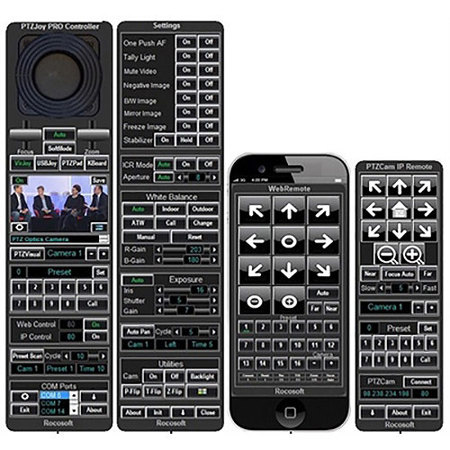
Main Controller
The main remote control interface provides convenient pan, tilt, zoom controls along with access to more advanced features such as Presets, WebRemote, IP Remote, PTZVisual Pad and Preset Scan.
Settings
The Settings screen shows additional video and control settings such as Exposure, White Balance, Auto Pan, Start with Windows, Camera ON/OFF and more.
WebRemote
The WebRemote is accessible from the web browser of any PC, Mac, Smartphone or tablet .This allows for quick and convenient far-end control of cameras on the go.
IP Remote
The IP Remote provides access to the main controller over a secure connection allowing control of the camera connected to the computer with the Main Controller installed. Control the pan, tilt, zoom, focus and recall presets of a far end cameras with the remote interface.
Far-End IP Camera Control with WebRemote
Control PTZ cameras from any mobile device over any LAN, Wi-Fi and WAN IP network. Simply turn ON Web Control access via IP on the main program and open the WebRemote in the web browser of any mobile device and use it to switch between cameras, control pan, tilt, zoom and focus, change the speed settings of camera movements and call on presets. This feature provides two-way communication between the distant WebRemote and the main program, so you can easily see what commands the cameras are receiving as well as the speed settings directly on the WebRemote. The PTZ WebRemote works with iPhones, iPads, Android phones and tablets, Windows phones and tablets, Google phones and tablets and all other mobile devices with a web browser. Supports all web browsers such as Internet Explorer, Google Chrome, Safari, Mozilla Firefox, etc.
PTZVisualPad
PTZVisualPad is a customizable graphic user interface for controlling a PTZ camera and is designed to simplify the logistics of preset switching during a video conference meeting. Totally customizable, users can set seat positions, camera positions, add pictures to represent people, add custom room layouts and designate presets to specific locations in the room. Use this feature locally or open it from a remote computer on the IP Remote for far-end camera control using the visual layout.
• Up to 16 position presets - memorizes the pan, tilt and zoom positions of the camera
• Easy preset recall - recall presets with the click of a button
• Room layout - chose from their included room templates, import any custom image or snap your one on the spot using the built-in Video Monitor
• Character Generator - each member of a meeting can be allocated to a seat and represented with a character graphic