more

See Options
Need help? Ask our experts.
To set up the HP DeskJet 2855e printer with your smartphone, download the HP print app, follow the intuitive setup instructions, and connect your device to the printer's Wi-Fi network.
The HP DeskJet 2855e uses cartridges with new or reused HP electronic circuitry and employs dynamic security measures to block cartridges using modified or non-HP circuitry.
Yes, you can enroll in the HP+ Instant Ink subscription at any time, allowing you to save up to 50% on ink and receive automatic ink deliveries.
Yes, the HP DeskJet 2855e is made from at least 60% recycled plastic and supports the HP Planet Partners program for free ink cartridge recycling.
Review Summary
2026-04-24T20:00:00
I returned it. Wouldn't connect to my internet.
L C.

2026-04-17T20:00:00
It works and then it doesn't
Hot p.

2026-04-16T20:00:00
Has been a headache since day one. Intial set up was a pain. Had to reset the thing every time I used it. Then I moved and had a different e-mail address. Two days of h-ll getting it to work again. Will not buy another one.
John C.

2026-04-15T20:00:00
I love this printer. It's so nice and compact you don't need a lot of space for it. But the best part is how easy it was to install and to begin using. Why are other printers so hard to install? What a nice surprise to get all that ink as well. I will never buy another brand of printer again.
C.G.B

2026-04-14T20:00:00
Amazing printer
Ym786

2026-04-14T20:00:00
First, for the price I paid, this is an incredible value. This printer is a replacement for my HP Envy 5540 that stopped working by refusing to initialize when powered. The new 2842e is very similar, if not a tad faster when printing. The top located buttons provide a quick access to some features, more importantly the photocopying ability. It is also very quiet. The only down side is that I lost the clever duplex printing the 5540 had and the smaller volume. Overall, an excellent product at an affordable price point.
Chris M.

2026-04-14T20:00:00
Great little printer fir my home office
Al S.

2026-04-11T20:00:00
works fine--super easy setup is my main reason for purchase
JNichols

2026-03-31T20:00:00
fast and clear
alfred b.

2026-03-30T20:00:00
Working flawlessly
Missy B.

2026-03-28T20:00:00
I was looking for a fairly good printer for my wife and I am very please with this one. After just a few instructions she has been able to print and copy with no problems. This printer sits in a very small space (Barely fits) and is perfect for our needs.
Harold D.

2026-03-28T20:00:00
It's tax time, I haven't had time to unpack and set it up yet !!
N A.

2026-03-26T20:00:00
The only thing it printed w info page brand new a month..2new cartridges..light blinks all the time..I'm ready to throw it off a balcony as another did..(true) I have used all the booting solutions I can..I was so pleased I c print from my IPad both r connected to WIF n it won't print.
Rosie R.

2026-03-18T20:00:00
excellent home printer,copier, scanner. It also is much quieter than my previous HP printer.
MAN E.

2026-03-08T20:00:00
I need help installing this printer to my computer! I've been trying for to many days now and just can't NOT do this and cannot get any help for HP?!
Product 5.

2026-02-26T19:00:00
I love this printer! Very easy to use and set up, prints beautiful photos
MandyS

2026-02-20T19:00:00
Easy, good quality, love ink program too
Jenny A.

2026-02-18T19:00:00
I really like it and it came in fast. Portable and easy to use.
Dyposel

2026-02-18T19:00:00
Cheap printer
Nothin

2026-02-15T19:00:00
A total waste of money.
JMSo

2026-02-14T19:00:00
the ask me on the right told me shy would connect me with people that would help. big mistake they gave me a vires wanted to charge $1000.00 to cleanup and 3 years of antivars .... took printer and pc to local people cost $150.00 that was some HP recomdation
Rich K.

2026-02-14T19:00:00
Don't like that you need to use an app on computer just to scan a page
Linda O.

2026-02-12T19:00:00
Love this printer, excellent price, prints and scan with ease
SlickPC

2026-02-08T19:00:00
Easy to use, not expensive. easy setup. What's not to like?
bobkaren76

2026-02-07T19:00:00
Good printer, easy set-up. Good value for this very basic printer. All the hp products I've ever owned or used at work have always been good quality & durable.
Ray

2026-01-19T19:00:00
The HP 2800e was easy to set up and is a nice priced, efficient printer. This is our second HP printer; the old one is 7 years old and still working.
Mark S.

2026-01-14T19:00:00
Easy Set Up and Reliable. I have several of these printers.
APCO S.

2026-01-13T19:00:00
I sent it back because I bought another printer
Darlene M.

2026-01-11T19:00:00
This printer was easy to set up and connect to my compooper! The instructions were easy to follow, and I was printing in about 20 minutes after getting things hooked up and running. I have always relied on HP products and services to keep me going. Kudos to HP for great products!
The r.

2026-01-11T19:00:00
I received unit in perfect condition and it working properly
Ketlene

Accidents happen where life happens. Protect your favorite Adorama products and purchase a protection plan to stay covered from accidental damage, mechanical or electrical failure, and more.
If we can’t fix it, we’ll replace it at no additional cost.
Protect your product from drops, spills, and more.
Enjoy your gear without fear. We have you covered!
When regular use of your product over time results in mechanical or electrical failure.
We will never charge you a deductible after the purchase of a plan.
Our claims process is simple & easy and our customer service team is happy to help.
Adorama Protect powered by Extend is available for purchase to customers in the United States. Not available for purchase Internationally or in U.S. Territories.
Browse our FAQ
Print, copy, scan
Black (ISO, laser comparable): Up to 7.5 ppm
Color (ISO, laser comparable): Up to 5.5 ppm
Up to 1200 x 1200 rendered dpi
Up to 4800 x 1200 optimized dpi color (when printing from a computer on selected HP photo papers and 1200 input dpi)
Up to 1,000 pages
50 to 100
HP Thermal Inkjet
Icon LCD display
1.0 GHz
2 (1 each black, tri-color)
HP 67 Black Original Ink Cartridge (-120 pages yield) 3YM56AN; HP 67XL Black High Yield Original Ink Cartridge (-240 pages yield) 3YM57AN; HP 67 Tri-Color Original Ink Cartridge (-100 pages yield) 3YM55AN; HP 67XL Tri-Color High-Yield Original Ink Cartridge (-200 pages yield) 3YM58AN. Actual yield varies considerably based on content of printed pages and other factors
Pigment-based (black); Dye-based (color)
HP PCL 3 GUI; HP PCLm (HP Apps/UPD); URF (AirPrint)
No
1
1
HP app; Apple AirPrint; Chrome OS; Mopria-certified
1 Hi-Speed USB 2.0 (device); 1 Wi-Fi 802.11b/g/n
64 MB DDR1
macOS V10.14 Mojave, macOS 10.15 Catalina, macOS 11 Big Sur, macOS 12 Monterey, macOS 13 Ventura; 2 GB HD; Internet required
Windows 10, 11, : 1 GHz 32-bit (x86) or 64-bit (x64) processor, 2 GB available hard disk space, Internet connection, Internet Explorer
Windows 11; Windows 10; macOS 10.14 Mojave; macOS 10.15 Catalina; macOS 11 Big Sur; macOS 12 Monterey; macOS 13 Ventura; Chrome OS; macOS 14 Sonoma
No
60-sheet input tray
25-sheet output tray
Manual (driver support provided)
Up to 5 envelopes
No
Sheetfed
Letter; legal; 4 x 6" ; 5 x 7" ; 8 x 10" ; No. 10 envelopes
3 x 5 to 8.5 x 14" (7.6 x 12.7 to 21.5 x 35.5cm)
Plain paper, photo paper, brochure paper, envelopes and other specialty inkjet papers
20 lbs (9.07kg)
Letter: 16 to 32 lbs; HP envelopes: 20 to 24 lbs; HP cards: up to 110 lbs; HP 4 x 6" photo paper: up to 145 lbs
Up to 1200 x 1200 dpi
Up to 1200 dpi
No
No
Up to 300 x 300 dpi
Up to 300 x 300 dpi (color text and graphics)
Up to 9 copies
No
Input voltage: 100 to 240 VAC (+/- 10%), 50/60 Hz (+/- 3 Hz), 350mA. India input voltage: 200 to 240 VAC (+/- 10%), 50/60 Hz (+/- 3 Hz), 350mA.
2.8W (ready), 1.4W (sleep), 0.3W (auto-off), 0.3W (off); For China: 2.8W (ready), 1.4W (sleep), 0.3W (auto-off), 0.3W (off)
This printer is intended to work only with cartridges that have new or reused HP electronic circuitry, and it uses dynamic security measures to block cartridges using modified or non-HP circuitry. Periodic firmware updates will maintain the effectiveness of these measures and block cartridges that previously worked. Reused HP electronic circuitry enables the use of reused, remanufactured, and refilled cartridges
41 to 104 Degree F (5 to 40 Degree C )
20 to 80% RH (non-condensing)
HP Printer Software, available online
AP EM only: Yes 1.0m (USB) cable; AMS, EMEA: No, please purchase (USB) cable separately
60% post-consumer recycled plastic
Dynamic security enabled printer
Certain HP printers are intended to work only with cartridges that have a new or reused HP chip or electronic circuitry. These printers use dynamic security measures to block cartridges using a non-HP chip or electronic circuitry.
Periodic firmware updates will maintain the effectiveness of these measures and block cartridges that previously worked. Reused HP chips and electronic circuitry enable the use of reused, remanufactured, and refilled cartridges.
Yes, built-in Wi-Fi 802.11b/g/n
16.7 x 11.97 x 6.06" (42.41 x 30.40 x 15.39cm)
Max: 16.7 x 21.5 x 9.8" (42.41 x 54.61 x 24.89cm) (Output Extension fully out)
7.55 lbs (3.42kg)
196337380097
How the HP DeskJet 2855e Wireless All-in-One Thermal Inkjet Printer Enhances Your Home Printing Experience
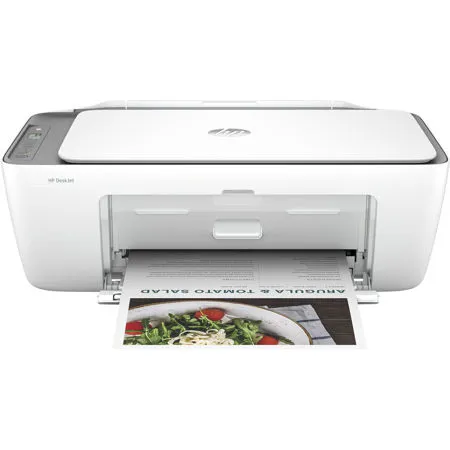
The HP DeskJet 2855e Wireless All-in-One Thermal Inkjet Printer is designed to streamline your home printing tasks with its compact and efficient design. As part of America's most trusted printer brand, this versatile device allows you to effortlessly print, scan, and copy a variety of documents, from labels to recipes, all while maintaining an affordable and user-friendly experience.
Ideal for home users with basic printing needs, the HP DeskJet 2855e offers seamless integration with the easiest-to-use print app, ensuring a quick and straightforward setup process. Simply follow the intuitive steps to get started, and enjoy the convenience of printing, scanning, and copying directly from your smartphone. The printer's control panel features easy-to-use buttons, allowing you to manage all your tasks efficiently.
This printer is engineered to work exclusively with cartridges that contain new or reused HP electronic circuitry. It employs dynamic security measures to prevent the use of cartridges with modified or non-HP circuitry, ensuring optimal performance. Periodic firmware updates further enhance these security measures, blocking previously compatible cartridges that do not meet HP's standards.
With an HP+ Instant Ink subscription, you can save up to 50% on ink costs and ensure you never run out of ink. This service delivers ink directly to your door before you run out, with plans starting as low as $1.49 per month. Enjoy the flexibility to change plans or cancel at any time without additional costs.
Stay connected with HP's most reliable Wi-Fi, which automatically reconnects if the connection is lost, allowing you to print from your smartphone with ease. The built-in wireless capability lets you access, print, and share documents from any device on your network, enhancing your productivity and convenience.
In line with HP's commitment to sustainability, the DeskJet 2855e is crafted from at least 60% recycled plastic. For every page you print, HP actively protects, restores, and manages forests, contributing to environmental conservation. Additionally, you can recycle your Original HP ink cartridges for free through the HP Planet Partners program, further supporting eco-friendly practices.
Experience the perfect blend of innovation, reliability, and sustainability with the HP DeskJet 2855e Wireless All-in-One Thermal Inkjet Printer, and transform your home printing tasks into a hassle-free process.