Orders placed during the Sukkot Holiday (Fri 9/25 after 1PM ET - Sun 10/4) will ship Mon 10/5View Schedule
44% Off

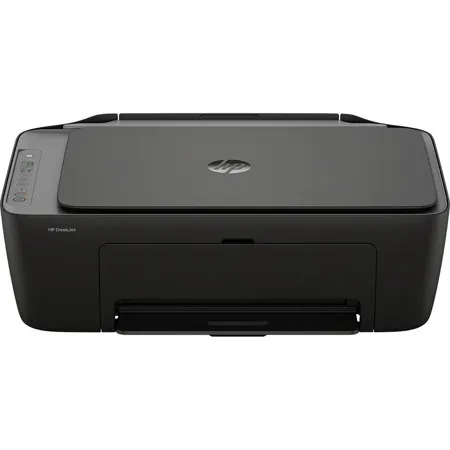
HP DeskJet 2955 All-in-One Wireless Color Thermal Inkjet Printer with 3-Months of Instant Ink

SKU: IHP2955 MFR: A24HJA
$49.99
$89.99
Save: $40 (44%)
Earn VIP Reward Points

Key Features

  • Experience crisp, high-quality printing for all your documents and photos with exceptional print quality.
  • Effortlessly connect and print from anywhere in your home or office using seamless wireless connectivity.
  • Boost your productivity with impressive print speed, ensuring your tasks are completed quickly and efficiently.
  • Manage your printing budget effectively with an all-in-one printer designed for optimal ink cost efficiency.
  • Digitize important papers and photos with the versatile scanner function, perfect for archiving and sharing.
  • Save paper and reduce your environmental footprint with convenient duplex printing capabilities.
See More Product Details
Temporarily On Backorder?Expected Availability: 11/2026Request assistance or get notified
Calculate Shipping

See Options

1
Add to ListGet Sale Alert

Need help? Ask our experts.

Overview
Compare
Accessories
Specs
Protection

Reviews about this item

Review Summary

2026-09-14T20:00:00

Rated 5 out of 5

The only printer you'll ever need!

HP has done it again with this beauty right here,?HP DeskJet 2955. It's the all-in-one Printer with an extra BONUS!!!!! You'll get 3 months of FREE INK ~ Yepp you heard that correctly! Three (3) whole months of FREE INK! Who doesn't like free & it's easy to sign up; just like setting up this lightweight printer. I had it unboxed, set up, signed up for the "BONUS of 3 months free ink" & printing all in under 15 minutes. It's user friendly & HP support is at your fingertips with any question, assistance or simply to say "Hey, thanks for being awesome" again with my printer needs! I'm a HP printer fanatic through & through?., what are you waiting for? Also, I got my unit on sale; could it get any better than this? Nope, I think not! It's that time for you to run, not walk, to get your printer from HP today!!!

Jewels G.

2026-09-14T20:00:00

Rated 2 out of 5

I liked that the printer prints but I don't like that I do not have a choice to print front and back or front only. I t is a waste of paper and too much paper to keep.

Brenda C.

2026-09-12T20:00:00

Rated 5 out of 5

Good product

Good product for the price

Printer

2026-09-11T20:00:00

Rated 5 out of 5

Improvement over 2800 series

2955 HP Printer series is huge improvement over the 2800 series which I had to return because of a defect. So far, it has performed admirably.

cobotwo

2026-09-11T20:00:00

Rated 5 out of 5

Try something new first cartridge came quick

William R.

2026-09-11T20:00:00

Rated 3 out of 5

Basic entry level printer

This printer is definitely for home use. It could not handle heavy printing jobs. It either feeds multiple sheets of paper at a time, or no paper at all. I have to feed 1 sheet at a time if my request is multiple sheets.

J A.

2026-09-09T20:00:00

Rated 4 out of 5

Nice and light

Prints well, light enough to carry from room to room, if needed. I'd recommend it.

Karen P.

2026-09-08T20:00:00

Rated 4 out of 5

Set up

I like the size of the printer. Not being tech savoy, it took longer to set up than anticipated. I used several HP Apps to connect the printer to the internet. The color cartridge took several attempts to get inserted. After an hour I was able to print. Nice printer.

Cooter

2026-09-08T20:00:00

Rated 2 out of 5

I need a more advanced model.

I need more features on the printer.

Pearlie C.

2026-09-08T20:00:00

Rated 1 out of 5

HP printer/scanner

I can't use this machine it seems like it wants to operate on wireless mode and I can't get it set up!

William H.

2026-09-08T20:00:00

Rated 5 out of 5

good printer

great printer for the price.

Printer

2026-09-07T20:00:00

Rated 5 out of 5

amazing

wow, this printer is small and it is amazing!

MARIA

2026-09-07T20:00:00

Rated 5 out of 5

HP2900

Very convenient size fits anywhere Photos come out sharp and colors are beautiful.

El

2026-09-07T20:00:00

Rated 5 out of 5

Hp. Printer

Needed a printer with easy set up for printing things on my phone. This is by far the best easy and quick. Without a lot of steps.

Bill

2026-09-07T20:00:00

Rated 5 out of 5

Love it

I like that i can get it right in my door and is very convenient

Nancy

2026-09-07T20:00:00

Rated 3 out of 5

Difficult to get it signed into and online. Its off at the moment and i can't get it back

Make it real simple to get it online. In trying to keep others out you manage to keep me out. L Im 88. Keep it simple.

Ralph M.

2026-09-06T20:00:00

Rated 3 out of 5

This is a good printer for the price

Setting up by following the instructions on the HP website is very easy. Print quality is average. My only complaint is the need to print pages individually and manually place in the paper holder in order to print back to back.

M M.

2026-09-06T20:00:00

Rated 5 out of 5

Best HP Printer

I am so happy to purchase this from online because it works with AI and everything becomes easy for me. It is better than my older printer I had it from HP.

Mehran

2026-09-06T20:00:00

Rated 5 out of 5

Great

It was a very easy set up Instructions was very easy to read,

Susan L.

2026-09-06T20:00:00

Rated 5 out of 5

Works Well

We purchased this as a second printer. It was easy to set up and prints and scans well. Not a speed demon but great value for the price.

NanTim

2026-09-06T20:00:00

Rated 5 out of 5

HP Review

Set up was very easy, and I am using it for work and personal use.

BL

2026-09-06T20:00:00

Rated 5 out of 5

Not able to link to my wireless laptop. Used a cord to connect, all is well.

We don't need to print often, but it is reliable and makes good copies. It is very easy to use which is great for the older generation.

Henrietta

2026-09-06T20:00:00

Rated 5 out of 5

Great product

Works just as it should

Good m.

2026-09-06T20:00:00

Rated 5 out of 5

So far so good!

Great affordable printer. I'm not tech savvy, and this was easy to set up. It is a great, basic home printer.

Rebaz

2026-09-06T20:00:00

Rated 1 out of 5

I never received the ink when they said they shipped it

I neger received the ink when they said they shipped it

Kendra

2026-09-06T20:00:00

Rated 1 out of 5

Worst printer experience I have ever had. Printer has never worked properly

Printer never worked properly With Windows 11 A totally bad experience

BF

2026-09-06T20:00:00

Rated 1 out of 5

Printing is not clear

Printing isnt clear. Printing cuts off the end or beginning of my page, too. I've tried everything to fix it.

Not H.

2026-09-06T20:00:00

Rated 1 out of 5

Wrong

You send me wrong ink

Lopatinsky J.

2026-09-06T20:00:00

Rated 1 out of 5

Disappointing purchase

I can't get my printer to work. I e tried different things and nothing works. I states "idle mode" when I try to do a print job

Deb K.

2026-09-06T20:00:00

Rated 1 out of 5

Membership ink

This is a horrible product with a plan of holding bought ink captive. I will never buy a hp product again after this.

Jacob

Select a plan in the Add Protection section above and purchase with this product by clicking “Add to Cart”.

image-protection

TRUSTED PROTECTION PLANS, EXCEPTIONAL SERVICE.

Invest In Your Gear and Peace Of Mind!

Accidents happen where life happens. Protect your favorite Adorama products and purchase a protection plan to stay covered from accidental damage, mechanical or electrical failure, and more.

Repair or Replacement

Repair or Replacement

If we can’t fix it, we’ll replace it at no additional cost.

Accidental Damage

Accidental Damage

Protect your product from drops, spills, and more.

Peace of Mind

Peace of Mind

Enjoy your gear without fear. We have you covered!

Malfunction Protection

Malfunction Protection

When regular use of your product over time results in mechanical or electrical failure.

Zero Deductible

Zero Deductible

We will never charge you a deductible after the purchase of a plan.

Customer-Focused Support

Customer-Focused Support

Our claims process is simple & easy and our customer service team is happy to help.

Adorama Protect powered by Extend is available for purchase to customers in the United States. Not available for purchase Internationally or in U.S. Territories.

HP DeskJet 2955 Specifications

  • Color

    Black

  • Functions

    Print, copy, scan

  • Multitasking supported

    No

  • Print speed

    Letter: Up to 7.5 ppm
    Black (ISO): Up to 7.5 ppm
    Color (ISO): Up to 5.5 ppm
    First page out black: As fast as 16 sec
    First Page Out Color: As fast as 20 sec
    Black (draft): Up to 20 ppm
    Color (draft): Up to 16 ppm
    Draft black (A4 Memo): Up to 27 ppm
    Draft color (A4 Memo): Up to 22 ppm

  • Print resolution

    Black (best): Up to 1200 x 1200 rendered dpi
    Color (best): Up to 4800 x 1200 optimized dpi color (when printing from a computer on selected HP photo papers and 1200 input dpi)

  • Print technology

    HP Thermal Inkjet

  • Print cartridges number

    2x (1 each black, tri-color)

  • Borderless printing

    No

  • Standard print languages

    HP PCL 3 GUI; HP PCLm (HP Apps/UPD); URF (AirPrint)

  • Scan type / Scan technology

    Flatbed / Contact Image Sensor (CIS)

  • Scan resolution

    Hardware: Up to 1200 x 1200 dpi; Optical: Up to 1200 dpi

  • Scan file format

    JPEG; TIFF; PDF; PNG

  • Scan input modes

    Front panel Copy buttons, HP app

  • Scan size maximum

    Flatbed 8.5 x 11.69" (216 x 297mm)

  • Bit depth / Grayscale levels

    24-bit/256

  • Digital sending standard features

    No

  • Copy speed

    Black (ISO): Up to 6 cpm
    Color (ISO): Up to 3 cpm

  • Copy resolution

    Black (text and graphics): Up to 300 x 300 dpi; Up to 300 x 300 dpi
    Color (text and graphics): Up to 300 x 300 dpi

  • Maximum Number of Copies

    Up to 9 copies

  • Fax Features

    Fax phone TAM interface supported: No
    Junk barrier supported: No
    Remote retrieval capability supported: No

  • Standard connectivity

    1x Hi-Speed USB 2.0 (device)
    Dual Band Wi-Fi

  • Network capabilities

    Wi-Fi 802.11a/b/g/n, 2.4 GHz and 5GHz dual band

  • Wireless capability

    Yes, built-in Wi-Fi 802.11a/b/g/n, 2.4 GHz and 5GHz dual band

  • Mobile printing capability

    HP app; Apple AirPrint; Mopria Print Service; HP Print Service Plugin (Android printing)

  • Memory

    Standard: 64 MB DDR1
    Maximum: 64 MB DDR1; 24 MB Flash

  • Processor speed

    1.0 GHz/Hard disk: No

  • Duty cycle

    Monthly, letter: Up to 1,000 pages
    Monthly, A4: Up to 1000 pages

  • Recommended monthly page volume

    50 to 100

  • Media types supported

    Plain paper, photo paper, brochure paper, envelopes and other specialty inkjet papers

  • Media weight supported

    Letter: 16 to 32 lbs (7.26 to 14.52kg)
    HP envelopes: 20 to 24 lbs (9.07 to 10.89kg)
    HP cards: up to 110 lbs (49.9kg)
    HP 4 x 6" photo paper: up to 145 lbs (65.77kg)

  • Media sizes supported

    Letter; legal; 4 x 6"; 5 x 7"; 8 x 10"; No. 10 envelopes

  • Media Sizes Custom

    Minimum: 3 x 5" (7.62 x 12.7cm)
    Maximum: 8.5 x 14" (21.59 x 35.56cm)

  • Paper handling

    Input Capacities: Up to 60 sheets Standard; Up to 5 envelopes; Up to 20 cards; Up to 60 sheets Legal
    Output Capacities: Up to 25 sheets Standard; Up to 5 envelopes; Up to 20 cards; Up to 25 sheets Legal
    Duplex Options: Manual (driver support provided)
    Envelope feeder: No
    Standard paper trays: 1

  • Replacement cartridges

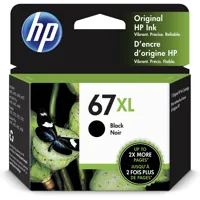
    HP 68 Black Original Ink Cartridge (Approx. 160 pages yield) 7FP21TN
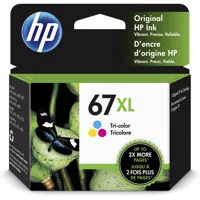
    HP 68 Tri-Color Original Ink Cartridge (Approx. 120 pages yield) 7FP20TN
    HP 68e EvoMore Black Original Ink Cartridge (Approx. 320 pages yield) 7FP22TN

  • Instant ink eligible

    HP Instant Ink eligible

  • Energy efficiency compliance

    EPEAT registered

  • Energy star certified

    Yes

  • Sustainable impact

    Forest First product; FSC Certified Packaging; Recyclable through HP Planet Partners; 70% post-consumer recycled plastic

  • Control panel

    Icon LCD display, 7 buttons (Power, Cancel, Resume, Wi-Fi, Info, Color Copy & Black Copy) 5 LED indicators (Power, Ink, Resume, Wi-Fi & Info)

  • Software included

    HP app, available online

  • Web solutions

    HP Printables

  • Compatible operating systems

    Windows 11; Windows 10; macOS 13 Ventura; macOS 14 Sonoma; macOS 15 Sequoia

  • Minimum system requirements

    PC: Microsoft Windows 11, 10: 1 GHz processor, 2 GB available hard disk space, Internet connection
    Mac: Apple macOS 13 Ventura, macOS 14 Sonoma, macOS 15 Sequoia; 2 GB HD; Internet required

  • Power

    Power supply type: Internal
    Power requirements: Input voltage: 100 to 240 VAC (+/- 10%), 50/60 Hz (+/- 3 Hz) 600mA. India input voltage: 200 to 240 VAC (+/- 10%), 50/60 Hz (+/- 3 Hz) 400mA.
    Power consumption: 2.55 W (ready), 1.31 W (sleep), 0.10 W (off)

  • Acoustics

    Acoustic power emissions: 6.3 B(A)
    Acoustic pressure emissions: 55 dB(A)

  • Operating environment

    Operating temperature range: 41 to 104 Degree F (5 to 40 Degree C)
    Recommended operating temperature: 59 to 86 Degree F (15 to 30 Degree C)
    Storage temperature range: -40 to 140 Degree F (-40 to 60 Degree C)
    Non-operating humidity range: 5 to 90% RH (non-condensing)
    Operating humidity range: 15 to 80% RH (non-condensing)
    Recommended humidity operating range: 20 to 80% RH

  • Country of Origin

    Vietnam

  • Dimensions (W x D x H)

    16.73 x 11.97 x 6.06" (425 x 304 x 154mm)
    Maximum: 16.73 x 21.52 x 9.84" (425 x 546.6 x 250mm)

  • Weight

    7.55 lbs (3.42kg)

28 Accessories for HP DeskJet 2955 All-in-One Wireless Color Thermal Inkjet Printer with 3-Months of Instant Ink

  • All Accessories (28)
  • Ink (3)
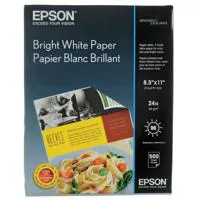
  • Copy Paper (3)
  • Photo Paper (8)
  • Power Supplies (5)
  • Cables & Adapters (4)
  • Cleaning Accessories (5)

About HP DeskJet 2955

Setup that's a breeze thanks to HP's easiest-to-use print app. Print everything from return labels to fun, colorful learning worksheets. Simplify printing, ignite creativity and learning. For home printing users seeking a wireless, easy-to-use and compact printer to print, scan and copy with ease.

This printer is intended to work only with cartridges that have new or reused HP electronic circuitry, and it uses dynamic security measures to block cartridges using modified or non-HP circuitry. Periodic firmware updates will maintain the effectiveness of these measures and block cartridges that previously worked. Reused HP electronic circuitry enables the use of reused, remanufactured, and refilled cartridges.

Easy setup, worry-free connection
Handle your printing, scanning, and copying needs from anywhere in your home. Reliable connection with dual-band Wi-Fi that reconnects automatically. Print from anywhere with HP's easiest-to-use print app.

Make learning fun with easy printing.
Make learning easy and fun with HP Printables. Discover an extensive collection of educational worksheets on the HP Printables website or through the HP app.

Perfectly formatted prints with HP AI.
Optimize ink usage. Remove unwanted content. Reduce wasted pages.

Print with ease with less waste.
One billion printer cartridges recycled and counting. Return used cartridges for Free via the HP Planet Partners Program. Contains at least 70% recycled plastic content.

HP DeskJet 2955 Features

  • Print, copy, scan in color, wireless printing
  • Easy setup, worry-free connection. Contains at least 70% recycled plastic
  • Perfectly formatted prints with HP AI
  • Get 3 months Free Instant Ink
  • Dynamic security enabled printer
  • Easily handle simple tasks and get a lot from this all-in-one printer
  • HP's most reliable dual-band, self-healing Wi-Fi - automatically reconnecting
  • Set up, print, scan and copy from any device with HP's easiest-to-use print app
  • Easily print all your documents with an intuitive control panel with buttons
  • Match your space's unique vibe with stylish and compact designs
  • Contains at least 70% recycled plastic content

Warranty Information

This product has a limited warranty of 12 months.

Key Features

  • Experience crisp, high-quality printing for all your documents and photos with exceptional print quality.
  • Effortlessly connect and print from anywhere in your home or office using seamless wireless connectivity.
  • Boost your productivity with impressive print speed, ensuring your tasks are completed quickly and efficiently.
  • Manage your printing budget effectively with an all-in-one printer designed for optimal ink cost efficiency.
  • Digitize important papers and photos with the versatile scanner function, perfect for archiving and sharing.
  • Save paper and reduce your environmental footprint with convenient duplex printing capabilities.

What's in the box:

  • HP DeskJet 2955 All-in-One Wireless Color Thermal Inkjet Printer
  • 68 Setup Black Ink Cartridge
  • 68 Setup Tri-Color Ink Cartridge
  • Power Cord
  • User Manual
  • HP 1 Year Limited Warranty