



See Options
Need help? Ask our experts.
Review Summary
2026-07-01T20:00:00
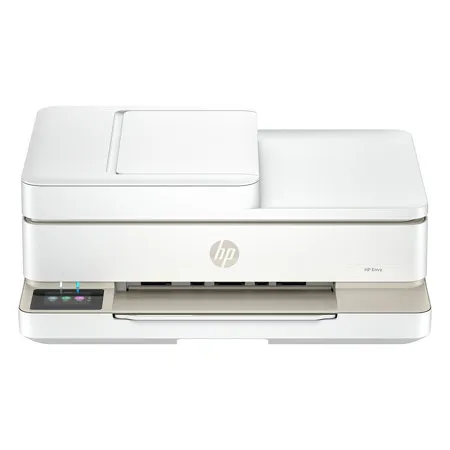
I recently purchased the HP ENVY 6555 for my personal use , and it has been good so far. The waiting is more than a month though. The sleek white design looks modern and fits nicely on my desk without taking up too much space. And it only take less than 10 minutes to set up. Print quality is excellent. Text is crisp and professional, while colors in photos and graphics are vibrant. I especially appreciate the automatic two-sided printing, which saves paper, and the scanner with its automatic document feeder for multi-page jobs. Copying and wireless printing from phones work seamlessly. Overall, this all-in-one printer is quiet, efficient, and delivers great performance at a good value. I highly recommend the HP ENVY 6555 to families, students, or anyone needing a dependable home printer.
Duyen0709

2026-06-28T20:00:00
I've only had my HP Envy 6555 for a short time, but so far I've been happy with it. I'm still working through a Wi-Fi connection issue, but it's been printing just fine using the cable while I get that sorted out. As a busy parent and student, I use my printer for everything from school assignments and work documents to the endless forms and projects that come with having kids. It's been a great help with all of those everyday tasks. I'm especially looking forward to printing more family photos. I love the idea of turning our favorite memories and adventures into something we can frame, scrapbook, and enjoy for years to come. Overall, I'm excited to keep using it and think it'll be a great addition to our home once I get the wireless connection figured out.
Cecerose
2026-06-25T20:00:00
The HP Envy 6555 All-in-One printer is a decent printer for light use. The setup was a little cumbersome using the iOS app. I had to make multiple attempts to complete the setup process. The first time I got it setup the HP app kept indicating there was an error with the printer and the support page directed me to remove and setup the printer again. Even after a full factory reset I continued to run into issues. After about 30 minutes of trying the printer was setup with out showing any errors. The reason I am suggesting for light use is that the paper tray is very small and only holds about a quarter of a ream of paper so if you print a lot be prepared to refill regularly. The printer prints as you would suspect from HP in great detail and quality. I have used it to print a few documents as well as scan a few receipts and everything has been acceptable. The printer will auto-duplex and the auto feeder is nice and documents flow smoothly through it. Where it seems to fall a little short is the touch screen is very very slow and placed in a awkward location flat on the front, so if you have it on a shelf it is difficult to interact with. This printer is replacing an much older HP and that touch was absolutely more responsive and better placed. The printer only utilized two ink cartridges which I feel is not convenient because if you only run out of cyan you will need to replace the entire cartridge which is wasteful in my opinion. I really like the instant ink program and the multiple plans available to pick from to suit my printing needs. Overall this is a good printer that has some questionable design choices but if you are not a heavy print user would be a reasonable choice.
jjyhawkins
2026-06-25T20:00:00
I have used the HP Envy 6552 for over a month, and it's been a solid choice. I like the print quality, which is sharp & the photos come out looking vibrant, plus the text documents look sharp. It is great for my day-to-day scanning, printing, and occasional photo or two. It is reliable and easy to use. If you want something that works without a headache, this is a great option. I would recommend.
fieldsw995
2026-06-23T20:00:00
I recently purchased this white HP all-in-one printer, and it works beautifully with my home office. Setting it up was an absolute breeze because the app guided me through every single step. I love that I can print, scan, and copy all from one machine without needing extra equipment. The pages come out looking very sharp, and the color photos come out bright. I printed some photos that I took and they came out looking great. I needed these for a project, so it saved me time having to take them somewhere to have printed. It also prints much faster than my old machine, which saves me time during workdays. It is a good and stylish printer that handles all of my daily needs perfectly. The one thing that I wish is that it was smaller because it is a pretty large printer.
Jdub949
2026-06-23T20:00:00
I purchased and use the HP Envy 6555 All-in-One Printer. The printer was not too heavy and pretty compact. It was cool to see all the different parts that flip in and out. I will say the set up with the app was annoying. It took around 15-20 minutes total to set up. I don't know why it could not be used straight out the box. Maybe it was user error on my part? As part of registering the printer I was given 3 months of their ink subscription service. I have not had the printer long enough to speak as to if the subscription is worth it or not though. Once everything was set up I explored the app options. There are so many things you can do with the app. 1) You can use your phone camera to scan a document then print. 2) Print photos from directly from your phone. 3) Printables - Templates to print for activities, cards, productivity. 4) Mobile Fax - Use your phone camera to scan the document you wish to send then fax. All on your phone! The printer itself feels a bit rickety though. The gears are exposed on the bottom as seen in the second image which means it must be on a clean, flat, hard surface to print. You will need to make sure you clean underneath often for dust buildup. The folding out parts feel a bit flimsy. I understand that they were made to tuck away for a sleeker look when not in use but the parts feel too flimsy like they might snap off.
Madeline804
2026-06-22T20:00:00
Nice all in one printer. Works as it should. Wish it was a laserjet to save money on ink, but printing in color is a nice touch. It prints clean and fast. I like that I can scan and copy documents very fast. The all in one feature is nice that it is the same unit and takes up less desk space. Works and prints fast, is a pretty quiet machine. The scanning feature runs smooth and same with the copy. Seems to be a good machine for home office use. I have enjoyed so far. The white color goes with my office very well. Fast and efficient printer, scanner, copier.
Beamready
2026-06-15T20:00:00
This printer works as it should. We haven't had any problems with it. I don't like having to sign up for a subscription but it is relatively affordable and then I don't have to think about when anything should be replaced. Easy cartridge change. Easy to navigate the electronic menu system.
Jessejf
2026-06-11T20:00:00
The HP Envy 6552 is a nice home printer. It has good printer speeds, good print quality and has a scanner built in. There is no ethernet port, but it does have wifi and wifi direct so you are still able to do network and mobile printing with the printer. For a home based printer, it's pretty good and has everything you need in an all-in-one printer.
CuriousGeorge1
2026-06-10T20:00:00
I've been very happy with my HP Envy 6552 All-in-One printer. The setup process was quick and easy, and connecting it to my home Wi-Fi was a breeze. I love the crisp clear documents it prints. It's quick and quiet!! I would definitely recommend it to anyone looking for an all-in-one printer!!
Stacie1209
2026-06-09T20:00:00
I am really enjoying my new home office printer. It's fast and prints great photos. We use it to print documents we need to sign, printable activities for the kids and to scan in documents to the computer. It has been a while since we bought a new printer and I'm really glad we got this one now.
Rensider
2026-06-09T20:00:00
This was exactly what I needed in a printer! I already had one from a different brand but needed one that had more features like an adf and could still print from anywhere. This printer checks all of those boxes and more. The setup was quick and seamless and the free 3 months of instant ink is super convenient. I actually really enjoy not having to worry about going to the store for ink anymore and the pricing of their plans is great. Highly recommend this printer!
Enpho
2026-06-08T20:00:00
I recently upgraded my printer from a very basic older model to this one and it has been a game changer!! Not only is this an upgrade from my previous one but it has more features and so EASY TO USE! I love the fact that I can get ink delivered to my home as often as I need it and before I run out of ink through their ink program! I love that I've been able to use it to start my own small business from the comfort of my home. I've started making stickers, gifts, and print photos full of memories. The quality of everything I've printed has been AMAZING as my previous one was a hit or miss. The app has also been the easiest to use. With the app I'm able to print anything on my phone without having to get my laptop. I can adjust any and all settings if needed. One of the best purchases I've made to date! I can't wait to see what else I'm able to do with it!
NancyyyDrew
2026-06-08T20:00:00
This printer is so easy to use! Installing ink cartridges years ago used to be a hassle to me. It was hard to get them to fit sometimes. This was incredibly easy to get installed. They just slide right in! HP has made the settings easier to navigate than it used to be years ago too. It's a lot more user friendly and easier to navigate changing settings. This is a brand that I trust and have solely used for 20 years. This does it all. Prints. Copies. Scans. Single or double sided. Color or black and white. Easy to set up the wifi as well! The colors on paper are vibrant and don't bleed through. It even takes time to dry when doing a double sided print. The top flap and paper holder extender fold up too which looks better and takes up less space. I have nothing bad to say. I love this printer.
Jennjenn356
2026-06-04T20:00:00
Super impressed by this HP printer. I was leery about replacing my HP printer with a more robust version but I love this one! It not only prints fast but it was super easy to set up and it is super easy to use. I love the fact that I can scan multiple pages of a document + make multiple copies at one time. I also like the fact that it does not seem to lose contact with my computer like my last printer.
qtami2
2026-06-04T20:00:00
I'd rate the HP Envy 6552 around 4.5 stars overall for home and light home office use. The print quality is sharp for everyday documents, labels, and colorful graphics, and photos come out vibrant for a compact printer. I also like that it includes scanning, copying, automatic double-sided printing, and a document feeder without taking up too much desk space. Let me add that set up was frustration free. Wireless printing works well once everything is connected, although I do wish the printer relied less on the HP Smart app. I prefer products that can be used more directly without needing an app for so many functions. Ink replacement costs can also add up with frequent color printing, but that is fairly common with inkjet printers in general and not really a reflection of the printer quality itself. Overall, it has been reliable, easy to use, and a solid option for everyday printing, creative projects, and home office tasks.
Sherita
2026-06-04T20:00:00
The HP Envy 6552 is great! It was very easy to set up. Connecting to Wi-Fi was very easy. I live that it doesn't have to be connected to my computer or even by it to use it. The all in one is great. The photo quality printing is very nice. It scans, copies and prints well. I do like the HP instant ink option. It does offer 2 sided printing and holds plenty of paper. The touch screen control is very easy to use. I would recommend it for everyday home printing!
kbennett526
2026-06-03T20:00:00
The HP Envy 6552 All in One Printer is fantastic. It meets all your printing needs. I have used it to print documents, photos, advertisements, etc. It has not failed me at all. The colors are very vibrant. All documents and images are very sharp. It also prints great double-sided and makes amazing copies. I highly recommend this printer.
Dakota2265
2026-06-03T20:00:00
This printer is the perfect all in 1 printer to have at home. With some paperwork and errands here and there this printer help us to have everything done in seconds, it prints, copy, scan, and print 2 sides, saving paper! The installation was super easy, and the set up too, everything is modern and sleep, just with the app. Another thing I enjoy a lot is the good speed it takes with black ink. It also turns on fast and start working right away! And last but not least, the lovely color touch screen adds a modern and refreshing look into this decide. Definitely a great one for simple tasks at home and to print pictures.
Diani007
2026-06-03T20:00:00
This HP Envy 6552 is replacing another All-in-One printer I own which has issue with scanning. This Envy printer is working great out of the box. The prints are coming out nice, a little slow, but the quality looks good. The setup has something left to be desired. They did seem to improve the setup process, but I had issues with getting the app and printer to talk. After a series of rebooting the phone and the printer, setup did manage to complete. If not for that, setup would've been super easy and fairly quick. Powering on the printer is a bit slow compared to a previous HP I owned, although that one was an Officejet Pro, which is a small business printer while the Envy is a home printer. So it can't really be compared. Just be aware it takes a couple minutes from power on to when it's fully booted and ready to be used. The Envy 6552 does have WiFi and direct WiFi, but lacks a dedicated Ethernet port. It does have a document feeder for scanning and duplex printing, which are both nice to haves in a printer. As a home printer, this is a pretty good printer to own and use. The HP app seems to have been updated since the last time I used it and they made it quite easy to use.
RTechEnthusiast
2026-05-26T20:00:00
I've been using the HP Envy 6552 for a while now, and it's genuinely made my home printing so much easier. First, it doesn't take up a lot of space. That was a big deal for me. It fits nicely without being an eyesore. Wireless printing is a breeze. I can send a print job from my phone when I'm headed out the door and wrap up a task without running back to my desk. That kind of convenience is hard to give up once you have it. Auto double?sided printing stole my heart. I try to save paper where I can, and this makes it effortless. Small win for the trees ??. I also use the scan and copy functions more than I expected. Digitizing things I'd otherwise lose, or making copies of documents I need to write on so I don't mess up the original. Print quality is crisp. No jams or Wi?Fi drops, and the self?healing connection actually works. If you need a reliable, space?saving printer that just works, this one's worth it.
Sheleesi
2026-05-26T20:00:00
I haven't upgraded my printer since probably ... around college? So it has been a very, very long time since I've had a new printer. Previously, I only used my printer for printing documents or paper crafts for journaling and things like that, but I felt that after all these years, it was time for an upgrade. I really liked that the Envy printer also prints photos! Who remembers the days of going to the store to get photos printed? Well gone are those days for me. Love that I can print such cute photos from home! Also it prints surprisingly fast compared to my old printer. I like that I was able to adjust to accommodate a smaller piece of photo paper as well! Super happy with this printer.
maimiu
2026-05-26T20:00:00
I've had pretty good luck with this printer so far. I've been using it for normal home stuff like printing documents, return labels, random forms, and occasionally pictures, and it's been way less frustrating than some printers I've dealt with in the past. Setup was easier than I expected. I had it on Wi Fi and printing from my phone pretty quickly, and the app works well without feeling clunky. The touchscreen is simple enough that I didn't need to dig through instructions to figure things out. The print quality has looked really nice too. Black and white pages come out clean, color prints look sharp. I've used the document feeder a few times already for scanning paperwork and that's been a huge help compared to feeding pages one at a time. One thing I weirdly appreciate is the way the printer folds up when you're not using it. When the document feeder is open it actually looks nice and functional, but once everything folds back down it doesn't scream "office printer" sitting in the room. The front paper support extends in two stages too, which is a small detail but actually useful. The first extension works great for normal letter paper, and when you push everything back in it looks compact and tidy instead of taking over the whole desk.
ChristopherC
2026-05-23T20:00:00
I have been in need for an all in one printer to have at home and then i had this opportunity to get an all in one printer. I frequently print and scan documents so this printer handles it amazingly. It also prints photos at different sizes and the colors are crisp and amazing quality. The printer was very easy to plug in and setup. The HP app makes using the printer easy and dont need any guess work. It exceeded my expectations and will highly recommend it to anyone needing a printer.
Estevangtz
2026-05-21T20:00:00
The printer was very easy to set up via the QR code. My only issue was finding the tray to load the paper! It is on the front at the bottom. No where in the illustrations or in print does it tell you. The printer works flawlessly and is quiet in operation. Time will tell how long the ink lasts, but the instant ink program means I should never run out.
msmd19
2026-05-20T20:00:00
Honestly, this printer has been amazing. I loved how well it was packaged from the start, everything came super protected and secure to avoid any damage during delivery, which gave me a really good first impression. The setup was super easy and quick, which I really appreciated. Having the app makes printing so much faster and more convenient, especially when I need something done quickly. The Instant Ink program is also a huge plus because it makes sure I'm never out of ink. As soon as it starts running low, HP sends more automatically, so everything stays up to date without me having to worry about it. The touchscreen is very easy to use and understand, and the print quality is excellent. Printing is also super fast, even when using best mode, which really impressed me because you still get amazing quality without waiting too long. Truly 10/10. Overall, it has made printing so much easier and stress free.
Jenndomz
2026-05-19T20:00:00
I was looking for a printer for home use to print labels, worksheets and coloring pages for my toddler. While I wanted simplicity, I also wanted added features likes scanning and photo printing. The touchscreen makes it quick and easy to use the printer but it also comes with an app for convenient mobile printing. The instructions were easy to understand and follow to quick installation and set up. The mobile printing from my phone via the HP Smart app is genuinely handy when I find a fun activity page online and want to print it straight from the browser. I am also able to copy documents and save them reducing paper clutter. This printer is not bulky or unsightly either. This printer will be handy to have at home for years to come as school activities pick up the pace for my toddler!
Notoriouslyimpatient
2026-05-15T20:00:00
I was looking for quality affordable printer for light home use and so far this HP Envy 6552 All-in-One Printer meets my needs and exceeds my expectations. The set-up was a breeze. Once plugged in, a screen on the printer along with a QR code that prompts you to install the HP app walks you through a straight-forwarded 15 minute process. The instructions were easy to understand and follow. I am not the greatest with tech and frequently run into problems with new electronics, but I had zero issues installing this HP Printer and printing from both my phone and computer. My top pros: straightforward set-up, easy to print from both my phone and laptop, quality of print, and price. My top cons: I am not a fan of the power button being located on the back of the machine (I am in a wheelchair and it is hard to access), the printing speed is slower than other comparable models I have had in this price range, and it does not have a sleep mode. Still to be determined: ink usage / replacement cost, stability of Wi-Fi connectivity, and mobile faxing. I will update my review once I know. All-in-all, I am very happy with this printer so far and it is a huge upgrade compared to the 10 year old printer that I replaced.
DMWaters
2026-05-14T20:00:00
I print a lot of documents and photos, and I find that this HP Envy 6552 is versatile, especially for photo printing. It's designed to handle both types of printing. It comes with 3 months of free instant ink. I suggest you sign up, as if you're not careful with how you use it, it can use up a lot of ink. Otherwise, I like that it uses a wider color gamut (P3), so my photos don't look "washed out", it prints two-sided, and it can handle edge-to-edge printing. I like the crisp, sharp text, which makes the documents easy to read. The scanner has an Auto Document Feeder (ADF), which is great for scanning multi-page documents. I really like this printer and highly recommend it.
gloria386
2026-05-12T20:00:00
I have not tried this brand of printer before so I wasn't sure how I would like it and I was so surprised!!! This was so easy to setup and so quick, it has to be the best setup I have ever done!! IT has a really great print quality and you only need 2 ink cartridges which is nicer than buying so many of them. I like how I can print it directly from my phone without needing a computer. The print quality is great and it looks like professional!! O really love all the options available with scan, print etc. If you are look for a great quality easy to setup printer this is the one!!
DandySandy

Accidents happen where life happens. Protect your favorite Adorama products and purchase a protection plan to stay covered from accidental damage, mechanical or electrical failure, and more.

If we can’t fix it, we’ll replace it at no additional cost.

Protect your product from drops, spills, and more.

Enjoy your gear without fear. We have you covered!

When regular use of your product over time results in mechanical or electrical failure.

We will never charge you a deductible after the purchase of a plan.

Our claims process is simple & easy and our customer service team is happy to help.
Adorama Protect powered by Extend is available for purchase to customers in the United States. Not available for purchase Internationally or in U.S. Territories.
Browse our FAQ
White
Print, copy, scan, mobile fax
No
Black (ISO): Up to 10 ppm; Color (ISO): Up to 7 ppm
Black (best): Up to 1200 x 1200 rendered dpi (when printing from a computer)
Color (best): Up to 4800 x 1200 optimized dpi color (when printing from a computer on selected HP photo papers and 1200 input dpi)
HP Thermal Inkjet
2x (1 each black, tri-color)
Yes, up to 8.5 x 12" (216 x 305mm)
HP PCL 3 GUI; HP PCLm (HP Apps/UPD); PJL (Printer Job Language); URF (AirPrint)
Flatbed, ADF / CIS
Hardware: Up to 1200 x 1200 dpi
Optical: Up to 1200 dpi
JPG; Basic PDF; PNG; TIF; HEIF
Mobile, HP Scan Software, HP App
ADF 8.5 x 14" (216 x 356mm)
Flatbed 8.5 x 11.7" (215.9 x 297mm)
Smart Tasks shortcuts: 1-click customizable scan to cloud destinations, email, and print; Smart Tasks destinations: Dropbox, Google Drive, OneDrive, email recipients
24-bit / 256
Everyday scan (scan to PDF); Scan to email; Scan to email (from software); Scan to email (PDF, JPG); Scan to email (via printer control app); Scan to file (from software); Scan to file (PDF, JPG); Scan to PC; Scan to PC (PDF, JPG); Scan to HP Cloud
Black (ISO): Up to 8 cpm; Color (ISO): Up to 3.5 cpm
Black (text and graphics): Up to 300 x 300 dpi
Color (text and graphics): 300 x 300 dpi
Up to 99 copies
Color, mono
Via HP app
1 Hi-Speed USB 2.0 (device); 1 Wi-Fi 802.11a/b/g/n/ac, dual band
Built-in Wi-Fi 802.11a/b/g/n/ac
Yes, Built-in Wi-Fi 802.11a/b/g/n/ac
HP app; Apple AirPrint; Chrome OS; HP Print Service Plugin (Android printing); Mopriacertified; Mopria Print Service
Standard: 256 MB DDR3
Maximum: 256 MB DDR3
800 MHz
Monthly, letter: Up to 1000 pages
Monthly, A4: Up to 1000 pages
100 to 400
Plain Paper; HP Photo Papers; HP Matte Brochure or Professional Paper; HP Matte Presentation Paper; HP Glossy Brochure or Professional Paper; Other Photo Inkjet Papers; Other Matte Inkjet Papers; Other Glossy Inkjet Papers; Plain Paper, Light/Recycled
Letter: 16 to 24 lbs (7.26 to 10.89kg); HP envelopes: 20 to 24 lbs (9.07 to 10.8kg); HP cards: up to 53 lbs (24.04kg); HP 4 x 6" photo paper: up to 80 lbs (36.2kg)
Letter, 3 x 5" (7.62 x 12.7cm), 4 x 6" (10.16 x 15.24cm), 5 x 7" (12.7 x 17.7cm), 8 x 10" (20.32 x 25.4cm), No. 10 envelopes, 5 x 5" (12.7 x 12.7cm), 4 x 12" (10.16 x 30.4cm)
Simplex: 3 x 5 to 8.5 x 12" (7.62 x 12.7 to 21.59 x 30.48cm)
Duplex: 3 x 5.5 to 8.5 x 11.7" (7.62 x 13.97 to 21.59 x 29.72cm)
Input Capacities: Up to 100 sheets Standard; Up to 10 envelopes
Auto Document Feeder: Standard, 35 Sheets
Output Capacities: Up to 25 sheets Standard; Up to 5 envelopes; Up to 10 cards
Duplex Options: Automatic
Envelope feeder: No
Standard paper trays: 1
HP 68 Black Original Ink Cartridge (160 pages yield) 7FP21TN; HP 68 Tri-Color Original Ink Cartridge (120 pages yield) 7FP20TN; HP 68e EvoMore Black Original Ink Cartridge (320 pages yield) 7FP22TN
HP Instant Ink eligible
IT ECO Declaration; EPEAT registered
Yes
Recyclable through HP Planet Partners; 60% post-consumer recycled plastic
2.4" (61mm) Diagonal Color Capacitive Touchscreen (320x240)
HP Printer Software
Windows 11; Windows 10; macOS 12 Monterey; macOS 13 Ventura; macOS 14 Sonoma; Linux
Windows 11; Windows 10; Linux; macOS 12 Monterey; macOS 13 Ventura; Chrome OS; macOS 14 Sonoma
PC: Microsoft Windows 11, 10: 32-bit or 64-bit, 2 GB available hard disk space, Internet connection, Microsoft Internet Explorer or Edge
Mac: Apple macOS 12 Monterey, macOS 13 Ventura, macOS 14 Sonoma; 2 GB HD; Internet required
Power supply type: Built-in Universal Power Supply
Power requirements: Input voltage (WW): 100 to 240 VAC (+/- 10%), 50/60 Hz, 700mA. Input voltage (India): 200 to 240 VAC (+/- 10%), 50/60Hz (+/- 3Hz), 400mA
Power consumption: 4.25 Watts (Ready); 1.90 Watts (Sleep); 0.175 Watts (Off)
Acoustic power emissions: 6.0 B(A) color printing at 3 ppm
Acoustic pressure emissions: 49 dB(A) color printing at 3 ppm
Operating temperature range: 41 to 104 Degree F (5 to 40 Degree C)
Recommended operating temperature: 59 to 86 Degree F (15 to 30 Degree C)
Storage temperature range: -40 to 140 Degree F (-40 to 60 Degree C)
Non-operating humidity range: 5 to 90% RH (non-condensing)
Operating humidity range: 20 to 80% RH (non-condensing)
Recommended humidity operating range: 25 to 75% RH (non-condensing)
Thailand
17.05 x 14.21 x 6.73" (433 x 361 x 171mm)
Maximum: 17.05 x 20.19 x 7.05" (433 x 513 x 179mm)
13.5 lbs (6.12kg)
199485546209


Handle everyday tasks with a versatile, all-in-one printer for quality home printing. Get vibrant prints that meet your expectations with HP's true-to-screen technology. Designed to deliver a seamless, organized print experience. For individuals seeking a versatile inkjet printer for high-quality everyday printing, schoolwork, and personal projects.
This printer is intended to work only with cartridges that have new or reused HP electronic circuitry, and it uses dynamic security measures to block cartridges using modified or non-HP circuitry. Periodic firmware updates will maintain the effectiveness of these measures and block cartridges that previously worked. Reused HP electronic circuitry enables the use of reused, remanufactured, and refilled cartridges.
Vibrant prints that match your screen
HP's true-to-screen technology ensures colors look just like they do on your display. Updated ink technology for consistent printing, delivering outstanding prints every time. Easily print on both sides of photos and documents with automatic 2-sided printing.
Seamless home printing
Set up, print, scan, and copy from your phone or laptop with the HP app. Smoothly navigate printing with HP's most intuitive color touchscreen. HP Instant Ink ensures you have ink delivered automatically before you run out.
Simplify tasks with HP AI
Enhance productivity. Personalize experiences. Inspire creativity.
